Fastboot Elite Tool v1.6 Download Free (ADB & FRP Tool)
If you regularly deal with Android software issues like FRP lock, bootloop, or system errors, having a reliable tool can save you a lot of time. Fastboot Elite Tool v1.6 is built exactly for that purpose—simple, lightweight, and effective.
Unlike bulky flashing tools, this one focuses on quick fixes using ADB and Fastboot modes. Whether you’re a beginner or someone who repairs phones daily, it offers a clean interface with powerful features that actually work without unnecessary complexity.
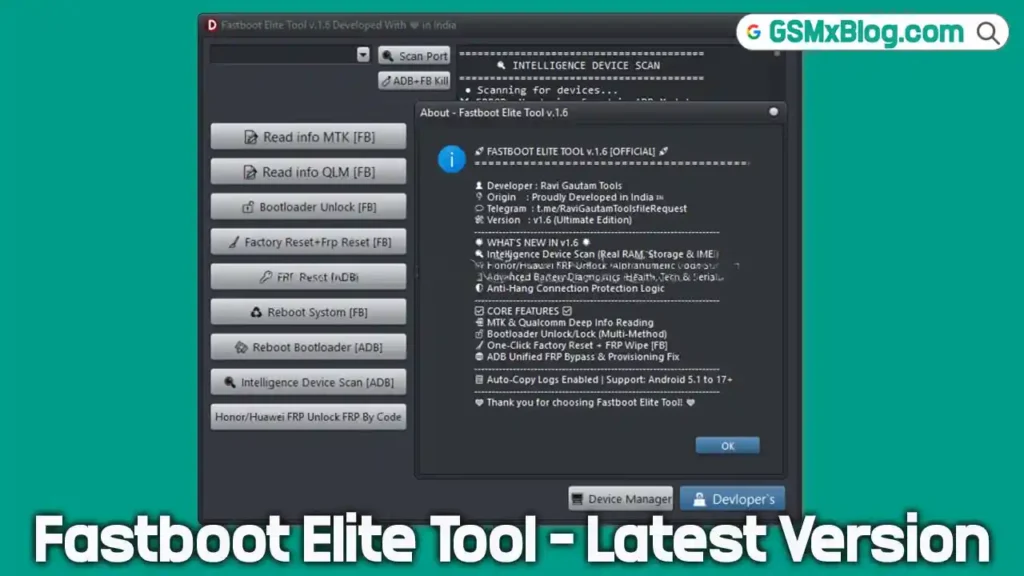
What is Fastboot Elite Tool v1.6?
Fastboot Elite Tool v1.6 is a Windows-based utility designed to fix common Android issues. It works through ADB (Android Debug Bridge) and Fastboot modes, allowing users to perform actions like FRP reset, bootloader unlock, and device diagnostics.
It supports major chipsets including MediaTek (MTK) and Qualcomm, making it compatible with a wide range of Android devices.
Key Features of Fastboot Elite Tool v1.6
- Reads full device info (RAM, storage, IMEI)
- Bootloader unlock & relock (multi-method)
- One-click factory reset & FRP removal
- ADB FRP bypass & setup fix
- Honor/Huawei FRP unlock support
- Battery health diagnostics
- Anti-hang & stable connection
- Auto log copy for troubleshooting
- Supports Android 5.1 to 17+
Supported Functions
- ADB Mode Operations
- Fastboot Mode Commands
- Reboot to System / Bootloader
- FRP Reset via ADB
- Device Scanning
- Bootloop Fix Support
Fastboot Elite Tool v1.6 Download
- File Name: Fastboot_Elite_Tool_v1.6.zip
- File Size: 6.42 MB
- File Type: Free
- Password: 123
Download From👉 MediaFire
How to Use Fastboot Elite Tool v1.6
- Download and extract the ZIP file
- Disable antivirus before extraction
- Run Fastboot Elite Tool.exe as administrator
- Connect your phone via USB
- Enable USB Debugging
- Select required function (FRP, Scan, Unlock, etc.)
- Wait until the process completes without disconnecting device
Important Tips Before Using
- Always backup your data before performing reset or unlock
- Use original USB cable for stable connection
- Ensure proper drivers are installed
- Do not interrupt the process midway
Conclusion
Fastboot Elite Tool v1.6 is a practical choice if you want a simple yet capable Android repair tool. It focuses on essential functions like FRP removal, bootloader control, and diagnostics without overwhelming the user.
If you need a lightweight solution that gets the job done quickly, this tool is definitely worth trying.
Related Tools
- SamFw FRP Tool 5.2 (Latest Version)
- UnlockToolPRO (Latest Version) Free
- Android Multi Tool Latest Version