Infinity CM2 Platform Detector Tool v1.02 (Latest Version) Free Download
The Infinity CM2 Platform Detector Tool is a free utility developed by the Infinity Team that helps technicians quickly identify a device’s chipset platform before flashing or repairing it. It detects SoC types such as MTK, SPD, RDA, RKT, and LGS, which makes it a handy companion tool for any mobile technician working on Android repair tasks.
In this article, we provide a complete guide to downloading and using the Infinity CM2 Platform Detector Tool v1.02, a lightweight free download for Windows PC.
Why Use Infinity CM2 Platform Detector Tool v1.02?
The Infinity CM2 Platform Detector Tool saves time for any GSM tool user who needs to confirm a device’s chipset before choosing the right flash tool. Here’s why it’s worth keeping in your toolbox:
- Dongle-Free: No Infinity Box or CM2 dongle is required to run this tool.
- Fast Detection: Quickly identifies the SoC type so you can pick the correct software for the job.
- Free Download: The tool is completely free to use, with no license or activation needed.
- Lightweight: A small 309 KB package that runs without slowing down your Windows PC.
Features of Infinity CM2 Platform Detector Tool
- Multi-Platform Detection: Recognizes chipset types including MTK, SPD, RDA, RKT, and LGS.
- Updated Device List: Maintains an updated list of supported devices for more accurate detection.
- Application List: Comes with an updated list of compatible applications for each detected platform.
- Update Checker: Built-in checker to notify users when a newer version is available.
- Simple GUI: A straightforward interface that makes platform detection quick, even for beginners.
What’s New in v1.02
- Detection algorithm updated for better accuracy
- Devices list updated with newer entries
- Applications list updated
- GUI changes for a cleaner look
- Updates checker added
How to Download Infinity CM2 Platform Detector Tool v1.02
Download the latest version of the Infinity CM2 Platform Detector Tool from the link below:
- File Name: Infinity CM2 Platform Detector Tool v1.02
- Version: 1.02
- Size: 309 KB
How to Use Infinity CM2 Platform Detector Tool
Follow these simple steps to use the tool on your Windows PC:
- Download the Tool: Grab the tool from the download link above.
- Extract the File: Unzip the downloaded package to a folder on your computer.
- Run the Application: Open the Platform Detector executable directly, no installation is required.
- Connect Your Device: Plug in the Android device you want to identify via USB.
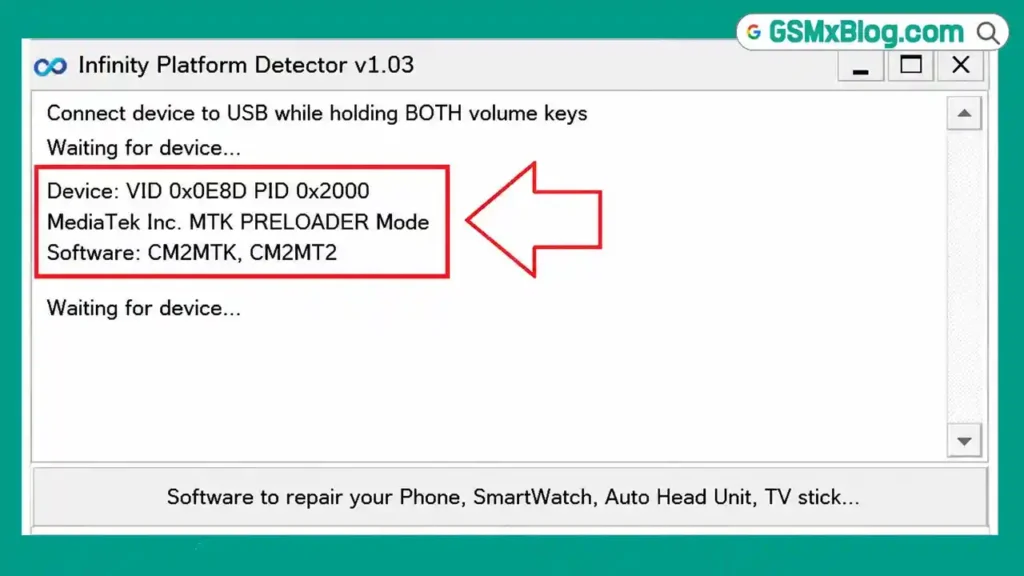
- Detect the Platform: Let the tool scan and display the chipset type, such as MTK or SPD.
- Choose the Right Tool: Use the detected platform information to select the correct flash tool or GSM tool for your repair job.
FAQs about Infinity CM2 Platform Detector Tool
1. What is the Infinity CM2 Platform Detector Tool used for?
It is used to detect a mobile device’s chipset platform, such as MTK, SPD, RDA, RKT, or LGS, before flashing or repairing it.
2. Is the Infinity CM2 Platform Detector Tool free?
Yes, it is completely free to download and use, and no dongle is required.
3. Do I need an Infinity Box or CM2 dongle to run this tool?
No, the tool runs independently without requiring any dongle or box.
4. What chipsets does the tool support?
It currently supports detection for MTK, SPD, RDA, RKT, and LGS platforms.
Conclusion
The Infinity CM2 Platform Detector Tool v1.02 is a simple but useful free download for any mobile technician who needs fast and reliable chipset detection. With its lightweight size, dongle-free operation, and support for multiple platforms, it’s a practical addition to your Android repair toolkit.