SamKey Code Reader V6.25.8 Download (Latest Version) – Unlock Samsung Devices
If you are looking for a reliable way to remove the network or SIM lock from your Samsung device, SamKey Code Reader V6.25.8 is the tool you need. This latest release brings improved compatibility, bug fixes, and faster code reading — making it the go-to choice for mobile technicians and everyday users alike.
In this guide, you will find everything you need to download, install, and use SamKey Code Reader on your Windows PC to unlock any supported Samsung smartphone or tablet.
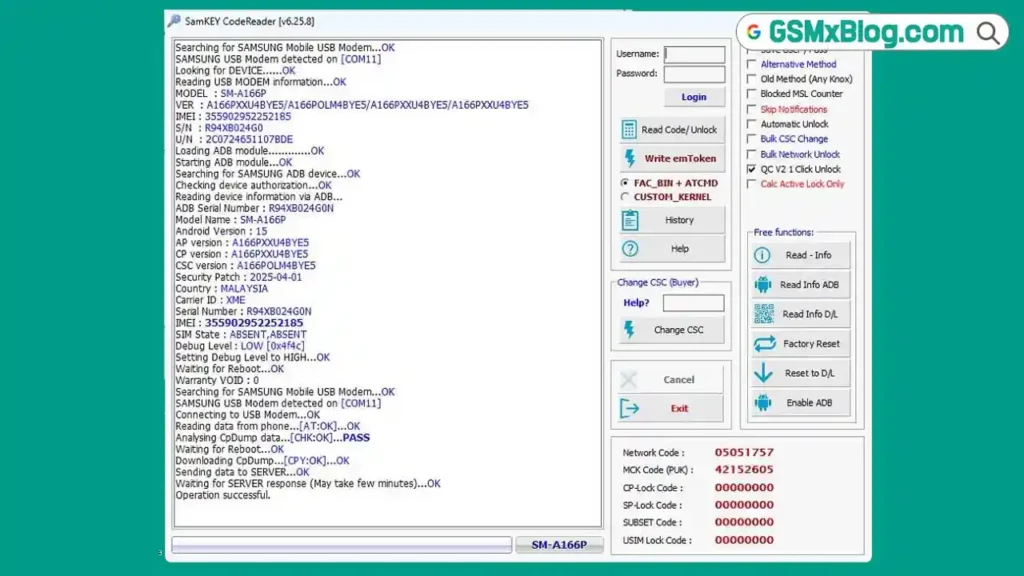
What is SamKey Code Reader?
SamKey Code Reader is a professional Samsung unlocking tool that reads the network unlock code directly from the device. It supports carrier-locked and country-locked Samsung phones and lets you use them freely with any SIM card or network provider.
Unlike risky third-party unlock services, SamKey Code Reader works directly with your device without modifying the firmware, wiping your data, or voiding your warranty. It is one of the most trusted tools in the GSM repair community.
Key Features of SamKey Code Reader V6.25.8
- Network Unlock – Removes carrier and country SIM locks from Samsung devices
- No Root Required – Works without rooting or modifying system files
- Data Safe – Does not touch user data, apps, or internal storage
- Wide Model Support – Compatible with the latest Samsung Galaxy series
- Fast Code Reading – Reads unlock codes in just a few minutes
- Stable & Lightweight – Runs smoothly on all Windows versions
- Bug Fixes – Improved stability and connection reliability over previous versions
Why Use SamKey Code Reader?
Most Samsung phones sold through carriers are locked to a specific network. This prevents you from switching SIM cards when travelling abroad or changing to a better local provider. SamKey Code Reader solves this problem quickly and safely.
Because SamKey Code Reader reads the unlock code directly from the device rather than relying on an online server database, the process is more accurate and reliable. It is used daily by Samsung repair technicians across the world and is a trusted solution backed by the official samkey.org team.
SamKey Code Reader V6.25.8 Download
Click on the link below to download the official SamKey Code Reader zip file:
- File Name: SamKey Code Reader
- Version: V6.25.8
- File Size: 85MB
- Last Update: July 2026
- Developer: samkey.org
- OS Support: Windows 7 / 8 / 10 / 11
System Requirements
Before installing SamKey Code Reader, make sure your PC meets the following requirements:
- Operating System: Windows 7, 8, 10, or 11 (32-bit or 64-bit)
- RAM: Minimum 2GB
- Storage: At least 200MB free disk space
- USB Port: Available USB 2.0 or 3.0 port
- Internet: Active internet connection required for code reading
How to Install and Use SamKey Code Reader V6.25.8
Step 1 – Download and Extract
- Click one of the download links above to get the SamKey Code Reader V6.25.8 RAR file
- Extract the archive using WinRAR or 7-Zip
- Open the extracted folder and run the installer
- Follow the on-screen instructions to complete the installation
Step 2 – Install Samsung USB Drivers
SamKey Code Reader needs proper USB drivers to detect your device. If you do not have them installed, download the latest Samsung USB Driver and install it before connecting your phone.
Step 3 – Enable USB Debugging
- On your Samsung device, go to Settings → About Phone
- Tap Build Number seven times to unlock Developer Options
- Go to Settings → Developer Options
- Enable USB Debugging
Step 4 – Connect and Unlock
- Open SamKey Code Reader on your PC
- Log in with your licensed SamKey account
- Connect your Samsung device to the PC with a USB cable
- Click Read Codes inside the tool
- Wait a few minutes while SamKey Code Reader reads the unlock code from your device
- Do not unplug the USB cable during the process
- Once the code appears, follow the on-screen instructions to apply the unlock
Your device will now accept any SIM card from any network provider worldwide.
Conclusion
SamKey Code Reader V6.25.8 remains the most reliable tool for unlocking Samsung devices professionally. Whether you are a mobile repair technician handling daily jobs or a user who simply wants to switch carriers, SamKey Code Reader delivers fast, safe, and accurate results without touching your data or firmware.
Download SamKey Code Reader V6.25.8 from the links above and start unlocking Samsung devices with confidence.
Related Tools
FAQs
Is SamKey Code Reader free to use?
The SamKey Code Reader tool is free to download, but you need a paid license (credits) to read unlock codes. Credits are purchased directly from samkey.org.
Does SamKey Code Reader support the latest Samsung Galaxy models?
Yes. SamKey Code Reader V6.25.8 supports a wide range of Samsung Galaxy devices including the latest series. Check the official website for the full compatibility list.
Will SamKey Code Reader erase my data?
No. SamKey Code Reader only reads the unlock code from your device and does not modify, wipe, or alter any data on your phone.
How long does the unlocking process take?
In most cases, SamKey Code Reader reads the code within 2 to 5 minutes. Do not disconnect your device during this time.
What Windows versions are supported?
SamKey Code Reader runs on Windows 7, 8, 10, and 11 — both 32-bit and 64-bit editions.
The unlocking process typically takes a few minutes, but please do not disconnect your device during this time to avoid interruptions.