Download Extra-KG-MDM Tool v1.0 (Latest Version) Free
Are you a mobile technician struggling with Samsung KG Lock, MDM Lock, or FRP that standard tools simply cannot remove? The Extra-KG-MDM Tool v1.0 is the latest free Android unlocking utility built specifically for these situations — packed with KG Lock removal (M1–M5), Knox MDM Generic bypass, Android 16 FRP support, QR Code setup, and USA model compatibility.
Whether you are dealing with a Knox Guard-locked Samsung, a corporate MDM-restricted device, or an IT Admin profile that blocks full access — Extra-KG-MDM Tool v1.0 has you covered. In this complete guide, you will find the download link, installation steps, full feature list, and step-by-step usage instructions — everything in one place.
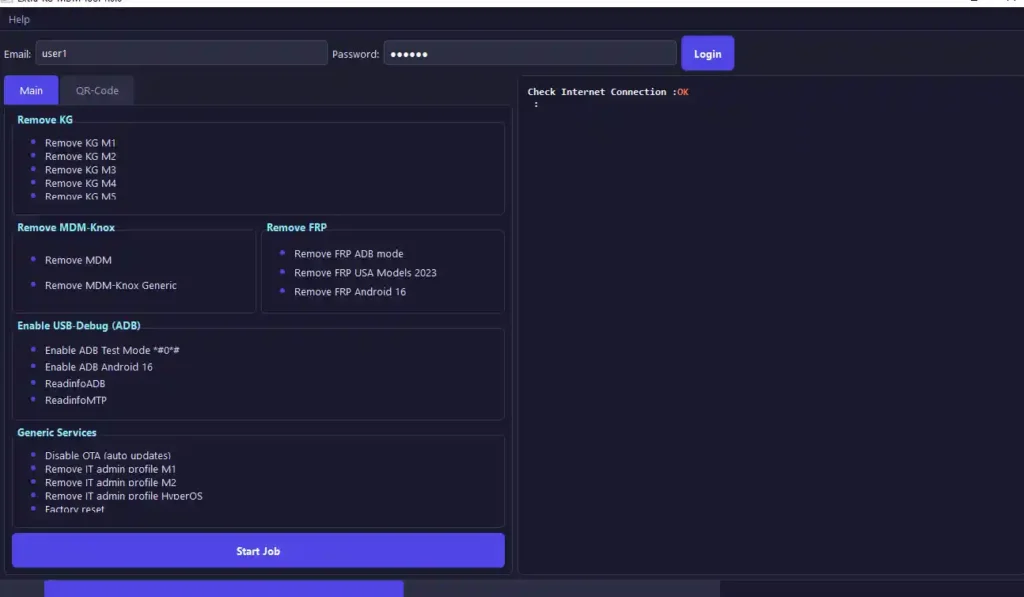
What Is Extra-KG-MDM Tool?
Extra-KG-MDM Tool is a Windows-based Android unlocking utility designed specifically for removing enterprise-level security locks from Samsung and other Android devices. The name directly reflects its purpose — KG (Knox Guard), MDM (Mobile Device Management), and related locks that standard flashing tools typically cannot handle.
Samsung phones used in corporate environments often carry Knox Guard and MDM profiles that restrict factory resets, block certain device functions, and prevent unauthorized access. When these devices arrive at a repair shop without administrator credentials, Extra-KG-MDM Tool provides the dedicated removal methods needed to restore full user access — all through a clean, free, dark-mode interface.
Key Features of Extra-KG-MDM Tool
🔓 KG & MDM Lock Removal
- Remove KG Lock M1, M2, M3, M4, and M5 — full range coverage
- Remove Samsung MDM Lock from corporate and carrier devices
- Remove Knox MDM Generic profiles from third-party MDM platforms
- Remove IT Admin Profile — restore full device administrative access
🔓 FRP & Screen Lock
- Remove FRP Lock in ADB Mode — fast and stable
- Full Android 16 FRP Support — latest security patch compatible
- QR Code Setup Method included for restricted devices
- Factory Reset Option directly from the tool interface
🛠️ Device Management
- Enable ADB Test Mode on Samsung devices
- Read Device Information — model, Android version, IMEI, security patch
- Read MTP Information for detailed device diagnosis
- Disable OTA Updates — prevent reactivation of security locks after repair
⚙️ General
- USA Model Support for 2023 Samsung lineup
- Faster ADB Detection — quicker device recognition
- Free Login System — accessible to all users
- Clean dark UI — easy on the eyes during long repair sessions
Extra-KG-MDM Tool v1.0 Download
- File Name: Extra-KG-MDM-TOOL v1.0.0.zip
- File Size: 26.9 MB
- Version: v1.0.0 (Latest)
- Platform: Windows 10 / 11
- License: Free
- Username: user1
- Password: 123456
How to Install Extra-KG-MDM Tool v1.0
- Download the ZIP file using the link above.
- Extract the ZIP to a folder on your PC using WinRAR or 7-Zip.
- Right-click the EXE file and select “Run as Administrator.”
- Login using Username: user1 / Password: 123456
- Connect your device and start working.
✅ Tip: Always run Extra-KG-MDM Tool as Administrator for stable device detection and full functionality.
How to Use Extra-KG-MDM Tool v1.0
▶️ Remove KG Lock
- Open the tool and login with the provided credentials.
- Click “Read Device Information” to confirm the device model and KG level.
- Connect the Samsung device via USB in ADB Mode.
- Select the correct KG Lock level (M1, M2, M3, M4, or M5).
- Click “Remove KG Lock” and wait for the success message.
- Reboot the device and verify the lock is removed.
▶️ Remove MDM / Knox MDM
- Open the tool and connect your device in ADB Mode.
- Navigate to the MDM section.
- Select “Remove Samsung MDM Lock” or “Remove Knox MDM Generic” depending on your device.
- Click Start and wait for completion.
- Reboot the device after the process finishes.
▶️ Remove FRP Lock
- Open the tool and select your device model.
- Enable USB Debugging on the device (or use QR Code Method if ADB is blocked).
- Navigate to the FRP section.
- Click “Remove FRP” and wait for the process to complete.
- Device will reboot automatically after FRP is removed.
▶️ Remove IT Admin Profile
- Open the tool and connect the device in ADB Mode.
- Navigate to “Remove IT Admin Profile.”
- Click Start and wait for the success message.
- Reboot and confirm full administrative access is restored.
What’s New in Extra-KG-MDM Tool v1.0
🔥 New Features & Improvements
✅ New Dark Style Interface
A completely redesigned dark UI that is clean, modern, and easy to navigate during long repair sessions.
✅ QR Code Setup Section Added
A new QR Code-based device setup and connection method — useful for devices where standard ADB is blocked by security policies.
✅ Better Android 16 Support
Updated FRP bypass methods fully compatible with Android 16 — one of the most significant additions in this release.
✅ Improved FRP Methods
More reliable FRP removal techniques across supported Samsung and Android brands — higher success rate on latest security patches.
✅ USA Model Support Added
Dedicated support for US carrier Samsung models from the 2023 lineup — covering region-specific security implementations.
✅ Faster ADB Detection
Improved device detection speed when connecting via USB — less waiting, more repairing.
✅ More Stable KG Removal
Knox Guard removal operations are now more stable with fewer errors across all five KG levels (M1–M5).
✅ Easy Login System
A simple, free login system accessible to all users — no paid subscription required for v1.0.
Supported Chipsets & Brands
Primary Focus: Samsung devices running Exynos and Qualcomm Snapdragon chipsets — covering the majority of Samsung’s global and USA model lineup including Android 14, Android 15, and Android 16 devices.
Additional Support: Other Android brands for FRP bypass and general lock removal operations.
Samsung Models Covered: All major Samsung Galaxy S, A, M, and F series devices — with specific USA carrier model support for 2023 devices.
For device-specific compatibility, use the “Read Device Information” function inside the tool before starting any repair operation.
Requirements Before You Start
- Windows 10 or 11 — 32-bit or 64-bit
- Samsung USB Driver — required for ADB device detection
- Good quality USB cable — original Samsung cable recommended
- Internet connection — required for tool login
- Login credentials — Username: user1 / Password: 123456
- USB Debugging enabled — for ADB mode operations
- Minimum 30% battery — to prevent disconnection during operations
Important Warnings
⚠️ Back up data before any operation. Factory Reset and some lock removal operations will permanently erase all user data.
⚠️ Select the correct KG level. Using the wrong KG removal method (M1–M5) can cause errors. Always read device info first.
⚠️ Disable OTA Updates after KG removal. On some Samsung devices, a software update after KG removal can reactivate the lock. Use the Disable OTA function immediately after repair.
⚠️ Do not disconnect during any operation. Interrupting an active process can leave the device in an unstable state.
✅ Always run as Administrator for full hardware access and stable operation.
Conclusion
Extra-KG-MDM Tool v1.0 is a focused, practical, and completely free solution for one of the most common challenges in Samsung repair — Knox Guard, MDM, IT Admin, and FRP locks that standard tools simply cannot remove. With Android 16 FRP support, all five KG lock levels covered, QR Code setup, USA model support, and a clean dark interface — this is a strong first release that any Samsung technician should have ready in their workshop toolkit.
Download Extra-KG-MDM Tool v1.0 now using the link above and stop letting Knox Guard locks walk out your door unrepaired. 🚀
Related Posts
- Android Multi Tool v1.3.5.5 – Latest Version
- Titan Tool v7.0.0 – Free Download
- DeepSmartTool v0.41 – Free Download
- MTK USB Driver – Free Download
- Qualcomm USB Driver – Free Download
Frequently Asked Questions (FAQs)
Is Extra-KG-MDM Tool free to use?
Yes. Version 1.0 is completely free with a free login included — no paid license or credits required.
Does it support Android 16 FRP removal?
Yes. Android 16 FRP support with updated bypass methods is one of the key features of this release.
What is the difference between KG Lock and MDM Lock?
Knox Guard (KG) Lock is Samsung’s device financing and carrier restriction system. MDM Lock is applied by enterprise IT departments to control company devices. Both are handled separately inside the tool.
Can it remove KG Lock on all Samsung models?
Extra-KG-MDM Tool supports KG Lock removal across M1 to M5 levels on a broad range of Samsung devices including USA carrier models from 2023. Always read device info first to confirm compatibility.
Will lock removal erase my data?
Factory Reset will erase all data. KG and MDM removal operations may preserve data depending on the method. Always back up before starting any operation.




![XTM GRT Dongle PRO v1.3.0 Setup Rebirth [Crack]](https://gsmxblog.com/wp-content/uploads/2025/07/xtm-grt-dongle-pro-v1-3-0-setup-rebirth-free-768x432.webp "Download XTM GRT Dongle PRO v1.3.0 Rebirth (Crack) Free – No Activation Required 8")