Titan Tool v7.0.0 (Official Free) Download – Latest Setup
If you’re a mobile technician working with Android phones daily, having a reliable all-in-one repair platform is essential. Titan Tool v7.0.0 is a powerful GSM servicing software designed for professionals who handle flashing, FRP removal, IMEI repair, bootloader operations, and advanced chipset-level repairs across multiple brands — all from a single interface.
In this guide, you’ll find the full feature breakdown, a direct download link, and step-by-step instructions on how to use the tool effectively.
What Is Titan Tool?
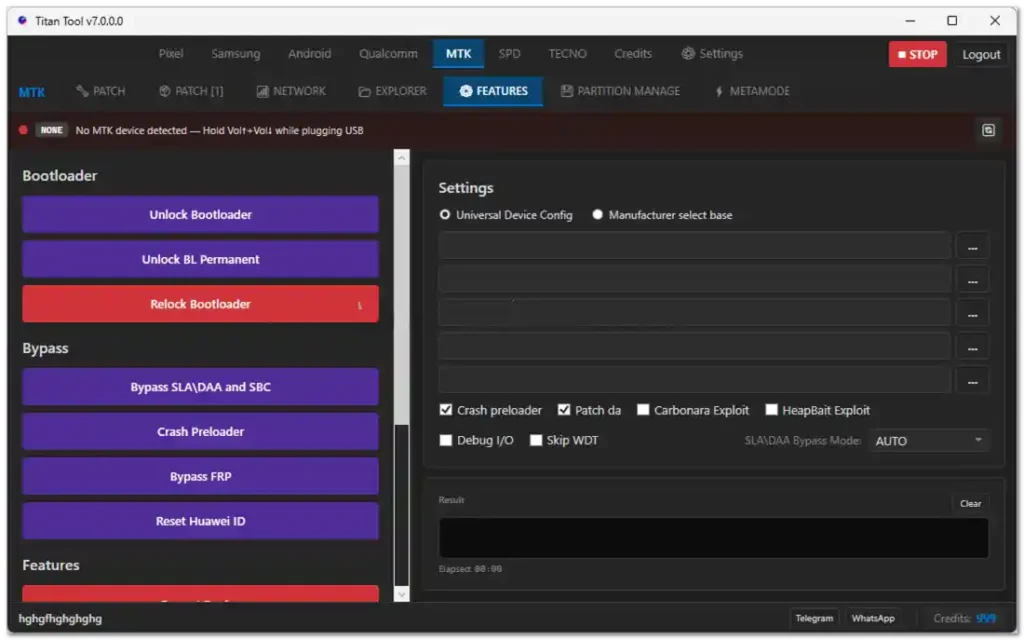
Titan Tool is a multi-platform Android servicing tool that supports Samsung, Qualcomm, MediaTek (MTK), UNISOC (SPD), and TECNO devices. Version 7.0.0 is one of the most feature-complete releases, offering both online and offline servicing modules for technicians at all skill levels.
Key Features of Titan Tool v7.0.0
🔹 Samsung Module
- IMEI Repair & DMI Repair
- FRP Bypass & FRP Reset (Android 15/16 supported)
- Knox Guard Removal
- Carrier Unlock & Relock
- Odin Flash support
🔹 Android General Module
- ADB, Fastboot & Reboot Tools
- FRP Reset & Master Clear
- App Manager & Package Manager
- Screen Capture & Screen Record
- File Transfer, Backup & Restore
- Device Info & Logcat Reader
- Driver Installer
- Quick access to Settings, Accounts, Chrome & YouTube
🔹 Qualcomm Module
- Device Info & Partition Manager
- Flash, Backup & Erase Partitions
- QCN Read/Write
- IMEI Repair & EFS Functions
🔹 MediaTek (MTK) Module
- Remove Security Lock, Payjoy, MDM & OTA Restrictions
- FRP Bypass & Bootloader Unlock
- NV Items Read / Write / Erase
- Partition Manager
- NVRAM Backup & Restore
- Certificate Patch & Modem Patch
🔹 UNISOC (SPD) Module
- Flash, Backup & Erase Partitions
- IMEI Read & Write
- SIM Unlock
🔹 TECNO Module
- FRP Reset & Factory Reset
- MDM Removal
- Enable ADB Mode
- Reboot Tools
- IMEI Repair & Write
Titan Tool v7.0.0 – Software Information
| Detail | Info |
|---|---|
| Tool Name | Titan Tool |
| Version | v7.0.0 |
| Supported OS | Windows 7 / 8 / 10 / 11 (32-bit & 64-bit) |
| Supported Chipsets | Samsung, Qualcomm, MTK, SPD/UNISOC, TECNO |
| File Type | ZIP (Compressed Archive) |
| License | Free (Official) |
Titan Tool v7.0.0 Download Link
Password: softwarecrackguru
How to Download & Install Titan Tool v7.0.0
- Click the download link below and save the ZIP file to your computer.
- Right-click the ZIP file and select “Extract Here” using WinRAR or 7-Zip.
- Open the extracted folder and run Titan Tool.exe as Administrator.
- Log in with your credentials (or create a free account if required).
- Install any USB drivers prompted during first launch.
⚠️ Important: Always disable your antivirus temporarily before extracting GSM tools, as some modules may trigger false positives due to low-level device access.
How to Use Titan Tool v7.0.0 – Step-by-Step
Step 1 — Prepare Your Computer Install all required USB drivers for your target device chipset (Qualcomm, MTK, Samsung, or SPD).
Step 2 — Launch the Tool Open Titan Tool as Administrator and log in to your account.
Step 3 — Connect Your Device Put your phone into the correct mode depending on the operation:
- ADB Mode — for FRP reset, app management, reboot tools
- Fastboot Mode — for bootloader operations
- EDL 9008 Mode — for Qualcomm deep flash
- Preloader / BROM Mode — for MTK operations
- Download Mode — for Samsung flashing
Step 4 — Select Your Platform Choose the correct module: Samsung / Android / Qualcomm / MTK / SPD / TECNO.
Step 5 — Choose Your Operation Select the task you need: FRP Reset, Flash Firmware, IMEI Repair, etc.
Step 6 — Execute & Wait Click Start and wait for the success message. Do not disconnect the phone during the process.
Step 7 — Reboot Once complete, reboot your device. The operation is now done.
Important Notes
- Always use the latest version of Titan Tool for best compatibility.
- Make sure to back up your device data before performing any flash or reset operation, as these actions may erase all data.
- Use a good quality USB cable to avoid connection drops during flashing.
- Run the tool as Administrator on Windows for full functionality.
- This tool is for professional use only. Incorrect use may brick your device.
Conclusion
v7.0.0 combines Samsung, Qualcomm, MTK, SPD, and TECNO servicing modules in one place. If you need a reliable tool for flashing, FRP removal, IMEI repair, and advanced Android servicing, this version is a solid choice for offline-tested functions.