Download UMT MTK2 V3.4 (Latest Version) Setup File
If you’re a mobile technician, phone repair shop owner, or Android enthusiast working with MediaTek-powered devices, UMT MTK2 V3.4 is an essential tool for your toolkit. The new update introduces advanced preloader and META exploits for Infinix, Tecno, and iTel, along with expanded Android 15 FRP support. These enhancements make it one of the most reliable and powerful utilities for Android device servicing.
In this article, you’ll find a complete guide covering the features, changelog, download links, installation steps, and SEO optimization to help you get the most out of UMT MTK2 V3.4.
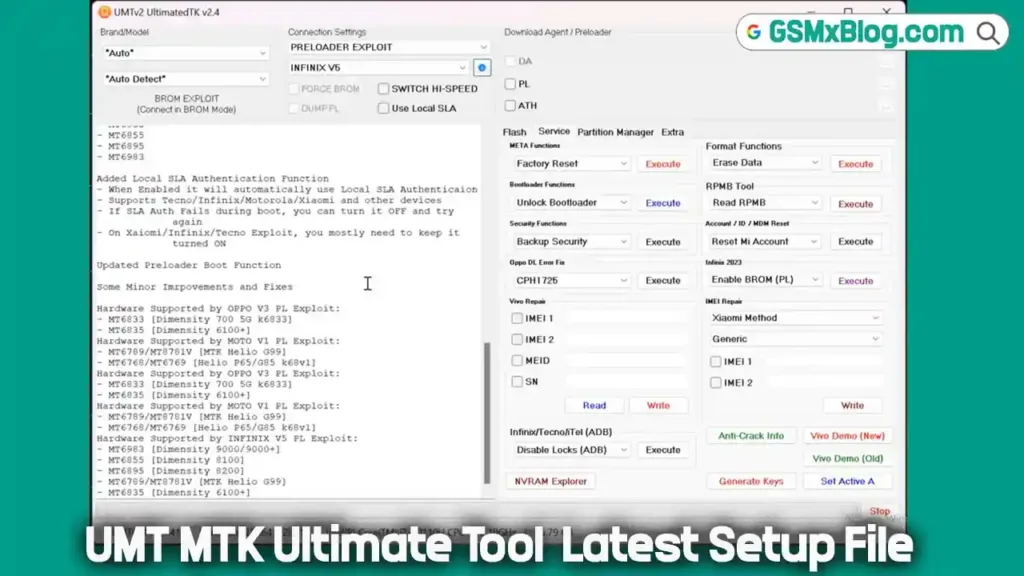
What is UMT MTK2 V3.4?
UMT (Ultimate Multi Tool) MTK2 is a Windows-based software solution designed for MediaTek (MTK) Android devices. It provides professional technicians with advanced functions for FRP removal, safe flashing, unlocking bootloaders, repairing IMEI, and managing partitions.
The latest V3.4 update introduces new preloader exploits, improved device compatibility, and extended Android 15 support for brands such as Infinix, Tecno, iTel, Xiaomi, and Realme.
Why Upgrade to V3.4?
- ✅ Android 15 Compatibility: Enhanced FRP and reset operations for new Android 15 devices.
- ⚙️ New Infinix/Tecno/iTel META Tools: Remove security plugins and PayJoy locks in META mode (reset FRP after operation).
- ⚡ Improved Preloader Stability: Better exploit handling for the latest MTK chipsets, ensuring reliable connections and faster processing.
UMT MTK Tool V3.4 Key Features
🔁 Flashing & Firmware Management
- Flash Scatter and OFP firmware formats.
- Read and write flash files securely.
- Safe Flash with DM-Verity patch options.
🔓 Unlocking & Format Options
- Reset FRP (Safe + Advanced) – compatible with Android 15.
- Remove screen locks (PIN, Password, Pattern).
- Safe Format FS and UserData.
- Format and restore NVRAM, NVDATA, and backups.
🔧 Bootloader & Partition Tools
- Unlock and relock bootloaders permanently.
- Patch or remove DM-Verity.
- Manage partitions (read/write/erase/backup).
🔐 Account & ID Reset
- Reset Mi Account, OPPO ID, Huawei ID.
- Remove Samsung KG Lock and Infinix MDM.
📶 IMEI Repair & Backup
- Backup and restore IMEI, NVRAM, and NVDATA.
- Read and write IMEI1, IMEI2, MEID, and Serial Numbers.
⚙️ Connection & Exploit Modes
- Support for BROM, FORCE BROM, Preloader, and META modes.
- Switch between standard and high-speed USB connections.
Download UMT MTK2 V3.4 (Latest Version) Setup File
- Tool Name: UMTv2_UMTPro_UltimateMTK2_3.4.7z
- Version: V3.4
- File Size: 84 MB
- Supported OS: Windows 7, 8, 10, and 11 (x64 & x86)
- Developer: UMT Team
- License: Requires Genuine UMT Box/Dongle
- Download Link: 👉 Click here to Download
How to Install and Use UMT MTK2 V3.4
Important: A genuine UMT dongle is required to activate and use the tool.
Step 1: Download & Extract
- Download the setup file and extract it using 7-Zip or WinRAR.
Step 2: Install Drivers
- Install MediaTek USB (VCOM/Preloader) drivers for proper device detection.
Step 3: Launch the Tool
- Run UMTLauncher.exe as Administrator.
- Ensure your UMT Dongle is connected and recognized.
Step 4: Perform Operations
- Flash Firmware: Navigate to the Flasher tab, select your firmware (Scatter/OFP), and click Flash.
- Reset FRP: Go to Tools > FRP, select your method (META or BROM), then connect your device.
- Reset Locks: Choose Format FS or Reset Locks to remove user locks safely.
Troubleshooting Tips:
- If the device isn’t detected, reinstall drivers or use another USB port.
- Always back up NVRAM/IMEI before formatting or flashing.
What’s New in UMT MTK2 V3.4 (Changelog) [01-04-26]
🔄 Main Update
- OnePlus / Oppo / Realme and Security Plugin Update
✨ What’s New
- Supported models in BROM Mode (Testpoint)
- Firmware supported up to Android 15
- No need to manually select preloader
📱 Supported Models
🔹 OnePlus
- Nord N30 SE (CPH2605)
- Nord N300 5G (CPH2389)
🔹 Oppo
- A53s (CPH2321)
- A56s 5G (PFVM10)
- A59 5G (CPH2617)
- A77 5G (CPH2339)
- A78 5G (CPH2483)
- A93s 5G (PFGM00)
- A97 (PFTM10)
- K10 5G (CPH2337)
🔹 Realme
- 8 5G (RMX3241)
- 9 5G India (RMX3388)
- Narzo 30 5G (RMX3242)
- Narzo 50 5G (RMX3572)
- Narzo 60 (RMX3750)
- V11s 5G (RMX3125)
🔐 META Auth Update
- Added Infinix / Tecno / iTel New META Auth
- Supports newer security patches (after October 2025)
🛡️ Security Plugin Bypass
- New method added to bypass Security Plugin
- Works on latest security systems
- Supports Android 14 on:
- iTel
- Tecno
- Infinix
- Successfully tested on:
- Infinix X6531 (Android 14, October 2025)
🙏 Special Thanks
- Shensohau
- AsadSoftware
- All users who contributed test reports
✅ Conclusion
The UMT MTK2 V3.4 (Latest Version) is one of the most dependable tools for technicians handling MediaTek-based smartphones. From firmware flashing and FRP removal to bootloader unlocking and IMEI repair, it offers everything needed for modern Android repair tasks.



Can’t mine be worked on online
I want my phone to be worked on online