Xiaomi Firmware Tool Beta V0.1 Free Download for Windows
If you regularly flash Xiaomi firmware and find most tools either too complicated or too cluttered, Xiaomi Firmware Tool Beta V0.1 is a breath of fresh air. This free flash tool was built from scratch with one goal in mind — making the Xiaomi Fastboot flashing process as clean and simple as possible for both new users and experienced mobile technicians. No extra software needed, no confusing command windows, just a straightforward Android repair experience on Windows PC.
This article covers all the features, step-by-step flashing guide, and the free download links for Xiaomi Firmware Tool Beta V0.1.
What Is Xiaomi Firmware Tool Beta V0.1?
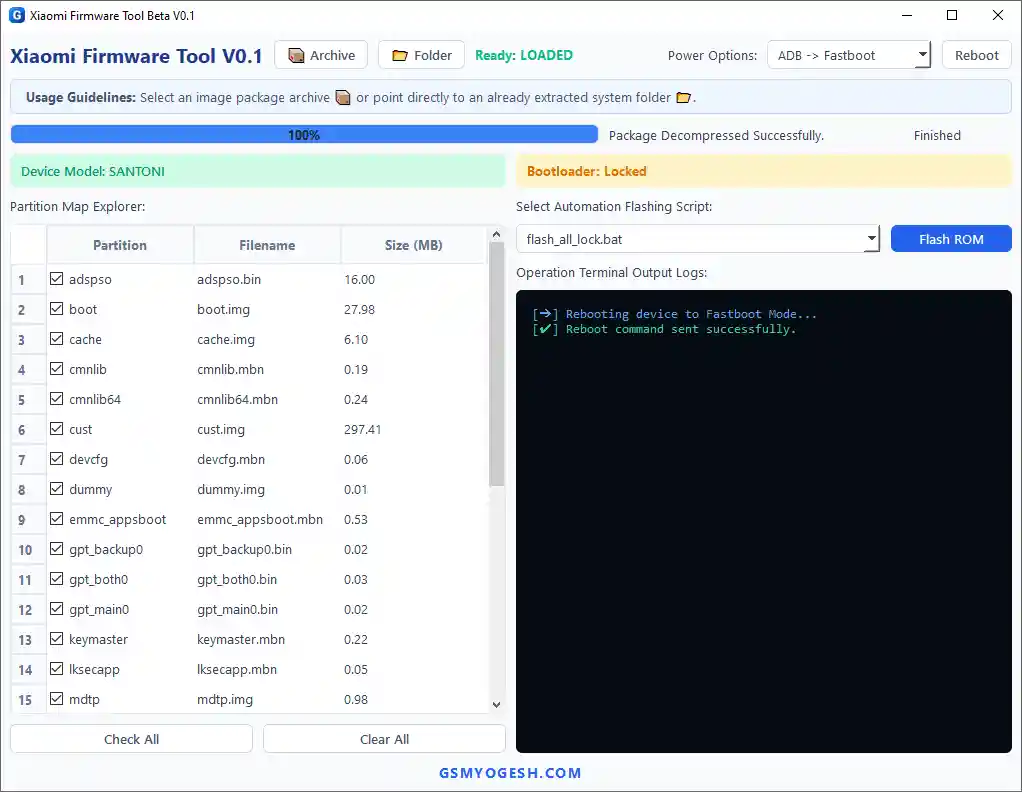
Xiaomi Firmware Tool Beta V0.1 is a Python-based Windows flash tool built specifically for Xiaomi Fastboot devices. It handles the entire firmware flashing process from a single interface — including firmware extraction, device detection, partition selection, and flashing — without requiring any third-party extraction programs like WinRAR or 7-Zip.
The tool is an official release from GSMYOGESH.COM and targets users who want a beginner-friendly interface without sacrificing the control that advanced users need. Since this is a beta version, some features are still being refined, and future updates are already planned by the developer.
Key Features of Xiaomi Firmware Tool Beta V0.1
📦 Firmware Loading & Extraction
- Supports ZIP, TGZ, and TAR firmware file formats
- Built-in extraction engine — no WinRAR or 7-Zip required
- Automatic firmware package detection
- Fast firmware extraction directly to the same folder
- Folder button for loading pre-extracted firmware directories
📱 Device Detection
- Fastboot device identification
- Device codename detection
- Bootloader status detection
- Works with both locked and unlocked bootloader devices
⚙️ Advanced Partition Manager
- Full partition list with file size information
- Select or deselect individual partitions before flashing
- Flash only the partitions you need instead of the full package
- Automatic pre-selection of important partitions
🛡️ Firmware Verification
- Automatic firmware analysis before flashing
- Firmware compatibility verification against connected device
- Anti-wrong firmware protection
- Flash script detection
🖥️ Interface & Logs
- Python-based modern GUI
- Professional workspace layout
- Beginner-friendly design
- Clean operation logs — no messy command clutter
- Real-time progress tracking
- Device information displayed on the left panel
🔁 Additional Functions
- One-click reboot functions
- Partition information viewer
- File size information display
Download Xiaomi Firmware Tool Beta V0.1
- Tool Name: Xiaomi Firmware Tool
- Version: Beta V0.1
- Platform: Windows
- Supported Devices: Xiaomi Fastboot Devices
- License: Free
- Developer: GSMYOGESH
- Status: Beta Release
- Password: softwarecrackguru
How to Use Xiaomi Firmware Tool Beta V0.1
▶️ Step 1 — Connect Your Device
- Make sure your phone has enough battery before starting.
- Power off the device completely.
- Boot into Fastboot Mode by holding Volume Down + Power together.
- Connect the phone to your Windows PC using a good quality USB cable.
▶️ Step 2 — Load Firmware
- Open Xiaomi Firmware Tool Beta V0.1.
- If your firmware is still compressed, click the Archive button and select the ZIP, TGZ, or TAR file. The tool extracts it automatically.
- If your firmware is already extracted, click the Folder button and select the firmware directory.
▶️ Step 3 — Check Firmware Information
- After loading, the tool scans all available firmware files automatically.
- The Partition Manager displays all detected image files with their sizes.
- Select the flashing profile you want to use.
▶️ Step 4 — Verify Device Information
- Look at the left panel of the tool window.
- Confirm the detected device codename matches your phone.
- Check the current bootloader status.
- Make sure the loaded firmware matches the connected device before proceeding.
▶️ Step 5 — Select Partitions
- Review the Partition Manager list.
- Important partitions are pre-selected automatically.
- Tick or untick partitions manually if you only need to flash specific files.
▶️ Step 6 — Start Flashing
- Once everything looks correct, click Flash ROM.
- The tool starts processing the firmware and shows live progress.
- Do not disconnect the USB cable during flashing.
- Wait until the process completes and the device reboots.
System Requirements
| Component | Requirement |
|---|---|
| OS | Windows PC |
| Supported Devices | Xiaomi Fastboot Devices |
| Firmware Formats | ZIP, TGZ, TAR |
| Bootloader | Locked or Unlocked |
| USB Cable | Good quality recommended |
| Internet | Not required for flashing |
⚠️ Warning
Always back up your data before flashing any firmware. Flashing the wrong ROM can brick your device. Use the built-in firmware verification feature to confirm your device codename matches the loaded firmware before clicking Flash ROM. Do not disconnect the USB cable during the flashing operation.
Important Notes
🛡️ Antivirus Notice: Some antivirus programs may flag this tool due to its Fastboot-based operations. This is typically a false positive. Run it on a dedicated repair machine. 📌 Credit: Full credit goes to GSMYOGESH.COM for developing and releasing this tool. 🔌 USB Driver: Make sure the correct Qualcomm USB Driver is installed before connecting your Xiaomi device in Fastboot mode. ⚠️ Beta Notice: This is an early beta release. Minor issues may exist. The developer has confirmed new features are planned for upcoming updates — test carefully and report any bugs.
Frequently Asked Questions (FAQs)
❓ Is Xiaomi Firmware Tool Beta V0.1 completely free? Yes, this is a free GSM tool with no activation or login required.
❓ Does it work with all Xiaomi devices? It supports Xiaomi Fastboot devices. Compatibility depends on the device model and whether the correct firmware is loaded. Locked bootloader devices may have limited functionality depending on Xiaomi’s restrictions.
❓ Do I need WinRAR or 7-Zip to extract firmware? No. The tool has a built-in extraction engine that handles ZIP, TGZ, and TAR files automatically without any third-party software.
❓ What if I only want to flash specific partitions? Use the Partition Manager to select or deselect individual partitions before flashing. You don’t have to flash the full firmware package every time.
❓ What is the RAR password for the download? The password is: softwarecrackguru
❓ Is this a stable release? No, this is Beta V0.1. It is functional but some minor issues may be present. The developer has confirmed further updates are coming with additional features.
Conclusion
Xiaomi Firmware Tool Beta V0.1 stands out as a clean, practical free download for anyone who flashes Xiaomi firmware regularly. The built-in extraction engine removes one of the most common pain points in the flashing workflow, the Partition Manager gives technicians full control over what gets flashed, and the firmware verification system reduces the risk of flashing the wrong ROM. Even as a beta release, it offers a more organized experience than many established tools in this category. If you work with Xiaomi Fastboot devices and want a simpler Android repair workflow on Windows PC, download Xiaomi Firmware Tool Beta V0.1 and give it a try.
Used this tool already? Share your feedback in the comments below.


![Xiaomi Patch NV V2 & Generate Critical Data [CPID Method] NV Error And IMEI Restore Free Tool](https://gsmxblog.com/wp-content/uploads/2025/08/xiaomi-patch-nv-v2-generate-critical-data-cpid-method-free-768x432.webp "Xiaomi Patch NV V2 & Generate Critical Data [CPID Method] NV Error And IMEI Restore Free Tool 5")