PulsarUnlock v1.8.1.4 (Latest Version) Download 2026 – Free Setup + Review
Looking for a lightweight, professional Android unlock tool that supports FRP remove, MDM unlock, carrier unlock, and Payjoy removal across Motorola, Samsung, Xiaomi, Google Pixel, OPPO, OnePlus, and more — all from one clean interface? PulsarUnlock v1.8.1.4 is a credits-based Windows unlock utility developed by the PulsarSync team, designed for mobile repair technicians who need fast, reliable unlock and security removal operations.
Version v1.8.1.4, released on May 14, 2026, adds Semi Permanent Payjoy Remove on Moto G24, G24 Power, G05, G15, and E15, plus Bootloader Unlock for the Moto E15 — making it the most capable Motorola-focused release yet. Best of all, registration, login, and setup access are completely free, with credits only required when performing actual device operations. This guide covers everything: features, supported models, file info, installation steps, usage instructions, FAQs, and the direct download link.
What Is PulsarUnlock?
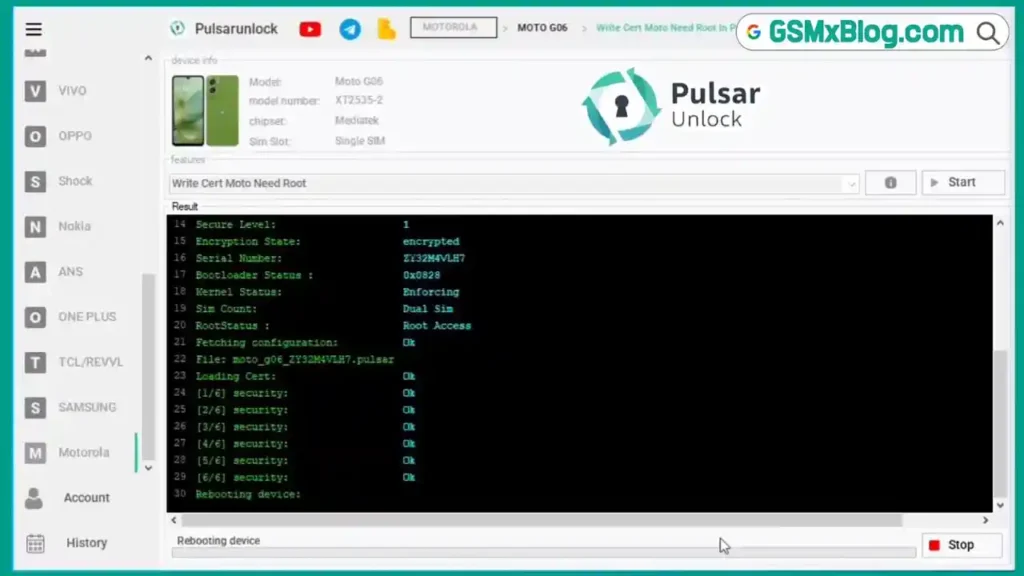
PulsarUnlock is a professional Windows-based Android unlock utility developed by the PulsarSync team. It focuses on FRP reset, MDM removal, carrier/network unlock, and Payjoy removal across a wide range of Android brands including Motorola, Samsung, Xiaomi, Google Pixel, OPPO, Nokia, OnePlus, LG, TCL, Vivo, and more.
The tool is built on a server-side architecture, meaning the main processing and model database are handled online — keeping the client-side application lightweight and fast. Users can register a free account, explore all supported models and categories, and browse the full interface without buying credits. Credits are only consumed when an actual device operation is performed.
🔑 Key advantage: PulsarUnlock lets you explore all brands, chipset filters, and supported models completely free before spending a single credit — ideal for checking if your device is supported before purchasing.
Key Features of PulsarUnlock v1.8.1.4
🔓 Unlock Functions
- FRP Reset (Factory Reset Protection Remove)
- MDM Remove
- Carrier / Network Unlock
- Semi Permanent Payjoy Remove
- Bootloader Unlock (Select Motorola Models)
📱 Supported Chipsets
- MediaTek (MTK)
- Qualcomm
- Spreadtrum (SPD)
- UniSoc
🔐 Security & Protection
- Developed in .NET
- Protected with VMProtect
- No Suspicious Background Activity
- Login via Free Account (Email + Password)
✨ Extra Features
- Free Registration & Login
- Free Setup Access & Model Explorer
- Lightweight Client Application
- Credits-Based Operation System
- Active Telegram Support Channel
- Official Tutorial YouTube Channel
- Windows PC Support (32-bit & 64-bit)
Supported Brands & Models
PulsarUnlock v1.8.1.4 supports the following brands and devices:
ANS
- Ans Aria – ACK2326
AT&T Mobile
- ATT Max Radiant – U705AA, ATT Motivate Pro 5G – SN512A, ATT Propel 3 5G – U56AA, ATT Calypso – U318AA, ATT Maestro – U202AA, Calypso 4 – U318AA, Motivate 4 – SL112A, Vorge – SL219A
Cricket Mobile
- Cricket Icon 2 – U325AC, Cricket Icon 2026 – U65KAC, Cricket Icon Plus 2026 – SN933C, Cricket Icon Pro 2026 – SN512C, Cricket Magic 5G – U65SAC, Cricket Outlast – U82BC, Debut Smart – SL101AE, Icon 5 – SL112C, Icon 6 – SL219C
Honor
- Huawei Nova 9, Honor 200, Honor 400 Smart, Honor Magic Lite, Honor Magic7 Lite, Honor Magic7 Pro, Honor Play10A, Honor X5b, Honor X6B, Honor X6c
LG
- LG Stylo 5 – LM-Q720, LG Stylo 6 – LM-Q730TM
Motorola (Most Supported Brand)
- Edge 60 Pro – XT2507, Moto E14 – XT2421, Moto E15 – XT2523, Moto Edge 30 Neo – XT2245, Moto Edge 40 Neo 5G – XT2307-1, Moto Edge 50 Fusion, Moto Edge 60 / Fusion / 2022 / 2025, Moto G Series (G04s, G14, G15, G23, G24, G24 Power, G34, G35, G55, G56 5G, G65, G66 Power, G72, G75, G 2022–2026 5G), Moto G Play / Power / Pure / Stylus (2021–2026), Moto Razr 2023/2024/2025/2026, Motorola One 5G Ace
Nokia
- Nokia G310 5G, Nokia C210, Nokia C400, Nokia X100
OnePlus
- OnePlus Nord N200, N300, N30 5G, OnePlus 7 Pro, OnePlus 10 Pro 5G
OPPO
- OPPO A3, A39, A40, A58, A60, A78, A80 5G, A5 5G, A79 5G, Find X3 Pro, Reno 7/10/11/12/13 5G
Google Pixel
- Pixel 4, 6, 6 Pro, 6a, 7, 7 Pro, 7a, 8, 8 Pro, 8a, 9, 9 Pro, 9 Pro Fold, 9 Pro XL, 9a, 10, 10 Pro, 10 Pro Fold, 10 Pro XL, Pixel Fold
Samsung
- Galaxy A06, A10e, A20, A25, A26 5G, A36 5G, A50, A51, Note10, Note10+, S9, S10, S10 5G, S10e, S24, S24 Ultra, S25, S25 Edge, S25 Ultra, Tab A 8.4, XCover Pro, Z Flip 6/7, Z Fold 6/7
TCL / Revvl
- REVVL 6, 6X 5G, 7, 7 Pro, V+ 5G, TCL 20L, TCL 50 XL 5G, TCL Tab 8 LE
Tecno Infinix
- Infinix Hot 60 Pro+, Infinix Note 50s, Tecno Camon 40 Pro, Tecno Spark 20 Pro+
Vivo
- Vivo Y19s
Wiko
- Wiko U616AT
Xiaomi / Redmi
- Redmi 7, Redmi 9A, Redmi 12, Redmi 15, Redmi A5, Redmi K70 Pro Max, Redmi Note 13 4G, Redmi Note 14, Xiaomi 15T, 15T Pro, Xiaomi 17, 17 Pro, 17 Pro Max, 17 Ultra, Xiaomi Note 14 Plus/Pro
ZTE
- ZTE Axon 60, ZTE Nubia Neo 3GT
What’s New in v1.8.1.4
| Version | Date | Changelog |
|---|---|---|
| v1.8.1.4 | May 14, 2026 | ✅ Added Semi Permanent Payjoy Remove on Moto G24, G24 Power, G05, G15, E15 — ✅ Added Unlock Bootloader Moto E15 |
Download PulsarUnlock v1.8.1.4 Link
- Tool Name: PulsarUnlock
- Version: v1.8.1.4
- Developer: PulsarSync Team
- Release Date: May 14, 2026
- File Size: 15.56 MB
- Platform: Windows (32-bit & 64-bit)
- File Type: Installer (EXE)
- ZIP Password: 1234
How to Install PulsarUnlock
- Download the ZIP file using the official link above.
- Extract the archive using WinRAR or 7-Zip — ZIP password is 1234.
- Open the extracted folder and run PulsarUnlock_Pass_1234.exe.
- Enter password 1234 when prompted and complete the installation.
- Disable your antivirus web filtering temporarily (especially NP Antivirus or similar) — this is required for the login screen to load correctly.
- Right-click the installed app and select “Run as Administrator.”
- Register a free account on the PulsarSync website if you don’t have one.
- Enter your email and password to log in — the interface will load automatically. ✅
✅ Important Tip: If the login screen does not appear, your antivirus is likely filtering HTTPS traffic. Temporarily disable the web filter (not the full antivirus) and the login menu will load normally.
How to Use PulsarUnlock v1.8.1.4
▶️ Remove FRP on Supported Device
- Open PulsarUnlock as Administrator and log in.
- Select the brand from the left menu (e.g., Samsung, Motorola, Xiaomi).
- Find your device model in the list — use the chipset filter (MTK / Qualcomm / SPD) to narrow it down.
- Connect the device via USB in the required mode (ADB / Fastboot / EDL as shown).
- Select FRP Reset and click the operation button.
- Confirm the credit deduction prompt and wait for completion.
- Reboot the device — FRP is cleared! ✅
▶️ Payjoy Remove on Moto G24 / G24 Power / G05 / G15 / E15 (New in v1.8.1.4)
- Open PulsarUnlock as Administrator and log in.
- Navigate to Motorola in the brand menu.
- Select your exact model (G24, G24 Power, G05, G15, or E15).
- Choose Semi Permanent Payjoy Remove.
- Connect the device in the required mode.
- Confirm and execute — wait for the process to finish.
- Reboot the device — Payjoy lock is removed! ✅
▶️ Unlock Bootloader on Moto E15 (New in v1.8.1.4)
- Open PulsarUnlock and navigate to Motorola → Moto E15.
- Select Unlock Bootloader.
- Connect the device in Fastboot Mode.
- Confirm the credit prompt and execute.
- Device reboots with bootloader unlocked. ✅
▶️ Carrier / Network Unlock
- Navigate to your device brand and model.
- Select Carrier Unlock or Network Unlock from the operations list.
- Connect the device as instructed.
- Execute the operation — credits are deducted on success.
- Device is now carrier-unlocked. ✅
Advantages & Limitations
✅ Advantages
- Free registration, login, and full interface access
- Clean brand-wise navigation with chipset filter
- Lightweight client — main processing handled server-side
- Professionally protected with VMProtect (no suspicious behavior)
- Supports a wide range of brands: Motorola, Samsung, Xiaomi, Pixel, OPPO, and more
- Active Telegram support channel and YouTube tutorials
- Regularly updated — new models and functions added frequently
⚠️ Limitations
- Credits required for every actual device operation
- No free test operations available for any model
- No flashing, PIN unlock, or password unlock support
- Limited model support compared to larger GSM tools
- Small user community — fewer public reviews available
- Login may require disabling antivirus web filtering
FAQs
Q1: Is PulsarUnlock completely free? Registration, login, and setup access are free. However, credits are required to perform actual device operations (FRP, MDM, unlock, etc.).
Q2: Where do I register a free account? Register directly at pulsarsync.com. The process is free and takes under a minute.
Q3: Why is the login screen not loading? Your antivirus is likely filtering HTTPS/HTTP traffic in the background. Temporarily disable the web filtering feature (not the entire antivirus) and the login screen will appear.
Q4: What is the ZIP password? The password for the downloaded ZIP file is 1234.
Q5: Does PulsarUnlock support flashing or pin unlock? No. The tool currently focuses on FRP reset, MDM removal, carrier unlock, Payjoy remove, and bootloader unlock only. Flashing and PIN/password unlock are not supported.
Q6: Where can I buy credits? Credits can be purchased from official resellers listed at pulsarsync.com/resellers.php.
Q7: Is PulsarUnlock safe for my PC? Yes. The tool is developed in .NET and protected with VMProtect. No dangerous or suspicious behavior was detected during testing. Always temporarily disable antivirus web filtering during login only.
Conclusion
PulsarUnlock v1.8.1.4 is a clean, professionally built Android unlock tool that stands out for its free registration and full interface access — letting technicians verify device support before spending any credits. The May 2026 update brings Payjoy removal for five Motorola models and Bootloader Unlock for the Moto E15, making it particularly valuable for Motorola-heavy repair shops.
While the credits-based model and limited free testing options may not suit everyone, the broad brand support (Motorola, Samsung, Xiaomi, Pixel, OPPO, and more), regular updates, and lightweight design make PulsarUnlock a serious option for unlock professionals. Download it free using the official link above, explore the full model database at no cost, and decide if it fits your workflow. 🚀
Have you used PulsarUnlock? Share your experience and results in the comments below!
Related Posts
- Download RDPowerPlus Tool V19.8 (Latest Version) Free 2026
- Download DEROID Unbricker Tool Pro v1.0 (Latest Version)
- Download WriteIMEI Tool R3.0.0001 (Latest Version)