EasyJtag Classic v3.8.0.15 Free Download – Latest Version (2026)
Some phones just refuse to cooperate. The screen stays black, no tool detects it, and every standard repair attempt fails. If you have spent time in a mobile repair shop, you know exactly what this feels like. This is where EasyJtag Classic earns its reputation.
EasyJtag Classic v3.8.0.15 is the latest update from the Z3X Team, and it brings real, meaningful improvements — a built-in HEX Editor, Dark Mode, major UFS fixes, and Force BootROM Mode. If you work with eMMC and UFS memory at a hardware level, this release is worth your attention.
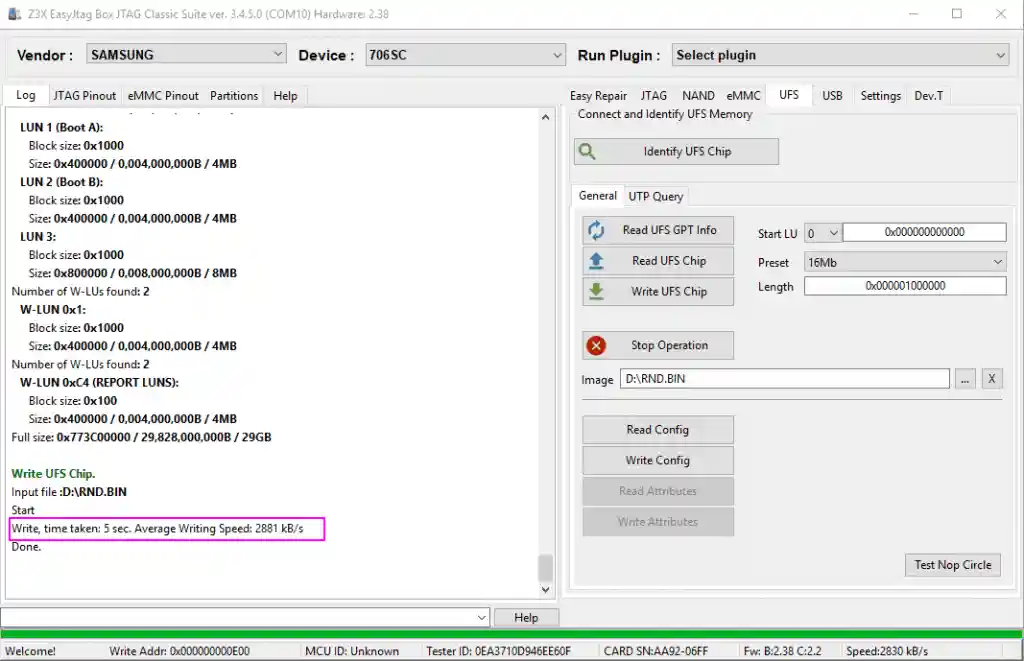
What Is EasyJtag Classic?
EasyJtag Classic is a professional memory repair and recovery tool developed by the Z3X Team. It works alongside the EasyJtag Box — a dedicated hardware interface that connects directly to a phone’s memory chip through eMMC ISP, JTAG, or UFS test points.
Unlike standard Android flashing tools that rely on the phone’s CPU and bootloader, EasyJtag bypasses them entirely. It talks straight to the memory chip — which is why it can recover phones that are completely dead, show no response, and cannot be detected by any other tool.
This is not a tool for everyday repairs. It is built for the situations where everything else has already failed.
Key Features of EasyJtag Classic v3.8.0.15
- 🔧 Full JTAG & eMMC operations (Read / Write / Edit all memory sections)
- 💾 Built-in HEX Editor for direct binary editing (new)
- ⚡ ERP system for quick repair with ready-made files
- 📊 Partition Manager for easy partition-level operations
- 🔌 Built-in pinout diagrams for JTAG & ISP connections
- 📥 Integrated Download Manager for files and updates
- 🌙 Dark Mode interface for better usability (new)
- 🚀 UFS support with advanced features like WriteBooster
- ⚙️ Force BootROM Mode for deep-level device access
EasyJtag Classic v3.8.0.15 Download Link
- File Name: EasyJtag_Release_v3.8.0.15_beta_ymtc
- Version: v3.8.0.15
- File Size: 322.31MB
What You Need Before Starting
- EasyJtag Box
- Windows 10 (64-bit recommended)
- Correct ISP/JTAG wiring
- ERP package for your device
- Soldering tools for eMMC ISP
- Antistatic protection equipment
How to Install EasyJtag Classic
- Download the v3.8.0.15 setup file
- Extract with WinRAR or 7-Zip
- Connect the EasyJtag Box via USB
- Run setup as Administrator
- Install updates if prompted
eMMC Repair — Quick Steps
- Power off the device
- Locate eMMC ISP test points
- Solder ISP wires to the box
- Launch EasyJtag Classic
- Click Read Info
- Back up the chip data
- Perform Write / Erase / ERP Repair
- Reassemble and test the device
Supported Memory & Storage
- Via JTAG: NAND, OneNAND, NOR, eMMC
- Via USB: NAND, OneNAND, eMMC
- Via MMC: eMMC (4-bit and 8-bit)
- Via UFS: UFS 2.x and 3.x including WriteBooster, SSR, and Extended Features
- eMMC Manufacturers: Samsung, SanDisk, Hynix, Toshiba, Micron, Pretec
- Flash Vendors: AMD, Fujitsu, Atmel, ST Micro, Micron, Intel, Toshiba, Sharp, Samsung, Hynix
Safety Warnings
⚠️ Always back up before any write operation
⚠️ Use the correct ERP file for your device
⚠️ Never disconnect during read/write
⚠️ eMMC ISP requires proper soldering skills
✅ Use antistatic protection
✅ Verify pinouts with Connection Helper before soldering
Conclusion
EasyJtag Classic v3.8.0.15 delivers powerful low-level eMMC and UFS repair features, even on hard-bricked devices. With new tools like HEX Editor, Dark Mode, Force BootROM, and improved chip support, it offers more control and compatibility than ever before.
For technicians working with storage repair, data recovery, and dead-device servicing, this is one of the most advanced releases of EasyJtag Classic. Keep it updated and ready for complex repair jobs.
💬 Need help? Leave a comment or contact your support team via WhatsApp.
Related Tools
- Android Multi Tool v1.3.5.5 – Free Download
- DeepSmartTool v0.41 – Free Download
- Titan Tool v7.0.0 – Free Download
- Qualcomm USB Driver – Free Download
- MTK USB Driver – Free Download
Can I use EasyJtag Classic without the hardware box?
No, EasyJtag Classic requires the EasyJtag Box to work.
eMMC ISP vs JTAG — what’s the difference?
JTAG uses the CPU debug interface, while eMMC ISP connects directly to memory test points. ISP is faster and supports newer devices.
Can it recover a dead phone?
Yes, it can access memory directly even if the phone is unresponsive.
What does the HEX Editor do?
It allows byte-level viewing and editing of raw memory data.
Is the software free after buying the box?
Yes, software updates are free for box owners.
What is YMTC support?
YMTC is a UFS chip maker, and v3.8.0.15 improves compatibility with YMTC8/9 storage chips.