Muslim Odin v5.0 (Latest Version) Free Download by Ali Hassani
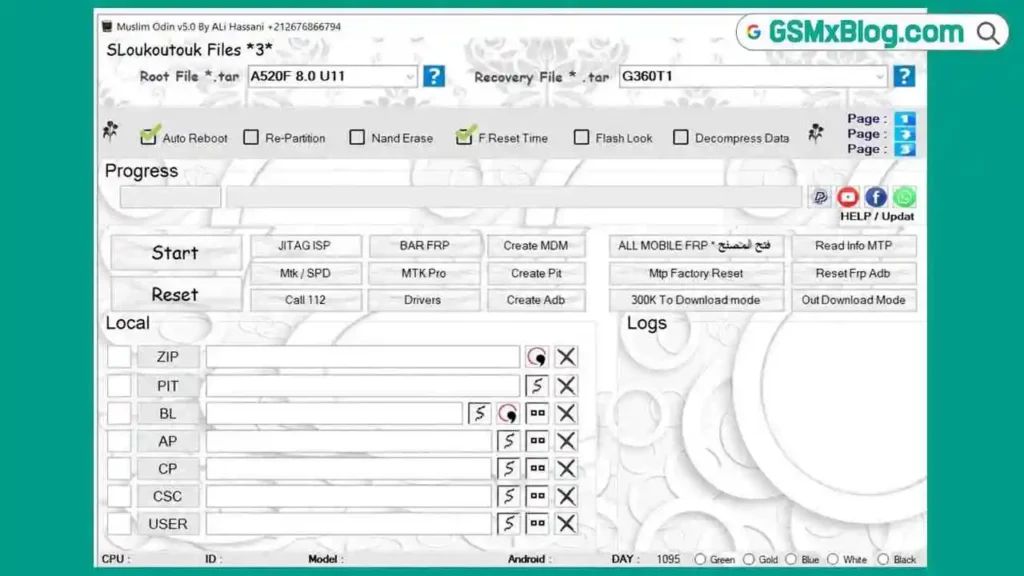
Looking for a free Samsung Odin flashing tool that goes beyond the standard BL, AP, CP, CSC layout? Muslim Odin v5.0 is a Windows-based flashing tool built on the familiar Odin structure but expanded into three separate working pages, each loading its own set of modules while the core flashing section stays fixed at the bottom. This makes it easy for any mobile technician already used to Odin to pick up the extra features without relearning the whole interface.
What sets Muslim Odin v5.0 apart from a typical Odin clone is its online server download system. Instead of hunting for FRP files, PIT files, KG/RMM modules, or root packages across Telegram groups, you select your Samsung model from a dropdown and the tool pulls the required file straight from its server. In this guide, you’ll find the full feature list, the download links, and the exact steps to install and activate the tool on your Windows PC.
What Is Muslim Odin v5.0?
Muslim Odin is a Samsung-focused flash tool that keeps the classic Odin flashing layout — BL, AP, CP, CSC, and USER slots, along with Auto Reboot, Re-Partition, NAND Erase, and F.Reset Time — always visible at the bottom of the window. What changes is the top section, which switches between three pages depending on what you’re working on:
- Page 1 – FRP File, PIT File, and ADB File modules
- Page 2 – KG/RMM, MDM, and CERT modules
- Page 3 – Root File and Recovery File modules
Each of these modules connects to an online server, so once you choose a supported Samsung model, the matching file downloads and loads into the tool automatically. This keeps the initial installer small since the tool only fetches the specific files you need instead of bundling every Samsung firmware package inside one download.
Key Features of Muslim Odin v5.0
📥 Server-Based Download Modules
- FRP File download module
- PIT File download module
- ADB File download module
- KG/RMM module
- MDM module
- CERT module
- Root File module
- Recovery File module
- Automatic file fetching once a supported model is selected
⚡ Core Flashing Section (Odin-Style)
- BL, AP, CP, CSC, and USER flashing slots
- ZIP and PIT file loading
- Auto Reboot
- Re-Partition
- NAND Erase
- F.Reset Time
- Flash Lock option
- Decompress Data
🛠️ Additional Utility Functions
- Read Info MTP
- Reset FRP ADB
- MTP Factory Reset
- 300K To Download Mode
- Out Download Mode
- JTAG ISP
- BAR FRP
- Create MDM
- Create PIT
- Create ADB
- MTK/SPD support package
- Built-in driver installer
- Call 112 function
- Live logs window for real-time output
📞 Support Shortcuts
- Facebook help shortcut
- YouTube shortcut
- WhatsApp shortcut
This combination makes Muslim Odin v5.0 useful for technicians who regularly work with Samsung FRP bypass, KG/MDM removal, and root or recovery flashing, without needing several separate GSM tools open at once.
Download Muslim Odin v5.0
- File Name: Muslim_Odin_Tool_V5.0_Free.rar
- Version: V5.0
- File Size: 203 MB
- Platform: Windows PC
- Activation: Free login credentials included
How to Install Muslim Odin v5.0
- Download the full RAR package from the link above.
- Extract the downloaded ZIP/RAR file to a folder on your Windows PC.
- Right-click the EXE file and choose Run as Administrator.
- If Windows Defender SmartScreen pops up, click More Info, then Run Anyway.
- Allow the request when Windows Firewall asks for permission.
- The launcher will open and may automatically load a browser page — you can close it and keep the launcher running.
- Wait for the login screen to appear.
- Enter the provided login email and password.
- Click LOGIN and wait until the status shows Server Connected.
- Click the REGISTER button.
- Once activation completes, the main Muslim Odin window will open, ready for use.
✅ After login, you’ll have access to BL, AP, CP, CSC, USER, PIT, FRP, Root, Recovery, and the other server-based modules.
How to Use Muslim Odin v5.0
▶️ Downloading FRP, PIT, or ADB Files (Page 1)
- Open Page 1 on the right side of the tool.
- Select your Samsung model from the dropdown.
- Choose FRP File, PIT File, or ADB File.
- Let the tool download and load the file automatically from the server.
- Connect your device and flash using the standard BL/AP/CP/CSC slots below.
▶️ Using KG/RMM, MDM, or CERT Modules (Page 2)
- Switch to Page 2.
- Select the correct Samsung model.
- Choose the KG/RMM, MDM, or CERT module as needed.
- Wait for the server to fetch the matching file for your device.
▶️ Root and Recovery Downloads (Page 3)
- Switch to Page 3.
- Pick your Samsung model from the list.
- Select Root File or Recovery File.
- Once the file loads, flash it using the AP or CSC slot as required.
▶️ Standard Flashing
- Load your BL, AP, CP, CSC, or USER files into the correct slots.
- Connect your Samsung device in Download Mode.
- Enable Auto Reboot and Re-Partition only if your firmware requires it.
- Click Start and monitor progress through the live logs window.
System Requirements
| Component | Requirement |
|---|---|
| OS | Windows PC (64-bit recommended) |
| Internet | Required for login and server-based file downloads |
| USB Port | USB 2.0 or 3.0 |
| Storage | Enough free space for the 203 MB package plus downloaded modules |
⚠️ Warning
Before using FRP removal, MDM, or Root/Recovery flashing functions, always back up important device data first where possible. Server-based modules require an active internet connection — without it, the file download options will not work. The MTK Pro section reportedly needs an extra package downloaded separately before it becomes usable, so don’t expect it to work immediately after installation.
Important Notes
🛡️ Antivirus Note: Loader-based activation tools are often flagged by antivirus software as false positives. Use this tool on a dedicated repair PC. 📌 Credit: This tool was shared free by RE GURU; the original developer remains unknown. 💳 Free Access: The tool includes working login credentials and does not require a paid subscription to activate. 🌐 Internet Dependency: Since FRP, PIT, KG/RMM, MDM, Root, and Recovery files load from an online server, a stable internet connection is required for these modules to function.
Frequently Asked Questions (FAQs)
❓ Is Muslim Odin v5.0 free to use? Yes. The tool includes working login credentials, and no additional purchase is needed to activate it.
❓ Does it work like a normal Odin tool? Yes. The core flashing section — BL, AP, CP, CSC, USER, Auto Reboot, Re-Partition, NAND Erase, and F.Reset Time — stays the same as standard Odin, while three extra pages add FRP, KG/MDM, and Root/Recovery server modules on top.
❓ Do I need internet to use this tool? Yes, for the server-based modules. FRP, PIT, ADB, KG/RMM, MDM, CERT, Root, and Recovery files are all downloaded online after you select your Samsung model, so an internet connection is required for those features.
❓ Is every feature ready right after installation? Almost all modules work immediately after activation, except the MTK Pro section, which needs an additional package downloaded separately before use.
❓ What login details do I need? The download package includes the required email and password combination needed to log in and register the tool.
Conclusion
Muslim Odin v5.0 brings a practical upgrade to the standard Odin flashing workflow by adding three dedicated pages for FRP, KG/MDM/CERT, and Root/Recovery modules — all backed by an online server download system that fetches the correct file for your Samsung model automatically. Combined with the familiar BL/AP/CP/CSC flashing layout, this makes it a convenient flash tool for any mobile technician who regularly handles Samsung FRP bypass, MDM removal, or firmware flashing on a Windows PC.
If you work with Samsung devices regularly, download Muslim Odin v5.0 using the link above and test it against your daily device list.
Related Posts
- NCK Online MTK Preloader Tool v0.2.5 (Latest Version)
- MH Unlocker Pro Tool V6.9 (Latest Version)
- E-GSM Tool v19 (Latest Version)
- 360 Tool v1.2.0 (Latest Version)