Ghost Auth Tool v3.3.0 (Latest Version) Download 2026 – Xiaomi Flash & Unlock Tool
Looking for an advanced server-auth based Android flashing and unlock tool that supports firmware flashing, FRP erase, Mi Cloud removal, EFS backup/restore, and Bootloader Unlock — with a massive supported model list covering the latest Xiaomi, Redmi, and POCO devices? Ghost Auth Tool v3.3.0 is a powerful Windows utility built specifically for Xiaomi ecosystem devices, using a server token authentication system that fetches MBN and ELF loaders per model to handle operations with precision.
Unlike basic offline tools, Ghost Auth Tool connects to a remote server to fetch device-specific loaders for each operation — making it a much more advanced solution than standard ADB/Fastboot utilities. Thanks to a free HWID-based offline loader, it can be accessed at zero cost. Version v3.3.0 has been personally tested by the GSMYOGESH team. This guide covers everything: features, full supported model list, file info, activation steps, usage instructions, honest review, important limitations, FAQs, and the direct download link.
What Is Ghost Auth Tool?
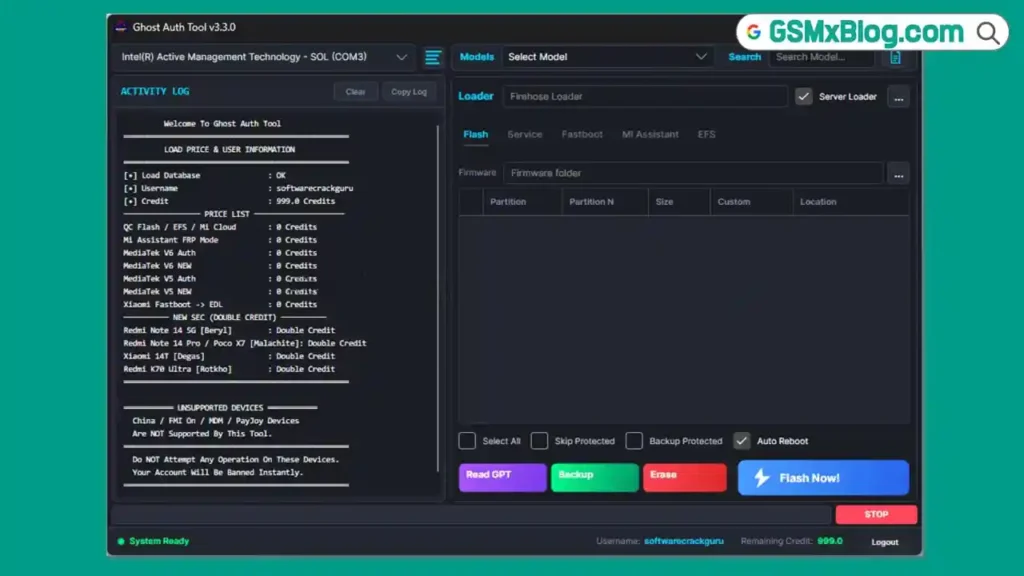
Ghost Auth Tool is a server-authentication-based Windows utility designed primarily for Xiaomi, Redmi, and POCO Android devices. It operates by fetching a unique server token for every operation — meaning each time you perform a task, the tool connects to a remote server to retrieve the correct MBN or ELF loader specific to your device model before executing.
This architecture makes Ghost Auth Tool significantly more powerful and precise than standard offline tools. It supports firmware flashing, partition backup, FRP erase, Mi Cloud remove/disable, factory reset, EFS backup and restore, Fastboot operations, and Bootloader Unlock — all organized across clean tabbed sections.
The tool is in beta stage (v3.3.0) and requires an active internet connection for most operations. A free HWID-based offline loader makes it accessible at no cost.
Key Features of Ghost Auth Tool v3.3.0
🔥 Flash Section
- Firmware Flashing Support
- Partition Flashing
- Custom Partition Support
- Backup Protected Option
- Skip Protected Option
- Auto Reboot Option
- Read GPT Function
- Backup Function
- Erase Function
- Flash Now Button
🔓 Service Section
- Erase FRP
- Mi Cloud Clean
- Mi Cloud Disable
- MI Unlock + Reset + FRP (Combined)
- Factory Reset
- Factory Reset + FRP (Combined)
- Enable Mi Account
⚡ Fastboot Section
- Read Info
- Fastboot to EDL
- Unlock Bootloader
- Erase FRP (Unlocked Devices)
- Reboot Bootloader
- Reboot Sideload
📱 MI Assistant Section
- Read Info
- Erase FRP
- Wipe Storage
💾 EFS Section
- Backup EFS
- Restore EFS
- Erase EFS
✨ Extra Features
- Server Token Authentication System
- Device-Specific MBN / ELF Loader Fetching
- Clean Dark Interface with Tab Navigation
- Custom Loader Support for Unlisted Models
- HWID-Based Free Offline Loader
- Windows PC Support (32-bit & 64-bit)
Download Ghost Auth Tool v3.3.0
- File Name: GhostAuthTool V3.3.0.rar
- Version: v3.3.0 (Latest 2026)
- Developer: Ghost Auth Team
- File Size: 56 MB
- Platform: Windows
- Type: Server-Auth Based Flashing & Unlock Tool
- RAR Password: No Password
How to Activate Ghost Auth Tool v3.3.0
- Download the RAR file from the link above.
- Extract the archive (no password needed) anywhere on your PC.
- Open the extracted folder and locate GHOST_AUTH.exe.
- Right-click
GHOST_AUTH.exeand select “Run as Administrator.” - The loader will open and display your HWID (Hardware ID).
- Copy the HWID shown in the loader window.
- Open gsmyogesh.com and find the Ghost Auth Tool post.
- In the activation section, paste your HWID and generate a key.
- Copy the generated key and paste it into the Ghost Auth loader.
- The loader will handle the rest automatically.
- When the login screen appears, enter any username and password — any text works.
- Click Login — the tool will open with all functions accessible. ✅
⚠️ Important: Do NOT close the loader window while using the tool. The loader must stay running in the background at all times — closing it will automatically close Ghost Auth Tool as well.
How to Use Ghost Auth Tool v3.3.0
▶️ Flash Firmware on Xiaomi / Redmi / POCO
- Open Ghost Auth Tool and log in.
- Navigate to the Flash tab.
- Select your firmware file and configure options:
- Enable Auto Reboot if you want the device to restart automatically after flashing.
- Enable Backup Protected to preserve protected partitions.
- Enable Skip Protected to bypass write-protected areas.
- Connect the device via USB in the correct mode.
- Click Flash Now — the server fetches the correct loader for your model and begins flashing.
- Wait for completion — device reboots automatically if Auto Reboot is enabled. ✅
▶️ Erase FRP via Service Section
- Open the tool and go to the Service tab.
- Connect your Xiaomi/Redmi/POCO device via USB.
- Select Erase FRP.
- The server authenticates and processes the request.
- Device reboots — FRP is cleared. ✅
▶️ Mi Cloud Remove / Disable
- Navigate to the Service tab.
- Choose Mi Cloud Clean (removes Mi account) or Mi Cloud Disable (disables verification).
- Connect the device and execute.
- Alternatively, use the combined MI Unlock + Reset + FRP for a full one-click operation. ✅
▶️ Unlock Bootloader
- Boot your Xiaomi device into Fastboot Mode (Power + Volume Down).
- Connect via USB and open the Fastboot tab.
- Click Unlock Bootloader.
- Server authenticates and sends the unlock command.
- Device unlocks and reboots. ✅
▶️ EFS Backup & Restore
- Connect the device in ADB Mode.
- Navigate to the EFS tab.
- Click Backup EFS to save the current EFS partition to your PC.
- Use Restore EFS to push a previously backed up EFS back to the device.
- Use Erase EFS only when required — this operation is irreversible. ✅
▶️ Fastboot to EDL
- Connect the device in Fastboot Mode.
- Go to the Fastboot tab.
- Click Fastboot to EDL to push the device into EDL/9008 mode for deeper repair work. ✅
Important Limitations
⚠️ Read before using Ghost Auth Tool:
- The tool is server-dependent — most functions will not work without an active internet connection and a responding server.
- Server downtime directly causes errors and failed operations — this is not a tool issue but a server availability issue.
- The server may fetch MBN and ELF loaders that are not compatible in full offline mode — always ensure internet is stable during operations.
- The model list inside the tool is mostly offline-based — if your model is not visible, use a custom loader matched to your specific device.
- This tool is primarily designed for Xiaomi, Redmi, and POCO — success on other brands (e.g., the listed OPPO A95) is not guaranteed.
- Always keep the loader running in the background — closing it terminates the tool immediately.
- As this is a beta release, some features may behave unexpectedly on certain models or firmware versions.
Full Supported Models List
| Device Name | Model Code | Status |
|---|---|---|
| Poco M5 | rock | Auth |
| POCO X8 Pro v2 | klee | Auth |
| POCO X8 Pro Max v2 | dash | Auth |
| Redmi Turbo 4 v2 | rodinv2 | Auth |
| Redmi Note 14 Pro / POCO X7 v2 | malachite | Auth |
| Redmi Note 15 Pro v2 | lapis | Auth |
| Redmi Note 15 5G | kunzite | Auth |
| Redmi Note 15 Pro+ 5G | flourite | Auth |
| Redmi 15R 5G / POCO M7 Plus 5G | spring | Auth |
| Redmi 15 / POCO M7 | creek | Auth |
| Redmi Note 15 4G v2 | spinel | Auth |
| Xiaomi 15T v2 | goya | Auth |
| Xiaomi 15T Pro v2 | klimt | Auth |
| Redmi Note 15 Pro 4G v2 | charoite | Auth |
| Xiaomi Redmi 13 | moon | Auth |
| Xiaomi Redmi Pad SE 8.7 | flare | Auth |
| Redmi 13C 5G | air | Auth |
| Xiaomi Redmi Note 14 4G | tanzanite | Auth |
| Xiaomi Redmi Note 14 4G v2 | tanzanitev2 | Auth |
| Xiaomi Redmi Note 14 | beryl | Auth |
| Xiaomi Redmi Note 14 Pro 4G | obsidian | Auth |
| Xiaomi Redmi Note 14 Pro 4G v2 | obsidianv2 | Auth |
| Xiaomi 13T | aristotle | Auth |
| Xiaomi 13T Pro / Redmi K60 Ultra | corot | Auth |
| Xiaomi 14T v2 | degas | Auth |
| Redmi Note 13 Pro 4G / POCO M6 Pro | emerald | Auth |
| Xiaomi 12T | plato | Auth |
| Redmi K50 | rubens | Auth |
| Redmi K50 Pro | matisse | Auth |
| Xiaomi 12 Pro Dimensity | daumier | Auth |
| Redmi K60E | rembrandt | Auth |
| Redmi K70 Ultra / Mi 14T Pro v2 | rothko | Auth |
| Redmi K70E / POCO X6 Pro 5G | duchamp | Auth |
| Redmi Note 11T Pro / Pro+ / POCO X4 GT / Redmi K50i | xaga | Auth |
| Redmi Note 13 Pro+ | zircon | Auth |
| Redmi Pad 2 Pro / POCO Pad M1 | flute | Auth |
| Redmi 14R 5G / POCO M7 5G / 14C 5G | flame | Auth |
| Xiaomi 17 Ultra | nezha | Auth |
| Redmi Turbo 4 Pro | onyx | Auth |
| Poco C75 | Lake | Auth |
| Xiaomi Redmi 13C | gale | Auth |
| Xiaomi Redmi 14C | lake | Auth |
| Xiaomi Redmi 15C | dew | Auth |
| Poco X6 Neo | gold | Auth |
| Poco X6 Neo v2 | goldV2 | Auth |
| Redmi A3 | blue | Auth |
| Redmi Note 12 Pro | ruby | Auth |
| Redmi Note 13 Pro | garnet | Auth |
| Poco X3 Pro | vayu | Auth |
| Redmi Note 10s | rosemary | Auth |
| Redmi A4 5G / POCO C75 5G | warm | Auth |
| Oppo A95 | CPH2365 | Auth |
| Xiaomi 15 Global | dada | Auth |
| Xiaomi Pad 7 Pro | muyu | Auth |
| POCO F7 Pro | zorn | Auth |
| POCO F7 Ultra | miro | Auth |
| Xiaomi Pad 7 | uke | Auth |
| Xiaomi 15 Ultra Global | xuanyuan | Auth |
Advantages & Limitations Summary
✅ Advantages
- Server-fetched device-specific loaders — more accurate than generic offline tools
- Covers Flash, FRP, Mi Cloud, EFS, Fastboot, and Bootloader Unlock in one tool
- Massive supported model list covering 2023–2026 Xiaomi/Redmi/POCO devices
- Clean, well-organized dark interface with tabbed navigation
- Custom loader support for models not in the database
- Free HWID-based activation — no credit purchases needed
- Tested and confirmed working by GSMYOGESH
⚠️ Limitations
- Server-dependent — unreliable if server is slow or offline
- Beta version — occasional instability expected
- Registration can take time during server load periods
- Credit errors may appear for some server-side operations
- Not a full replacement for professional Xiaomi boxes (MiFlash Pro, etc.)
- Loader must stay open during entire session — closing it kills the tool
- Limited support for non-Xiaomi brands
FAQs
Q1: Is Ghost Auth Tool v3.3.0 completely free? Yes — using the included HWID-based offline loader, the tool is accessible for free. The activation key is generated at no cost from gsmyogesh.com.
Q2: What login details do I use? Any username and password works — the loader handles authentication. Just type anything in the login fields and click Login.
Q3: Why is the server not responding during registration? Ghost Auth Tool uses a server-based auth system that can experience high load or downtime. If registration fails, wait 10–15 minutes and try again.
Q4: Can I use this tool without internet? Partially. The model list loads offline, but most actual operations (flashing, FRP erase, Mi Cloud remove) require an active server connection to fetch the correct device loader.
Q5: My model is not in the list — what should I do? Use a custom loader matched to your specific Xiaomi model. Contact the tool’s community channel for guidance on obtaining the correct custom loader.
Conclusion
Ghost Auth Tool v3.3.0 stands out as one of the most technically advanced free Xiaomi servicing tools available in 2026, thanks to its server-fetched device-specific loader system, comprehensive feature set across Flash, Service, Fastboot, MI Assistant, and EFS sections, and an extensive supported model list covering the latest Xiaomi 15, Redmi Note 15, POCO F7, and many more.
Its beta status and server dependency mean it is not the most stable option for high-volume shop use — but for technicians who need a capable, free Xiaomi flash and unlock solution and can handle occasional server hiccups, Ghost Auth Tool delivers impressive results. The GSMYOGESH team rates it 8.5/10. Download the RAR free using the Proton Drive link above, activate it in minutes, and add it to your Xiaomi repair arsenal today. 🚀
Have you tested Ghost Auth Tool v3.3.0? Share your results and model feedback in the comments below!
Related Posts
- Download BMT PRO Android Edition V3.8 Free 2026
- Download PulsarUnlock v1.8.1.4 (Latest Version) Free 2026
- Download RDPowerPlus Tool V19.8 (Latest Version) Free 2026
- Download LazyUnlocker v9.1 (Latest Version) Free 2026