DEROID Unbricker Tool Pro v1.0 (Latest Version) Free Download 2026
Is your Android phone soft-bricked, stuck in a bootloop, or refusing to respond to standard ADB commands? The DEROID Unbricker Tool Pro v1.0 is a lightweight, portable Windows utility built specifically for Android repair technicians and beginners who need a fast, no-fuss solution for unbricking devices, removing FRP, entering EDL/Fastboot modes, and running essential ADB operations — all from one clean, dark-themed interface.
Version 1.0 is the first public release, already packed with ADB tools, Fastboot reboot functions, Qualcomm EDL support, FRP erase, USB driver utilities, and real-time device detection — making it an ideal addition to any GSM repair shop’s toolkit. This guide covers everything: features, file info, installation steps, usage instructions, FAQs, and the free download link.
What Is DEROID Unbricker Tool Pro?
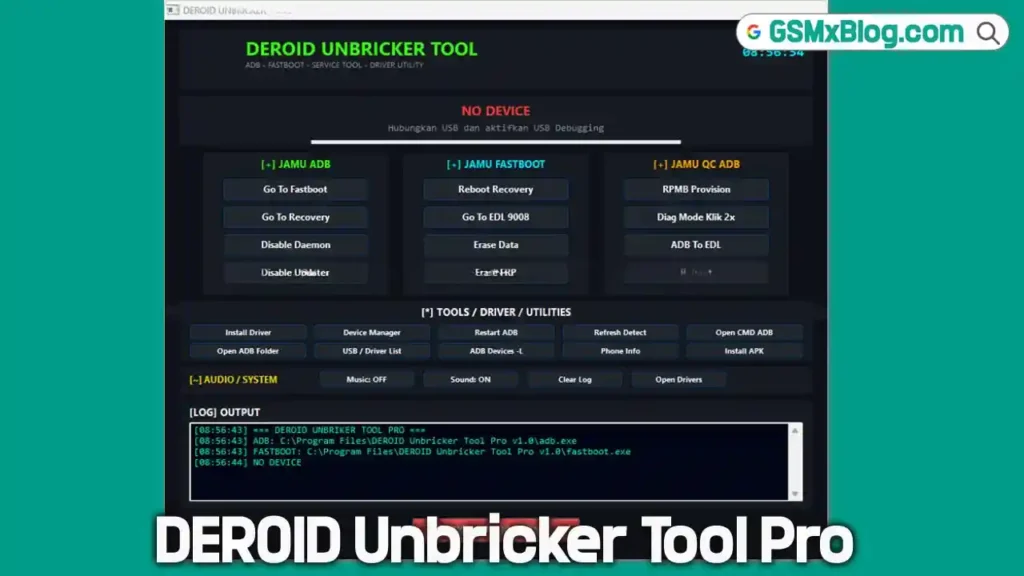
DEROID Unbricker Tool Pro is a small, portable Windows repair utility designed to handle the most common Android device recovery tasks without requiring a heavy setup or deep technical knowledge. It consolidates ADB, Fastboot, Qualcomm EDL, FRP erase, and USB driver management functions into a single dark-themed interface that both beginners and experienced technicians can navigate quickly.
The tool is especially useful for mobile repair shops handling a variety of Android brands, since it works with any device that supports ADB or Fastboot mode, including Qualcomm-based handsets needing EDL/9008 access.
🔑 Key advantage: DEROID Unbricker Tool Pro packs ADB, Fastboot, EDL, FRP erase, and USB driver tools into one portable EXE — no installation required, no complicated setup.
Key Features of DEROID Unbricker Tool Pro v1.0
🔧 ADB Functions
- Go To Fastboot
- Go To Recovery
- Disable Daemon
- Disable Updater
- Restart ADB
- ADB Devices List
- Open CMD ADB
- Phone Information
- Install APK
- ADB To EDL
⚡ Fastboot Functions
- Reboot Recovery
- Go To EDL 9008
- Erase Data
- Erase FRP
- Fastboot Reboot
🔲 Qualcomm Functions
- RPMB Provision
- Diag Mode (2x Click)
- ADB To EDL Mode
- Qualcomm Reboot
🔌 Driver & Utility Functions
- Install USB Driver
- Open Device Manager
- USB Driver List
- Open ADB Folder
- Refresh Device Detect
- Open Drivers Folder
⚙️ System Functions
- Music ON/OFF
- Sound ON/OFF
- Clear Log
- Log Output Window
- Real-Time Device Detection
- Portable Tool Support
✨ Extra Features
- Simple User Interface
- Dark Theme Design
- One-Click Functions
- Fast Device Response
- Android Service Utility
- Small Tool Size (11 MB)
- Windows PC Support
- 100% Free to Use
What’s New in Version 1.0
- Version 1.0: First public release of DEROID Unbricker Tool Pro.
- Added FRP erase support via Fastboot.
- Added Fastboot reboot options (Recovery, EDL, Normal).
- Included USB driver install utility.
- Added direct ADB tools section with CMD access.
- Improved real-time detection speed for Android devices.
Download DEROID Unbricker Tool Pro v1.0
- Tool Name: DEROID Unbricker Tool Pro
- Version: v1.0 (Latest 2026)
- File Size: 11 MB
- Platform: Windows
- File Type: Portable (No Install Required)
- RAR Password: No Password
How to Install DEROID Unbricker Tool Pro
- Download the RAR file using the link below.
- Extract the archive using WinRAR or 7-Zip to any folder on your PC.
- Open the extracted folder.
- Disable your antivirus temporarily to avoid false-positive blocks.
- Right-click the main
.exefile and select “Run as Administrator.” - Install USB drivers from within the tool if your device is not detected.
- Enable USB Debugging on the target Android phone.
- Connect the phone via a quality USB cable — the tool will detect it automatically. ✅
✅ Tip: Always install USB drivers before connecting your device. Missing drivers are the most common cause of “NO DEVICE” errors in any ADB/Fastboot tool.
How to Use DEROID Unbricker Tool Pro v1.0
▶️ Remove FRP via Fastboot
- Open DEROID Unbricker Tool Pro as Administrator.
- Boot your Android device into Fastboot Mode (Power + Volume Down).
- Connect the device via USB — wait for detection.
- Navigate to the Fastboot Functions section.
- Click “Erase FRP” and wait for the process to finish.
- Reboot the device — FRP is cleared! ✅
▶️ Enter EDL / 9008 Mode
- Open the tool and connect your Android device in ADB Mode.
- Navigate to the ADB Functions section.
- Click “ADB To EDL” to push the device into EDL/9008 mode.
- Alternatively, use the Fastboot → Go To EDL 9008 button if the device is already in Fastboot. ✅
▶️ Go To Fastboot / Recovery from ADB
- Open the tool and connect your device with USB Debugging enabled.
- In the ADB Functions tab, click “Go To Fastboot” or “Go To Recovery” as needed.
- Wait for the device to reboot into the selected mode. ✅
▶️ Install APK via ADB
- Open the tool and connect the device in ADB Mode.
- Click “Install APK” in the ADB Functions section.
- Browse to your
.apkfile and confirm. - The APK is silently installed on the device. ✅
▶️ Qualcomm Reboot / Diag Mode
- Connect your Qualcomm-based Android device in ADB Mode.
- Navigate to the Qualcomm Functions tab.
- Select “Diag Mode (2x Click)” or “Qualcomm Reboot” as required.
- For RPMB provisioning, use the “RPMB Provision” button. ✅
Advantages of This Tool
- ✅ Easy for beginners — no complex setup required
- ✅ Very small file size (11 MB), runs portably
- ✅ Fast Android device detection in real time
- ✅ Ideal for local mobile repair shops
- ✅ Covers ADB, Fastboot, EDL, and FRP in one tool
- ✅ Works on most Android devices with ADB/Fastboot support
- ✅ Free to use — no credits, no license key
FAQs
Q1: Is DEROID Unbricker Tool Pro free? Yes, version 1.0 is completely free to download and use.
Q2: Does this tool support all Android phones? It supports most Android devices that have ADB and Fastboot mode enabled.
Q3: Can I remove FRP using this tool? Yes — the tool includes an “Erase FRP” option under the Fastboot Functions section.
Q4: Is installation required? No. DEROID Unbricker Tool Pro is fully portable. Just extract the RAR and run the EXE directly as Administrator.
Q5: Why does my phone show “NO DEVICE”? Make sure USB Debugging is turned on in Developer Options and that USB drivers are properly installed via the tool’s Driver section.
Conclusion
The DEROID Unbricker Tool Pro v1.0 is a compact but capable free Android repair utility for 2026 — particularly well-suited for repair shops and technicians who need one-click access to ADB, Fastboot, EDL, and FRP erase functions without heavy software overhead. Its portable design, dark-theme UI, real-time device detection, and beginner-friendly layout make it a practical addition to any mobile servicing workstation.
Whether you’re clearing a stubborn FRP lock, pushing a Qualcomm device into EDL mode, or simply rebooting into Recovery — DEROID Unbricker Tool Pro handles it cleanly and quickly. Download it free using the GitHub link above and add it to your Android repair arsenal today. 🚀
Have you tried DEROID Unbricker Tool Pro? Share your experience in the comments below!
Related Posts
- Download RDPowerPlus Tool V19.8 (Latest Version) Free 2026
- Download Artemis Unlock Tool v2025.06.04 AI-Powered Mobile Unlock Free Tool
- Download RC DARK Tool v1.2.3 (Latest Version)
- Qualcomm USB Driver (Latest Version)
- MTK USB Driver (Latest Version)