Download UMT Pro QcFire v13.7 (Latest Version) Setup File
The UMT Pro QcFire V13.7 (Latest Version) Setup File is one of the most reliable tools for repairing and unlocking Qualcomm-powered devices. Whether you need to flash firmware, remove FRP locks, repair IMEI issues, or bypass screen locks, QcFire delivers powerful features in a single, easy-to-use package.
The new V13.7 update adds support for the latest devices from Samsung, Huawei, Motorola, Nokia, Xiaomi, Vivo, and more—including popular flagship and mid-range models. It also introduces a new SIM unlock method for Google Pixel devices, enhanced compatibility with more loaders, and overall improved stability.
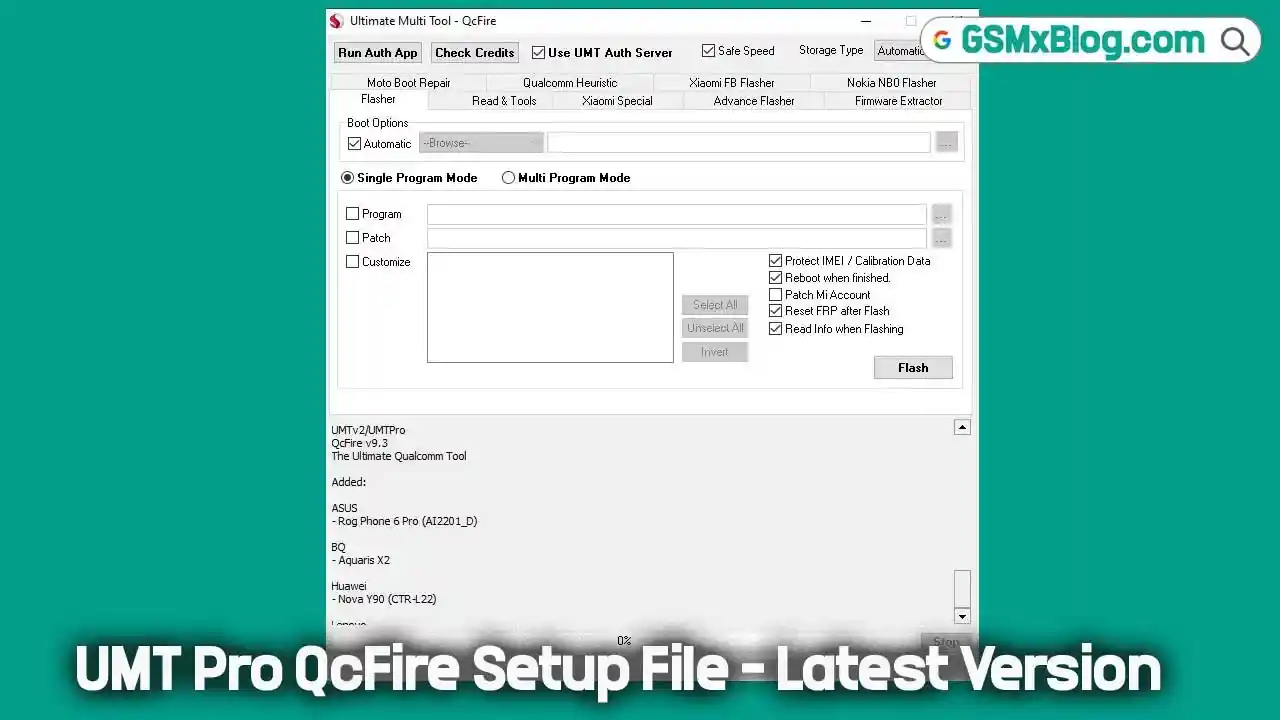
Key Features of UMT Pro QcFire V13.7
UMT Pro QcFire is widely trusted by mobile technicians for its broad range of Qualcomm repair capabilities. Here are the most notable features:
1. Flashing and Firmware Management
- Read and write firmware for supported Qualcomm devices.
- Backup and restore QCN files.
- Directly flash Nokia
.nb0factory firmware in EDL mode. - Extract Oppo OFP firmware.
2. IMEI and Security Repair
- IMEI repair in FTM/Diag + Flash mode.
- Backup, reset, and restore EFS security data.
- Xiaomi IMEI repair for RSA-protected devices.
- Forensic features for reading contacts and messages in EDL mode.
3. FRP and Lock Removal
- Reset FRP (Google Factory Reset Protection).
- Remove PIN, password, or pattern locks without data loss (unencrypted devices).
- Unique methods for Vivo and Xiaomi lock resets.
- Samsung MDM unlock in EDL mode.
- Huawei ID and universal ID reset.
4. Xiaomi-Specific Functions
- Reset/disable Mi Account.
- Temporary bootloader unlock.
- EDL authentication via Xiaomi Auth App or UMT server.
- Sideload firmware updates and FRP resets.
5. Additional Utilities
- Enable Diag mode.
- One-click root in EDL mode.
- Motorola boot repair.
- Lost mode reset for Samsung.
UMT Pro QcFire V13.7 (Latest Version) Download
- File Name: UMTv2_UMTPro_QcFire_V13.7_Setup.7z
- Version: V13.7 (Latest)
- File Size: 262 MB
- Platform: Windows (32-bit / 64-bit)
Download Link 👉 MediaFire
How to Install and Use UMT Pro QcFire V13.7
- Download the setup file from the provided link.
- Extract the
.7zfile using WinRAR or 7-Zip. - Install the tool by running the setup file on your Windows PC.
- Launch the QcFire application.
- Load Firmware by checking the “Program” option and selecting the firmware file.
- Connect Device in EDL mode.
- Click Flash to begin the process.
- Wait for the operation to complete, then disconnect your device.
💡 Tip: Always back up your device data before performing flashing or unlocking to avoid accidental data loss.
📋 UMTv2 / UMTPro QcFire V13.7 Update – Changelog
Release Date: 01-06-2026
🚀 Added Xiaomi No Auth Loader
- Added support for Qualcomm Snapdragon 8 Gen 2 CPU devices
- No Auth Loader support for selected Xiaomi models
📱 Supported Xiaomi Models
- Xiaomi 13 (fuxi)
- Xiaomi 13 Pro (nuwa)
- Xiaomi 13 Ultra (ishtar)
- Xiaomi MIX Fold 3 (babylon)
- POCO F6 Pro (vermeer)
- Xiaomi Pad 6S Pro 12.4 (sheng)
- Redmi K60 Pro (socrates)
- Redmi K70 (vermeer)
- Redmi Note 13 4G (sapphire)
📲 Samsung Added
- Galaxy A05s (SM-A057G) — BIT-A
- Galaxy A05s (SM-A057M) — BIT-E
- Galaxy A23 (SM-A235M) — BIT-E
- Galaxy A23 (SM-A235M) — BIT-F
- Galaxy A23 5G (SM-S236DL) — BIT-G
- Galaxy S21 5G (SM-G991U) — BIT-J
- Galaxy S21 FE (SM-G990U) — BIT-M
- Galaxy S22 Ultra 5G (SM-S908U) — BIT-9
- Galaxy S22 Ultra 5G (SM-S908W) — BIT-9
- Galaxy S23 Ultra (SM-S918B) — BIT-9
- Galaxy S23 Ultra (SM-S918N) — BIT-7
- Galaxy S23 Ultra (SM-S918U) — BIT-7
- Galaxy S23 Ultra (SM-S918W) — BIT-7
- Galaxy S24 Ultra (SM-S928B) — BIT-5
- Galaxy S24 Ultra (SM-S928N) — BIT-5
- Galaxy S24 Ultra (SM-S928U) — BIT-5
- Galaxy S24 Ultra (SM-S928W) — BIT-5
- Galaxy Z Flip5 (SM-F731U) — BIT-7
- Galaxy Z Fold6 (SM-F956U) — BIT-3
🔧 Other Changes
- Updated Internal Loader Database
- Improved compatibility with newly supported devices
- Enhanced loader stability and performance for Qualcomm-based devices
Conclusion
The UMT Pro QcFire V13.7 (Latest Version) Setup File is an essential tool for any technician working on Qualcomm-based smartphones. With expanded device support, enhanced compatibility, and robust repair features, this update ensures you can handle even the latest models efficiently.