Nokia OST Tool v6.3.7 – Free Download for Windows PC (Latest)
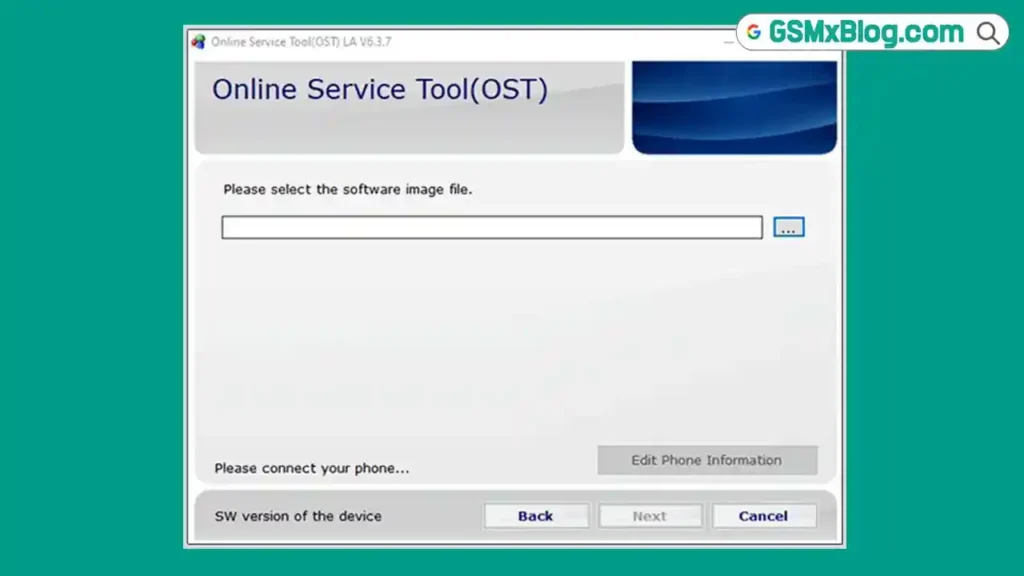
If you repair Nokia Android devices regularly, having the right flash tool on your Windows PC saves a lot of time. Nokia OST Tool — short for Online Service Tool — is the official Nokia Mobility application for flashing stock ROM on Nokia Android smartphones and tablets. It supports .nb0 and .mlf Nokia firmware files, and also lets you reset screen locks and FRP locks on Nokia devices. The package includes the tool itself, USB drivers, login information, and a tutorial to get you started.
In this guide, the GSMxblog team covers everything about Nokia OST Tool v6.3.7 — what it does, how to set it up correctly, how to use it step by step, and where to download all versions for free.
What is Nokia OST Tool?
Nokia OST Tool is an official application developed and distributed by Nokia Mobility for servicing Nokia Android devices on Windows PC. The full name is Online Service Tool, and it is the standard flashing utility used by Nokia service centers for installing official stock ROM files in .nb0 and .mlf format.
Beyond flashing firmware, the tool also handles screen lock reset and FRP lock removal on Nokia Android smartphones and tablets. It requires a login with an account ID, password, and a specific MAC address configuration before use — which makes it a controlled tool even though it is distributed for free.
The ZIP package shared by the GSMxblog team includes the OST Tool installer, USB drivers, login credentials, and a step-by-step tutorial so you have everything in one place.
Key Features of Nokia OST Tool
- Flash official Nokia stock ROM in .nb0 and .mlf format
- Reset screen lock on Nokia Android devices
- Remove FRP lock on Nokia Android devices
- Supports Nokia Android smartphones and tablets
- Requires MAC address change for login authentication
- Login protected with Account ID and Password
- Includes USB driver support inside the ZIP package
- Includes tutorial inside the ZIP package
- Official tool by Nokia Mobility — distributed free of charge
Nokia OST Tool v6.3.7 Download
- File Name: OST_v6.3.7.zip
- Version: v6.3.7
- File Size: 128.8MB
- Author: Nokia Mobility
- Supported OS: Windows PC
Login Information
Nokia OST Tool requires login authentication before you can flash any device. Use the credentials below:
| Field | Value |
|---|---|
| Account ID | NokiaIN528_433527 |
| Password | 5WP5D3 |
| Domain | N/A |
| MAC Address | 0CD2B5444B34 |
Important: You must change your PC’s MAC address to 0CD2B5444B34 before logging in. Without this step, login will fail regardless of whether the account credentials are correct. See Step 4 in the usage guide below for exact instructions.
Requirements Before You Start
Before you open Nokia OST Tool, make sure everything below is ready:
- Nokia Stock ROM — Download and extract the correct .nb0 or .mlf firmware file for your Nokia device model before starting.
- USB Driver — Install the Nokia USB Driver, MTK USB Driver, or Qualcomm USB Driver depending on your device’s chipset. Without drivers, the tool will not detect your device.
- MAC Address Changed — The MAC address change must be done before launching the tool. Do not skip this step.
- Data Backup — Flashing stock ROM will erase all user data including contacts, photos, and files. Always take a full backup before starting.
How to Use Nokia OST Tool
Step 1: Download and Install OST Tool
Download the ZIP package from the links above, extract it, and run the installer. The tool installs to C:\Program Files (x86)\OST LA by default.
Step 2: Download and Extract the Nokia Stock ROM
Download the correct Nokia stock ROM for your device model and extract it to a folder on your PC. Make sure the .nb0 or .mlf file is accessible before you open the tool.
Step 3: Install the USB Driver
Install the USB driver included in the ZIP package. Choose the correct driver for your device — Nokia USB Driver for standard Nokia devices, MTK USB Driver for MediaTek chipsets, or Qualcomm USB Driver for Snapdragon-based models.
Step 4: Change the MAC Address
This step is mandatory. Without changing the MAC address, login will fail.
Follow these steps exactly:
- Open Network and Internet Settings
- Click Change Adapter Options
- Right-click Ethernet and select Configure
- Go to the Advanced tab
- Find Local Administered Address or Network Address
- Enter the MAC address: 0CD2B5444B34
- Click OK and close the settings
Step 5: Launch Nokia OST Tool
Go to C:\Program Files (x86)\OST LA and run OnlineUpdateTool.exe.
Step 6: Log In
Enter the login credentials when the tool opens:
- Account: NokiaIN528_433527
- Password: 5WP5D3
- Domain: Leave blank (N/A)
Step 7: Select the Nokia Stock ROM
After logging in successfully, browse to the extracted firmware folder and select the Nokia stock ROM file (.nb0 or .mlf format).
Step 8: Connect Your Device
Boot your Nokia phone into Fastboot Mode or Download Mode and connect it to the PC via USB cable. Wait for the tool to detect the device.
Step 9: Start Flashing
Click NEXT to begin the flashing process. Wait for it to complete. Do not disconnect the device during the flash.
Important Notes
MAC Address is Mandatory: This is the most common reason OST Tool login fails. The MAC address 0CD2B5444B34 must be set on your Ethernet adapter before you open the tool. Re-check this step if you are unable to log in.
Data Will Be Erased: Flashing stock ROM through OST Tool resets the device to factory state. All user data is permanently deleted. Back up everything important before starting.
Virus Scan: The Nokia OST Tool package has been scanned with antivirus software before being shared. Always scan downloaded files on your own PC before running them as well.
Credit: Nokia OST Tool is developed and distributed by Nokia Mobility. Full credit goes to the Nokia Mobility team for creating and releasing this tool.
Alternative Tools: If Nokia OST Tool does not work for your specific Nokia model, you can also try Phoenix Service Tool or Nokia HMD DeviceKit as alternative Nokia flash tools.
Conclusion
Nokia OST Tool v6.3.7 is the standard official flash tool for Nokia Android devices on Windows PC. It supports .nb0 and .mlf firmware formats, handles screen lock and FRP lock removal, and is distributed free by Nokia Mobility. The MAC address requirement and login system are the main setup steps that trip up first-time users — follow the instructions in this guide carefully and the login will work on the first attempt.
The GSMxblog team recommends always using the latest version (v6.3.7) for Nokia Android repair work, but the full version archive above gives you the flexibility to fall back to an older release if needed. Download Nokia OST Tool from the links above, follow the setup steps, and you’ll have a working Nokia GSM tool ready for your next repair job.
If you have any questions or run into issues with the MAC address setup or login, drop a comment below and we’ll help you out.
Related Articles:
FAQs
Why can’t I log in to Nokia OST Tool?
The most common reason is the MAC address has not been changed before launching the tool. Set your Ethernet adapter’s MAC address to 0CD2B5444B34 first, then restart the tool and try logging in again.
What firmware formats does Nokia OST Tool support?
Nokia OST Tool supports .nb0 and .mlf Nokia stock ROM formats. Make sure your downloaded firmware is in one of these formats before starting.
Will flashing with OST Tool delete my data?
Yes. Flashing stock ROM through Nokia OST Tool performs a full factory reset and deletes all user data including contacts, photos, and app data. Back up everything before you start.
Is Nokia OST Tool free?
Yes. Nokia OST Tool is an official application distributed free of charge by Nokia Mobility. No credits, no dongle, and no paid activation are required to use it.
⚠️ Disclaimer: All tools and files shared on GSMxblog are for educational and testing purposes only. Always scan files before use. Use everything at your own risk.