Tecno Infinix Itel Fastboot Info Read Tool (Latest 2026) – Free Download
Reading device information from a Tecno, Infinix, or Itel phone with a broken display or unknown model has always been a slow process — until the Tecno Infinix Itel Fastboot Info Read tool showed up. This small, free GSM tool lets you pull critical device details directly over Fastboot Mode on Windows PC, with no activation required and no login needed. If you work in Android repair and regularly deal with phones that have damaged screens or unclear firmware requirements, this tool is worth keeping in your GSM toolkit.
What Is Tecno Infinix Itel Fastboot Info Read?
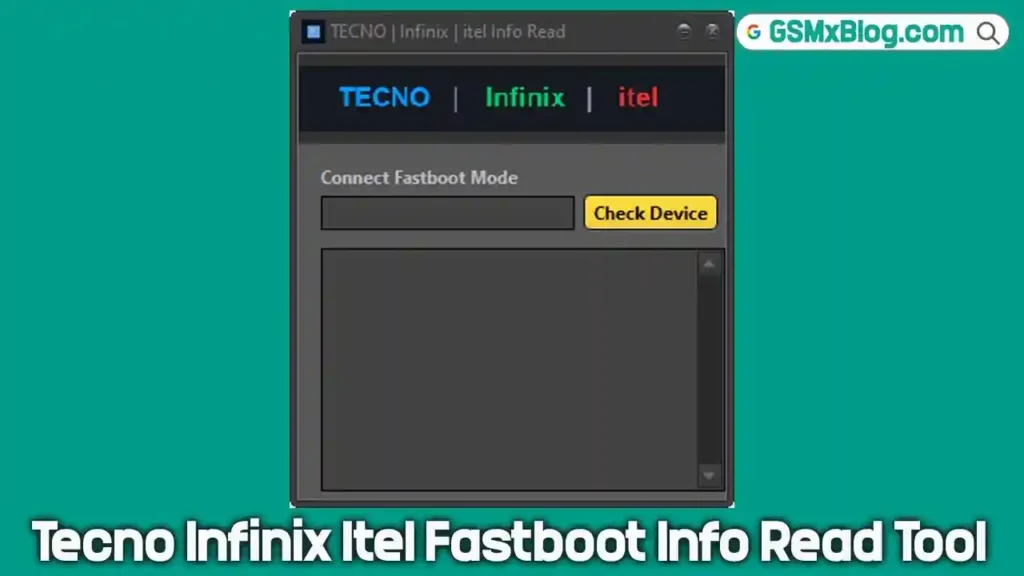
Tecno Infinix Itel Fastboot Info Read is a free Windows-based diagnostic GSM tool designed specifically for Tecno, Infinix, and Itel Android devices. It reads device information directly through Fastboot Mode without requiring bootloader unlock, paid activation, or any account login.
This tool fills a very specific gap in mobile repair workflows. When a phone arrives at your workshop with a shattered display or physically damaged buttons, identifying the exact model number is the first step before downloading firmware or starting any repair work. This tool gives you that information in seconds — brand name, model number, IMEI 1, IMEI 2, and serial number — just by connecting the device in Fastboot Mode to your Windows PC.
The tool was tested on an Infinix Hot 50 5G (model X6720) and successfully read both IMEI numbers and the serial number without any issues or bootloader unlock requirement. It is completely free to use and requires no installation of a box or dongle.
Key Features of Tecno Infinix Itel Fastboot Info Read
📱 Fastboot Device Detection
- Detects connected Tecno, Infinix, and Itel devices automatically when booted into Fastboot Mode
- Reads full device information within seconds of clicking Check Device
- Works without unlocking the bootloader — tested and confirmed
🆓 Completely Free — No Activation Required
- No paid license, no dongle, no hardware box needed
- No login or account registration required
- Download, extract, open, and use — that’s it
🖥️ Lightweight Windows Tool
- Very small file size — opens and loads quickly
- Portable design — runs directly after extraction
- Compatible with Windows PC (32-bit and 64-bit)
🔍 Supports Tecno, Infinix, and Itel
- Built specifically for this group of Android brands
- Particularly useful for devices from budget and mid-range lineups where firmware versions vary widely by model suffix
🛠️ Practical for Android Repair Workflows
- Saves time before firmware selection, FRP bypass, or flash tool setup
- Eliminates guesswork on model identification for broken-display devices
- Useful as a first-step diagnostic before using any other flash tool or Android repair utility
What Information It Reads
When you connect a supported device in Fastboot Mode and press Check Device, the tool displays the following details on screen:
| Field | Description |
|---|---|
| Brand Name | Tecno, Infinix, or Itel |
| Device Model Number | Exact model code (e.g., X6720) |
| Model Name | Full device name (e.g., Infinix Hot 50 5G) |
| IMEI 1 | Primary IMEI number |
| IMEI 2 | Secondary IMEI number (dual SIM) |
| Serial Number | Device serial number |
Download Tecno Infinix Itel Fastboot Info Read
| Detail | Info |
|---|---|
| File Name | Tecno_Infinix_Itel_Fastboot_Info_Read.rar |
| Version | Latest 2026 |
| File Size | 2.3 MB |
| Platform | Windows PC |
| Price | Free |
How to Install
- Download the RAR file from the download link above.
- Right-click the RAR file and select Extract Here using WinRAR or 7-Zip.
- Open the extracted folder and locate the tool executable.
- No installation required — the tool runs directly from the extracted folder.
- If Windows SmartScreen shows a warning, click More Info → Run Anyway to proceed. ✅
Tip: Install the MTK USB Driver or Qualcomm USB Driver beforehand if your PC does not already recognize the device in Fastboot Mode.
How to Use the Tool
▶️ Reading Fastboot Device Info
- Boot your device into Fastboot Mode — hold the Volume Down button while connecting the phone to your PC via USB cable.
- Open the tool from the extracted folder.
- Wait for the tool to recognize the connected device.
- Click the Check Device button.
- The tool will display the device brand, model number, model name, IMEI 1, IMEI 2, and serial number on screen within a few seconds. ✅
- Note down the information you need before proceeding with firmware download, FRP bypass, or any repair operation.
System Requirements
| Component | Requirement |
|---|---|
| OS | Windows 7 / 8 / 10 / 11 (32-bit & 64-bit) |
| USB Port | USB 2.0 or USB 3.0 |
| USB Driver | Fastboot / Android USB Driver installed |
| Internet | Not required |
| Box/Dongle | Not required |
| Activation | Not required |
Important Notes
📌 Credit: Full credit for this tool goes to its original developer. This article is published by the GSMxblog team for informational and educational purposes only.
⚠️ Use Responsibly: This tool should only be used on devices you own or have explicit authorization to service. Always scan downloaded files with an antivirus before use.
🔌 Fastboot Mode Required: The tool reads device information through Fastboot Mode only. Make sure your device boots into Fastboot Mode successfully before connecting to the PC.
🛡️ No Data Risk: The tool reads device info only — it does not write, flash, or modify anything on the device.
Frequently Asked Questions (FAQs)
❓ What is Tecno Infinix Itel Fastboot Info Read used for? It reads device information — brand name, model number, model name, IMEI 1, IMEI 2, and serial number — from Tecno, Infinix, and Itel phones connected in Fastboot Mode. It is particularly useful for identifying broken-display devices before firmware download or Android repair work.
❓ Does this tool require a paid license or dongle? No. The tool is completely free. No activation, no login, no dongle, and no hardware box is required at any point.
❓ Does it work without unlocking the bootloader? Yes. Based on real testing, the tool successfully reads device information without requiring a bootloader unlock.
❓ What brands does it support? The tool is built for Tecno, Infinix, and Itel Android devices.
❓ Is it safe to use? The tool only reads information from the device — it does not modify, flash, or write anything. Always scan downloaded files with an antivirus before running them on your Windows PC.
❓ Do I need an internet connection? No. The tool works fully offline once you have downloaded and extracted it.
Conclusion
The Tecno Infinix Itel Fastboot Info Read tool does one thing and does it well — it reads accurate device details from Tecno, Infinix, and Itel phones over Fastboot Mode, without bootloader unlock, without activation, and without any cost. For mobile technicians dealing with broken-display devices or uncertain model numbers, this free download saves real time before any Android repair, firmware flash, or FRP bypass operation begins. At just 2.3 MB, it is a lightweight addition to any Windows PC GSM tools folder.
Download the tool from the link above, boot your device into Fastboot Mode, and get the exact model information you need in seconds. Already tested it in your workshop? Drop your experience in the comments below.
Related Posts:
- Griffin Unlocker (Latest Version)
- EFT Pro Dongle (Latest Version)
- USBDK Driver – Free Download
- Oplus Flash Tool – Latest Version