TR Tools PRO v2.0.4.0 Download – Samsung, Huawei, Xiaomi & Oppo Repair Tool
If you need a single GSM tool that covers Samsung, Huawei, Xiaomi, Oppo, and Spreadtrum-based devices, TR Tools PRO brings together one-click root, FRP removal, firmware flashing, and IMEI repair in one Windows application. It’s built around a simple, no-fuss interface, which is part of why it has built up a large user base among mobile technicians.
This guide covers the full feature breakdown by brand, pricing options, and what you need to know before getting TR Tools PRO.
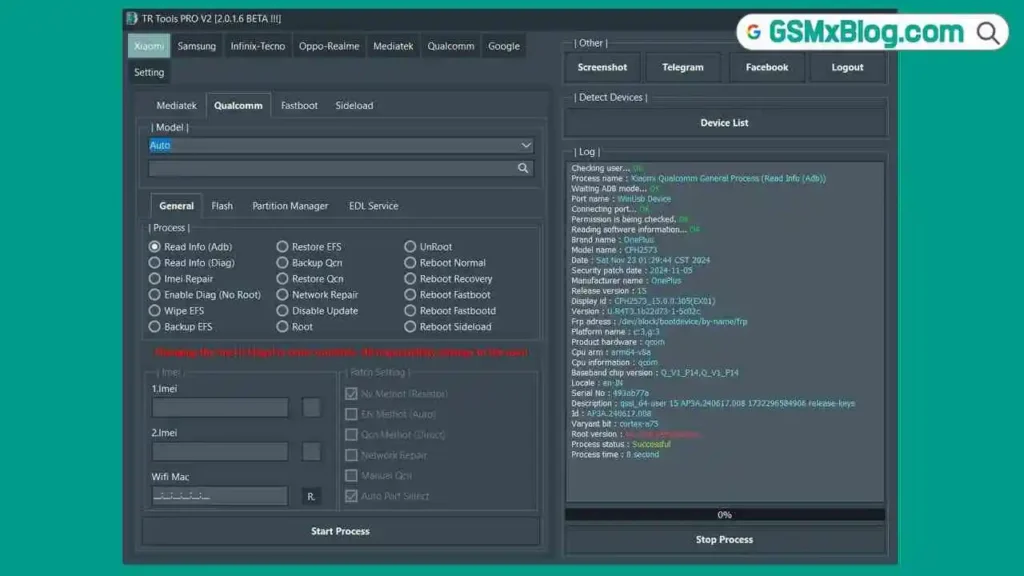
What Is TR Tools PRO?
TR Tools PRO is a multi-brand Android repair tool that organizes its functions by device manufacturer, covering Samsung, Huawei, Xiaomi, Oppo, and Spreadtrum-based devices. The tool focuses on a simple, user-friendly interface and is backed by an active user community where issues are often resolved quickly. According to the developer, the platform has processed over 1 million operations a month, with more than 6,000 customers using the software.
Key Features of TR Tools PRO
📱 Samsung Functions
- One Click Root (almost all Samsung Android devices)
- Read Info (Modem and Flash Mode)
- Firmware Flash
- Firmware Download
- Remove Screen Lock
- FRP Removal
📲 Huawei Functions
- Unlock Bootloader (Huawei devices with MTK processors)
- Read Info
- IMEI Repair (Flash Mode)
- Read Cert
- FRP Removal
- NVDATA Backup and Restore
- NVRAM Backup and Restore
- Read Firmware
- Factory Reset
- NVRAM Reset
- Exit Brom Mode
📱 Xiaomi Functions
- Unlock Bootloader (MTK processor devices)
- Read Info
- IMEI Repair (Flash and Meta Mode)
- Firmware Download
- Mi Account Bypass
- FRP Removal
- NVDATA Backup and Restore
- NVRAM Backup and Restore
- Firmware Read
- Factory Reset
- NVRAM Reset
- Exit Brom Mode
📲 Oppo Functions
- Unlock Bootloader (MTK-powered devices)
- Read Info
- IMEI Repair (Flash Mode)
- Exit Brom Mode
- FRP Removal
- NVDATA Backup and Restore
- NVRAM Backup and Restore
- Read Firmware
- Factory Reset
- NVRAM Reset
🔧 Spreadtrum Functions
- IMEI Repair
- Read Info
- Factory Reset
- FRP Removal
Download TR Tools PRO
- File Name: Tr Tools PRO 2.0.4.0.exe
- Version: V2.0.4.0
- File Size: 202 MB
- Platform: Windows PC
How to Get Started with TR Tools PRO
- Download TR Tools PRO and review the available plans.
- Choose the license duration that fits your repair workload (1, 2, or 3 years).
- Complete the purchase through the official Buy Now page.
- Download the software from the official Download section after purchase.
- Install the tool on your Windows PC and activate it using your purchased license.
TR Tools PRO Pricing
TR Tools PRO is licensed software with no free version. Pricing is structured around annual plans, with each license tied to one computer:
| Plan | Price | License Length |
|---|---|---|
| Starter | $70 | 1 Year |
| Most Popular | $140 | 2 Years |
| Most Affordable | $210 | 3 Years |
All plans include full access, use on one computer, 24/7 support, firmware support, and one-click root.
Why Mobile Technicians Use TR Tools PRO
For technicians who service multiple Android brands, having Samsung, Huawei, Xiaomi, and Oppo functions in one flash tool cuts down on the need to juggle separate software for each manufacturer. The one-click root, FRP bypass, and firmware flashing functions cover much of the daily workload for a typical repair shop, while NVRAM and NVDATA backup/restore options add an extra layer of safety before making changes to a device.
System Requirements
| Component | Requirement |
|---|---|
| OS | Windows PC |
| License | Required (no free trial listed) |
| USB Port | USB 2.0 or 3.0 |
| Internet | Required for license activation |
⚠️ Warning
Always confirm your exact device brand and model before running any FRP removal, bootloader unlock, or firmware flash. NVRAM and NVDATA backups are available for many brands, so back up this data before making changes where possible. Each license is locked to one computer, so confirm your setup before purchasing.
Important Notes
💳 Licensing: TR Tools PRO is paid software only — there is no free download or trial version listed on the official site. 🖥️ One PC Per License: Each purchased license can only be used on one computer. 📌 Credit: TR Tools PRO is developed and maintained by MEBU Bilişim Teknolojileri Ltd. Şti.
Frequently Asked Questions (FAQs)
❓ Is TR Tools PRO free to use? No, TR Tools PRO is a paid tool with annual license plans starting at $70 for one year.
❓ Which brands does TR Tools PRO support? It supports Samsung, Huawei, Xiaomi, Oppo, and Spreadtrum-based devices.
❓ Can I use one license on multiple computers? No, each license is restricted to use on a single computer.
❓ Does TR Tools PRO support firmware downloading? Yes for Samsung and Xiaomi. Firmware download for Huawei and Oppo is listed as “coming soon.”
❓ What support is included with a license? All plans include 24/7 support, firmware support, and one-click root access.
Related Posts
- QuickADB Tool – Free ADB and Fastboot Tool
- DTPro Qualcomm Module – Xiaomi EDL Repair Tool
- Download Sigma Plus (Latest Version)
Conclusion
TR Tools PRO offers a broad set of Android repair functions across Samsung, Huawei, Xiaomi, Oppo, and Spreadtrum devices, from one-click root and FRP removal to firmware flashing and IMEI repair. While it requires a paid annual license with no free trial, the combination of multi-brand support and 24/7 support makes it a tool worth considering for technicians who service a wide mix of device brands. If your repair shop handles multiple brands daily, check out TR Tools PRO and compare the license plans that fit your workload.