Download UFS Checker Pro Tool Free – Android Hardware Info & Storage Diagnostic 2026
Every mobile technician has faced moments where basic Android settings just don’t tell you enough. Chipset version, UFS memory type, IMEI slot status, SELinux state, FRP partition path — this kind of deep hardware data is what separates a confident repair job from guesswork. UFS Checker Pro is a free Windows-based Android diagnostic tool by SHA Mobile that reads all of this information and more in a single click. With a ZIP package of just 134 KB, it is one of the lightest device information tools available for Android repair on Windows PC in 2026.
In this guide you will find the full feature breakdown, download table, setup steps, usage walkthrough, and FAQs — everything a mobile technician needs before downloading.
What Is UFS Checker Pro?
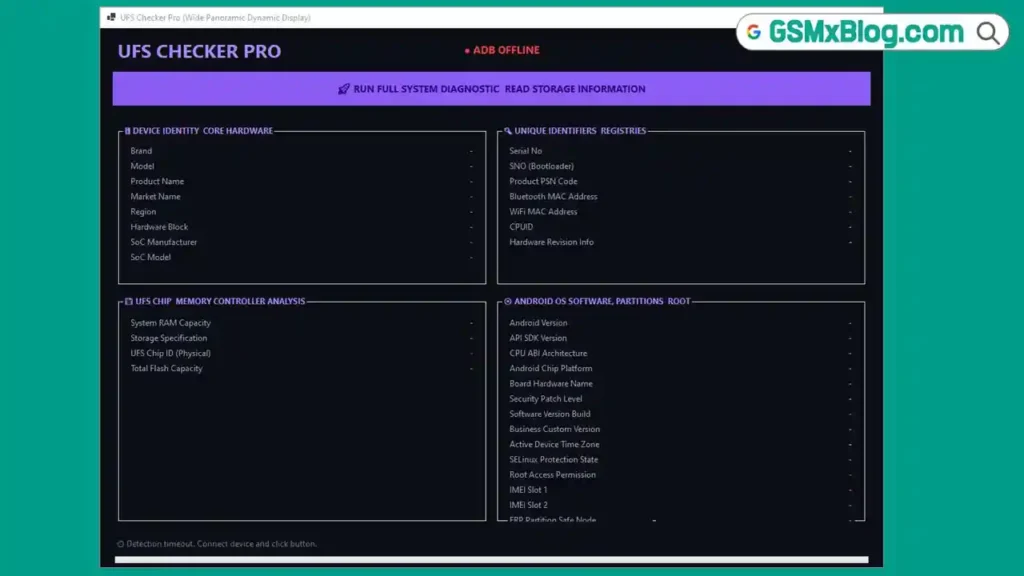
UFS Checker Pro (also listed as the SHA Mobile Info Checker Tool) is a free, no-login Android information reader for Windows. It connects to Android devices over ADB and pulls a complete set of hardware and software details — from UFS chip physical ID and total flash capacity to IMEI numbers, root status, SELinux protection state, and FRP partition path.
The tool is organized into four clean sections: Device Identity & Core Hardware, Unique Identifiers & Registries, UFS Chip & Memory Controller Analysis, and Android OS, Software, Partitions & Root. Each section targets a specific layer of the device, making it easy to find exactly what you need without scrolling through pages of raw ADB output.
It works with both MediaTek and Qualcomm devices, requires no account or activation, and runs entirely from an extracted folder after a one-time ADB file download on first launch.
🔑 Key note: The ZIP package is 134 KB, but on first launch the tool downloads ADB binaries in the background (total folder size reaches approximately 15 MB). After that initial download, the tool works fully offline.
Key Features of UFS Checker Pro
🖥️ Device Identity & Core Hardware
- Brand — reads device manufacturer
- Model — exact device model number
- Product Name — internal product string
- Market Name — consumer-facing device name
- Region — device region/variant
- Hardware Block — hardware block identifier
- SoC Manufacturer — chipset brand (MediaTek, Qualcomm, etc.)
- SoC Model — exact processor model name
🔍 Unique Identifiers & Registries
- Serial Number — device serial via ADB
- SNO (Bootloader) — bootloader-level serial number
- Product PSN Code — product serial code
- Bluetooth MAC Address — hardware-level BT MAC
- WiFi MAC Address — hardware-level WiFi MAC
- CPUID — CPU unique identifier
- Hardware Revision Info — board hardware revision string
💾 UFS Chip & Memory Controller Analysis
- System RAM Capacity — total installed RAM
- Storage Specification — UFS version and storage spec
- UFS Chip ID (Physical) — physical chip identifier read from memory controller
- Total Flash Capacity — total onboard storage size
📱 Android OS, Software, Partitions & Root
- Android Version — installed Android OS version
- API SDK Version — Android API level
- CPU ABI Architecture — processor instruction set (arm64-v8a, etc.)
- Android Chip Platform — platform string
- Board Hardware Name — board name used in builds
- Security Patch Level — latest security patch date
- Software Version Build — full build number string
- Business Custom Version — OEM custom build string
- Active Device Time Zone — current device time zone
- SELinux Protection State — enforcing / permissive status
- Root Access Permission — root granted / denied status
- IMEI Slot 1 — primary IMEI number
- IMEI Slot 2 — secondary IMEI (dual SIM devices)
- FRP Partition Safe Node — FRP partition path for repair reference
Download UFS Checker Pro Tool Free
- File Name: UFS_INFO_CHECKER.zip
- File Size: 134 KB (ZIP)
- Platform: Windows PC
- Login Required: No
- Credit Required: No
- Developer: SHA Mobile
- Tested By: GSMxblog Team
How to Install UFS Checker Pro
- Download the UFS_INFO_CHECKER.zip file using any link above.
- Extract the ZIP file to any folder on your Windows PC using WinRAR or 7-Zip.
- Open the extracted folder and locate the main executable file.
- Right-click the EXE and select Run as Administrator.
- On first launch, the tool will automatically download ADB files in the background — allow internet access when prompted.
- Wait for the ADB download to complete (folder size will reach approximately 15 MB).
- The tool is now ready to use — no further installation or activation required. ✅
How to Use UFS Checker Pro
▶️ Read Full Device Information
- Enable USB Debugging on your Android phone.
- Go to Settings → About Phone → tap Build Number 7 times to enable Developer Options.
- Go to Settings → Developer Options → enable USB Debugging.
- Connect your phone to the PC via USB cable.
- Authorize the ADB connection on the phone when prompted (tap “Allow”).
- Open UFS Checker Pro on your PC.
- Click “Run Full System Diagnostic — Read Storage Information” (the purple button at the top).
- Wait a few seconds while the tool reads all four sections.
- All hardware and software details will populate across the four panels. ✅
▶️ Check UFS Chip Information
- After running the diagnostic, look at the UFS Chip & Memory Controller Analysis panel (bottom left).
- The tool will display System RAM Capacity, Storage Specification, UFS Chip ID (Physical), and Total Flash Capacity.
- Use the UFS Chip ID (Physical) value to cross-reference the memory chip in repair databases or ISP pinout guides.
▶️ Check IMEI and FRP Partition
- After the scan completes, scroll to the Android OS, Software, Partitions & Root panel (bottom right).
- IMEI Slot 1 and IMEI Slot 2 will display the device’s registered IMEI numbers.
- The FRP Partition Safe Node field shows the exact partition path — useful for targeted FRP bypass on Android repair.
- Root Access Permission confirms whether the device has root or not before you attempt any root-dependent operations.
▶️ Verify Bootloader & Security Status
- In the Unique Identifiers & Registries panel (top right), check SNO (Bootloader) for the bootloader-level serial number.
- In the Android OS panel, check SELinux Protection State — Enforcing means standard security is active; Permissive means security is relaxed (common on rooted or custom ROM devices).
- Security Patch Level tells you the last applied security update date for the device.
System Requirements
| Component | Requirement |
|---|---|
| OS | Windows 7 / 8 / 10 / 11 (32-bit & 64-bit) |
| RAM | 1 GB minimum |
| Storage | 50 MB free space (after ADB download) |
| USB Port | USB 2.0 or USB 3.0 |
| Internet | Required on first launch (for ADB download only) |
| Android | USB Debugging must be enabled on target device |
⚠️ Warning
UFS Checker Pro is a read-only diagnostic tool — it does not write, modify, or flash anything to your device. However, always enable USB Debugging on a device you own or have authorization to service. Do not use this tool to read hardware identifiers from customer devices without their knowledge. IMEI, MAC addresses, and serial numbers are sensitive device data. Handle all information read by this tool responsibly and in accordance with local repair regulations.
Important Notes
🛡️ Antivirus Note: Some antivirus programs may flag ADB-based tools during first launch due to the background ADB download. This is a known false positive behavior with Windows ADB tools. Scan the ZIP file independently before extracting if you have concerns.
📌 Credit: Full development credit goes to the SHA Mobile Team for creating this free Android diagnostic utility.
💾 ADB Download on First Run: The ZIP package is 134 KB, but the tool downloads ADB binaries on first launch. This is a one-time process and the tool works offline afterward.
⚠️ Storage Reading Bug: A known issue exists where the Total Flash Capacity may display an incorrect value on some devices (for example, showing 256 GB on a 64 GB phone). Cross-check storage readings with the device’s own settings. The developer is expected to address this in a future update.
🔌 USB Driver: Make sure the correct USB driver for your device is installed. Download MTK USB Driver for MediaTek phones or Qualcomm USB Driver if your device runs on a Snapdragon chipset.
Frequently Asked Questions (FAQs)
❓ What is UFS Checker Pro used for? UFS Checker Pro reads deep hardware and software information from Android devices over ADB — including UFS chip ID, RAM, IMEI numbers, FRP partition path, SELinux status, root access, build number, security patch level, and more. It is designed for mobile technicians who need fast, reliable device diagnostics before repair.
❓ Does UFS Checker Pro require login or payment? No. The tool is completely free with no login, no registration, and no credit system. Just download, extract, and run.
❓ Why is the ZIP only 134 KB but the folder grows larger after launch? The tool downloads ADB binaries in the background on first launch, which increases the folder size to around 15 MB. This only happens once. After that, the tool runs fully offline.
❓ Does it work on both MediaTek and Qualcomm phones? Yes. UFS Checker Pro was tested on MediaTek (Redmi Note 13 5G) and Qualcomm (Xiaomi Civi 5 Pro) devices and detected both without issues.
❓ Why does my phone not show up in the tool? Make sure USB Debugging is enabled in Developer Options on your phone. Also confirm that you have tapped “Allow” on the ADB authorization pop-up that appears on the device screen when first connected.
❓ Is the storage capacity reading always accurate? Not always. A known bug may display incorrect total flash capacity on some devices. All other fields tested correctly. Cross-check storage information with your device’s own settings until the developer releases a fix.
❓ What USB driver do I need? Install the MTK USB Driver for MediaTek devices or the Qualcomm USB Driver for Snapdragon devices before connecting.
❓ Can I use this tool without an internet connection? Only after the first launch. The initial ADB download requires internet. Once complete, the tool runs fully offline.
Conclusion
UFS Checker Pro by SHA Mobile delivers something rare in the Android repair world — a genuinely lightweight, completely free diagnostic tool that reads hardware data most technicians normally have to dig through ADB manually to find. At just 134 KB download size with no login or activation required, it is one of the easiest tools to add to your repair toolkit on Windows PC.
The four-panel interface covers everything from UFS chip physical ID and total flash capacity to IMEI slots, FRP partition path, SELinux state, and root access — giving you a full picture of any connected Android device in seconds. The known storage capacity bug is a minor drawback worth watching, but for daily device diagnostics before flashing, FRP bypass, or IMEI repair work, download UFS Checker Pro today and keep it ready on your repair PC. 🚀
Tested it on your device? Share your experience and chipset in the comments below — your feedback helps the repair community know which devices work best.
Related Posts
- RDPower Plus Tool (Latest Version)
- MTK USB Driver Download (Latest Version)
- Download Qualcomm USB Driver (Latest Version)
- SamFw FRP Tool (Latest Version)