UMT Samsung Tool v1.1 – Flash, Unlock & Repair Samsung Devices (Latest Version)
If you regularly service Samsung Android phones, you already know how important it is to have a reliable tool for flashing, unlocking, and repairing devices. UMT Samsung Tool is one of the most trusted options in the market for exactly that. Developed by the UMT Team, this module lets you flash stock ROMs, reset FRP locks, unlock network restrictions, and repair software issues on a wide range of Samsung devices — all from a single Windows-based interface.
This page gives you the direct download link for the latest version, a full feature breakdown, step-by-step usage instructions, and everything else you need to get started.
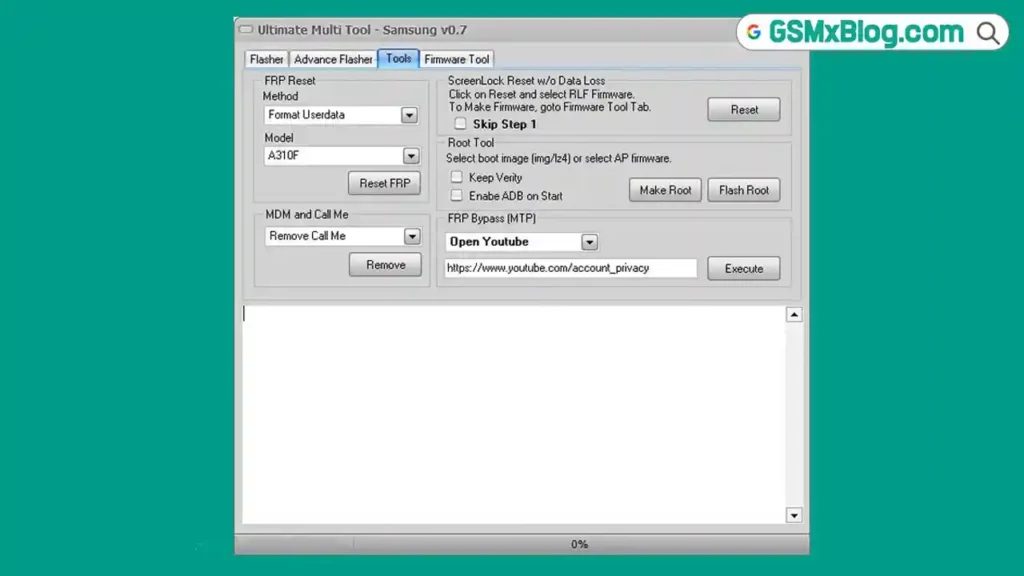
⚠️ Important: UMT Samsung Tool is not a free or cracked tool. A genuine UMT Box or UMT Dongle is required to use it. Download the setup file here, but make sure you have the hardware before attempting to run it.
What Is UMT Samsung Tool?
UMT Samsung Tool is a dedicated module released by the UMT (Ultimate Multi Tool) Team for servicing Samsung Android devices. It handles the most common repair tasks that technicians deal with every day — flashing official firmware, removing FRP locks, resetting screen locks without data loss, and unlocking devices.
The tool is distributed as a zip package that includes the Samsung USB Driver, so you get everything you need in a single download. It runs on Windows and is compatible with UMT Box and UMT Pro dongles.
If you also work on Apple devices and need an iCloud bypass solution, check out the FRPFILE A5-A6 Activator guide on GSMxBlog — it covers A5 and A6 chipset iPhones without any Arduino hardware.
Key Details
| Detail | Info |
|---|---|
| Tool Name | UMT Samsung Tool |
| Version | v1.1 (Latest) |
| File Name | UMTv2_UMTPro_UltimateSams_v1.1.zip |
| File Size | 85 MB |
| Developer | UMT Team |
| Platform | Windows |
| Includes | Samsung USB Driver |
| Hardware Required | UMT Box or UMT Dongle |
| Price | Paid (Box/Dongle Required) |
Download UMT Samsung Tool v1.1
Download the latest version using either link below. The package includes both the UMT Samsung Tool and the Samsung USB Driver.
What Can UMT Samsung Tool Do?
Here is what this tool handles on Samsung Android devices:
- Flash Stock ROM — restore official Samsung firmware to fix bootloops, bricked devices, or software corruption
- Reset FRP Lock — remove Google Factory Reset Protection on Samsung devices in Download Mode or Test Mode
- Screen Lock Reset — reset screen PIN, pattern, or password without wiping user data
- Network Unlock — carrier unlock supported Samsung models
- Repair Functions — fix various software-level issues on Samsung Android phones
Requirements Before You Start
Make sure the following are ready before running the tool:
- ✅ A Windows PC — UMT Samsung Tool runs on Windows only
- ✅ UMT Box or UMT Dongle — this is mandatory; the tool will not function without genuine UMT hardware
- ✅ Samsung USB Driver installed on your PC — without it, the tool will not detect your device
- ✅ A working USB cable to connect your Samsung phone to the PC
- ✅ A complete data backup — flashing stock ROM erases all data on the device
How to Use UMT Samsung Tool – Step by Step
▶️ Initial Setup
- Download the UMT Samsung Tool zip package from the links above.
- Install the Samsung USB Driver included in the package — this is mandatory. Without the driver, the tool will not detect any connected device.
- Install UMT Samsung Tool on your Windows PC.
- Connect your UMT Box or Dongle before opening the tool.
▶️ How to Flash Stock ROM
- Open UMT Samsung Tool on your PC.
- Go to the Flasher tab inside the tool.
- Browse and select the stock ROM file for your Samsung model.
- Boot your Samsung device into Download Mode (usually by holding Volume Down + Home + Power, or Volume Down + Bixby + Power depending on the model).
- Connect the device to your PC via USB cable.
- Click the Flash button and wait for the process to complete.
- ✅ The device will reboot automatically once flashing finishes successfully.
▶️ How to Reset FRP Lock (Standard Security)
- Open UMT Samsung Tool and go to the Tools tab.
- Boot your Samsung device into Download Mode.
- Connect the device to your PC via USB.
- Click Reset FRP and wait for confirmation.
- ✅ FRP lock will be cleared and the device will reboot.
▶️ How to Reset FRP Lock (Latest Security)
- Open UMT Samsung Tool and go to the Tools tab.
- Boot your Samsung device into Test Mode — note this is different from Download Mode.
- Connect the device to your PC via USB.
- Click Reset FRP and allow the process to finish.
- ✅ FRP removed successfully.
UMTPro UltimateSams v1.1 – Changelog
📱 Samsung Exynos
Updated Enable ADB in Download Mode
Added support for the following Exynos chipsets:
- Exynos 1280
- Exynos 1380
- Exynos 1480
- Exynos 1580
- Exynos 2100
- Exynos 2200
- Exynos 2400
- Exynos 2500
- Exynos 7884
- Exynos 7885
🚀 Improvements
- Improved ADB device handling.
- Made minor internal improvements.
📌 Important Notes
- You may need to perform a Factory Reset if Enable ADB does not work.
- Exynos 850 has been tested and confirmed to work.
- If your Exynos chipset is not listed, you can try selecting another chipset from the available list.
- After enabling ADB, use Reset FRP (Exynos) to remove the FRP lock.
- If this method does not work, you can use a third-party tool to enable ADB before performing the FRP reset.
FAQs
Q1: Is UMT Samsung Tool free to use? No. It requires a genuine UMT Box or UMT Dongle to operate. The setup file is free to download, but the hardware is paid and mandatory.
Q2: Will flashing a stock ROM delete my data? Yes. Flashing stock firmware completely wipes all data on the device. Always take a full backup before you begin.
Q3: My device is not being detected — what should I do? The most common cause is a missing or incorrectly installed Samsung USB Driver. Reinstall the driver included in the zip package, reconnect the USB cable, and try again.
Q4: Which Samsung devices does this tool support? UMT Samsung Tool supports a wide range of Samsung Android devices. For the exact compatibility list, refer to the official UMT Team release notes or check your specific model inside the tool after connecting.
Q5: What is the difference between Download Mode and Test Mode for FRP? Download Mode is used for standard security FRP resets. Test Mode is required for devices running the latest Samsung security patches. Using the wrong mode for your device’s firmware may result in the reset failing.
Q6: Is the downloaded file safe? Yes — the file was scanned using Virus Total before being uploaded. Always download from the official links provided on this page to avoid modified or tampered versions.
Q7: Where can I get the Samsung USB Driver separately? The Samsung USB Driver is included inside the UMT Samsung Tool zip package. If you need it separately, download the latest version from the Samsung USB Driver page on GSMxBlog.
Related Posts
- FRPFILE A5-A6 Activator – Full iCloud Activation Without Arduino
- Download WinRa1n v2.1 – Free Windows Jailbreak Tool for iPhone 6 to X
- Download Ghost Auth Tool v3.3.0 (Latest Version) Free 2026
Conclusion
UMT Samsung Tool v1.1 remains one of the most capable and actively maintained Samsung servicing modules available for technicians running a UMT Box or Dongle setup. Whether you need to flash a bricked device back to life, clear FRP after a factory reset, or remove a screen lock without touching the user’s data — this tool handles it all cleanly from a single Windows interface.
The hardware requirement is the only real barrier. If you already own a UMT Box or UMT Dongle, downloading and using the latest v1.1 setup is a straightforward process. Keep the Samsung USB Driver installed, always back up before flashing, and use Test Mode for FRP resets on devices with recent Samsung security patches.
Have you used UMT Samsung Tool on a specific device model? Leave the model name and what you fixed in the comments — it helps other technicians looking for the same solution.