SmartTool Pro v20.0.0 (Latest Version) Download
If you’re a mobile technician looking for a powerful, all-in-one Android repair and bypass tool in 2026, SmartTool Pro v20.0.0 is one worth having on your Windows PC. Developed by Mr. Kemboi and released in April 2026, this professional-grade GSM tool packs over 280 premium features — covering Enhanced MTK Super Editing, Samsung KG lock removal with Android 16 support, FRP bypass, IMEI repair, SPD/MTK bypass, DNS fixes, binary bypass, and advanced diagnostics — all inside one clean, fast interface.
In this guide, you’ll find the complete feature breakdown, system requirements, version history, download link, step-by-step installation instructions, and everything else you need to get started with SmartTool Pro v20.0.0.
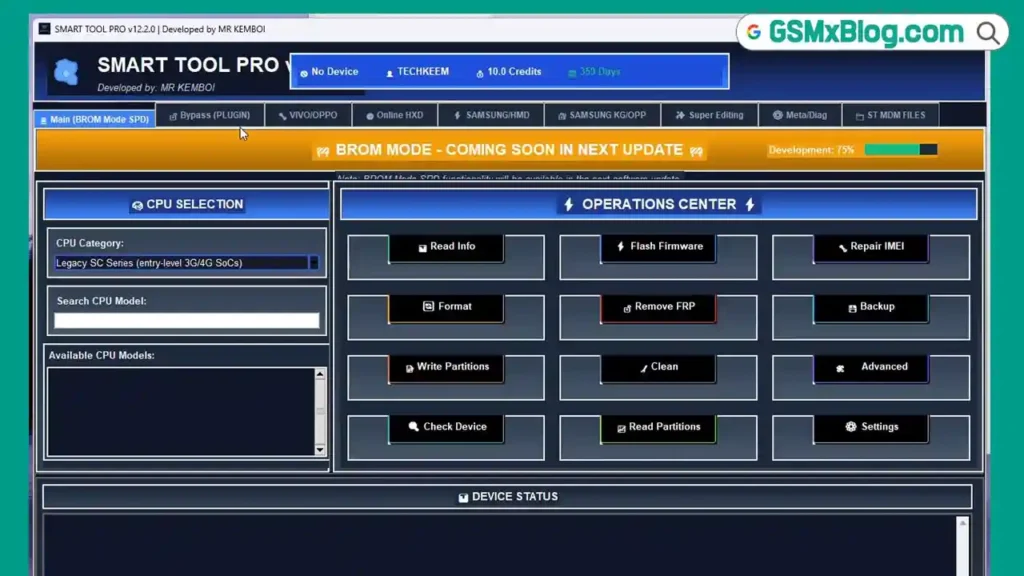
What Is SmartTool Pro?
SmartTool Professional is a free Windows-based flash tool and device repair utility developed by Mr. Kemboi, based in Nairobi, Kenya. First launched in 2025, the tool has grown rapidly and now serves over 150,000 active users across more than 190 countries.
It is built specifically for mobile technicians and repair professionals who need reliable, multi-brand support without juggling multiple tools. From MediaTek chipset editing to FRP bypass and Samsung Knox Guard removal, SmartTool Pro handles a wide range of daily repair tasks from a single dashboard.
SmartTool Pro v20.0.0 — Key Details
| Field | Details |
|---|---|
| Tool Name | SmartTool Professional |
| Version | v20.0.0 (Super Edit Edition) |
| Latest Build | v20.4.0 (Build 20260526) |
| File Size | 198 MB |
| Platform | Windows 10 / 11 (64-bit) |
| Developer | Mr. Kemboi |
| Official Site | smarttool.top |
| Price | Free |
| Release Date | April 15, 2026 |
Key Features of SmartTool Pro v20.0.0
🔧 Enhanced MTK Super Editing Engine
This is the headline feature of v20.0.0. The Enhanced MTK Super Editing Engine gives technicians deep-level access to MediaTek chipsets, enabling advanced parameter editing, improved bypass success rates, and comprehensive repair workflows across all MTK devices. Version 20.4.0 extends this further with support for Dimensity 9300, Helio G99, and other newer MTK platforms.
🔓 Samsung KG Lock Removal v5.0
SmartTool Pro v20.0.0 includes Samsung KG Lock Removal v5.0 with full support for Android 16 / One UI 8.x. It handles KG Lock removal across all Samsung variants — Exynos, Snapdragon, and MediaTek — along with enhanced binary bypass and Knox Guard removal for One UI 5.x and 6.x firmware.
📱 Enhanced FRP Bypass
The FRP bypass module covers all major brands — Samsung, Xiaomi, Oppo, Vivo, Huawei, and Google Pixel. Version 20.4.0 updates FRP removal support for Android 13/14 with higher success rates, including one-click FRP for Samsung S23/S24 series.
⚡ Enhanced SPD & MTK Bypass
New advanced bypass methods for Unisoc/SPD and MediaTek chipsets with an auto-detection system, broader device compatibility, and improved success rates compared to previous versions.
🌐 DNS Fixes & Network Tools
SmartTool Pro includes built-in DNS fix tools and a Zero-Trust Network Scanner for enterprise-grade vulnerability assessment, packet analysis, and network diagnostics — useful for carrier lock and DNS-based bypass operations.
🛠️ IMEI Repair
A dedicated IMEI repair module supports batch IMEI repair across multiple Android devices, saving time in high-volume repair environments.
⚙️ Script Runner v2
Run custom ADB and Fastboot scripts, save frequently used commands, and use batch processing for repetitive tasks. v20.4.0 brings the upgraded Script Runner v2 with native Python and JavaScript support through the Scripting Engine v4.
📊 Device Diagnostics
Complete hardware diagnostics including battery health check, display test, sensor calibration, and network analysis — all from within the tool.
🚀 Neural Workflow Optimization
An intelligent workflow optimization system preloads frequently used tools and cuts operational latency by 45% using smart resource allocation.
🖥️ Workspace Hub 3.0
A unified dashboard with customizable widgets, real-time system metrics, multi-project sync, and cloud backup support — keeping your workspace organized and efficient.
Download SmartTool Pro v20.0.0
| File | SmartTool_Setup_v20.4.0.rar |
|---|---|
| Version | v20.0.0 / Latest Build: v20.4.0 |
| File Size | 198 MB |
| Platform | Windows 10 / 11 (64-bit) |
| Developer | Mr. Kemboi |
| License | Free |
| RAR Password | No Password |
How to Install SmartTool Pro v20.0.0
- Download the
SmartTool_Setup_v20.4.0.rarfile using the link above. - Extract the RAR file using WinRAR or 7-Zip — no password required.
- Open the extracted folder and run the setup file as Administrator.
- Follow the installation wizard — click Next then Install.
- Click Finish when the installation completes.
- Launch SmartTool Pro from the Desktop shortcut.
- The tool is ready to use — no login or license required. ✅
How to Use SmartTool Pro v20.0.0
▶️ Samsung KG Lock Removal
- Open SmartTool Pro and go to the Samsung tab.
- Select KG Lock Removal.
- Connect your Samsung device via USB.
- Follow the on-screen instructions to enter the correct mode.
- Click Remove KG Lock and wait for completion.
- Reboot the device — KG Lock removed. ✅
▶️ FRP Bypass (Android Repair)
- Go to the FRP Bypass tab and select your device brand.
- Connect the device via USB.
- Follow on-screen steps to enter the required mode.
- Click Bypass FRP — the tool removes the Google account lock automatically.
- Reboot and set up the device fresh. ✅
▶️ MTK Super Editing
- Navigate to the MTK Super Editing section.
- Connect your MediaTek device via USB.
- The tool auto-detects the chipset and loads the optimal workflow.
- Select the operation — IMEI repair, parameter editing, or bypass.
- Click Execute and wait for the process to finish. ✅
▶️ IMEI Repair
- Go to the IMEI Repair tab.
- Connect the device via USB with ADB enabled.
- Enter the correct IMEI or use the batch repair option for multiple devices.
- Click Write IMEI and wait for confirmation. ✅
▶️ Device Diagnostics
- Connect your device via USB.
- Open the Diagnostics tab.
- Select the test type — battery, display, sensors, or network.
- Click Run Diagnostics — results display in real time. ✅
Pros and Cons
✅ Advantages
- ✅ Completely free — no license or subscription required
- ✅ 280+ professional features in a single tool
- ✅ Enhanced MTK Super Editing for deep chipset-level access
- ✅ Samsung Android 16 / One UI 8.x KG lock support
- ✅ Multi-brand FRP bypass covering all major Android brands
- ✅ Built-in IMEI repair and diagnostics
- ✅ Fast performance — 42% speed improvement in v20.4.0
- ✅ Lightweight on RAM — 28% less memory usage vs v18
- ✅ Active development with frequent updates
- ✅ 24/7 support via email, WhatsApp, and Telegram
⛔ Limitations
- ⛔ Requires Windows 10/11 64-bit — no 32-bit support
- ⛔ 198 MB download size — larger than some tools
- ⛔ Internet connection required for cloud features and updates
- ⛔ Some advanced features require correct USB drivers to be pre-installed
⚠️ Warning
SmartTool Pro is intended for use by authorized mobile repair technicians and lawful device owners only. Always confirm you have legal ownership or proper authorization before performing any bypass, FRP removal, or IMEI repair operation. Using this tool on devices you do not own or are not authorized to service may violate local telecommunications laws. The developer and this blog are not responsible for any misuse.
Important Notes
🛡️ Safety: Always download SmartTool Pro from the official site at smarttool.top or from the links provided on this page. Scan all downloaded files with your antivirus before installation.
📌 Credit: Full credit goes to Mr. Kemboi and the SmartTool Professional team at smarttool.top for developing and maintaining this tool.
🔌 USB Drivers: Install the correct USB drivers for your device’s chipset brand — MTK, Qualcomm, SPD, or Samsung — before connecting any device to avoid detection errors.
Frequently Asked Questions (FAQs)
❓ Is SmartTool Pro v20.0.0 really free? Yes — SmartTool Pro is completely free to download and use. No subscription, no activation fee, and no hidden charges. Just download, install, and start working.
❓ Does SmartTool Pro support Samsung Android 16? Yes. SmartTool Pro v20.0.0 introduced Samsung KG Lock Removal v5.0 with full support for Android 16 and One UI 8.x across all Samsung variants.
❓ Which chipsets does the MTK Super Editing Engine support? The Enhanced MTK Super Editing Engine supports all major MediaTek chipsets. Version 20.4.0 adds specific support for Dimensity 9300, Helio G99, and other recent MTK platforms.
❓ Can I use SmartTool Pro for FRP bypass on Xiaomi and Oppo? Yes. The FRP bypass module covers Samsung, Xiaomi, Oppo, Vivo, Huawei, OnePlus, Google Pixel, and all other major Android brands.
❓ Does SmartTool Pro work on macOS? According to the official download page, SmartTool Pro v20.4.0 supports macOS 12+ in addition to Windows 10/11 (64-bit).
❓ How often is SmartTool Pro updated? The tool receives regular updates. v20.4.0 was released in May 2026, just one month after v20.0.0, showing an active development cycle. The next update (v20.5) is scheduled for August 2026.
Conclusion
SmartTool Pro v20.0.0 is a genuinely impressive free GSM tool for any serious mobile technician. Whether you’re doing daily FRP bypass jobs, repairing IMEI on Android repair projects, or performing deep-level edits on MTK devices, this tool covers it all without costing anything. The jump to v20.0.0 — and the fast follow-up with v20.4.0 — shows that Mr. Kemboi and the team are actively improving the tool based on real technician needs.
With 280+ features, multi-brand support, 42% faster performance, and a growing community of 150,000+ users across 190 countries, SmartTool Pro v20.0.0 earns a permanent spot on every professional repair PC. Download it now from the links above and take your repair workflow to the next level. 🚀
Have you already tested SmartTool Pro? Drop your experience in the comments below!
Related Posts
- MultiUnlock Tool v1.2.2 (Latest Version)
- MultiUnlock Tool v1.2.2 (Latest Version)
- UMT Samsung Tool v0.9 – Flash, Unlock
- Samsung Tools – Latest Downloads