Osiris Ramdisk v1.0 (Latest Version) Free 2026 – A12 & A13 Passcode
Working on an iPhone with a locked passcode? If the device runs on an A12 or A13 chip, Osiris Ramdisk is a tool worth looking at. This is a Windows-based iPhone servicing tool that uses the usbliter8 exploit to perform passcode bypass on supported Apple devices — while keeping Signal, Face ID, and Camera functional after the operation.
This article covers everything you need to know about Osiris Ramdisk v1.0 — what it does, what’s supported, how to install it, and what to watch out for before using it on a customer’s device.
What Is Osiris Ramdisk?
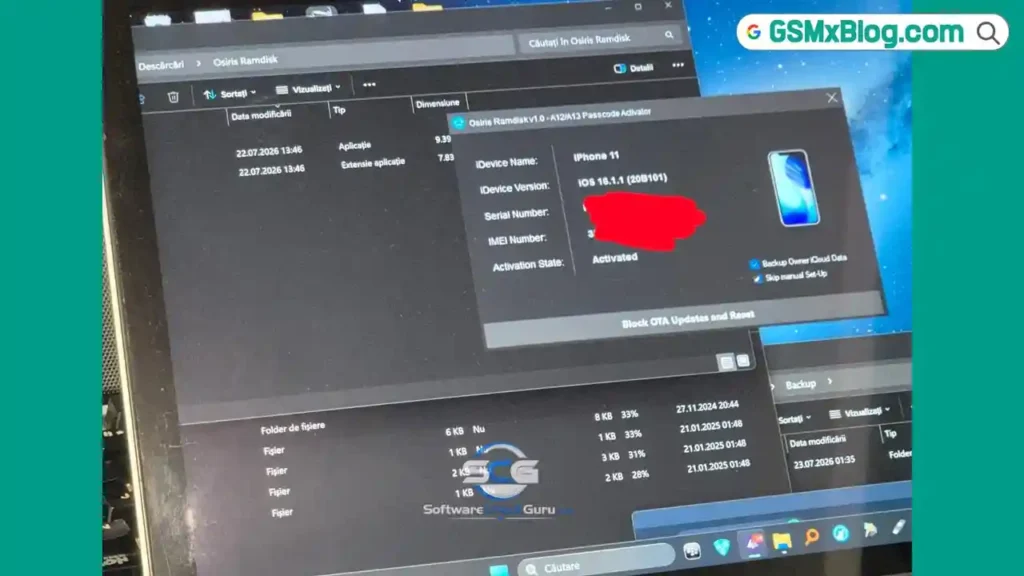
Osiris Ramdisk is an iPhone passcode bypass tool designed for Apple devices powered by the A12 and A13 Bionic processors. It exploits the usbliter8 vulnerability to gain low-level access to the device without the need for the original passcode.
What makes this tool stand out from basic ramdisk utilities is that it keeps several core functions running after the bypass. According to the developer, Signal, Face ID, and Camera continue to work after the bypass is completed. iCloud Sign-In is the one function that isn’t guaranteed — the developer clearly states it may or may not work depending on the specific device.
The tool also performs an untethered bypass, which means the bypass doesn’t require the device to stay connected to a PC to remain functional.
Key Features of Osiris Ramdisk v1.0
📱 Device Support
- Supports Apple A12 and A13 processor-based iPhones
- Uses the usbliter8 exploit for passcode bypass
- Untethered bypass — device stays operational without staying connected to a PC
✅ What Keeps Working After Bypass
- Signal — remains functional
- Face ID — listed as working
- Camera — supported and working
⚠️ Partial Support
- iCloud Sign-In — may or may not work depending on the device
🛠️ General Tool Behavior
- Runs on Windows PC
- Opens as a standard executable file
- Requires Run as Administrator to launch properly
- May trigger Windows SmartScreen — expected behavior, not a virus warning
Download Osiris Ramdisk v1.0
- File Name: Osiris Ramdisk.zip
- Version: v1.0
- File Size: 16.45 MB
- Platform: Windows PC
- Activation: Paid (per device)
- Archive Password: 123
Pricing
| Period | Price |
|---|---|
| First 24 hours (launch offer) | $5 per device |
| After 24 hours | $10 per device |
Registration & Support
- Website: iosnemes1s. org
- Telegram: @iosnemes1s
- Telegram: @sulegsm
How to Install Osiris Ramdisk v1.0
- Download the ZIP package from the MediaFire link above.
- Extract the archive using your preferred extraction tool.
- When prompted, enter the archive password: 123
- Open the extracted folder.
- Right-click Osiris Ramdisk.exe and select Run as Administrator.
- If Windows SmartScreen appears, click More Info.
- Click Run Anyway to proceed.
- The tool will open without additional errors.
✅ The application launches normally after allowing the Windows security prompt. No extra installation steps are required.
How to Use Osiris Ramdisk v1.0
▶️ Passcode Bypass on A12 / A13 Device
- Open the tool as Administrator.
- Connect your supported iPhone via USB.
- Follow the on-screen instructions from the tool interface.
- Allow the tool to communicate with the device using the usbliter8 exploit.
- Wait for the bypass process to complete.
- After completion, verify that Signal, Face ID, and Camera are functional.
💡 Tip: Always confirm the device chipset before starting. A12 and A13 are the only supported processors in this release.
⚠️ Known Limitations
Before using Osiris Ramdisk v1.0 on any real device, keep these points in mind:
- iCloud Sign-In is not guaranteed. The developer is transparent about this. It may work on some devices and may not on others.
- Some boot files are still missing from the server. If you get a 404 error while the tool tries to download certain boot files, it doesn’t always mean something is broken. Those specific files may not have been uploaded yet by the developer.
- Unexpected bugs are still possible. This is a v1.0 release. Like most early-stage servicing tools, users should test carefully rather than rushing in on critical jobs.
System Requirements
| Component | Requirement |
|---|---|
| Operating System | Windows PC |
| Connection | USB cable |
| Supported Devices | iPhones with A12 / A13 chipset |
| Internet | Required (for boot file downloads) |
| Permissions | Run as Administrator |
⚠️ Warning
Before using this tool on any customer device, confirm the chipset. Do not attempt to run the bypass on models outside the A12 and A13 family. The usbliter8 exploit is specific to these processors, and using the tool on unsupported hardware may produce unexpected results. Always activate per-device before starting — there is no batch activation system in this release.
Important Notes
🛡️ Virus Status: The executable may trigger Windows SmartScreen because it isn’t a commonly recognized application. This is a standard false positive for servicing tools. Use on a dedicated repair PC and allow the prompt manually during launch.
📌 Credit: Full credit goes to the Osiris Ramdisk development team — developer Signal — for building and releasing this tool.
💳 Activation: This is a paid tool charged per device. The launch pricing is $5 per device for the first 24 hours, after which it returns to $10 per device. There is no free tier for actual device operations.
⚠️ Boot Files: Not all boot files have been uploaded to the server at the time of this release. A 404 error during file download is a known issue — check the developer’s Telegram for updates on file availability.
Frequently Asked Questions (FAQs)
❓ Is Osiris Ramdisk free to use? No. Osiris Ramdisk v1.0 is a paid tool. It costs $5 per device during the launch window and $10 per device after that. There is no free activation option.
❓ Which iPhone models does it support? The tool supports iPhones powered by the A12 and A13 Bionic processors. Specific model compatibility depends on the chipset, not just the model name.
❓ What is the usbliter8 exploit? It is the underlying exploit that Osiris Ramdisk uses to access the device at a low level for passcode bypass. This is specific to A12 and A13 hardware.
❓ Does iCloud Sign-In work after the bypass? The developer says iCloud Sign-In may or may not work depending on the individual device. It is not guaranteed and should not be expected to function in every case.
❓ Why does Windows show a SmartScreen warning? Because the application isn’t widely recognized by Windows yet. This is a common false positive for newer repair tools. Click More Info and then Run Anyway to proceed.
Conclusion
Osiris Ramdisk v1.0 is a focused iPhone passcode bypass tool built for A12 and A13 devices, using the usbliter8 exploit to get the job done while keeping Signal, Face ID, and Camera intact. The untethered bypass is a genuine advantage for repair workflows — it means the device stays functional without staying connected to a PC after the operation.
That said, this is an honest look at the tool. iCloud Sign-In isn’t guaranteed, some boot files are still missing from the server, and bugs are still possible in this first release. If your daily work includes A12 and A13 iPhones and you need a passcode bypass solution, download Osiris Ramdisk and test it carefully. Reach out to the developer on Telegram for support and stay updated on boot file availability.
Have you tested Osiris Ramdisk v1.0? Share your experience in the comments below!
Related Posts
- FRPFILE A5-A6 Activator – Full iCloud Activation Without Arduino
- Download WinRa1n v2.1 – Free Windows Jailbreak Tool for iPhone 6 to X
- Download Ghost Auth Tool v3.3.0 (Latest Version) Free 2026