Q-Unlocker Tool V0.2.0 (Latest Version) SIM Unlock, FRP Bypass & Carrier Relock
Carrier unlocking and FRP bypass across Samsung, LG, Motorola, Nokia, Xiaomi, Tecno, and dozens more brands from a single Windows application — without a dongle, without a hardware box, and without needing professional repair skills — is exactly what Q-Unlocker was built to deliver. Developed and maintained by the Q-Unlocker team, this professional Android unlock and repair platform covers SIM unlock, carrier relock, read unlock code, FRP bypass, and CSC change across 29 supported brands with independent servers running 24/7 and a credit-based pricing model that starts at just $1 per credit.
Over 10,000 customers worldwide are already using Q-Unlocker through its authorized reseller network. This guide covers the complete feature breakdown, all supported brands, pricing, download table and installation steps.
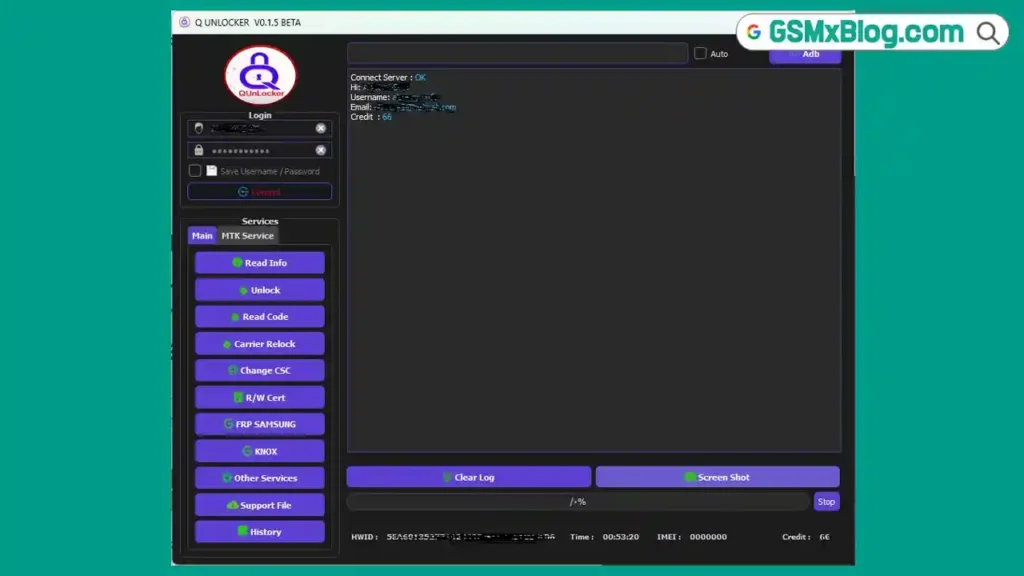
What Is Q-Unlocker Tool?
Q-Unlocker is a professional Windows-based Android unlock and repair tool developed by the Q-Unlocker team, headquartered in Yemen, Sana’a. The platform positions itself as a leader in the SIM unlock, carrier relock, FRP bypass, and code reading space — covering a wide cross-section of Android brands from Samsung and LG through to Tecno, Itel, ZTE, Coolpad, Wiko, BLU, TCL, Cricket, AT&T-branded devices, and more.
The tool is designed with accessibility as a core principle — the interface is built so that professional repair skills are not required. One-click operations handle unlock, FRP bypass, and CSC change without long manual procedures. The platform runs on independent servers with 100% uptime guarantee — no downtime windows, no maintenance breaks.
Q-Unlocker offers two access modes — a desktop tool for direct Windows PC use, and an API plan for developers and resellers who want to integrate unlock services into their own server platforms. Both operate on the same credit system at $1 per credit.
Crucially, Q-Unlocker operates without a box or dongle — download the tool, register a free account, purchase credits through any authorized reseller, and start servicing devices directly.
Key Features of Q-Unlocker Tool
🔓 SIM Unlock
- Remove carrier SIM locks from supported Android devices across all major brands
- Unlocks the device to work with any SIM card on any network worldwide
- Supports Samsung, LG, Motorola, Nokia, ZTE, Xiaomi, Tecno, Itel, TCL, BLU, Alcatel, and more
- No hardware box or dongle required — server-based operation via Windows PC
📶 Carrier Relock
- Relock a previously unlocked device to a specific carrier network
- Essential for refurbishing, resale, or carrier compliance workflows
- Works on supported models across the brand lineup
🔢 Read Unlock Code
- Read the network unlock code directly from the device
- Provides the unlock code string for manual network unlock entry
- Useful for devices where direct server unlock is not available but code reading is
- Covers a wide range of supported Samsung, LG, Motorola, and Nokia models
🔓 FRP Bypass
- Remove Google Factory Reset Protection lock from supported Android devices
- Covers all supported Android versions
- Fast one-click operation — no manual ADB procedures required
- Supported across Samsung, LG, Motorola, Xiaomi, Tecno, Itel, Nokia, ZTE, and more
🌍 Change CSC
- Change the CSC (Consumer Software Customization) code on Samsung devices
- Switches regional software packages, carrier bloatware sets, and regional feature locks
- Useful for converting carrier-branded Samsung models to open market firmware behavior
🔒 E-Token Bypass
- E-Token bypass support on select models
- Removes electronic token-based carrier lock layers on supported devices
🛡️ Safe & Warranty-Friendly
- Device warranty, user data, and memory remain untouched during all operations
- Server-side operations do not modify device firmware
- No physical connection required for code-based unlock operations
🔄 Free Updates
- Development team works 24/7 to add new models and exclusive functions continuously
- Free updates included with all credit and API plans
- Every new model and function is thoroughly tested before release
🌐 API Access
- Full API plan available for developers and reseller server integration
- Unlimited unlock operations and unlimited model support via API
- Enables building custom unlock portals on top of Q-Unlocker’s server infrastructure
Pricing & License Plans
| Plan | Price | Features |
|---|---|---|
| Credit License | $1 / 1 Credit | Unlimited unlocks, free updates, 24/7 premium support, unlimited functions, for servers and tools |
| API Plan | $1 / 1 Credit | Unlimited unlocks, unlimited models, free updates, 24/7 premium support, API access |
Credits are purchased through the authorized worldwide reseller network. Visit q-unlocker.com/Home/Reseller for the nearest reseller.
Download Q-Unlocker Tool V0.2.0
- File Name: Q_UNLOCKER_V0.2.0.zip
- Version: V0.2.0
- Total size: 56.8 MB
- Platform: Windows PC
- Developer: Q-Unlocker Team
How to Install Q-Unlocker Tool
- Download the Q-Unlocker installer from the official download page linked above.
- Right-click the installer and select Run as Administrator.
- Follow the on-screen setup prompts to complete installation.
- Once installed, launch Q-Unlocker from the desktop shortcut.
- Click Register or visit q-unlocker.com to create a free account.
- An activation email will be sent to your registered email address — confirm it to activate your account.
- Purchase credits through any authorized reseller at.
- Log in to the tool with your registered credentials.
- Credits load automatically — you are ready to start servicing devices. ✅
How to Use Q-Unlocker Tool
▶️ SIM Unlock – Samsung / LG / Nokia / Other Brands
- Open Q-Unlocker and log in with your account.
- Connect the target device to your PC via USB.
- Navigate to the appropriate brand tab — Samsung, LG, Nokia, etc.
- Select SIM Unlock from the available operations.
- The tool detects the device and confirms the model.
- Click Unlock — the server processes the request and applies the SIM unlock.
- Wait for completion. Reboot the device and test with a different carrier SIM. ✅
▶️ Read Unlock Code
- Connect the device via USB or enter the device IMEI manually (where supported).
- Navigate to the brand tab and select Read Unlock Code.
- The tool communicates with the Q-Unlocker server and returns the unlock code string.
- Enter the code on the device when prompted after inserting a non-original carrier SIM. ✅
▶️ FRP Bypass
- Navigate to the target brand tab — Samsung, Xiaomi, Tecno, Motorola, etc.
- Connect the device via USB in the required mode (ADB mode or download mode as indicated).
- Select FRP Bypass.
- Click the operation button — the tool applies the bypass automatically.
- Wait for completion and reboot the device. ✅
▶️ Carrier Relock
- Connect the device via USB.
- Select the brand and navigate to Carrier Relock.
- Enter or confirm the target carrier for the relock operation.
- Click Relock and wait for the server to complete the operation.
- Reboot the device and verify carrier lock status. ✅
▶️ Change CSC – Samsung
- Navigate to the Samsung tab.
- Connect the Samsung device in the required mode.
- Select Change CSC.
- Enter or select the target CSC code for the desired region or carrier.
- Click Apply and wait for the operation to complete.
- Reboot the device — the CSC and associated regional settings will update. ✅
▶️ API Integration (API Plan)
- Log in to your Q-Unlocker account.
- Navigate to the API section in your account dashboard.
- Copy your API key.
- Integrate the API endpoints into your own server or unlock portal.
- All unlock and FRP operations are available programmatically through the API. ✅
System Requirements
| Component | Requirement |
|---|---|
| OS | Windows 7 / 8 / 10 / 11 (32-bit & 64-bit) |
| Processor | Intel / AMD Dual-Core or faster |
| RAM | 2 GB minimum |
| Storage | 100 MB free space |
| USB Port | USB 2.0 or USB 3.0 |
| Internet | Required for all server-based operations |
| Box / Dongle | Not required |
Supported Brands
Q-Unlocker supports 29 brands covering budget, mid-range, and flagship Android devices:
| Brand | Brand | Brand |
|---|---|---|
| Samsung | LG | Motorola |
| Alcatel | Google Pixel | Nokia |
| ZTE | Coolpad | Wiko |
| MTK Devices | FIH | Xiaomi / Redmi |
| Hisense | Tecno | Stylo |
| Itel | Vodacom | Mobiwire |
| Vortex | BLU | TCL |
| Cricket | AT&T | FOXXD |
| Hotpepper | Azumi | Hurricane |
| Cloud Mobile | Maxwest | — |
⚠️ Warning
Q-Unlocker is a server-based platform — all operations require an active internet connection. Do not attempt operations in areas with unstable internet as incomplete server transactions may consume credits without completing the operation. Always verify the exact device model and IMEI before starting any unlock or FRP operation. SIM unlock, carrier relock, and CSC change operations are intended for devices you own or have explicit authorization to service. Use responsibly and in accordance with local laws and carrier agreements.
Important Notes
🌐 No Box or Dongle: Q-Unlocker is a pure software platform — no hardware dongle or box is required at any point. Download the tool, activate your account, and start working.
🛡️ Data Safe: All Q-Unlocker operations are server-side — device warranty, user data, and memory remain completely untouched during SIM unlock, code reading, and FRP operations.
📌 Credit: Full development credit goes to the Q-Unlocker Team. This article is published for informational and educational purposes only.
💳 Credit System: Registration is free. All device operations consume credits at $1 per credit, available through the worldwide authorized reseller network.
📞 Support: Q-Unlocker support is available 24/7 via live chat on the official website and through the official Telegram group at t.me/QUNLOCKER.
Frequently Asked Questions (FAQs)
❓ What is Q-Unlocker used for? Q-Unlocker is a professional Android unlock and repair platform covering SIM unlock, carrier relock, read unlock code, FRP bypass, E-token bypass, and CSC change across 29 brands including Samsung, LG, Motorola, Xiaomi, Tecno, Nokia, ZTE, BLU, TCL, Cricket, and AT&T-branded devices.
❓ Does Q-Unlocker require a hardware box or dongle? No. Q-Unlocker operates entirely as software — no dongle, no box, and no hardware key is required. Download the tool, register a free account, and purchase credits to start using it.
❓ Is Q-Unlocker free? Account registration and the tool download are both free. All device operations (SIM unlock, FRP bypass, read code, carrier relock, CSC change) consume credits priced at $1 per credit, available through authorized resellers.
❓ Does Q-Unlocker affect user data or device warranty? No. The official website explicitly states that device warranty, user data, and memory remain untouched during all Q-Unlocker operations.
❓ What is the API plan for? The API plan gives developers and resellers programmatic access to Q-Unlocker’s unlock and FRP servers through API endpoints — enabling integration into custom unlock portals, reseller platforms, and automated server tools.
❓ What Android versions does Q-Unlocker support? Q-Unlocker supports all Android versions on supported device models — from older Android releases through the latest 2024–2025 security patch levels.
❓ How do I get support if I have a problem? Q-Unlocker offers 24/7 support through live chat on the official website and via the official Telegram group at t.me/QUNLOCKER. You can also reach the team by email or phone (+967 773754545).
❓ Can I use Q-Unlocker on Windows 11? Yes. Q-Unlocker supports Windows 7, 8, 10, and 11 in both 32-bit and 64-bit configurations.
Conclusion
Q-Unlocker delivers a clean, accessible, no-dongle Android unlock and repair platform covering SIM unlock, carrier relock, FRP bypass, read unlock code, E-token bypass, and CSC change across 29 brands and all Android versions — all backed by independent 24/7 servers with a 100% uptime guarantee. The $1 per credit pricing model, free account registration, and API access option make it a practical choice for both individual repair technicians and resellers building their own unlock service portals.
With over 10,000 customers worldwide and a development team continuously adding new models and functions, download Q-Unlocker from the official website and register your free account today. Contact any authorized reseller for credits and start servicing your first device. 🚀
Already using Q-Unlocker in your repair shop? Share which brand and operation you use it for most in the comments below — your experience helps the community.
Related Posts
- Penguine Multi Tool (Latest Version)
- MH Unlocker Pro Tool V6.9 (Latest Version)
- NCK Online Samsung Tool v3.7 (Latest Version)
- E-GSM Tool v19 (Latest Version)