Download MH Unlocker Pro Tool V6.9 (Latest Version) Free 2026 – Main Module
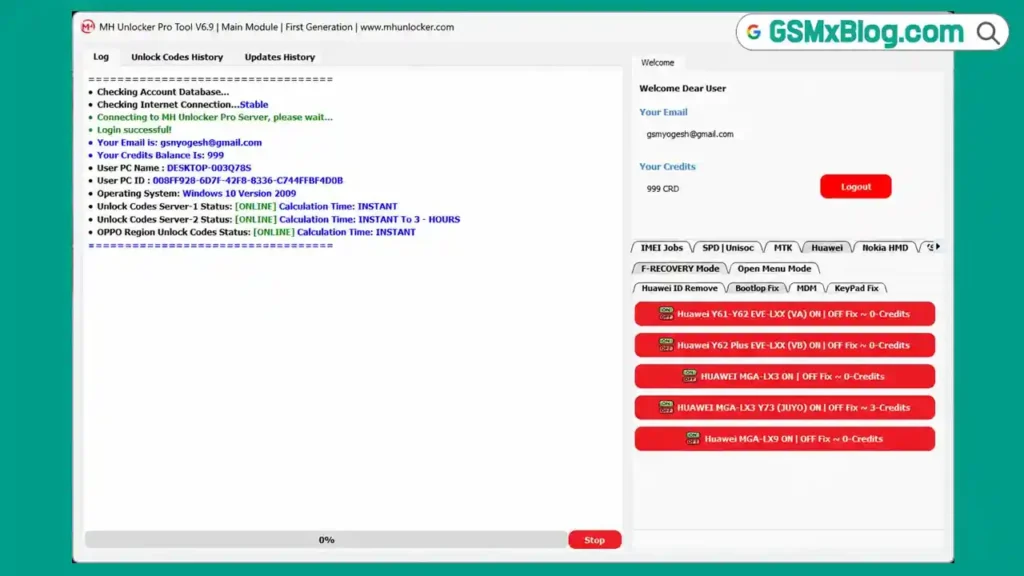
Looking for an all-in-one multi-brand mobile repair tool covering Samsung, Huawei, MediaTek, Unisoc, Nokia HMD, Honor, and Tecno devices in 2026? MH Unlocker Pro Tool V6.9 is a comprehensive Windows-based service software bringing together FRP removal, MDM repair, IMEI services, network unlocking, factory reset, bootloader unlock, and brand-specific bootloop/keypad fixes — all organized into dedicated tabs for each manufacturer.
This release is part of the larger MH Unlocker Pro ecosystem, which also includes separate MH SPD Tool, MH Qualcomm Tool, and MH MTK Tool modules — making the “Pro” version a genuine all-rounder covering nearly every device type. In this guide you’ll find the complete feature breakdown across all brands, activation steps, and download links.
What Is MH Unlocker Pro Tool?
MH Unlocker Pro is a multi-brand Windows-based mobile repair tool that consolidates functions across Samsung, Huawei, MediaTek (MTK), Spreadtrum/Unisoc (SPD), Nokia HMD, Honor, Tecno/Infinix/itel, and OPPO into a single application with organized brand-specific tabs. It also includes server-based IMEI services for network unlock code calculation, SIM lock code generation, and region unlock services across multiple brands.
The “Pro” designation reflects its position as the all-rounder version within the broader MH Unlocker ecosystem — which includes dedicated MH SPD Tool, MH Qualcomm Tool, and MH MTK Tool modules for users who only need chipset-specific functionality.
🔑 Key consideration: Registration and login are free and the interface opens with full tab access, but the vast majority of operations require credits — and credit costs for many jobs are reportedly on the higher side. Test carefully before committing to a credit purchase.
Key Features of MH Unlocker Pro Tool V6.9
🌐 Server Features
- Unlock Codes Server 1 & 2 — status check for both server connections
- OPPO Region Unlock Server support
- Online Account Verification
- Online Credit System
- Instant Code Calculation support
- Automatic Server Connection
📱 IMEI Services
- Network Unlock Code Calculation
- SIM Lock Code Generation
- Region Unlock Code Generation
- IMEI Information Check
- iPhone SIM Lock Status Check
- Brand and Model Based IMEI Services
- Support for multiple brands
🟠 OPPO Services
- OPPO Region Unlock Code Service
- Region Lock Removal Support
- Online Region Unlock Calculation
📡 SPD / Unisoc Features
Diag Mode:
- Read Device Information
- Factory Reset in Diag Mode
SIM & Network Unlock:
- Permanent SIM Lock Removal
- Network Lock Removal
- Carrier Unlock Support
- General Brand Unlock Support
Security Functions:
- IMEI Repair
- Dual IMEI Repair Support
🔧 MediaTek (MTK) Features
Meta Mode Functions:
- Read Device Information
- Factory Reset
Network Unlock:
- Permanent SIM Lock Removal
- Network Unlock
- Carrier Lock Removal
Tecno / Infinix / itel:
- Enable ADB Mode
- Special MTK Utility Functions
📱 Huawei Features
Huawei ID Removal:
- Backup User Data
- Remove Huawei ID
- Restore User Data
- Restore NV Data
- Reboot To eRecovery Mode
- Reboot To ADB Mode
Bootloop Fix (Model-Specific):
- Huawei Y61 ON/OFF Fix
- Huawei Y62 ON/OFF Fix
- Huawei MGA-LX3 ON/OFF Fix
- Huawei MGA-LX3 Y73 ON/OFF Fix
- Huawei MGA-LX9 ON/OFF Fix
MDM Functions:
- Huawei MDM Repair
- Huawei Factory Reset
Keypad Fix (Model-Specific):
- Huawei EVE-LX Fix Keypad
- Huawei MGA-LX3 Fix Keypad
- Huawei MGA-LX9 Fix Keypad
Open Menu Mode:
- Huawei ID Remove via Open Menu
- ADB Mode Based Huawei ID Removal
📲 Nokia HMD Features
- Fastboot Factory Reset
- Nokia HMD device support
- Model-based reset operations
📱 Samsung Features
MTP Mode:
- Read Device Information
- Samsung FRP Old Patch Method
- ADB Enable via QR Code
- Samsung Factory Reset
- Reboot To Download Mode
Download Mode:
- Samsung MDM Reset
- PayJoy Removal Support
- Factory Reset Support
ADB Mode:
- Prevent MDM
- ADB Utility Functions
Fastboot Mode:
- Samsung Bootloader Unlock
- Samsung FRP Remove
⚙️ ADB Mode Features (General)
- ADB Enable via QR Code
- MDM Remove Method 1
- MDM Remove Method 2
- Vivo MDM & Bloatware Removal
- Remove Security Plugin App
- Reboot To Recovery
- Reboot To EDL
- FRP Remove
- Alternative FRP Removal Method
🟡 Honor Features
- Honor Device Information Read
- Honor FRP Unlock by Key
- Honor MDM Removal via OEMINFO File
- Honor Device Control Repair via OEMINFO File
- Honor Demo Removal via OEMINFO File
🔵 Tecno Features
- Bypass Welcome Screen
- FRP Bypass Through ADB Mode
- ADB Utility Operations
🛠️ Additional Utilities
- Account Management System
- Credit Management
- Unlock Code History
- Update History Section
- Live Server Status Monitoring
- Multi-Brand Device Support
- Online Authentication System
- Fastboot / Factory Reset / FRP / MDM / SIM Lock / Network Unlock Functions
Download MH Unlocker Pro Tool V6.9
- File Name: MH_Unlocker_Pro_V6.9.rar
- Version: V6.9
- File Size: 33 MB
- Platform: Windows 10 / 11 (64-bit)
- Activation: Free Account + Credit System
- RAR Password: softwarecrackguru
How to Install MH Unlocker Pro Tool V6.9
- Download the complete RAR package using any link above.
- Extract the file using password: softwarecrackguru
- Open the extracted folder.
- Windows 11 users: Run MH_Unlocker_Pro_Loader_WIN_11.exe as Administrator.
- Windows 10 users: Run MH_UNLOCKER_PRO_TOOL_LOADER_WIN_10.exe as Administrator.
- Click “Copy Hardware ID.”
- Click “Get HWID Key” — opens registration/key generation page.
- Generate the required activation key.
- Paste the key into the activation box.
- Click “Activate” the software.
- Login using any username and password combination.
✅ After login, the software displays a credit balance in the log panel. Connect your device and test the available functions.
How to Use MH Unlocker Pro Tool V6.9
▶️ Samsung FRP Remove (Fastboot Mode)
- Login to the tool.
- Go to the Samsung tab → Fastboot Mode section.
- Connect Samsung device in Fastboot mode.
- Click “Samsung FRP Remove.”
- Confirm credit deduction and wait for completion. ✅
▶️ Huawei ID Removal
- Go to the Huawei tab → Huawei ID Removal section.
- Click “Backup User Data” first (recommended).
- Connect device as instructed.
- Click “Remove Huawei ID.”
- After completion, use “Restore User Data” and “Restore NV Data” if needed.
▶️ MTK Network Unlock
- Go to the MediaTek (MTK) tab → Network Unlock section.
- Select your device model.
- Connect device in Meta Mode.
- Click “Permanent SIM Lock Removal” or “Network Unlock.”
- Wait for completion.
▶️ SPD/Unisoc IMEI Repair
- Go to the SPD / Unisoc tab → Security Functions.
- Connect device in Diag Mode.
- Click “IMEI Repair” or “Dual IMEI Repair” as needed.
- Enter correct IMEI values and confirm.
▶️ Honor FRP Unlock by Key
- Go to the Honor tab.
- Click “Honor Device Information Read” first.
- Click “Honor FRP Unlock by Key.”
- Wait for the key-based unlock process to complete.
▶️ IMEI / Unlock Code Services
- Go to the IMEI Services tab.
- Select brand and model.
- Enter the device IMEI.
- Click “Network Unlock Code Calculation” or relevant service.
- Credits are deducted and the code/result is generated via server connection.
Understanding the Credit System
MH Unlocker Pro V6.9 follows a free-access, credit-required model similar to other tools in the MH ecosystem:
- ✅ Free: Account creation, login, full interface access across all brand tabs
- ⚠️ Requires Credits: Nearly all actual device operations and IMEI server services
- ⚠️ Credit costs reportedly high for many operations — verify pricing before committing
💡 Recommendation: Given the high credit costs and partial verification status, technicians are advised to test specific functions relevant to their daily device list on a small credit purchase first, rather than committing to a large balance upfront.
📌 If you only work with one chipset family, the dedicated SPD or MTK modules may offer more focused functionality than the full Pro version.
System Requirements
| Component | Requirement |
|---|---|
| OS | Windows 10 / 11 (64-bit) |
| Processor | Intel / AMD Dual-Core or faster |
| RAM | 2 GB minimum (4 GB recommended) |
| Storage | 200 MB free space |
| USB Port | USB 2.0 or 3.0 |
| Internet | Required for login, server checks, and IMEI services |
⚠️ Warning
Before performing any Factory Reset, ID Removal, MDM Repair, or Restore operation, always back up user data and NV data first using the built-in backup functions where available. Operations involving NV data restoration, IMEI repair, and OEMINFO file modifications carry risk of device malfunction if performed incorrectly. This tool’s verification status is partial — test on non-critical devices first, and proceed with caution especially for model-specific bootloop and keypad fixes.
Important Notes
🛡️ Virus Status: This tool uses a HWID-based loader and license key activation system. Antivirus programs commonly flag such loaders as false positives — use on a dedicated repair PC and disable antivirus only during activation.
📌 Credit: Full credit goes to the MH Unlocker Pro Team for developing this multi-brand tool.
💳 Credits System: Account creation and full interface access are free. Nearly all device operations and IMEI services require credits, and costs for some jobs are reportedly significant. Budget carefully.
⚠️ Verification Status: Many functions are limited to specific listed models and have not been independently verified across all brands. Community testing and feedback are encouraged — share your results to help other technicians.
🔌 USB Driver: Ensure correct brand-specific USB drivers (Samsung, Huawei, MTK, Unisoc) are installed before connecting devices for any operation.
Frequently Asked Questions (FAQs)
❓ Is MH Unlocker Pro V6.9 free? Account creation, login, and full interface access are free. However, the vast majority of device operations require credits, and costs for some operations are reportedly on the higher side.
❓ Has every feature been tested? No — this is an honest, partially-verified review. Many functions are limited to specific listed models that weren’t all available for testing. Results may vary; community feedback is encouraged.
❓ What is the difference between MH Unlocker Pro and MH SPD/MTK/Qualcomm Tools? MH Unlocker Pro is the all-in-one version covering multiple brands and chipsets in one interface. The MH SPD Tool, MH Qualcomm Tool, and MH MTK Tool are dedicated single-chipset modules with potentially more focused functionality for their specific chipset family.
❓ What login credentials should I use? After activation, you can login using any username/email and password (e.g., password: 12345678) — the account system accepts custom credentials at login.
❓ Why does the tool ask for credits for almost everything? This is the standard freemium model used across the MH Unlocker ecosystem — free interface access, but credits required for actual device operations and server-based services.
❓ Are the Huawei bootloop/keypad fixes model-specific? Yes — fixes like Huawei Y61/Y62 ON/OFF Fix and MGA-LX3/MGA-LX9 Keypad Fix are designed for those specific models only and may not apply to other Huawei devices.
❓ Is it safe to activate using the HWID loader method? Antivirus programs commonly flag HWID-based loaders as false positives. Use on a dedicated repair PC, and only disable antivirus temporarily during activation.
Conclusion
MH Unlocker Pro V6.9 offers one of the broadest feature sets seen in a single multi-brand tool — spanning Samsung, Huawei, MediaTek, Unisoc, Nokia HMD, Honor, Tecno, and OPPO, plus server-based IMEI services for unlock codes and region unlocking. The free account creation and full interface preview let you explore everything before spending.
That said, this review reflects an honest, partially-verified assessment — many functions are tied to specific listed models, credit costs can be significant, and not every feature has been confirmed working on real hardware. If your daily repair work matches the listed models and brands, download MH Unlocker Pro Tool V6.9 and test it for yourself — and consider sharing your results to help the wider GSM community evaluate this tool. 🚀
Have you tested MH Unlocker Pro V6.9? Share your results and experience in the comments below!