Penguine Multi Tool (Latest Version) Xiaomi FRP, Realme Unlock Tool 2026
Mobile technicians handling Xiaomi, Redmi, POCO, Realme, OPPO, and MediaTek devices daily need a tool that detects the device model automatically and applies the right bypass method without manual selection. Penguine Multi Tool is a professional Windows-based Android repair platform built exactly for this workflow — covering Xiaomi Mi Account and Google FRP bypass, Realme and OPPO ID removal, Screen Unlock, MTK chip support, Auth Bypass for flashing, and Factory Reset across Qualcomm Snapdragon, MediaTek, and Spreadtrum chipsets in one lightweight application.
With a VirusTotal scan of 0/70 clean, a specialized FRP module that auto-detects device models and applies the correct bypass script, and a global authorized reseller network, Penguine Multi Tool is a solid addition to any professional Android repair bench on Windows PC in 2026.
What Is Penguine Multi Tool?
Penguine Multi Tool is a professional Android unlock and repair software developed by the Penguine Tool Team. It targets mobile technicians who work daily with Xiaomi, Redmi, POCO, Realme, OPPO, Vivo, and Samsung devices — delivering FRP bypass, account removal, screen unlock, MediaTek chipset repair, and factory reset under a single clean Windows interface.
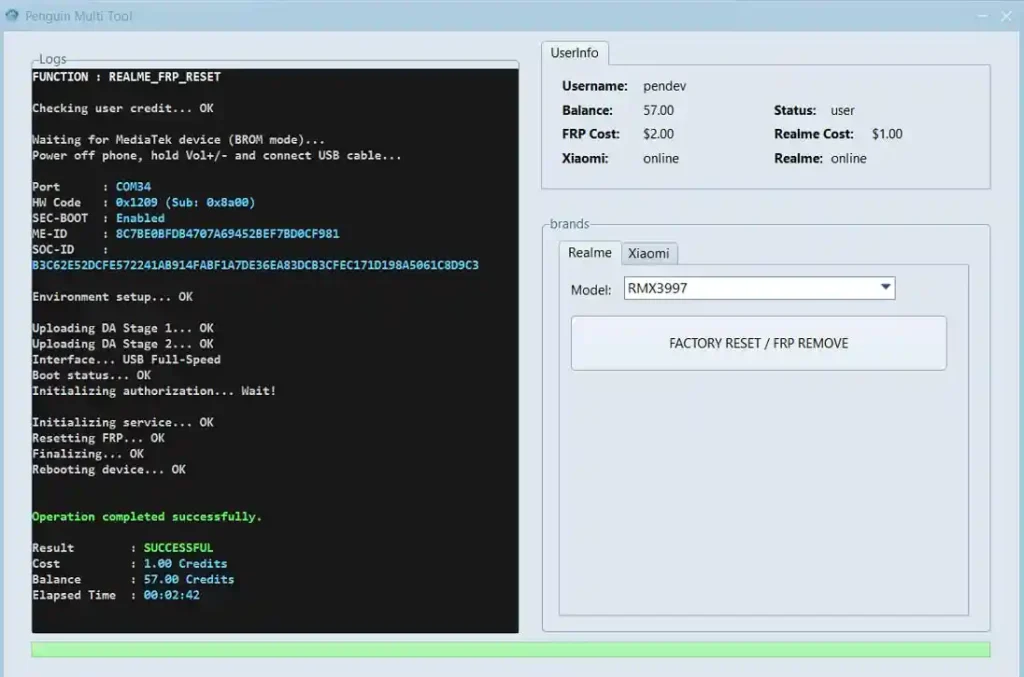
The tool’s standout feature is its specialized FRP module — it automatically detects the connected device model and applies the correct bypass script without requiring the technician to manually identify the method. Real-time logs display every step of the process as it runs, keeping the repair workflow transparent and trackable.
Penguine Multi Tool operates on a credit and activation code system with activation codes available through a network of authorized worldwide distributors and resellers. The tool installer is freely downloadable from the official website at penguintool.com, and the installer passes a VirusTotal scan at 0/70 — completely clean.
Key Features of Penguine Multi Tool
🔓 Xiaomi FRP Remove
- Bypass Mi Account and Google FRP on Xiaomi, Redmi, and POCO devices
- Supports both Test Point and ADB methods for flexible repair scenarios
- One-click Mi Account bypass on supported models
- Covers a wide range of Xiaomi and Redmi models across current Android versions
📱 Realme FRP Remove
- Remove Realme ID and Google Account verification on OPPO and Realme smartphones
- Operates without formatting on supported models — user data is preserved
- Direct unlock path for Realme and OPPO ID locks
- Fast, reliable results across supported device variants
🔐 Screen Unlock
- Unlock Pattern, PIN, and Password screen locks
- No data loss on supported Android 10–14 devices
- Covers a range of brands beyond Xiaomi and Realme for screen lock removal
- Useful for devices where the owner has forgotten the screen lock credentials
🔧 MTK Support
- Full MediaTek chipset support including:
- Read Flash
- Write Flash
- Format
- Bootloader Repair
- Covers MTK-based Xiaomi, Redmi, Realme, OPPO, and other brand devices on MediaTek platforms
⚡ Auth Bypass
- Bypass server authorization for flashing operations
- No need for a specialized authorized account for supported flash operations
- Particularly useful for Xiaomi Auth Flash scenarios where standard accounts are unavailable
🔄 Factory Reset
- Deep clean factory reset for removing malware, persistent bugs, or preparing a device for a new owner
- Works across supported brands and chipsets
- Reliable reset path for devices where standard settings reset is inaccessible
🤖 Specialized Auto-Detection FRP Module
- The dedicated FRP module automatically detects the device model on connection
- Applies the correct bypass script automatically — no manual method selection required
- Real-time log output tracks every step during FRP bypass operations
- Reduces technician error and speeds up high-volume FRP repair workflows
📱 Wide Brand & Chipset Support
- Xiaomi / Redmi / POCO — Qualcomm and MediaTek
- Realme / OPPO / Vivo — Qualcomm and MediaTek
- Samsung Galaxy Series — select models
- Chipsets: Qualcomm Snapdragon, MediaTek MTK, Spreadtrum (SPD)
Download Penguine Multi Tool
Platform
Windows 7 / 8 / 10 / 11 (64-bit)
Prerequisite
.NET Framework 4.8
Activation
Credit / Activation Code System
VirusTotal
0/70 Clean ✅
Developer
Penguine Tool Team
Tested By
GSMxblog Team
| Version | Format | Link |
|---|---|---|
| Windows Installer | .exe | Download from MEGA |
| Portable Version | .zip | Download from MEGA |
How to Install Penguine Multi Tool
Option A — Windows Installer (.exe)
- Download the Windows Installer (.exe) from the MEGA link above.
- Right-click the EXE and select Run as Administrator.
- Follow the on-screen installation prompts to complete the setup.
- Once installed, launch Penguine Multi Tool from the desktop shortcut or Start Menu.
- Enter your activation code obtained from an authorized reseller.
- The tool activates and opens with full function access. ✅
Option B — Portable Version (.zip)
- Download the Portable Version (.zip) from the MEGA link above.
- Extract the ZIP to any folder on your PC using WinRAR or 7-Zip.
- Open the extracted folder and right-click the EXE — select Run as Administrator.
- Enter your activation code when prompted. ✅
USB Driver Note: Install the correct USB driver for your device before connecting. Use MTK USB Driver for MediaTek devices or Qualcomm USB Driver for Snapdragon-based phones.
How to Use Penguine Multi Tool
▶️ Xiaomi / Redmi / POCO – FRP & Mi Account Bypass
Via ADB Method:
- Enable USB Debugging on the Xiaomi device (Settings → Developer Options → USB Debugging).
- Connect the device to PC via USB.
- Open Penguine Multi Tool and enter your activation code.
- Navigate to the Xiaomi FRP Remove tab.
- Select ADB Method.
- Click Remove FRP / Bypass Mi Account — the FRP module auto-detects the model and applies the correct script.
- Watch the real-time log and wait for completion. Reboot the device. ✅
Via Test Point Method:
- Open the device and locate the MTK Test Point on the motherboard (refer to your device’s test point diagram).
- Short the test point using a jumper wire while connecting via USB.
- The tool detects the device in preloader mode.
- Select Xiaomi FRP Remove → Test Point Method.
- Run the operation and wait for completion. ✅
▶️ Realme / OPPO – FRP & ID Removal
- Open Penguine Multi Tool and navigate to the Realme FRP Remove tab.
- Connect your Realme or OPPO device via USB in the required mode.
- Click Remove Realme ID / Remove FRP.
- The auto-detection module identifies the device and applies the correct bypass path.
- Wait for the operation to complete. ✅
Note: Supported models complete this operation without formatting — user data is preserved.
▶️ Screen Unlock – Pattern / PIN / Password
- Navigate to the Screen Unlock tab.
- Connect the device via USB.
- Select the lock type — Pattern, PIN, or Password.
- Click Unlock Screen and wait for the process to complete.
- The screen lock is cleared — reboot the device. ✅
Supports: Android 10 through Android 14 on supported models, with no data loss.
▶️ MTK Repair – Read / Write / Format / Bootloader
- Navigate to the MTK Tool tab.
- Connect your MediaTek device via USB in the required mode (Preloader or META).
- Select the required operation:
- Read Flash — read the current firmware from the device
- Write Flash — write/flash new firmware to the device
- Format — format partitions
- Bootloader Repair — fix bootloader issues
- Load any required files (firmware, scatter) when prompted.
- Click the operation button and wait for completion. ✅
▶️ Auth Bypass – Flashing Without Authorization
- Go to the Auth Bypass tab.
- Connect the device in the required flash mode.
- Click Auth Bypass — the tool bypasses the server authorization check.
- Proceed with your flash operation normally. ✅
▶️ Factory Reset
- Navigate to the Factory Reset tab.
- Connect the device via USB.
- Select the target device brand.
- Click Factory Reset and confirm.
- Wait for the reset to complete and reboot. ✅
Understanding the Activation System
Penguine Multi Tool uses an activation code system managed through authorized worldwide resellers:
- ✅ Free: Tool download (installer and portable), VirusTotal-clean package
- ⚠️ Requires Activation Code: All device operations
- 💳 Where to Buy: Through any authorized reseller
System Requirements
| Component | Requirement |
|---|---|
| OS | Windows 7 / 8 / 10 / 11 (64-bit) |
| Processor | Intel / AMD Dual-Core or faster |
| RAM | 2 GB minimum (4 GB recommended) |
| Storage | 200 MB free space |
| USB Port | USB 2.0 or USB 3.0 |
| .NET Framework | 4.8 (required) |
| Internet | Required for activation |
⚠️ Warning
Before performing any FRP bypass, account removal, screen unlock, or factory reset, always confirm the device model and Android version. Screen unlock without data loss is only guaranteed on supported models running Android 10–14 — always inform the customer before proceeding on unsupported variants. The Test Point MTK method requires physically opening the device — handle with care to avoid hardware damage. Do not run operations on devices you do not own or do not have authorization to service.
Important Notes
🛡️ Clean Tool: Penguine Multi Tool passes a VirusTotal scan at 0/70 — completely clean on all 70 antivirus engines. Download with confidence from the official links above.
📌 Credit: Full development credit goes to the Penguine Tool Team. This article is published for informational and educational purposes only.
🔌 USB Driver: Install MTK USB Driver for MediaTek phones or Qualcomm USB Driver for Snapdragon devices before connecting.
⚠️ For Professional Use: Penguine Multi Tool is designed for trained mobile technicians. Use only on devices you own or have proper authorization to repair.
Frequently Asked Questions (FAQs)
❓ What is Penguine Multi Tool used for? Penguine Multi Tool is a professional Android repair platform covering Xiaomi Mi Account and Google FRP bypass, Realme and OPPO ID removal, screen unlock (Pattern/PIN/Password), MediaTek chip repair (Read/Write/Format/Bootloader), Auth Bypass for flashing, and Factory Reset across Qualcomm, MTK, and Spreadtrum devices.
❓ Is Penguine Multi Tool safe to download? Yes. The official installer passes a VirusTotal scan at 0/70 — completely clean across all 70 antivirus engines. Always download from the official MEGA links on
❓ Is the tool free to use? The installer download is free. All device operations require an activation code purchased through authorized resellers listed on the official website.
❓ What is the auto-detection FRP module? The specialized FRP module automatically detects the connected device model and selects the correct bypass script without manual input. Real-time logs display every step during the bypass process.
❓ Does screen unlock work without data loss? Yes — for supported Android 10–14 models, screen unlock (Pattern, PIN, Password) completes without erasing user data. Always verify model support before proceeding with a customer’s device.
❓ What chipsets does Penguine Multi Tool support? The tool supports Qualcomm Snapdragon, MediaTek MTK, and Spreadtrum (SPD) chipsets across Xiaomi, Redmi, POCO, Realme, OPPO, Vivo, and Samsung devices.
❓ What is the .NET Framework requirement? Penguine Multi Tool requires .NET Framework 4.8 to run on Windows. Most Windows 10 and 11 installations already include it. If the tool does not launch, download and install .NET Framework 4.8 from Microsoft’s website.
❓ Can I use this tool on Windows 11? Yes. Penguine Multi Tool is compatible with Windows 7, 8, 10, and 11 (64-bit recommended).
Conclusion
Penguine Multi Tool delivers a clean, focused Android repair platform that covers the most in-demand daily repair scenarios — Xiaomi and Redmi Mi Account and FRP bypass, Realme and OPPO ID removal, no-data-loss screen unlock on Android 10–14, full MediaTek chipset repair, Auth Bypass for flashing, and factory reset — all driven by an auto-detection FRP module that eliminates the guesswork of manual method selection. A 0/70 VirusTotal clean score on the official installer adds an important layer of confidence for technicians downloading new tools.
For mobile repair shops handling Xiaomi, Realme, OPPO, and MTK-based devices regularly, download Penguine Multi Tool from the official links above and contact your nearest authorized reseller for an activation code. 🚀
Have you tested Penguine Multi Tool on your repair bench? Drop your device model and result in the comments below — your feedback helps the repair community.
Related Posts
- NCK Online MTK Preloader Tool v0.2.5 (Latest Version)
- MH Unlocker Pro Tool V6.9 (Latest Version)
- Muslim Odin v5.0 (Latest Version)