KRDT Utility Pro v1.5.0 (Main Module) Free By GCT_Team
KRDT Utility Pro is a powerful, all-in-one Windows tool designed for professional mobile repair technicians. It simplifies complex Android repair tasks such as MDM removal, IT Admin fixes, Samsung KG unlocking, and network unlocking. With a clean interface and well-organized sections, even advanced operations are easy to perform. The latest release, KRDT Utility Pro v1.5.0, delivers better stability, new methods, and full support for modern Android versions.
What is KRDT Utility Pro?
KRDT Utility Pro is a professional Android service and repair tool widely used in mobile repair shops. It supports many popular brands, including Samsung, Xiaomi, Tecno, Infinix, Itel, Vivo, and more.
The tool is built for technicians who regularly work with locked, restricted, or enterprise-managed Android devices.
Main Uses of KRDT Utility Pro
- MDM lock removal
- IT Admin restriction fixes
- Samsung KG unlock
- Network (SIM) unlock
- Device patching
- Enable or disable OTA updates
- Factory protection fixes
Main Sections in KRDT Utility Pro
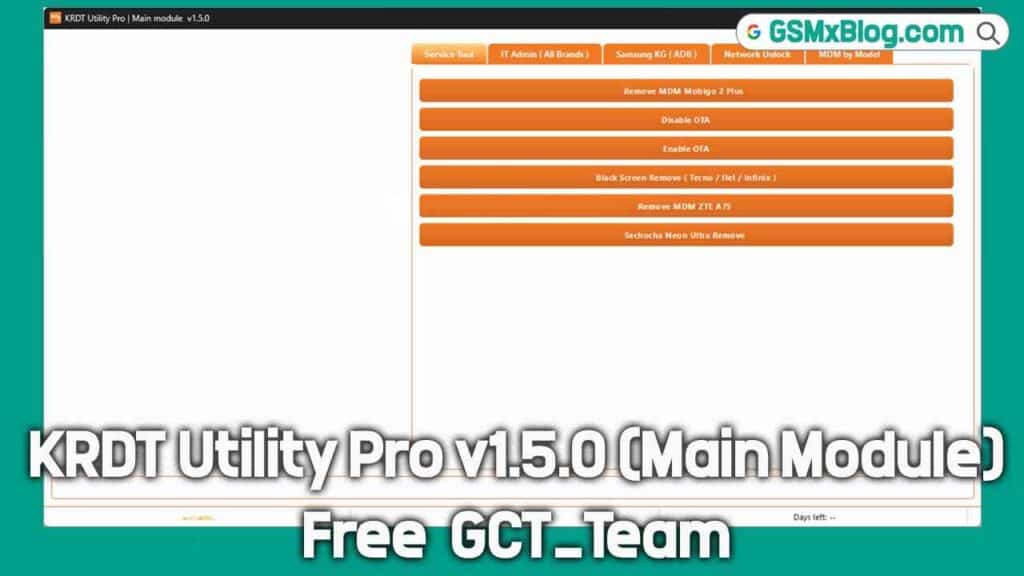
1. Service Tool
Designed for everyday repair tasks.
Functions include:
- Remove MDM from supported devices
- Enable or disable OTA updates
- Fix black screen issues
- Remove MDM from ZTE and Tecno phones
Ideal for quick shop-level repairs.
2. IT Admin (All Brands)
Used to remove IT Admin or device policy restrictions.
Available options:
- Read device information
- Remove IT Admin on Android 15
- Universal IT Admin removal
- Brand-specific options for Vivo, Tecno, Infinix, and Redmi
Perfect for devices locked by company or organizational policies.
3. Samsung KG (ADB)
Dedicated section for Samsung KG-locked devices.
Features include:
- Android 13 KG fix
- New Android 14 KG methods
- KG status check
- Samsung KG Manager
- Advanced patch methods
All operations work through ADB mode.
4. Network Unlock
Used to remove SIM and network restrictions.
Includes:
- Google Pixel SIM unlock
- Android 9 to Android 15 support
- USB-based unlock option
Helpful for devices showing “No Network” or SIM lock issues.
5. MDM by Model
One of the strongest features of KRDT Utility Pro.
You can:
- Load Super files
- Patch devices by model name
- Remove MDM from Infinix, Tecno, and Itel phones
- Disable factory reset protection
- Use the automatic patch system
Everything works step by step, making it easy even for less-experienced users.
KRDT Utility Pro v1.5.0 Free Download
- File Name: KRDT_Utility_Pro_v1.50_Free_By_GCT_Team.rar
- Version: v1.5.0
- File Size: 61 MB
Download Links:👇👇
How to Install & Use KRDT Utility Pro (Step-by-Step)
Step 1: Download the File
Download the RAR file.
- No password required
- Direct download
Step 2: Extract the RAR File
- Right-click the file
- Select Extract Here or Extract to Folder
Step 3: Install the Tool
- Open the setup file
- Click Next → Next → Install → Finish
No special settings are required.
Step 4: Run the Tool as Administrator
- Right-click the desktop icon named GCT
- Select Run as Administrator
This step is important for proper operation.
Step 5: Login Details
When the login window appears, enter:
- Username: gsmxblog
- Password: gsmxblog
Click Login. No activation is required.
Step 6: Connect Your Mobile Device
- Connect your phone via USB cable
- Enable USB debugging
- Install the required drivers
- Make sure the device is detected
Step 7: Use the Required Function
Choose any option such as:
- MDM Remove
- IT Admin Remove
- Samsung KG
- Network Unlock
- Super Device Patch
Click the option and wait for the process to complete.
What’s New in KRDT Utility Pro v1.5.0
Version 1.5.0 introduces improved compatibility, new repair methods, and a cleaner layout for faster workflow.
Key Updates
- New Samsung KG unlock methods
- Full support for Android 14 and Android 15
- Improved IT Admin removal
- New MDM patch techniques
- Super Device Patch option added
- Enhanced stability
- Clean, tab-based user interface
All features are now clearly organized, making the tool faster and easier to use.
Conclusion
KRDT Utility Pro v1.5.0 is a complete Android repair solution built for speed, simplicity, and reliability. With advanced features like MDM removal, IT Admin fixes, Samsung KG unlocking, and network unlocking, it is an essential tool for mobile repair professionals. Download it today and make your daily repair work faster, easier, and more efficient.
Related Tools
- SamFw FRP Tool 5.2 (Latest Version)
- UnlockToolPRO (Latest Version) Free
- Android Multi Tool Latest Version