MTK Pro Tool V54 (Latest Version) Download Free – Offline Module for Muslim ODIN Tool
Looking for a powerful offline repair module that adds MediaTek, Samsung, Exynos, and iPhone functions to your existing flashing setup? MTK Pro Tool V54 is an offline add-on module built to work inside Muslim ODIN Tool, giving GSM technicians a huge collection of MTK, Samsung, Exynos, ADB, and firmware extraction functions in one offline package.
This is not a standalone application — it works as a module that becomes active once Muslim ODIN Tool is installed on your Windows PC. Below you’ll find the complete feature list, installation steps, and download link for this flash tool.
What Is MTK Pro Tool V54?
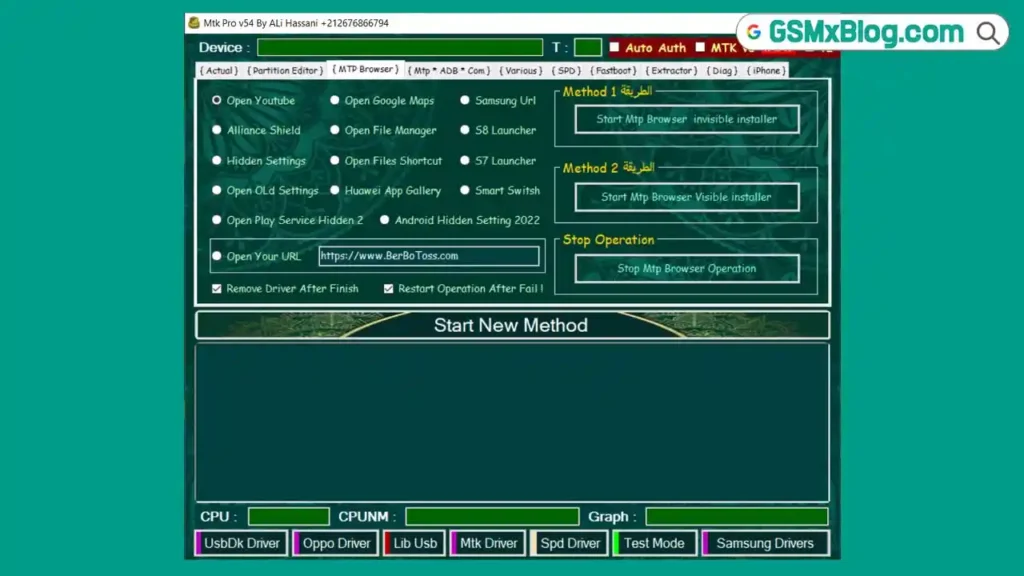
MTK Pro Tool V54 is an offline module for Muslim ODIN Tool that brings together repair functions for MediaTek, Samsung, Exynos, and iPhone devices, along with ADB commands, Diag operations, an MTP browser, and a multi-format firmware extractor. Since it runs offline, most operations do not depend on a live server connection once the module is installed.
Key Features of MTK Pro Tool V54
🆕 New in V54
- New Exynos Loader with updated boot files for Galaxy A, F, J, M, Note, S, Z Flip series and Galaxy Watches
- Fixed incomplete formatting issue for Samsung Tab A9+ (SM-X216B) Bit C
- Exynos Download Mode method for ADB enable and FRP removal from Exynos 7570 up to Exynos 2500 and W1000
- Complete support for Samsung Tab A9+ (SM-X216B) Bit B and Bit C
- FRP Reset, Formatting, EDL Boot Fix, MDM, KG, and Knox bypass support
- New MDM, Knox, KG, and FRP bypass method using DNS Server
- Updated virus cleaner covering HummingBad, Anubis, Cerberus, FluBot, Triada, xHelper, BlackRock, and TeaBot
- Security patch support added for Galaxy Tab A9, Redmi Note 14 Pro, Poco X6 Pro 5G, Moto E20, Oppo A55, Vivo Y22, iTel, and ZTE
- Redmi 15 and Redmi 10C Test Point images with EDL FRP Reset and Format
- TCL 50 5G and TCL NXTPAPER 70 Pro support
- Android 15 and Android 16 FRP methods for many Samsung models
- Patch and Direct KG + MDM bypass from Android 9 up to Android 17
- MT6575 CPU support added for older MediaTek devices
- More than 100 internal software methods fixed and optimized
🔧 MediaTek (MTK) Functions
- OAuth Bypass, Auto Auth, MTK V6 Security
- Reset FRP, Reset Mi Account, Vivo Demo Removal, Erase Huawei ID
- Read Scatter File, Mtx DA Security 2024, Fix DM-Verity
- Format FRP, Unlock Bootloader, Relock Bootloader
- Read and Write Huawei OEMINFO, Redmi DA Support
- Format UserData, Reset Meizu Cloud, Format Recovery
- Switch Brom Mode, Exit Brom Mode
- Backup NvData, Format NvData, Read Device Information
- Erase Anti-Theft, Read Preloader, Read and Write Flash.bin
- Reset MDM, Read and Write Boot.img, Permanent Unlock
- Safe Format, Reset Screen Lock, Format UserData + FRP
- CPU support from MT2601 up to MT8697
📱 Samsung & Exynos Functions
- FRP via MTP for MTK, SPD, and Exynos
- Samsung MTK Test Point FRP and No Test Point FRP
- Read Download Mode Information, Read MTP Information
- MTP FRP for Samsung and Huawei, Android 13 MTP FRP
- Delete Samsung Account, Delete Huawei Account
- Install Arabic Language Packages
- Anti Relock, Tab A7 and Tab A9+ Format
- Reset Knox, Reset KG, Reset MDM
- USA FRP MTP 2024, Reset FRP New and Old Methods
- Remove Enterprise Apps, Enable Mobile Data
- Fix Tablet Boot Loop, Factory Reset
- Repair Smart Switch, Change CSC, New MDM Kill
- Fix MTP Mode, Download Mode Reboot, Change Serial
🍎 iPhone & iOS Functions
- Support for iOS 12 up to iOS 16
- Purple Mode, Jailbreak and Pwnd Options
- Device Information, DFU Boot, Go To DFU
- Factory Reset, SSH Backup and Restore
- Hello Bypass, Activation Creation
- MDM Bypass, MEID and GSM Bypass
- Broken Baseband Fix, Baseband Remove and Restore
- Purple Mode Boot, Ramdisk Full Reset, Read Owner Information
🌐 MTP Browser & ADB Commands
- Two MTP connection methods, Open YouTube, Open Google Maps
- Samsung URL Launcher, Invisible and Visible Installer
- Open File Manager, S7/S8 Launcher, Alliance Shield Launcher
- Hidden Settings, Huawei App Gallery, Smart Switch, Custom URL Launcher
- Enable Diag, Read Device Info, Stop System Updates
- Reset KG Lock, Mi Anti Relock, Install Arabic Language, Install Keyboard
- Install One UI Files, Reboot Bootloader, Fix Realme Wireless
- Send ADB/AT/Hex Commands, Recovery Reboot, QR Code Bypass
- Reset KaiOS, Network Unlock, Enable Unknown APK Installation
📡 Diag Operations & Firmware Extractor
Diag Mode: Read Information, Factory Reset, Format UserData, Format FRP, SIM Unlock, SIM Relock, Enter/Exit Diag Mode, Power Off Device
Firmware Extractor: Extract KDZ, DZ, OFP, OZIP, LZ4, APP, IMG, OPS, OnePlus Files, OEMINFO, TAR, MD5, Payload.bin, SIN, FTF, NB0, PAC, and Create Samsung FRP Firmware
➕ Extra Brand Modules
- Vivo Fastboot Tools, Sideload Tools, Format, Recovery Wipe
- Xiaomi Sideload and Sideload Format
- LG MTP Tools, LG Driver Launcher
- SPD UserData and FRP Format, SPD Device List
Download MTK Pro Tool V54
- File Name: RE GURU.zip (contains Mtk_Pro_v54_installer_By_Ali_Hassani.exe)
- Version: V54
- File Size: 2 GB
- Platform: Windows PC (offline module for Muslim ODIN Tool)
- Requires: Muslim ODIN Tool installed as the main program
How to Install MTK Pro Tool V54
- Download the RE GURU.zip package using the link above.
- Extract the ZIP file using WinRAR or 7-Zip into a new folder.
- Open the extracted folder and locate RE GURU.exe.
- Double-click RE GURU.exe. If Windows Defender shows “Windows protected your PC,” click More info, then Run anyway.
- A small command window with the RE GURU logo will open — leave it running in the background and do not close it.
- Return to the extracted folder and run Mtk_Pro_v54_installer_By_Ali_Hassani.exe (right-click and select Run as administrator if needed).
- If another security warning appears, click More info, then Run anyway.
- Wait for the installer to reach 100% and display “Install Successfully.”
- A new Muslim ODIN shortcut will appear on your desktop — always launch the tool from this shortcut.
⚠️ This tool has triggered Windows Defender warnings during installation. Install and test it only on a secondary or dedicated GSM repair PC, not your main computer.
How to Use MTK Pro Tool V54
- Open the Muslim ODIN Tool from the desktop shortcut.
- On the login screen, enter the provided credentials: Email: the address included with the package, Password:
1337. - Click LOGIN.
- Wait while the tool shows “Waiting For Connection…” followed by “Server Connected.”
- The main MTK Pro interface will open automatically.
- From here you can access the MTK, Samsung, Exynos, ADB, MTP Browser, Firmware Extractor, iPhone, SPD, Vivo, and Xiaomi tabs and run the function needed for your device.
System Requirements
| Component | Requirement |
|---|---|
| OS | Windows PC |
| Base Software | Muslim ODIN Tool (must be installed first) |
| Storage | Sufficient free space for a 2 GB package |
| Antivirus | Recommended to disable temporarily during install on a test PC |
| Internet | Required for initial login and server connection |
⚠️ Warning
Windows Defender has flagged this installer during testing, and antivirus software may also detect it. Always install and run MTK Pro Tool V54 on a secondary or testing computer rather than your main or office PC. Some functions such as formatting, FRP reset, and bootloader operations can erase user data, so confirm exactly what a function does before running it on a customer’s device.
Important Notes
🛡️ Virus Status: Windows Defender showed a malicious activity warning during installation and testing. Use only on a dedicated repair or test PC. 📌 Requirement: This is an offline module, not a standalone tool — Muslim ODIN Tool must be installed first for MTK Pro to appear. 💾 File Size: The package is 2 GB, larger than typical GSM utilities, since it bundles many modules into one installer. ⚙️ Offline Operation: Once installed and logged in, most functions run offline without needing a constant server connection.
Frequently Asked Questions (FAQs)
❓ Is MTK Pro Tool V54 a standalone tool? No — it is an offline module that only becomes available after Muslim ODIN Tool is installed and set up on your Windows PC.
❓ Is it safe to install on my main computer? It’s not recommended. Windows Defender has flagged the installer during testing, so it’s best used on a secondary or dedicated GSM repair PC.
❓ What login details do I need? After installing Muslim ODIN Tool, log in using the email address supplied with the package and the password 1337.
❓ What devices does MTK Pro Tool V54 support? It covers MediaTek chipsets from MT2601 up to MT8697, Samsung and Exynos devices, iPhone models from iOS 12 to iOS 16, plus Vivo, Xiaomi, LG, and SPD modules.
❓ Does the tool work offline? Yes — once installed and logged in through Muslim ODIN Tool, the MTK Pro module runs its repair functions offline.
❓ How large is the download? The full offline package is 2 GB, since it bundles MTK, Samsung, Exynos, ADB, firmware extraction, and iPhone modules into a single installer.
Conclusion
MTK Pro Tool V54 packs an unusually wide range of repair functions — MediaTek, Samsung, Exynos, iPhone, ADB, Diag operations, and a multi-format firmware extractor — into a single offline module for Muslim ODIN Tool. The V54 update adds fresh Exynos loader support, new FRP and MDM bypass methods, and coverage for newer Samsung, Redmi, and TCL devices.
Since Windows Defender has flagged the installer during testing, treat this as a tool for your secondary repair PC rather than your daily driver. If your workflow already uses Muslim ODIN Tool, download MTK Pro Tool V54 and explore its MTK, Samsung, and firmware extraction functions for yourself.