MH Unlocker Pro SPD Module V2.0 (Latest Version) Download Free 2026
Are you looking for a powerful, all-in-one Spreadtrum and Unisoc repair tool in 2026? The MH Unlocker Pro SPD Module V2.0 is a professional Windows-based service software covering FRP reset, factory reset, bootloader unlock/relock, SIM/Network unlock, PAC firmware flashing, RPMB read/write, and full partition management — all from a clean, well-organized tabbed interface.
The latest V2.0 update brings a major new feature: Direct SIM Lock and Network Lock removal via Flash Mode, along with expanded device support for several new Hisense, Vodacom, and Stylo models. In this guide you’ll find the complete feature list, supported chipsets, step-by-step activation and usage instructions, and download links.
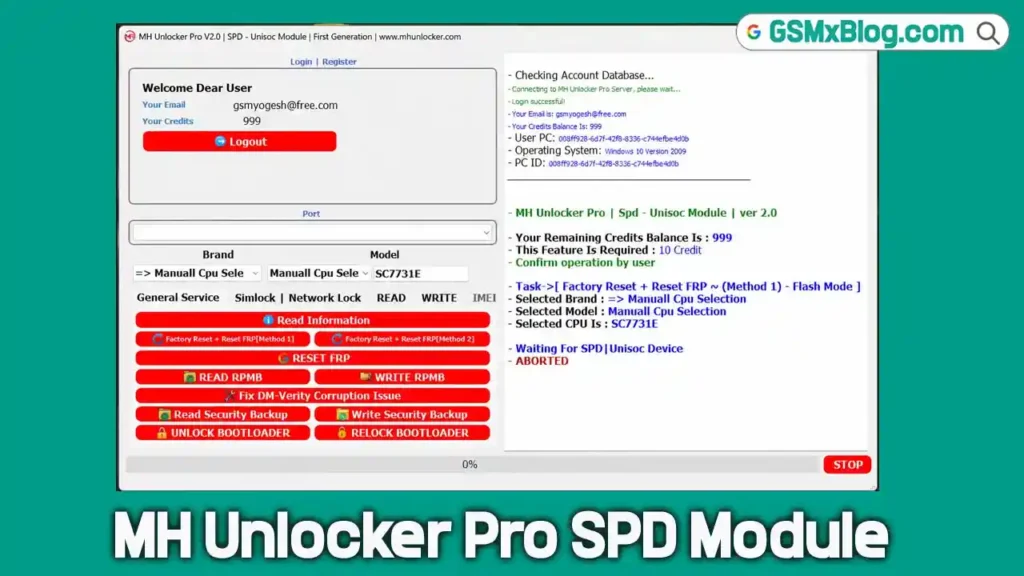
What Is MH Unlocker Pro SPD Module?
MH Unlocker Pro SPD Module is a professional Windows-based repair tool focused on Spreadtrum (SPD) and Unisoc Android devices. Unlike many SPD tools that lock the entire interface behind a reseller activation, MH Unlocker allows users to install the software, create an account, log in, and explore every tab and function before deciding to purchase credits — giving technicians a real look at the tool’s capabilities upfront.
The interface is organized into seven main sections: General Service, SIM Lock & Network Lock, Read Operations, Write Operations, Firmware Functions, RPMB Functions, and Security Operations — with real-time display of account info, selected CPU/model, available credits, and operation logs.
Key Features of MH Unlocker Pro SPD Module V2.0
🔧 General Service Features
- Read Information — full device diagnostics and info
- Factory Reset — restore device to stock state
- FRP Reset — remove Google Factory Reset Protection
- Advanced Reset Methods — multiple FRP/reset techniques for stubborn devices
- Read Security Backup — back up security partition data
- Write Security Backup — restore security partition data
- DM-Verity Error Fix — resolve dm-verity boot errors after modifications
🔓 Bootloader Features
- Unlock Bootloader — gain full flashing access
- Relock Bootloader — restore locked state if needed
📶 SIM Lock & Network Lock Features
- SIM Unlock — remove carrier SIM restrictions
- Network Unlock — full carrier network unlock
- Permanent Network Lock Removal — permanent unlock solution
- Flash Mode Unlock Support — NEW in V2.0: Direct SIM/Network Lock removal via Flash Mode
🔐 RPMB Functions
- Read RPMB — extract Replay Protected Memory Block data
- Write RPMB — restore RPMB data for security repair
📥 Read Functions
- Read Firmware — dump full device firmware
- Read GPT — read GUID Partition Table
- Read Partitions — extract individual partitions
📤 Write Functions
- Write Firmware — flash firmware to device
- Write PAC Firmware — flash official PAC firmware packages
- Write Partitions — flash individual partitions
📦 Firmware Support
- PAC Firmware Support — official Unisoc firmware format
- Internal Loaders — built-in loader database
- Hybrid Loaders — combined loader support for tricky devices
- Manual Loaders — load your own custom loader files
- Flash Mode Support — full flash mode operation across functions
Download MH Unlocker Pro SPD Module V2.0
- File Name: MH_Unlocker_Spd_Module_V2.0.zip
- Version: V2.0 (Latest 2026)
- Platform: Windows (64-bit)
- Tool Type: Spreadtrum / Unisoc Repair Tool
- Activation: Free Account + Credit System
- RAR Password: softwarecrackguru
How to Install & Activate MH Unlocker Pro SPD Module V2.0
Step 1 — Run the Patch as Administrator
- Open your downloaded release folder.
- Locate the file MH_Unlocker_Spd_Patch_2026.exe.
- Right-click and select “Run as Administrator” to grant full permissions.
Step 2 — Copy Your Hardware ID
- When the MH Unlocker SPD Module loader window appears, click “Copy Hardware ID.”
- A quick “Copied!” confirmation will flash on the button.
Step 3 — Generate the Activation Key
- Click “Get Activation Key” — this opens the registration page in your browser.
- Scroll to the key generator section.
- Right-click inside the box labeled “ENTER YOUR 16-CHAR HWID” and paste your ID.
- Click the green “GENERATE KEY NOW” button.
- Highlight and copy the long activation key shown in the black bar above the input field.
Step 4 — Activate the Loader System
- Return to the loader interface on your desktop.
- Right-click inside the “Enter License Key Here” box and paste your generated key.
- Click the green “ACTIVATE SYSTEM” button.
- Once status shows active, click the newly appeared “Start Server” button.
- If a Windows Security Warning about installing a root certificate appears, click “Yes” to let the server finish launching.
Step 5 — Log In and Select Your Model
- The main MH Unlocker Pro interface loads.
- Enter your email and password (created during registration).
- Check “Save Login” if desired, then click “Login.”
- Wait for the terminal area to display “Login successful!” ✅
How to Use MH Unlocker Pro SPD Module V2.0
▶️ Factory Reset + FRP Reset (Method 1)
- Go to the dropdown menus at the bottom of the interface.
- Set your Brand and Model — e.g. select “Manual CPU Select” and “SC7731E.”
- Switch to the General Service tab.
- Click “Factory Reset + Reset FRP [Method 1].”
- Click “Yes” on the “Read Carefully!” confirmation prompt.
- The log window will show “Waiting For SPD | Unisoc Device.”
- Connect your device in flash mode — the tool handles the rest automatically. ✅
▶️ SIM / Network Unlock (Flash Mode — New in V2.0)
- Select your device’s Brand and Model (or Manual CPU Select).
- Go to the SIM Lock & Network Lock tab.
- Click “SIM Unlock” or “Network Unlock” as required.
- Confirm the prompt and connect device in Flash Mode.
- Wait for the direct unlock process to complete. ✅
▶️ Read / Write RPMB
- Select device model.
- Go to the RPMB Functions tab.
- Click “Read RPMB” to back up, or “Write RPMB” to restore.
- Connect device in flash mode and wait for completion.
▶️ Write PAC Firmware
- Select device model and load your PAC firmware file.
- Go to the Write Functions tab.
- Click “Write PAC Firmware.”
- Connect device in flash mode — flashing begins automatically.
- Wait for completion and reboot. ✅
▶️ Unlock / Relock Bootloader
- Select device model.
- Go to the Bootloader section.
- Click “Unlock Bootloader” or “Relock Bootloader” as needed.
- Connect device and confirm — process completes automatically.
What’s New in MH Unlocker Pro SPD Module V2.0
🔓 Direct SIM Lock & Network Lock Removal (Flash Mode)
The headline feature of V2.0 is Direct SIM Lock and Network Lock removal via Flash Mode — allowing technicians to remove carrier locks directly through the device’s flash mode connection, without needing additional intermediate steps.
📱 New Supported Devices
V2.0 expands device support with the following newly added models:
| Brand | Model |
|---|---|
| Hisense | U43 HLTE112E |
| Hisense | U61 HWCD118E |
| Hisense | U964 HLTE106E |
| Hisense | Y82 Pro HLTE123E |
| Vodacom | Kicka 6 H6032+ |
| Stylo | Mesa EPY29 |
🔄 Continued Expansion
- Ongoing expanded support for Spreadtrum and Unisoc devices across multiple brands and chipsets.
Supported CPUs / Chipsets
| Chipset | Series |
|---|---|
| SC7731E | Unisoc SC Series |
| SC9832E | Unisoc SC Series |
| SC9863A | Unisoc SC Series |
| SC9863A 64-Bit | Unisoc SC Series |
| Tiger T310 | Unisoc Tiger Series |
| Tiger T606 | Unisoc Tiger Series |
| Tiger T610 | Unisoc Tiger Series |
| Tiger T612 | Unisoc Tiger Series |
| Tiger T616 | Unisoc Tiger Series |
| Tiger T700 | Unisoc Tiger Series |
| Tiger T760 Series | Unisoc Tiger Series |
Newly Supported Devices (V2.0)
| Brand | Model | Chipset Type |
|---|---|---|
| Hisense | U43 HLTE112E | Unisoc |
| Hisense | U61 HWCD118E | Unisoc |
| Hisense | U964 HLTE106E | Unisoc |
| Hisense | Y82 Pro HLTE123E | Unisoc |
| Vodacom | Kicka 6 H6032+ | Unisoc |
| Stylo | Mesa EPY29 | Unisoc |
⚠️ Warning
Before performing any Factory Reset, Firmware Flash, or Partition Write operation, always back up important data and security partitions — these operations can permanently erase user data or, if done incorrectly, damage the device. RPMB and Firmware writing operations should only be performed by experienced technicians — incorrect writes to RPMB or partitions may result in a bricked device. Always verify your device model and CPU selection before starting any operation.
Important Notes
🛡️ Virus Status: This tool was scanned before uploading — use on a dedicated repair PC. Antivirus false positives are common with patch/loader-based activation tools; temporarily disable antivirus during extraction and activation if needed.
📌 Credit: Full credit goes to the MH Unlocker Pro Team for developing this SPD Module.
💳 Credits System: Account creation and interface access are free. Actual device operations require purchasing credits through the tool’s account system.
🔌 USB Driver: Install the Unisoc / SPD USB Driver before connecting any device in flash mode. Missing drivers are the most common cause of “Waiting For Device” never completing.
Why Use MH Unlocker Pro SPD Module V2.0?
- ✅ Free registration and full interface access — see before you buy
- ✅ Covers FRP, Factory Reset, Bootloader, SIM/Network Unlock, RPMB, and Firmware in one tool
- ✅ New Direct SIM/Network Unlock via Flash Mode — major V2.0 addition
- ✅ PAC Firmware support — official Unisoc firmware format
- ✅ Internal, Hybrid, and Manual Loader options for tricky devices
- ✅ Supports the latest Tiger T760 series chipsets
- ✅ Clean, organized tabbed interface with real-time logs
- ✅ Regular updates with new device support
Frequently Asked Questions (FAQs)
❓ Is MH Unlocker Pro SPD Module free? Account creation, installation, and full interface access are free. However, actual device operations (FRP reset, firmware flash, etc.) require credits purchased through the account system.
❓ Why did my operation fail immediately? The most common cause is a zero credit balance. Check your account credits before troubleshooting drivers, USB cables, or device connection issues.
❓ What is new in V2.0? The major addition is Direct SIM Lock and Network Lock removal via Flash Mode, plus support for new Hisense, Vodacom, and Stylo Unisoc devices.
❓ What is RPMB and why does it matter? RPMB (Replay Protected Memory Block) stores security-critical data on Unisoc devices. Reading and backing up RPMB before any security-related operation is essential — writing incorrect RPMB data can cause serious device issues.
❓ Does it support PAC firmware files? Yes — MH Unlocker Pro SPD Module fully supports PAC firmware format, the official Unisoc firmware packaging format, for both reading and writing.
❓ What chipsets are supported? The tool supports SC7731E, SC9832E, SC9863A (32 & 64-bit), and the full Tiger series including T310, T606, T610, T612, T616, T700, and the newer T760 series.
❓ Is the activation process safe? The activation uses a HWID-based patch and license key system. Antivirus programs commonly flag patch-based loaders as false positives — use on a dedicated repair PC and disable antivirus only during activation.
❓ Can I select a device manually if it’s not listed? Yes — use “Manual CPU Select” and choose the matching chipset (e.g., SC7731E, Tiger T616) for devices not specifically listed in the model database.
Conclusion
MH Unlocker Pro SPD Module V2.0 stands out for its transparent freemium approach — letting technicians create an account, install the software, and explore the full interface before committing to any purchase. Combined with comprehensive coverage spanning FRP reset, factory reset, bootloader unlock/relock, RPMB read/write, PAC firmware flashing, and the new Direct SIM/Network Unlock via Flash Mode — plus support for the latest Tiger T760 series and newly added Hisense, Vodacom, and Stylo devices — it’s a solid addition to any Spreadtrum/Unisoc repair toolkit.
While many operations do require credits, the ability to fully evaluate the tool first sets it apart from typical reseller-locked SPD tools. Download MH Unlocker Pro SPD Module V2.0 now using the links above and explore its capabilities for your Unisoc repair work! 🚀
Have you used MH Unlocker Pro SPD Module before? Share your experience in the comments below!