MH Unlocker Pro MTK Module V1.2 (Latest Version) Download Free 2026
Looking for a lightweight MediaTek (MTK) repair and unlocking tool in 2026? The MH Unlocker Pro MTK Module V1.2 is a Windows-based service software focused on Simlock removal, Network Lock removal, Permanent Lock removal, FRP/Google Account removal, and Security Backup operations — working through both Preloader and BROM modes on supported MediaTek devices.
The latest V1.2 update adds Simlock and Network Lock removal directly in Flash Mode, plus support for the Stylo Solar EIT57 and fixes a recurring automatic update popup issue. In this guide you’ll find the complete feature list, full changelog history (V1.0–V1.2), supported chipsets and devices, step-by-step activation, and download links.
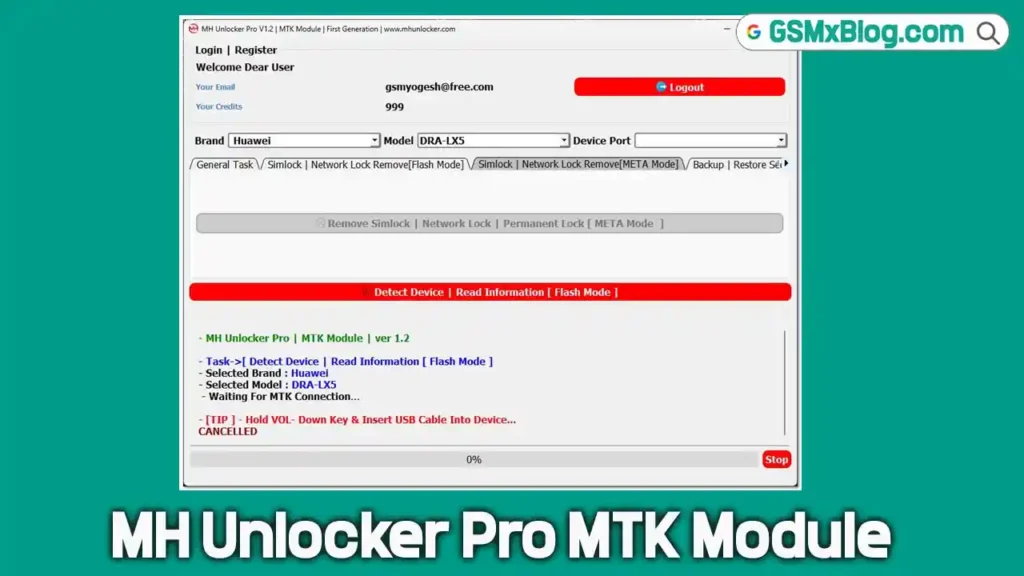
What Is MH Unlocker Pro MTK Module?
MH Unlocker Pro MTK Module is a compact Windows-based repair tool focused on MediaTek Android devices, operating through Preloader Mode and BROM Mode connections. It is part of the broader MH Unlocker Pro suite, which also includes a separate SPD (Spreadtrum/Unisoc) Module.
The tool follows a freemium model — registration is completely free and gives full access to the interface, but actual device operations require credits. The supported device list is currently smaller compared to larger established tools, making it best suited for technicians who specifically work with the listed MediaTek models on a regular basis.
Key Features of MH Unlocker Pro MTK Module
🔓 Unlock Functions
- Remove Simlock — eliminate SIM card restrictions
- Remove Network Lock — carrier network unlock
- Remove Permanent Lock — permanent unlock for persistent locks
- Simlock & Network Lock Remove in Flash Mode (new in V1.2)
🔐 Account & Security
- Remove FRP / Google Account — bypass Factory Reset Protection
- Read Security Backup — back up security partition data
- Write Security Backup — restore security partition data
🔌 Connection Modes
- Preloader Mode Support — connect via MediaTek Preloader
- BROM Mode Support — connect via Bootrom mode for deeper access
- Flash Mode Support (new in V1.2) — direct Simlock/Network Lock removal
Download MH Unlocker Pro MTK Module V1.2
- File Name: MH_Unlocker_MTK_FREE.rar
- Version: V1.2 (Latest 2026)
- Platform: Windows (64-bit)
- Tool Type: MediaTek (MTK) Repair Tool
- Activation: Free Account + Credit System
- RAR Password: softwarecrackguru
How to Install & Activate MH Unlocker Pro MTK Module V1.2
Step 1 — Extract the Package
- Locate the downloaded archive MH_Unlocker_MTK_FREE.rar.
- Right-click the file and choose “Extract Here” or “Extract to MH_Unlocker_MTK_FREE.”
- When prompted for the extraction password, enter: softwarecrackguru
Step 2 — Launch the Loader
- Open the extracted folder.
- Find Loader_Run_As_Admin.exe, right-click, and select “Run as administrator.”
✅ Tip: Running with administrator permission helps avoid connection-related issues during device detection.
Step 3 — Copy Hardware ID
- After the loader opens, click “Copy Hardware ID.”
- Your unique HWID is automatically copied to the clipboard.
Step 4 — Generate Activation Key
- Click “Get Activation Key” — your browser opens the registration page automatically.
- Scroll to the key generator section and paste your 16-character HWID.
- Click “GENERATE KEY NOW.”
- Copy the complete generated activation key.
Step 5 — Activate the Tool
- Return to the loader window.
- Paste the generated key into the activation field.
- Click “ACTIVATE MH MTK TOOL.”
- If successful, the status section turns green. ✅
Step 6 — Start Server
- Press the “Start Server” button.
- If Windows shows a security warning about installing a certificate, click “Yes” to continue.
- The loader verifies the environment and prepares the software for use.
Step 7 — Login to the Main Interface
- The main software window opens automatically.
- Enter your account email and password (created during registration).
- Enable “Save Login” if desired.
- Click “Login” — the console verifies your account and shows your credit balance.
How to Use MH Unlocker Pro MTK Module V1.2
▶️ Remove Simlock / Network Lock (Standard Mode)
- Select the device brand from the list.
- Choose the exact model.
- Open the “Simlock” or “Network Lock Remove” category.
- Click “Detect Device | Read Information.”
- The tool enters waiting mode.
- Power off the target device.
- Hold Volume Down and connect the phone via USB.
- Once detected, the operation starts automatically. ✅
▶️ Simlock / Network Lock Removal (Flash Mode — New in V1.2)
- Select your device brand and model.
- Open the Manual Connection or relevant Flash Mode category.
- Click the Simlock/Network Lock Remove (Flash Mode) option.
- Connect device following on-screen Flash Mode instructions.
- Wait for the process to complete. ✅
▶️ Remove FRP / Google Account
- Select device brand and model.
- Open the “General Task” category.
- Click “Remove FRP / Google Account.”
- Click “Detect Device | Read Information” and connect device as prompted (Volume Down + USB while powered off).
- Operation runs automatically once detected. ✅
▶️ Read / Write Security Backup
- Select device brand and model.
- Open the “General Task” category.
- Click “Read Security Backup” to back up, or “Write Security Backup” to restore.
- Connect device in Preloader or BROM mode as required.
- Wait for completion. ✅
Understanding the Credit System
MH Unlocker Pro MTK Module follows the same freemium model as its SPD counterpart:
- ✅ Free: Account registration, software access, browsing all categories and functions
- ⚠️ Requires Credits: Actual device operations (Simlock removal, FRP removal, Security Backup, etc.)
💡 Honest Note: The supported device list for this module is currently smaller than many established alternatives. If you’re only testing the tool out of curiosity, it may not be worth purchasing credits unless your specific devices are listed in the supported devices section below. Technicians who regularly service the listed models — particularly itel, Stylo, Mobicel, and the newly added Redmi A1/A2 and Villaon models — will find the most value here.
Supported CPUs / Chipsets
| Chipset | Series |
|---|---|
| MT6582 | MediaTek Entry |
| MT6739 | MediaTek Entry |
| MT6755 | MediaTek Mid |
| MT6761 | MediaTek Entry |
| MT6765 | MediaTek Mid |
| MT6768 | MediaTek Mid |
| MT6771 | MediaTek Mid-High |
| MT6779 | MediaTek High |
| MT6785 | MediaTek High |
| MT6833 | MediaTek 5G |
| MT6853 | MediaTek 5G |
| MT6893 | MediaTek 5G Flagship |
Full Supported Device List (V1.0–V1.2)
| Brand | Model | Added In |
|---|---|---|
| Huawei | DRA-LX5 | V1.0 |
| Mobicel | Force | V1.0 |
| Mobicel | Neo Plus | V1.0 |
| itel | A06S | V1.0 |
| itel | V652L | V1.0 |
| Stylo | Matrix | V1.0 |
| Stylo | Solar | V1.0 |
| Redmi | A1 (220733SG) | V1.1 |
| Redmi | A2 (23028RN4DG) | V1.1 |
| Villaon | V652L | V1.1 |
| Stylo | Solar EIT57 | V1.2 |
System Requirements
| Component | Requirement |
|---|---|
| OS | Windows 10 / 11 (64-bit) |
| Processor | Intel / AMD Dual-Core or faster |
| RAM | 2 GB minimum |
| Storage | 100 MB free space |
| USB Port | USB 2.0 or 3.0 |
| Internet | Required for login and activation |
⚠️ Warning
Before performing any Simlock removal, Network Lock removal, or Security Backup write operation, always back up security partition data first using the “Read Security Backup” function. Writing incorrect security data may cause network or IMEI-related issues. Always verify your exact device brand, model, and chipset before starting any operation. This tool should be used by experienced MediaTek repair technicians.
Important Notes
🛡️ Virus Status: This tool was scanned before uploading — use on a dedicated repair PC. Antivirus false positives are common with patch/loader-based activation tools; temporarily disable antivirus during extraction and activation if needed.
📌 Credit: Full credit goes to the MH Unlocker Pro Team for developing this MTK Module.
💳 Credits System: Account creation and interface browsing are free. Actual device operations require purchasing credits through the tool’s account system.
🔌 USB Driver: Install the MTK USB Driver (Preloader/VCOM Driver) before connecting any device. Without correct drivers, the “Detect Device” function will not work.
Frequently Asked Questions (FAQs)
❓ Is MH Unlocker Pro MTK Module free? Account creation and interface access are free. However, actual device operations (Simlock removal, FRP removal, etc.) require credits purchased through the account system.
❓ Is the supported device list large? No — currently the tool supports a relatively small list of specific models (itel, Stylo, Mobicel, Redmi A1/A2, Villaon, Huawei DRA-LX5). Check the full supported device list before purchasing credits.
❓ What is new in V1.2? The main addition is Simlock and Network Lock removal directly in Flash Mode, plus support for the Stylo Solar EIT57, and a fix for the recurring automatic update popup.
❓ Do I need to power off my device before connecting? Yes — for most operations, power off the device, hold Volume Down, and connect via USB while the tool is in “waiting” mode for automatic detection.
❓ What connection modes are supported? The tool supports Preloader Mode (added in V1.1) and BROM Mode, plus the new Flash Mode for Simlock/Network Lock removal in V1.2.
❓ Is the activation process safe? The activation uses a HWID-based loader and license key system. Antivirus programs commonly flag patch-based loaders as false positives — use on a dedicated repair PC and disable antivirus only during activation.
❓ Should I buy credits just to test the tool? Based on real testing, if you’re only curious about how the tool works and your devices aren’t in the supported list, it may not be worth purchasing credits purely for testing purposes.
Conclusion
MH Unlocker Pro MTK Module V1.2 is a lightweight, actively developed MediaTek repair tool that follows the same free-registration, credit-based model as its SPD counterpart. The V1.2 update’s headline feature — Simlock and Network Lock removal in Flash Mode — adds a useful direct method for supported devices, alongside the new Stylo Solar EIT57 support and a fix for the persistent update popup issue.
While the supported device list remains smaller than established alternatives (currently 11 specific models across itel, Stylo, Mobicel, Redmi, Villaon, and Huawei), the tool’s fast, clean interface and free interface preview before purchasing credits make it worth checking if your daily repair devices happen to be on the list. Download MH Unlocker Pro MTK Module V1.2 now using the links above and see if it fits your MediaTek repair workflow! 🚀
Have you used MH Unlocker Pro MTK Module before? Share your experience in the comments below!