TunaPro Tool V3.8.0 (Latest Version) Download – Samsung Exynos FRP Bypass & ADB Enable
Looking for a working Samsung Exynos FRP bypass tool that’s actually free in 2026? TunaPro Tool V3.8.0 is a new, lightweight Windows utility offering Samsung Exynos FRP removal with a built-in ADB-enable function — covering 60+ Galaxy models from the Galaxy S7 all the way up to the Galaxy S25 series, plus newer A-series and M-series devices.
What stands out is the simple registration — no OTP or email verification required, and even temporary email addresses work for signup. The Samsung Exynos FRP section is currently free to use, with a Xiaomi FRP option also available (credit-based). In this guide you’ll find the complete feature list, supported device list, step-by-step usage instructions, and download link.
What Is TunaPro Tool V3.8.0?
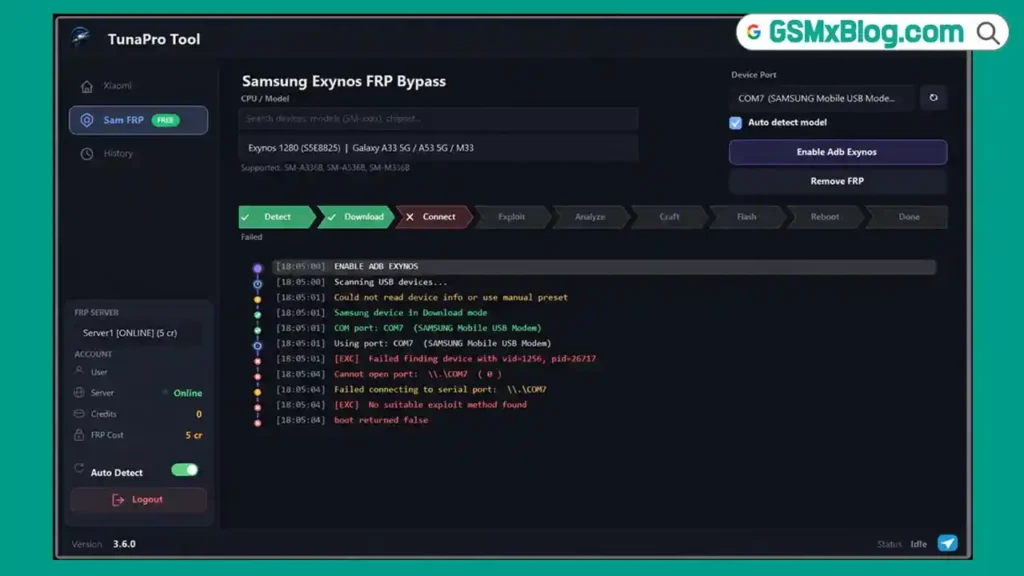
TunaPro Tool V3.8.0 is a recently released Windows-based FRP removal tool available, focused primarily on Samsung Exynos devices. Its standout feature is a built-in ADB-enable function — something that normally requires a separate tool or additional steps before standard FRP procedures can run on Exynos devices. TunaProTool handles both the ADB enable and FRP removal from the same window.
The tool also includes a Xiaomi Server FRP Removal option (credit-based), though this function has not yet been independently tested.
Key Features of TunaPro Tool V3.8.0
🔓 Samsung Exynos FRP
- Samsung Exynos FRP Bypass — free function (as of current version)
- Enable ADB on Supported Exynos Devices — built into the same workflow, no separate tool needed
- Auto Device Detection — automatic recognition once connected
- Chipset-Based Device Selection — select your Exynos chipset from the list
📱 Xiaomi Functions
- Xiaomi Server FRP Removal — credit-based (5 credits per job) (not yet independently tested)
⚙️ Tool Design
- Built-in ADB and Fastboot Files — no need to download separate ADB packages
- Simple Login System — no OTP, no email verification required
- Clean, uncluttered interface — minimal sections, easy navigation
- Lightweight Windows application
Download TunaPro Tool V3.8.0
- File Name: TunaproToolV3.8.0.rar
- Version: V3.8.0
- File Size: 33.0 MB
- Platform: Windows (64-bit)
- Tool Type: Samsung Exynos FRP / Xiaomi FRP Tool
How to Use TunaPro Tool for Samsung Exynos FRP
- Download TunaProTool from the official link above.
- Extract the downloaded ZIP file to your Desktop. Before extracting, disable Windows Defender or antivirus temporarily — some files may be blocked during extraction.
- Open the extracted folder and run
TunaProTool.exeas Administrator. - If you’re a new user, click “Register” and create a new account — enter username, email, password, and password confirmation. No email verification or OTP required. Click “Create Account.”
- Once registered, log in using your username and password.
- Manually put your Samsung device into Download Mode — the tool cannot do this automatically, so use the correct key combination for your specific model.
- Connect the device to your PC and wait for software detection.
- Click the “Enable ADB Exynos” button — the tool performs the required partition-level operation automatically.
- After completion, the phone usually reboots automatically into normal mode. If it stays in Download Mode, press and hold Volume Down + Power until it restarts.
- Once booted normally, return to the tool and start the FRP removal process.
- A USB Debugging permission window will appear on the phone — tap “Allow.”
- The tool continues automatically and removes the FRP lock. ✅
- Wait for completion, reboot the device, and complete the normal Android setup process.
✅ Tip: The combined ADB-enable + FRP removal in one tool eliminates the need to switch between multiple applications — a significant time-saver for Exynos FRP jobs.
Supported Samsung Exynos Models
TunaProTool’s Samsung Exynos FRP function covers a wide range of Galaxy devices spanning multiple generations:
📱 Latest Flagship Series
- ✅ Galaxy S21 Series
- ✅ Galaxy S22 Series
- ✅ Galaxy S24 Series
- ✅ Galaxy S25 Series
📱 Galaxy A Series (5G)
- ✅ Galaxy A33 5G
- ✅ Galaxy A53 5G
- ✅ Galaxy A34 5G
- ✅ Galaxy A54 5G
- ✅ Galaxy A35 5G
- ✅ Galaxy A55 5G
- ✅ Galaxy A36 5G
- ✅ Galaxy A71 5G
📱 Galaxy A Series (Legacy)
- ✅ Galaxy A5 2017
- ✅ Galaxy A7 2017
- ✅ Galaxy A8 2018
- ✅ Galaxy A6+ 2018
- ✅ Galaxy A10s
- ✅ Galaxy A12
- ✅ Galaxy A13
- ✅ Galaxy A20
- ✅ Galaxy A20s
- ✅ Galaxy A30
- ✅ Galaxy A30s
- ✅ Galaxy A50
- ✅ Galaxy A51
- ✅ Galaxy A04s
📱 Galaxy M Series
- ✅ Galaxy M12
- ✅ Galaxy M20
- ✅ Galaxy M21
- ✅ Galaxy M30s
- ✅ Galaxy M31
- ✅ Galaxy M31s
- ✅ Galaxy M33
📱 Galaxy F Series
- ✅ Galaxy F41
📱 Galaxy S Series (Legacy)
- ✅ Galaxy S7 / S7 Edge
- ✅ Galaxy S8 / S8+
- ✅ Galaxy S9 / S9+
- ✅ Galaxy S10 / S10+ / S10e
- ✅ Galaxy S20 / S20+ / S20 Ultra
📱 Galaxy J Series
- ✅ Galaxy J2 Pro
- ✅ Galaxy J3 2017
- ✅ Galaxy J5 2017
- ✅ Galaxy J7 2017
- ✅ Galaxy J8
📱 Galaxy Note Series
- ✅ Galaxy Note FE
- ✅ Galaxy Note 8
- ✅ Galaxy Note 9
- ✅ Galaxy Note20
📱 Other
- ✅ Generic Exynos Devices
How the ADB-Enable Feature Helps
Many Samsung Exynos FRP procedures require ADB to be enabled before the actual FRP removal can run — normally this means using a separate tool, downloading additional files, or performing extra manual steps.
TunaProTool’s “Enable ADB Exynos” function handles this directly within the same application — performing the required partition-level operation automatically, then continuing into the standard FRP removal workflow once the device reboots. This significantly simplifies the overall process compared to multi-tool workflows.
System Requirements
| Component | Requirement |
|---|---|
| OS | Windows 10 / 11 (64-bit) |
| Processor | Intel / AMD Dual-Core or faster |
| RAM | 2 GB minimum |
| Storage | 100 MB free space |
| USB Port | USB 2.0 or 3.0 |
| Internet | Required for login |
⚠️ Warning
TunaProTool is intended for use by authorized device owners and mobile repair technicians only. Always verify you have legal ownership or proper authorization before performing any FRP removal operation. This tool is newly released — exercise caution and test on non-critical devices first where possible. Always back up important data before performing ADB-enable or FRP operations. The developer and this blog are not responsible for any issues encountered.
Important Notes
🛡️ Virus Status: Some antivirus programs and Windows Defender may flag files during extraction — temporarily disable antivirus during extraction only, then re-enable after setup.
📌 Credit: Full credit goes to the TunaProTool developers for creating this tool — reportedly built with assistance from AI development tools, a increasingly common approach for newer utility software.
🆓 Pricing Status: The Samsung Exynos FRP function is currently free — there is no official statement on whether this will remain free long-term. The Xiaomi FRP function uses a 5-credit-per-job system.
🔌 Manual Download Mode: TunaProTool cannot automatically reboot devices into Download Mode — you must manually enter Download Mode using your device’s specific key combination before connecting.
📧 Registration: No OTP or email verification is required — a temporary/disposable email address works fine for account creation.
Frequently Asked Questions (FAQs)
❓ Is TunaProTool completely free? The Samsung Exynos FRP function is currently free. The Xiaomi FRP function uses a credit system (5 credits per job). There’s no official statement on whether Samsung FRP will remain free permanently.
❓ Do I need to verify my email to register? No — registration requires no OTP or email verification. Even temporary/disposable email addresses work for signup.
❓ Does the tool automatically put my device into Download Mode? No — you must manually enter Download Mode using your device’s specific key combination before connecting it to TunaProTool.
❓ What does the “Enable ADB Exynos” button do? It performs a partition-level operation that enables ADB on supported Exynos devices — a step normally requiring a separate tool — directly within TunaProTool, before continuing to FRP removal.
❓ Has the Xiaomi FRP function been tested? No — at this time, only the Samsung Exynos FRP function has been personally tested and confirmed working. The Xiaomi section (5 credits) remains unverified.
❓ Why does Windows Defender block the extraction? This is common with FRP and ADB-related tools due to the nature of the included files. Temporarily disable antivirus during extraction, then verify the files before running.
❓ Is my Galaxy model supported? TunaProTool covers 60+ Samsung Exynos models spanning Galaxy S7 through S25, plus A, M, J, F, and Note series devices. Check the full supported list above — “Generic Exynos Devices” is also listed as a catch-all option.
Conclusion
TunaPro Tool is a promising new addition to the Samsung Exynos FRP toolkit landscape — offering a genuinely free Exynos FRP bypass with integrated ADB-enable, simple no-verification registration, and coverage spanning 60+ Galaxy models from the Galaxy S7 era through the latest S25 series. The combined ADB-enable and FRP workflow in a single window is a meaningful convenience improvement over typical multi-tool approaches.
As a newly released tool, it’s worth keeping an eye on for future updates — particularly regarding the untested Xiaomi FRP function and whether the Samsung Exynos section remains free long-term. For technicians with a Samsung Exynos device on the bench right now, download TunaProTool and give the free Exynos FRP function a try! 🚀
Have you tested TunaProTool? Share your experience in the comments below!