Download GSTool V2026.05.02 (Latest Version) Free 2026
Are you a mobile technician looking for one of the most complete multi-chipset Android repair tools in 2026? GSTool V2026.05.02 is the latest update packed with powerful features — including Qualcomm EDL flashing, MediaTek RPMB operations, Unisoc Tiger FRP bypass, Samsung FRP reset, Oplus Demo Exit Code, and support for the latest Oppo and OnePlus models.
Whether you are dealing with a stubborn FRP lock, corrupted firmware, a factory reset job, or a demo-mode device that needs unlocking — GSTool V2026.05.02 covers it all from one clean Windows interface. In this complete guide, you will find the full feature list, changelog, download link, installation steps, and supported device list — everything in one place.
What Is GSTool?
GSTool is a professional Windows-based Android repair and unlocking tool developed by the GSTool Team at www.gstool.asia. It is designed specifically for GSM technicians who handle a wide variety of Android brands daily — providing a unified platform for FRP reset, firmware flashing, factory reset, IMEI repair, bootloader operations, and network repair across Qualcomm, MediaTek, Unisoc, and HiSilicon Kirin chipsets.
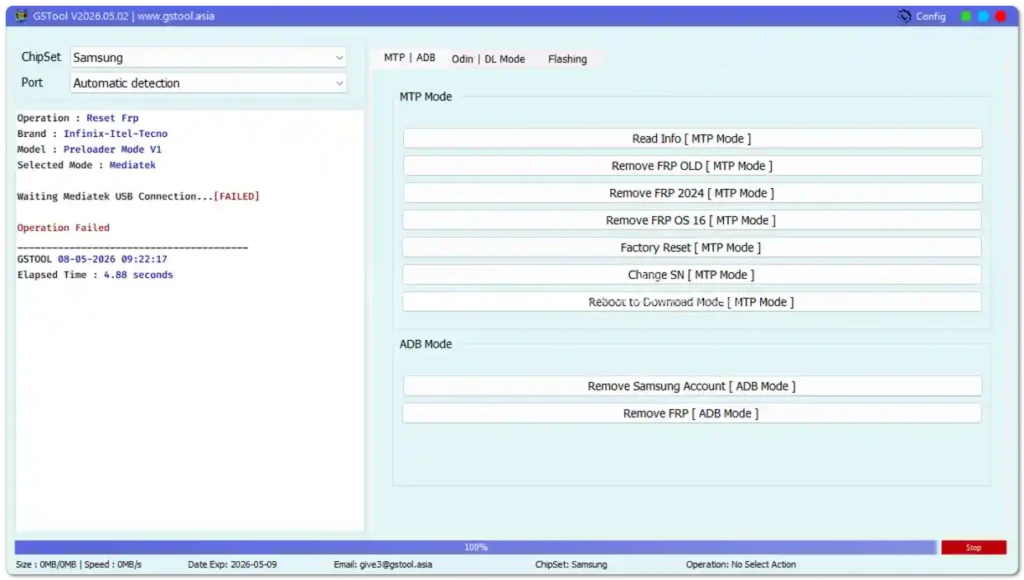
Unlike tools that focus on a single brand or chipset, GSTool brings multi-platform support into one organized interface with separate tabs for each chipset — MTP | ADB, Odin | DL Mode, and Flashing — making it fast and easy to navigate between different repair workflows without switching applications.
🔑 Why choose GSTool? GSTool supports Samsung, Oppo, Vivo, Xiaomi, Realme, Huawei, Infinix, Tecno, and many more brands — all from one tool — saving technicians from managing a separate application for every brand they service.
Key Features of GSTool V2026.05.02
🔌 Qualcomm Flashing & Repair
- Read / Write / Erase Partition
- Flash Firmware via EDL Mode
- Read & Backup GPT
- Read / Write Firmware
- Reset FRP & Factory Reset
- Mi Account Reset
- EFS Backup & Restore
- Load Firehose, Patch & Firmware Files
- LUN Selection & Sector Size Control
- Begin & End Address Selection
- Reboot Device
🔓 Qualcomm Unlock Features
- Reset FRP
- Reset Lock
- Realme FRP Reset — Narzo, GT, Neo, X, C, Q, V Series
- Realme Reset Lock
🛠️ Qualcomm Network Repair
- Write IMEI
- QCN Read & Write
- Critical Read & Write
- Diag Enable (Standard, Xiaomi, Root)
📱 MediaTek Flashing & Repair
- Read / Write / Erase Partition
- Flash Firmware with Scatter File Support
- Preloader & Download Agent Support
- Read / Write / Erase / Backup / Restore RPMB
- Factory Reset & Safe Format
- META Mode Support
- Payload Parser
- Read GPT & Data
🔓 MediaTek Unlock Features
- Reset FRP & Userdata
- Reset Lock & Mi Account
- Unlock & Relock Bootloader
- Erase FRP
- Security Repair & Fix DM Verify
- Patch IMEI
- Erase Data & Reset Backup
⚙️ MediaTek META Mode
- IMEI Repair
- NVRAM Operations
- Network Repair
- Security Repair
📡 Unisoc (SPD) Features
- Tiger T7200 FRP Bypass (New)
- Tiger T7250 FRP Bypass (New)
- Factory Reset
- Reset User Lock
- SOC & Auto Detection
📲 Samsung Features
- Samsung FRP Reset
- Samsung Factory Reset
- Samsung Erase FRP Bit 1 (New — SM-A075F)
- Samsung Erase FRP Bit 2 (New — SM-A075F)
- Samsung MediaTek Support
📱 Xiaomi Features
- Mi Account Reset
- Xiaomi Diag Enable
- Bootloader Unlock
- FRP Reset
- Factory Reset
🎮 Extra Mode Features
- Oplus Demo Exit Code (New)
- Vivo Demo Exit Code (New — Beta)
- Demo Phone Unlock
- Special Service Functions
GSTool V2026.05.02 Download Info
- Tool Name: GSTool
- Version: V2026.05.02
- Developer: GSTool Team
- Website: www.gstool.asia
- Platform: Windows 10 / 11
- Supported Chipsets: Qualcomm, MediaTek, Unisoc, HiSilicon Kirin
- License: Paid (Official Account Required)
- File Format: Setup / ZIP
How to Install GSTool V2026.05.02
- Download the setup file using the link above.
- Extract the ZIP to a folder on your PC using WinRAR or 7-Zip.
- Right-click the EXE and select “Run as Administrator.”
- Login with your official GSTool account from www.gstool.asia.
- Select your chipset from the left panel and start working.
✅ Tip: Always run GSTool as Administrator and install the correct USB driver for your target device chipset before connecting.
How to Use GSTool V2026.05.02
▶️ Reset FRP (Samsung — MTP Mode)
- Open GSTool and select Samsung from the ChipSet dropdown.
- Navigate to the MTP | ADB tab.
- Connect your Samsung device in MTP Mode.
- Click “Remove FRP 2024” or “Remove FRP OS 16” depending on your Android version.
- Wait for the process to finish and reboot the device.
▶️ Flash Firmware (Qualcomm — EDL Mode)
- Open GSTool and select Qualcomm from the ChipSet dropdown.
- Go to the Flashing tab.
- Load your Firehose file, Patch file, and Firmware file.
- Connect the device in EDL Mode (Volume Up + Volume Down + USB).
- Click Flash Firmware and wait for completion.
▶️ Flash Firmware (MediaTek — Download Mode)
- Open GSTool and select MediaTek from the ChipSet.
- Go to the Flashing tab and load your Scatter file.
- Connect the device in Preloader / BROM Mode.
- Click Flash and wait for the process to complete.
- Device reboots automatically after flashing.
▶️ Reset FRP (Oppo / Realme — Qualcomm)
- Open GSTool and select Qualcomm.
- Navigate to the Unlock section.
- Select your Realme or Oppo model from the list.
- Click “Reset FRP” or “Reset Lock” as needed.
- Wait for completion and reboot the device.
▶️ Bypass FRP (Unisoc — Tiger T7200 / T7250)
- Open GSTool and select Unisoc.
- Choose your device and select “Tiger T7200 Bypass FRP” or “Tiger T7250 Bypass FRP.”
- Connect the device and click Start.
- Wait for the success message and reboot.
What’s New in GSTool V2026.05.02 — Changelog
✅ New Oplus Demo Exit Code Support
Added support for retrieving the Demo Exit Code for Oppo and Realme devices — allowing technicians to unlock demo-mode retail phones quickly.
✅ Vivo Demo Exit Code (Beta)
Added Vivo Demo Exit Code retrieval in beta — enabling demo-mode unlock on supported Vivo models.
✅ Unisoc Tiger T7200 & T7250 FRP Bypass
New FRP bypass and Factory Reset support for Unisoc Tiger T7200 and T7250 chipsets — expanding budget device coverage significantly.
✅ Samsung SM-A075F FRP Erase (Bit 1 & Bit 2)
Added dedicated FRP erase methods for Samsung SM-A075F — both Bit 1 and Bit 2 approaches are now supported.
✅ New Oppo Model Support
Newly added Oppo models in this update:
- Oppo A3 (CPH2669)
- Oppo A3x (CPH2641)
- Oppo A3 Pro 5G (CPH2639)
- Oppo A5x (CPH2725)
- Oppo A5 Pro 4G (CPH2711)
- Oppo A5 Pro 5G (CPH2695)
- Oppo A5 5G (CPH2735)
- Oppo A5i (CPH2773)
- Oppo A60 (CPH2631)
- Oppo A6 Pro 5G (CPH2781)
- Oppo Reno13 Pro 5G (CPH2697)
- Oppo Reno14F 5G (CPH2743)
- Oppo Reno14 5G (CPH2737)
- Oppo Reno14 Pro 5G (CPH2739)
- OPPO Pad Air (OPD2102)
- OnePlus 11 5G (CPH2449)
Supported Brands & Chipsets
| Brand | Chipset | Functions |
|---|---|---|
| Samsung | Exynos / MTK | FRP Reset, Factory Reset, Erase FRP Bit 1/2 |
| Oppo / Realme | Qualcomm | FRP Reset, Lock Reset, Demo Exit Code |
| Xiaomi / Redmi | Qualcomm / MTK | FRP, Mi Account, Bootloader Unlock, Diag |
| Vivo | Qualcomm | Demo Exit Code (Beta), FRP |
| Infinix / Tecno / Itel | Unisoc / MTK | FRP, Factory Reset, IMEI Repair |
| Huawei / Honor | HiSilicon Kirin | FRP Reset, Factory Reset |
Supported Device Models (Selected)
Realme
Narzo 50i, C71, Note 70, C11 2021, C31, C21Y, C25Y, C30, C33, C35, C51, C53, C60, C61, C63, Narzo 50A, Narzo N53, Narzo N61, Note 50, Note 60X, Realme Pad Mini 2022
Samsung
A03, A03 Core, A03s, Tab A7 2022, Tab A8 2021, Tab A9, SM-A037F, SM-A042F, SM-A045F, SM-A065F, SM-A066B, SM-A075F, SM-A155F, SM-A156B, SM-A165F, SM-A226B, SM-A245F, SM-E066B, SM-G556B, SM-M156B
Infinix
Smart 3 Plus through Smart 10, Hot 8 Lite through Hot 50 5G, Note 7 through Note 40 5G, Zero 5G, S5 series
Tecno
Spark 4 through Spark Go 2024, Pop 2 Plus through Pop 7, Camon 12 Air through Camon 20, Pova through Pova Neo 3
Huawei / Honor
Nova 2i, P20 Lite, Mate 10 Lite, P30 Lite, Honor 7X through Honor 20 Pro
System Requirements
| Component | Requirement |
|---|---|
| OS | Windows 10 / 11 (32-bit & 64-bit) |
| Processor | Intel / AMD Dual-Core 2.0 GHz or faster |
| RAM | 2 GB minimum (4 GB recommended) |
| Storage | 200 MB free space |
| USB Port | USB 2.0 or 3.0 (direct port preferred) |
| Internet | Required for login and server operations |
⚠️ Warning
Before performing any repair, flashing, or reset operation, always back up your important data — it may be permanently lost during the process. Ensure your device has at least 30% battery before starting any operation. GSTool is a professional-grade tool and should be used by experienced GSM technicians. Incorrect use can result in a bricked device that requires further repair.
Important Notes
🛡️ Virus Status: This tool is from the official GSTool Team at www.gstool.asia — it is safe to download and use from the official source.
📌 Credit: Full credit goes to the GSTool Team for developing and maintaining this software.
🔌 USB Driver: Install the correct Qualcomm, MTK, Samsung, or Unisoc USB Driver before connecting any device for the best results.
Conclusion
GSTool V2026.05.02 continues to grow into one of the most complete multi-platform Android repair tools available in 2026. With fresh support for Oplus Demo Exit Code, Vivo Demo Exit Code, Unisoc Tiger T7200/T7250 FRP bypass, Samsung SM-A075F Bit 1/2 FRP erase, and an expanding list of Oppo and OnePlus models — this update delivers real, practical value for technicians who handle diverse Android brands every day.
Whether you are resetting FRP on a Samsung, flashing a MediaTek device, repairing IMEI on a Qualcomm phone, or unlocking a demo-mode Oppo — GSTool handles it all from one organized, professional interface. Download GSTool V2026.05.02 now and bring one of the most capable repair tools in 2026 into your workshop. 🚀
Related Posts
- Android Multi Tool v1.3.5.5 (Latest Version)
- Titan Tool v7.0.0 – Free Download
- DeepSmartTool v0.41 – Free Download
Frequently Asked Questions (FAQs)
Is GSTool free to use?
GSTool requires an official paid account from www.gstool.asia. The account expiry date is displayed at the bottom of the tool interface (shown as “Date Exp” in the status bar).
What chipsets does GSTool V2026.05.02 support?
GSTool supports Qualcomm Snapdragon, MediaTek, Unisoc (SPD/Tiger), and HiSilicon Kirin chipsets — covering the majority of Android devices in circulation today.
Does GSTool support Android 16 FRP removal?
Yes. The MTP Mode tab includes a dedicated “Remove FRP OS 16” button for the latest Android 16 security patch on Samsung devices.
Does GSTool support Unisoc Tiger chipsets?
Yes. V2026.05.02 adds dedicated FRP bypass and Factory Reset support for Unisoc Tiger T7200 and T7250 — two of the most common chipsets in budget Android devices.