Download FRPFILE WiFi V2 Tool (Latest Version) Free – iCloud Hello Screen Bypass iOS 12–18.x
Are you an Apple device repair technician looking for the most reliable untethered iCloud Hello Screen bypass tool for iOS 12 through iOS 18.x in 2026? The FRPFILE WiFi V2 Tool is one of the most trusted free solutions used by technicians worldwide — delivering a fully untethered bypass with no signal, 100% working iCloud services, push notifications, and no serial number change required.
Developed by the FRPFILE Team, this tool works on iPhone 5S through iPhone X and a wide range of iPad models — supporting iOS 12.x all the way to iOS 18.x. Combined with any compatible jailbreak tool (iFrpfile, Winra1n, Palera1n, or Checkra1n), it delivers one of the cleanest and most stable bypass results available for these device generations. In this guide you’ll find the complete feature list, supported devices, step-by-step instructions, and download links.
⚠️ Legal Notice: FRPFILE WiFi V2 Tool is intended for lawful device owners and authorized repair technicians only. By using this tool, you confirm that you are the lawful owner of the device or have explicit written authorization from the owner. Misuse may result in legal consequences.
What Is FRPFILE WiFi V2 Tool?
The FRPFILE WiFi V2 Tool is a free iCloud Hello Screen bypass utility developed by FRPFILE.COM (by Dang Nguyen). It performs an untethered bypass — meaning the bypass remains active after every reboot without needing to reconnect to a PC — on supported iPhone and iPad models running iOS 12.x through iOS 18.x.
Unlike many other bypass methods, FRPFILE WiFi V2 operates without changing the device’s serial number and delivers full iCloud services and push notification functionality — making it one of the cleanest bypass results available for Checkm8-compatible devices.
Key Features of FRPFILE WiFi V2 Tool
🔓 Bypass Capabilities
- Untethered Hello Screen bypass — survives device reboots
- Supports iOS 12.x through iOS 18.x on compatible devices
- Works in No Signal mode — no carrier SIM required
- No serial number change — device identity fully preserved
- 100% iCloud services working after bypass
- Push notifications working after bypass
- No battery drain — clean background operation
📱 Platform Support
- Supports Windows and Mac (separate tool versions)
- Works with iFrpfile, Winra1n, Palera1n jailbreak tools
- Works with Checkra1n jailbreak for iOS 12–14.x devices
- Simple two-step process — jailbreak then activate
Download FRPFILE WiFi V2 Tool
| File Name | FRPFILE_WIFI_V2.zip |
|---|---|
| Version | V2 (Latest) |
| Platform | Windows & Mac |
| ZIP Password | frpfile |
| Price | 100% Free |
| Developer | FRPFILE Team (frpfile.com) |
What’s New in FRPFILE WiFi V2
Compared to the original FRPFILE WiFi V1, version 2 brings significant improvements:
- ✅ Expanded iOS version support — now covers iOS 12.x through iOS 18.x
- ✅ No serial number change required — major improvement over V1
- ✅ Improved notification support — iCloud push notifications now fully working
- ✅ No battery drain — cleaner bypass implementation
- ✅ macOS version added — previously Windows only
- ✅ Improved device compatibility — more iPad models supported
- ✅ More stable untethered bypass — better reboot survival rate
How to Use FRPFILE WiFi V2 Tool
The process involves two main steps — jailbreak first, then activate.
Step 1 — Jailbreak the Device
Choose your jailbreak tool based on your iOS version:
| iOS Version | Jailbreak Tool |
|---|---|
| iOS 12 – 14.x | Checkra1n (recommended) |
| iOS 14.x – 18.x | iFrpfile / Winra1n / Palera1n |
- Download the appropriate jailbreak tool for your iOS version.
- Connect your iPhone or iPad via USB to your PC or Mac.
- Follow the jailbreak tool’s instructions to jailbreak the device.
- Wait for the jailbreak to complete — device will reboot.
Step 2 — Activate with FRPFILE WiFi V2
- Connect device to WiFi — this is essential for notification support.
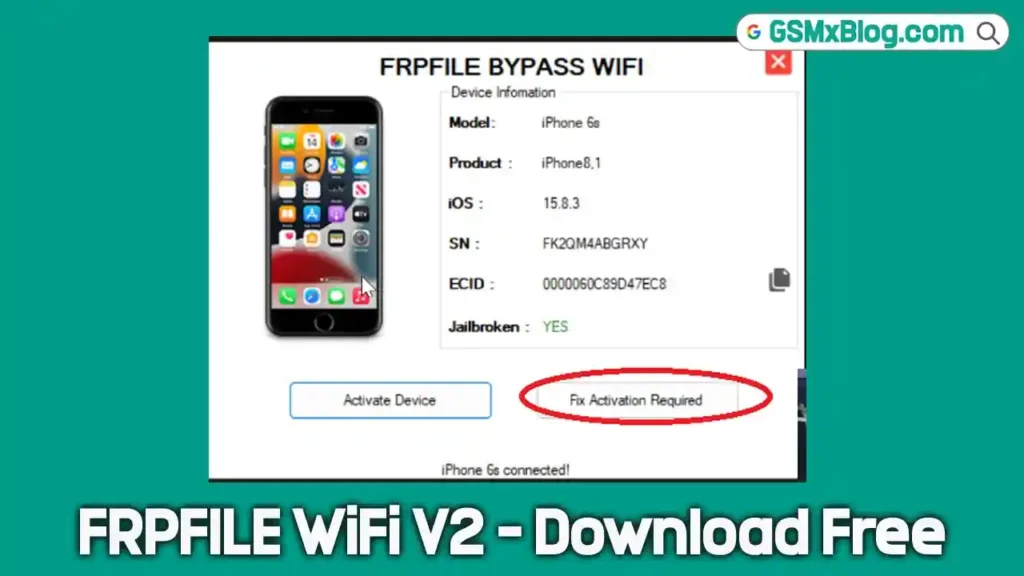
⚠️ Important: Make sure WiFi is connected on the device BEFORE pressing “Activate Device.” WiFi connection is required for iCloud notifications to work correctly.
- Open FRPFILE WiFi V2 Tool on your PC or Mac.
- Ensure your device is still connected via USB.
- Click “Activate Device” button.
- Wait for the activation process to complete.
- Device will display the Home Screen — bypass complete! ✅
Supported iPhone Models
| Model | Jailbreak Required |
|---|---|
| iPhone 5S | ✅ Checkra1n required |
| iPhone 6 & 6 Plus | ✅ Checkra1n required |
| iPhone SE (1st Gen) | No extra jailbreak needed |
| iPhone 6S & 6S Plus | No extra jailbreak needed |
| iPhone 7 & 7 Plus | No extra jailbreak needed |
| iPhone 8 & 8 Plus | No extra jailbreak needed |
| iPhone X | No extra jailbreak needed |
Supported iPad Models
| Model | Notes |
|---|---|
| iPad Mini 2 & 3 | Checkra1n jailbreak required |
| iPad Air 1 | Checkra1n jailbreak required |
| iPad Air 2 WiFi (A1566) | Full support |
| iPad Air 2 4G (A1567) | Full support |
| iPad Mini 4 WiFi (A1538) | Full support |
| iPad Mini 4 4G (A1550) | Full support |
| iPad 5 2017 WiFi (A1822) | Full support |
| iPad 5 2017 4G (A1823) | Full support |
| iPad 6 2018 WiFi (A1893) | Full support |
| iPad 6 2018 4G (A1954) | Full support |
| iPad 7 2019 WiFi (A2197) | Full support |
| iPad 7 2019 4G (A2198 / A2200) | Full support |
| iPad Pro 9.7 WiFi (A1673) | Full support |
| iPad Pro 9.7 4G (A1674 / A1675) | Full support |
| iPad Pro 10.5 WiFi (A1701) | Full support |
| iPad Pro 10.5 4G (A1709 / A1852) | Full support |
| iPad Pro 12.9 1st Gen WiFi (A1584) | Full support |
| iPad Pro 12.9 1st Gen 4G (A1652) | Full support |
| iPad Pro 12.9 2nd Gen WiFi (A1670) | Full support |
| iPad Pro 12.9 2nd Gen 4G (A1671 / A1821) | Full support |
Supported iOS Versions
| iOS Range | Bypass Method |
|---|---|
| iOS 12.x – 14.x | Checkra1n + FRPFILE WiFi V2 |
| iOS 14.x – 18.x | iFrpfile / Winra1n / Palera1n + FRPFILE WiFi V2 |
⚠️ Warning
FRPFILE WiFi V2 Tool is intended for use by authorized mobile repair technicians and lawful device owners only. Using this tool on a device you do not own or do not have written authorization to service may violate Apple’s Terms of Service and local laws regarding unauthorized computer access. Always verify device ownership before performing any bypass operation. FRPFILE Team and this blog will cooperate fully with law enforcement when required. By downloading or using this tool, you accept full responsibility for lawful use.
Important Notes
🛡️ Virus Status: This tool was scanned before uploading — 100% safe to use. Always download from the official FRPFILE links above.
📌 Credit: Full credit goes to the FRPFILE Team (frpfile.com) and developer Dang Nguyen for creating and maintaining this free tool.
📶 WiFi Requirement: Always connect the device to WiFi before clicking “Activate Device.” WiFi connection during activation is required for push notifications and iCloud services to function correctly after bypass.
🔧 Jailbreak Required: FRPFILE WiFi V2 requires a jailbroken device to function. Use Checkra1n for iOS 12–14.x or iFrpfile / Winra1n / Palera1n for iOS 14.x–18.x.
💻 Platform: Separate tool versions are available for Windows and Mac — ensure you download the correct version for your operating system.
Why Use FRPFILE WiFi V2?
- ✅ Untethered bypass — no PC reconnect needed after each reboot
- ✅ No serial number change — device identity fully preserved
- ✅ 100% iCloud services working — including notifications
- ✅ No battery drain — clean, lightweight bypass implementation
- ✅ Supports iOS 12.x through iOS 18.x — broad version coverage
- ✅ Available for both Windows and Mac
- ✅ 100% Free — no paid license or dongle needed
- ✅ Trusted and used by Apple technicians worldwide
- ✅ Maintained by the reputable FRPFILE Team
Frequently Asked Questions (FAQs)
❓ Is FRPFILE WiFi V2 completely free? Yes — FRPFILE WiFi V2 is 100% free. No activation, license, or dongle required. Download directly from the official MediaFire or Google Drive links.
❓ What does “untethered” mean? An untethered bypass means the bypass remains active after the device reboots — you do not need to reconnect to a PC to reactivate it each time the phone is restarted.
❓ Why is WiFi required during activation? WiFi connection during the activation process is required for iCloud push notifications to function correctly after bypass. Without WiFi during activation, notifications may not work.
❓ Does it work on iPhone X? Yes — iPhone X is fully supported without requiring any additional jailbreak tool beyond the standard iFrpfile/Winra1n/Palera1n process.
❓ Does FRPFILE WiFi V2 support iOS 18? Yes — FRPFILE WiFi V2 supports iOS 12.x through iOS 18.x on all compatible Checkm8 devices.
❓ Which jailbreak tool should I use for iOS 12–14? For iOS 12–14.x, use Checkra1n jailbreak. For iOS 14.x–18.x, use iFrpfile, Winra1n, or Palera1n.
❓ What is the ZIP password for the download? The unzip password is: frpfile
❓ Is there a Mac version available? Yes — FRPFILE WiFi V2 has separate versions for both Windows and Mac. Both are included in the download folder.
Conclusion
The FRPFILE WiFi V2 Tool remains one of the most reliable and complete free iCloud Hello Screen bypass solutions available in 2026. Its combination of untethered operation, no serial number change, full iCloud services, working push notifications, zero battery drain, and broad support for iOS 12.x through iOS 18.x across iPhone 5S to iPhone X and 20+ iPad models makes it the go-to choice for technicians working with Checkm8-compatible Apple devices.
Whether you’re servicing an iPhone 6S, an iPhone X, or an iPad Pro — download FRPFILE WiFi V2 now using the official links above and perform one of the cleanest untethered bypass results available for these device generations! 🚀
Have you used FRPFILE WiFi V2 Tool before? Share your experience in the comments below!
Related Posts
- MR GSM PRO v9.1.0.0 (Latest Version)
- OTAKO SOFT TOOL V2.0 (Latest Version)
- Android Root Tool (ART) V4.0.1.0 (Latest Version)
- DFT PRO Tool V7.0.0 (Latest Version)