DeepSmartTool v0.41 Free Download – Qualcomm, MTK & Android Flash Tool
If you work in a mobile repair shop and regularly deal with hard-bricked Qualcomm phones, you know how frustrating it is when standard tools simply cannot reach the device. Most flashing tools work at the Android OS level — but when a phone refuses to boot at all, you need something that goes much deeper. That is exactly what DeepSmartTool (DST) was built for.
DeepSmartTool v0.41 is a professional-grade, free Android servicing tool that operates at the hardware level using Qualcomm EDL (Emergency Download Mode). It also includes modules for MediaTek, Android Fastboot, and Unpack operations — making it one of the most versatile free tools available in 2026 for GSM technicians.
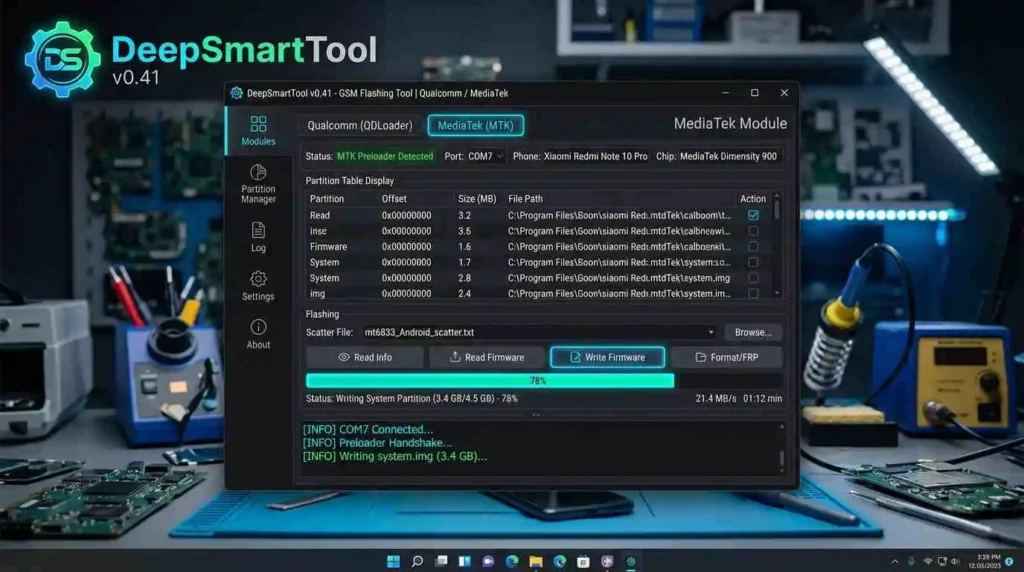
What Is DeepSmartTool (DST)?
DeepSmartTool, commonly known as DST, is a Windows-based Android repair and firmware flashing utility developed by the DeepSmartTool Team. Unlike tools that depend on the phone’s bootloader being accessible, DST communicates with the phone through EDL mode (Qualcomm HS-USB QDLoader 9008) — a low-level hardware recovery mode built directly into Qualcomm chipsets.
This means DST can recover phones that are completely dead, stuck on a black screen, or unable to boot — situations where tools like QFIL or MiFlash often fail. In v0.41, stability has been further improved with several bug fixes and expanded model support.
Full Feature Breakdown
🔧 Home / General Tools
These are quick-access utilities available on the main screen:
- Install Qualcomm USB Driver (one-click)
- Install Android ADB Driver
- Open Device Manager
- Repair USB 3.0 Compatibility Issues
- ROM Library Link
- Phone Info Lookup
📱 Qualcomm Module — Core Functions
This is the most powerful section of DST, designed for deep Qualcomm device repair:
- Read Partition Table — view all existing partitions on the device storage
- Read / Write / Erase Partition — full partition-level control
- Factory Reset — wipe user data even on a non-booting phone
- Remove FRP — bypass Factory Reset Protection at hardware level
- Repair GPT / Erase GPT — fix or rebuild the GUID Partition Table
- Reboot To — reboot the device into any target mode
- Set Boot Partition — useful for A/B partition devices
- Backup Security Partition — protect EFS / NV data before repair
- Generate OCDT — generate the Online Carrier Data Table
- Retrieve Factory IMEI — read the original IMEI from hardware
- View UFS Storage Detail — inspect storage type and specs
- Remove Alarm ID — remove regional alarm identifiers
- Hot Plug Support — detect device after connection without restart
- Skip User Data / Security Partition — flash without touching personal data or EFS
🛠️ MediaTek (MTK) Module
- Read / Erase Partition Table
- Write Firmware to MTK device
- Skip Sending DA (Download Agent)
- Generate Scatter File automatically
- Set GPT A Partition
📦 Unpack Module
- Analyze firmware packages
- Read and extract individual partitions
- Full firmware unpack support for advanced users
⚡ Android Flash Module
- Read Partition Table via Fastboot
- Erase / Write Firmware via Fastboot
- Flash Recovery Package (dedicated Xiaomi support)
- Open Command Prompt for manual ADB/Fastboot commands
- Skip User Data / Security Partition during flash
⚙️ Settings Module
- Set custom User Data Partition path
- Configure Security Partition path
- Add Custom Partition entries
- Set Readback Save Folder for backups
Download DeepSmartTool v0.41 Free
- File Name: DeepSmartToolVer0.4.1
- Version: v0.4.1
- File Size: 8 MB
Requirements Before You Start
Before downloading and using DeepSmartTool v0.41, make sure the following are in order:
- Windows PC — Windows 10 or 11 (64-bit strongly recommended)
- Qualcomm USB Driver — Install before connecting your device (built into DST)
- Correct EDL Firmware — Must match your exact phone model (includes
rawprogram0.xmland patch files) - Original USB Cable — Use a good quality, data-capable USB cable
- Backup Your Data — Back up EFS / NV partitions before any repair operation
How to Use DeepSmartTool v0.41 – Step-by-Step
Step 1 — Install Drivers
Open DST and click “Install Qualcomm Driver” from the Home tab. Once installed, restart your PC.
Step 2 — Prepare Your Firmware
Download the correct EDL firmware package for your phone model. The package should contain rawprogram0.xml and related partition files. Do not use firmware from unknown sources.
Step 3 — Launch DST as Administrator
Right-click on DeepSmartTool.exe and select “Run as Administrator”. This ensures full hardware-level access.
Step 4 — Enter EDL Mode on Your Phone
Turn off your phone completely. Then press and hold both Volume Up + Volume Down simultaneously and connect the USB cable to your PC while holding the buttons. The phone should appear in Device Manager as “Qualcomm HS-USB QDLoader 9008”.
Step 5 — Open Qualcomm Module
Navigate to the Qualcomm tab in DST. Select your chipset from the first dropdown menu. Then load your rawprogram0.xml file by selecting it from the second dropdown — this will populate all available partitions.
Step 6 — Select Partitions (Optional)
Before flashing, review the partition list. If you want to preserve user data or the EFS/security partition, uncheck those partitions before proceeding.
Step 7 — Click “Write Partition”
Once everything is set, click Write Partition to begin the flashing process. DST will automatically detect and flash the device. Do not disconnect the USB cable or close the tool during this process.
Step 8 — Reboot & Verify
After the process completes and a success message appears, click Reboot To → Normal or manually remove and reinsert the battery. Power on your phone and verify it boots correctly.
Supported Brands & Chipsets
Qualcomm Snapdragon Devices
DST has verified support for a wide range of Qualcomm Snapdragon chipsets:
- Xiaomi / Redmi — Snapdragon 439, 632, 636, 660, 665, 675, 710, 730, 835, 845, 855, 865, 888 series
- OnePlus — OnePlus 1, 3, 3T, 5, 5T, 6, 6T, Nord N200
- Oppo / Realme / OnePlus (Oplus Series) — Snapdragon 670, 835, 845, 855, 888, 8 Gen 1, 8 Gen 2, 8 Gen 3, SM7550
- Black Shark — Black Shark 1, 2, 2 Pro, 3, 3S, 4S, 5, HELO
- Other Qualcomm brands — Supported if correct firmware and EDL loaders are available
MediaTek (MTK) Devices
The MTK module in v0.41 supports basic partition operations, firmware writing, scatter file generation, and FRP bypass on MediaTek chipsets.
Is DeepSmartTool Safe to Use?
Yes — when used correctly, DST is considered safe by the mobile technician community. However, keep these important warnings in mind:
⚠️ Always back up your EFS / NV partition before any Qualcomm repair operation. Losing EFS data can permanently remove the phone’s IMEI, causing it to lose network connectivity.
⚠️ Use the correct firmware for your exact model. Flashing incompatible firmware can cause permanent damage. Always verify your phone’s model number and chipset before loading any firmware file.
⚠️ Do not interrupt the flashing process. A mid-flash USB disconnection or power failure can hard-brick the device.
✅ DST is free and officially distributed. Avoid downloading from unofficial or third-party sources, as modified versions may contain malware.
Developer Credits
- Main Developer: DeepSmartTool Team
- UI Framework: AntdUI
- Special Thanks: FlasherCore, Jackson
- Community Contributors: All testers and supporters acknowledged by the developer
Related Tools You May Like
- Titan Tool v7.0.0 – Free Download
- Android Multi Tool (AMT) – Latest Version
- AMF Tool v1.2.5 – Free Download
- Qualcomm USB Driver – Free Download
Frequently Asked Questions (FAQ)
Is DeepSmartTool completely free?
A: Yes. DST v0.41 is an official public release from the developer team. No credits, dongle, or paid login is required for core operations.
Does DST support Qualcomm phones?
A: Yes. Qualcomm EDL support is the core feature of this tool. It supports a wide range of Snapdragon chipsets from SD439 up to SD8 Gen 3.
Does DST support MediaTek (MTK) phones?
Yes, but MediaTek support in DST is more limited compared to Qualcomm. For heavy MTK work, tools like SP Flash Tool or MTK Client may be more suitable.
My phone is not detected in EDL mode. What should I do?
First, ensure the Qualcomm USB Driver is properly installed. Try a different USB port (USB 2.0 preferred over USB 3.0). Also verify your phone is entering EDL mode correctly — the Device Manager should show “Qualcomm HS-USB QDLoader 9008”
Conclusion
DeepSmartTool v0.41 is one of the best free Android repair tools for GSM technicians in 2026. It works in Qualcomm EDL mode — reaching completely dead phones that standard tools cannot recover. With MediaTek support, Fastboot module, and built-in driver installation, it covers almost every repair scenario you face daily. It is completely free, requires no dongle or credits, and v0.41 is the most stable release yet. If you need one reliable tool in your workshop — DST is it. Download it and keep it ready.