G Finder v2.0.1 (Latest Version) Download – Tempered Glass Compatibility Scanner
If you work in a mobile repair shop and regularly spend time guessing which tempered glass fits which phone, G Finder v2.0.1 is exactly the kind of tool you need on your Windows PC. This free offline software lets you search any phone model and instantly see all compatible tempered glass models from its built-in database — no internet connection, no login, and no account registration required.
In this guide, you will find the complete feature breakdown, database details, installation steps, usage guide, and download link for G Finder v2.0.1 — everything you need before installing it on your shop PC.
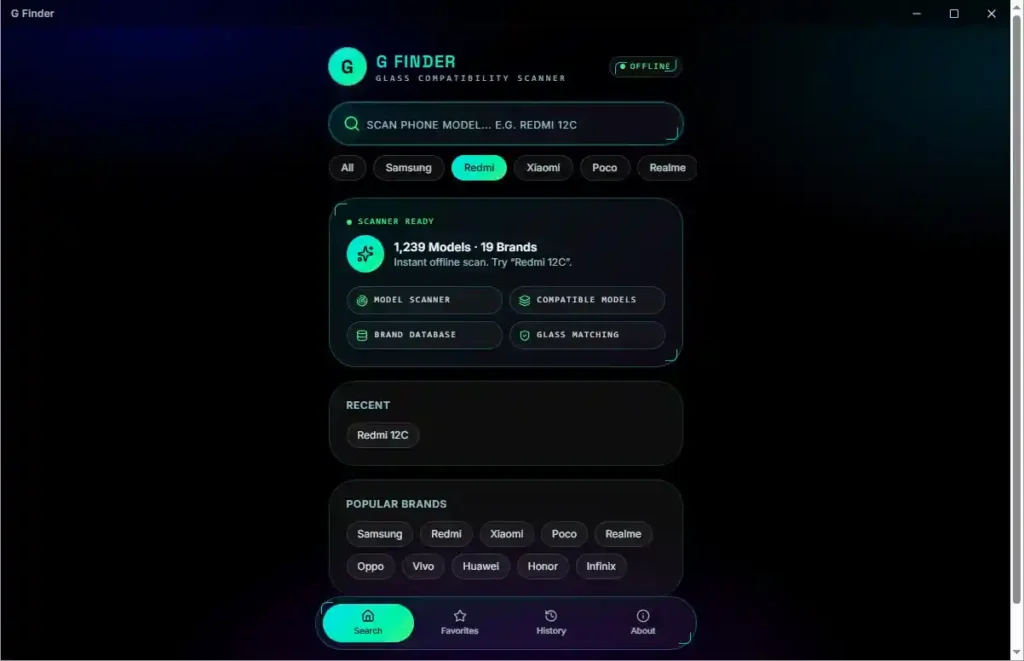
What Is G Finder?
G Finder is a free Windows-based offline glass compatibility scanner designed specifically for mobile phone shops and repair technicians. Developed by Omh Min Htet from Yuzana Mobile (Yangon), the software solves a very common problem in mobile shops — figuring out which tempered glass from a different model will fit the phone in front of you.
Instead of opening multiple glass boxes and testing one by one, you type the model name into G Finder and the software immediately shows a full list of compatible models from its local database. Since everything is stored as local JSON files on the PC, the search works instantly without any server connection.
G Finder v2.0.1 Database Overview
| Detail | Info |
|---|---|
| Total Phone Models | 1,239 |
| Supported Brands | 19 |
| Database Type | Offline (Local JSON Files) |
| Internet Required | No |
| Account Required | No |
Key Features of G Finder v2.0.1
🔍 Offline Glass Compatibility Search
- Search any phone model and get instant compatible glass results
- All data stored locally — no internet connection needed at any point
- Search results show compatibility level, total compatible models, and compatible brands
- Database stored as local JSON files — can be updated later without reinstalling
📱 Quick Brand Filters
- One-click brand filter buttons on the home screen
- Available quick filters: All, Samsung, Redmi, Xiaomi, Poco, Realme
- Saves time when your shop mostly handles one brand
🗂️ Four Main Sections
- Model Scanner — main search function
- Compatible Models — full list of matching phone models
- Brand Database — browse by brand
- Glass Matching — glass compatibility overview
⏱️ Time-Saving Features
- Recent Searches — quickly re-open previously searched models
- Favorites — save frequently searched models for one-click access
- History — view all previous searches in one place
ℹ️ About Page
- Shows live database stats: total models and brand count
- Displays developer credits and software version
- Explains the local JSON database structure
Supported Brands in G Finder v2.0.1
G Finder v2.0.1 currently supports 19 mobile brands inside its offline database:
- Samsung
- Redmi
- Xiaomi
- Poco
- Realme
- Oppo
- Vivo
- Huawei
- Honor
- Infinix
- Tecno
- itel
- Nokia
- Motorola
- OnePlus
- Google Pixel
- Nothing
- iPhone
- ASUS
G Finder v2.0.1 Setup Download
- File Name: GFinder-Setup-2.0.1.rar
- Version: v2.0.1 (Latest)
- File Size: 98.5 MB
- Developer: Omh Min Htet
- Platform: Windows 10 / 11 (64-bit)
- License: Free
- Internet Required: No
How to Install G Finder v2.0.1
- Download the RAR file using one of the links above.
- Extract the archive — no password is required.
- Open the extracted folder and locate GFinder-Setup-2.0.1.exe.
- Right-click the file and select Run as Administrator.
- If Windows asks for permission, click Yes.
- The installer window will open — select whether to install for all users or your account only and click Next.
- Choose the installation folder — leave the default path or click Browse to change it.
- Click Install and wait for the progress bar to finish.
- When installation completes, keep Run G Finder checked and click Finish.
- The program opens automatically. A desktop shortcut is also created during setup.
How to Use G Finder v2.0.1
▶️ Search a Phone Model for Compatible Glass
- Open G Finder from the desktop shortcut.
- The Offline status appears at the top — confirming no internet is needed.
- Type the phone model name into the search box at the top of the screen.
- Results appear almost instantly — no loading delay.
- The software displays:
- Compatibility Level (e.g. 98%)
- Total Compatible Models
- Compatible Brands count
▶️ Read the Compatible Models List
- Scroll down below the main result to reach the Compatible Models section.
- Every matching model appears as a separate button — easy to read and scan quickly.
- The list covers models across multiple brands that use the same tempered glass size.
▶️ Use Brand Filters
- On the home screen, click any quick filter button: All, Samsung, Redmi, Xiaomi, Poco, or Realme.
- The software immediately filters results for that brand.
- Use this when your shop mostly works with one brand to save search time.
▶️ Use Recent Searches
- After searching a model, it appears in the Recent Searches section on the home screen.
- Click any recent model to instantly reload its results without typing again.
- Useful for shops that receive the same phone models repeatedly.
▶️ Save Models to Favorites
- Open the Favorites tab at the bottom of the software.
- Save any model you search frequently.
- Re-access saved models in one click without searching again.
What You See After Searching Redmi 12C (Test Result)
To confirm the software actually works offline, the GSMxBlog team disconnected the internet connection before searching.
The result for Redmi 12C appeared immediately:
- Compatibility Level: 98%
- Compatible Models: 62
- Compatible Brands: 13
The compatible model list included phones from Samsung, Redmi, Poco, Realme, Oppo, Vivo, Huawei, Honor, Infinix, Tecno, itel, Nokia, and Motorola — all displayed as individual buttons for easy reading.
System Requirements
| Component | Requirement |
|---|---|
| Operating System | Windows 10 / Windows 11 |
| Architecture | 64-bit |
| Internet Connection | Not required |
| Account / Login | Not required |
| Additional Drivers | Not required |
| PC Restart After Install | Not required |
⚠️ Warning
G Finder is a glass compatibility reference tool. Results show models that are likely to share the same tempered glass size based on the offline database. Always physically verify the fit before selling or applying a glass on a customer’s device.
Important Notes
🛡️ Virus Status: The installer may trigger a Windows SmartScreen warning because the application is not yet widely recognized. This is a standard false positive for independently distributed free tools. Download from the official links above, then proceed by clicking More Info → Run Anyway.
📌 Credit: Full credit goes to the original developer Omh Min Htet from Yuzana Mobile (Yangon) for building and releasing G Finder as a free tool for the mobile repair community.
🗄️ Database Updates: The offline database is stored as local JSON files inside the software folder. This means future database updates can be applied by replacing those files — no need to reinstall the entire program.
Frequently Asked Questions (FAQs)
❓ Is G Finder free to use? Yes. G Finder v2.0.1 is completely free. There is no activation, no login screen, and no account required to use any feature.
❓ Does G Finder need an internet connection? No. The software works entirely offline. The database is stored as local JSON files on your PC, so searches work instantly without any server connection.
❓ How many phone models are in the database? The current database contains 1,239 phone models across 19 brands.
❓ Can the database be updated later? Yes. According to the developer, future database updates can be done by replacing the local JSON files inside the software folder — no reinstallation needed.
❓ What does the compatibility percentage mean? It indicates how closely the phone model matches the tempered glass size of the compatible models listed. A 98% compatibility level means the glass dimensions are nearly identical.
❓ Is there a password for the RAR archive? No. The GFinder-Setup-2.0.1.rar archive does not have a password. Extract it directly and run the installer.
❓ Which Windows versions does G Finder support? G Finder supports Windows 10 and Windows 11 (64-bit). No additional drivers or Microsoft account are needed.
Conclusion
G Finder v2.0.1 is one of the most practical free tools you can add to a mobile repair shop PC in 2026. With a database of 1,239 phone models across 19 brands, fully offline operation, instant search results, and features like Recent Searches and Favorites — it covers the one job it was built for and does it well.
No guessing, no opened glass boxes, no wasted time. You type the model, the software shows the compatible glass options, and you move on to the next customer. If your daily work includes selling or fitting tempered glass, download G Finder v2.0.1 from the links above and start using it today.
Tested it on your own devices? Share your results in the comments below!
Related Posts
- HSD AIO Tool Beta v1.02 (Latest Version)
- DFT PRO Tool (Latest Version)
- Ghost Auth Tool (Latest Version)