Download AB A5 & A6 Bypass Tool 2.0.3 By Aamir Buneri – Untethered iCloud Bypass for Old Apple Devices
Hello GSM friends! If you regularly work on older Apple devices and deal with iCloud activation lock issues, you already know how frustrating it can be to find a tool that actually works without requiring a tether every time the device restarts. Today we are covering AB A5 & A6 Bypass Tool 2.0.3 by Aamir Buneri, a Windows-based iCloud bypass utility designed specifically for A5 and A6 chip Apple devices. Read through this complete guide to understand what this tool does, which devices it supports, and what changed in this latest version before you download it.
What Is AB A5 & A6 Bypass Tool By Aamir Buneri?
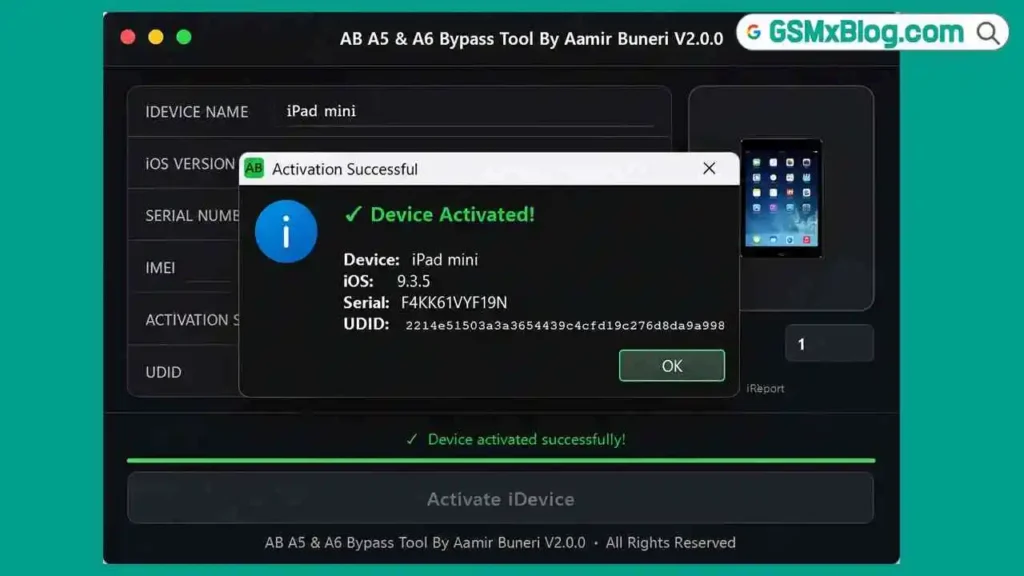
AB A5 & A6 Bypass Tool is a free Windows PC utility developed by Aamir Buneri — “AB” in the tool’s name stands for the developer’s initials. It targets older Apple devices running on A5 and A6 chipsets and delivers an untethered iCloud activation lock bypass, meaning the device stays bypassed even after a full restart. No reconnecting to a computer every time the phone boots up.
The tool requires activation before you can perform any operation. This is a developer-side activation step built into the software itself — without it, the bypass functions will not run. This is worth knowing before you install it on your repair PC.
Version 2.0.3 is a focused update over V2.0, bringing bug fixes and stability improvements rather than new features. If you are still running V2.0 and working with A6 devices in particular, upgrading to 2.0.3 is worth it.
Key Features of AB A5 & A6 Bypass Tool 2.0.3
🔓 iCloud Bypass
- Untethered iCloud activation lock bypass
- One-click bypass process
- Supports both A5 and A6 Apple chipsets
- Stable bypass that survives device restarts
💻 Platform & Usability
- Windows PC tool
- Simple, easy-to-use interface
- Improved UI design in version 2.0.3
- Faster overall software performance
🛠️ Stability & Bug Fixes
- Fixed A6 activation issue on certain devices
- Fixed A6 relock problem after device restart
- Better stability during the activation process
- Multiple reported bugs resolved
Tool Information
| Detail | Info |
|---|---|
| File Name | AB A5 & A6_BypassTool 2.0.3 By Aamir Buneri.zip |
| File Size | 117 MB |
| Version | 2.0.3 |
| Developer | Aamir Buneri |
| Platform | Windows PC |
| Chipset Support | Apple A5, Apple A6 |
Download AB A5 & A6 Bypass Tool 2.0.3
- File Name: AB A5 & A6_Bypass Tool 2.0.3 By Aamir Buneri.zip
- File Size: 117 MB
- Version: 2.0.3
What’s New in Version 2.0.3
Version 2.0.3 is a targeted patch update that addresses real problems mobile technicians were running into, especially on A6 devices. Here is exactly what changed:
- Fixed A6 activation issue on some devices
- Fixed A6 relock issue after device restart
- Improved user interface design
- Improved overall software speed
- Better stability during the activation process
- Fixed multiple known bugs
Supported Devices
A6 Chip Devices
Supported iOS Versions: iOS 10.3.3, iOS 10.3.4
Supported Devices:
- iPhone 5
- iPhone 5c
- iPad (4th Generation)
A5 Chip Devices
Supported iOS Versions: iOS 9.3.6, iOS 9.3.5, iOS 8.4.1
Supported iPhone:
- iPhone 4S
Supported iPad:
- iPad 2
- iPad mini (1st Generation)
- iPad (3rd Generation)
Supported iPod:
- iPod touch (5th Generation)
Supported Apple TV:
- Apple TV (3rd Generation)
- Apple TV (3rd Generation Rev A)
How to Use AB A5 & A6 Bypass Tool on Windows PC
Using this GSM tool is straightforward. Follow these steps carefully to complete the iCloud bypass on your device:
- Download the ZIP package using the download link below.
- Extract the downloaded file using WinRAR or 7-Zip.
- Open the tool and wait for it to load.
- Connect your Apple device to your Windows PC using a USB cable.
- Click “Check Device” to detect your device.
- Copy the UDID shown in the tool interface.
- Send the UDID for activation (required before bypass will work).
- Once activation is confirmed, click “Bypass.”
- Wait until the process finishes — do not disconnect your device.
- The device will complete the bypass. Restart to confirm the untethered bypass is holding.
✅ Make sure you have the correct Apple device USB driver installed before connecting. You can find USB driver downloads in our USB Driver section.
Understanding the Activation Requirement
One thing worth being clear about — AB A5 & A6 Bypass Tool requires activation before any bypass operation will run. This is intentional and built in by the developer. The tool will not skip this step. You need to complete the UDID submission and receive activation confirmation before the bypass button becomes functional.
This is a standard approach in many iCloud bypass and FRP bypass tools. If you are used to working with similar GSM tools, this will be familiar. If you are new to it, just follow the steps in order and do not try to click Bypass before the activation step is done.
System Requirements
| Component | Requirement |
|---|---|
| OS | Windows 7 / 10 / 11 (PC) |
| Processor | Intel or AMD Dual-Core |
| RAM | 2 GB minimum |
| Storage | Sufficient free space for 117 MB zip + extraction |
| USB Port | USB 2.0 or 3.0 |
| Internet | Required for activation |
⚠️ Warning
Always back up any recoverable data before running a bypass operation. Results can vary depending on the specific device model and iOS version. Test on a spare device first before relying on this tool in a live repair workflow.
Important Notes
🛡️ Antivirus Alert: Like most bypass and flash tools, AB Bypass Tool may be flagged by antivirus software as a false positive. This is common behavior for Windows tools that connect to external servers for activation. Use it on a dedicated repair PC and disable antivirus temporarily during launch if needed.
📌 Credit: Full credit goes to Aamir Buneri for developing and maintaining this free iCloud bypass utility for old Apple devices.
Frequently Asked Questions (FAQs)
❓ What does “untethered bypass” mean? Untethered means the device stays activated even after you restart it. You do not need to reconnect it to a computer every time it boots up. This is what makes AB Bypass Tool useful for day-to-day device use after the bypass.
❓ Does AB Bypass Tool support newer iPhones? No. This tool is designed specifically for older A5 and A6 chip devices. Newer iPhones and iPads are not supported.
❓ Is activation required before bypass? Yes. The tool requires you to submit the device UDID and complete activation before the bypass operation will run. This is a mandatory step built into the software.
❓ Which iOS versions does it support? For AB A5 & A6 devices: iOS 10.3.3 and iOS 10.3.4. For A5 devices: iOS 9.3.6, iOS 9.3.5, and iOS 8.4.1.
❓ Why is there a V2.0 and a V2.0.3 download? V2.0.3 is the latest and recommended version. It fixes the A6 activation issue and the A6 relock problem after restart. V2.0 is the older release. Always download V2.0.3 for better stability.
❓ Will antivirus flag this tool? It likely will. Bypass tools that communicate with activation servers are commonly flagged as false positives by antivirus software. Use it on a dedicated repair workstation and disable real-time scanning during launch if necessary.
Related Posts
- Download Venom Auth Tool Free Version – Xiaomi & POCO Auth Tool
- Download UnlockTool Latest Version Setup File
- Flash Tools – All GSM Tool Downloads
Conclusion
AB A5 & A6 Bypass Tool 2.0.3 by Aamir Buneri is a practical iCloud bypass solution for mobile technicians who still handle older Apple A5 and A6 devices. The untethered bypass support is the biggest advantage — once you complete the process, the device stays bypassed through restarts without needing to be reconnected. Version 2.0.3 specifically fixes the A6 activation and relock issues that earlier users were running into, making it a more reliable option for iPhone 5, iPhone 5c, and iPad 4th generation repairs.
The activation requirement before bypass may take a little getting used to, but once you go through it once, the workflow is quick. If your repair bench still sees iPhone 4S, iPad 2, or similar legacy Apple devices, download AB A5 & A6 Bypass Tool 2.0.3 and add it to your GSM tool collection.
Have you used this tool on any A5 or A6 devices? Share your experience in the comments — your feedback helps other technicians in the community!