LazyUnlocker v9.1 (Latest Version) Download 2026 – Vivo FRP & Unlock Tool
Are you looking for a safe, server-based unlock solution for Vivo Android devices that won’t risk dead-booting your phone the way many offline tools can? LazyUnlocker v9.1 is a professional Windows unlock utility specifically designed for Vivo FRP reset, format, and network unlock via online server methods — supporting both MediaTek (MTK) and Qualcomm Vivo chipsets without requiring risky ISP or hardware-level work.
Unlike traditional offline tools that can permanently damage newer Vivo firmware, LazyUnlocker performs all operations through a secure online server, making it a preferred choice for repair technicians handling Vivo devices. The setup is freely downloadable and the interface is clean and modern — credits are only consumed when performing actual device operations. This guide covers everything: features, file info, installation steps, usage tutorial, honest review, important warnings, FAQs, and the direct download link.
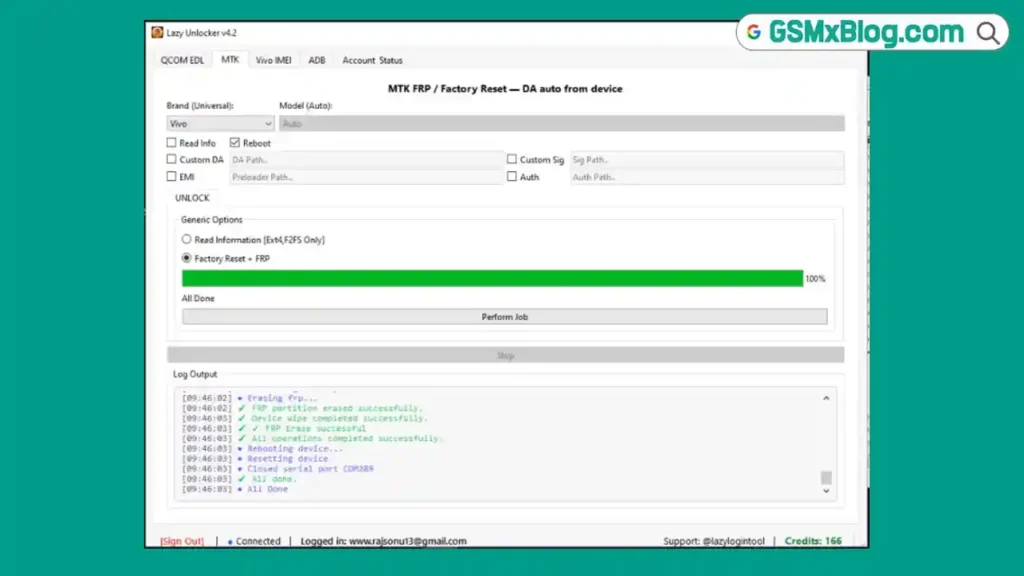
What Is LazyUnlocker?
LazyUnlocker is a server-based Windows unlock tool developed by the Lazy Unlock Tool team, primarily focused on Vivo Android devices. It performs FRP reset, formatting, and carrier unlock operations through an online server connection — meaning all processing happens remotely, keeping the client software lightweight and avoiding the risky direct firmware modifications that commonly dead-boot newer Vivo phones.
The tool is designed for professional mobile repair technicians and service centers who need a reliable, non-invasive way to service Vivo devices running on both MTK (MediaTek) and Qualcomm chipsets. Free registration is available, and the interface can be explored before purchasing credits.
🔑 Key advantage: LazyUnlocker uses a server-side method that avoids direct firmware modification — making it one of the safer choices for FRP and format operations on newer Vivo devices that are prone to dead-boot with offline tools.
Key Features of LazyUnlocker v9.1
🔓 Unlock & Service Functions
- Vivo FRP Reset (Factory Reset Protection Remove)
- Vivo Format / Hard Reset via Server
- Network / Carrier Unlock (Select Models)
- Fastboot to Preloader Mode Support
📱 Supported Chipsets
- MediaTek (MTK)
- Qualcomm
🔧 Connection Method
- USB Cable Connection
- Fastboot Mode Connection
- Server-Based Online Processing
- No ISP or Hardware Work Required
🖥️ Interface Features
- CPU Type Selection (MTK / Qualcomm)
- Vivo Device Category Navigation
- Clean Modern Windows Interface
- Online Account Login System
🔐 Account & Security
- Free Account Registration
- Email + Password Login
- Credits-Based Operation System
- Operational Logging (Device Model, Operation Type, Timestamp)
✨ Extra Features
- Free Download & Setup Access
- Lightweight Installation
- Windows PC Support
- Active Telegram Channel
- Official YouTube Tutorial Channel (MaiThil Boy)
- Official Website: home.lazyloader.in
Download LazyUnlocker v9.1
- Tool Name: LazyUnlocker
- Version: v9.1
- Developer: Lazy Unlock Tool Team
- File Name: LazyUnlocker_Setup
- File Size: 68 MB
- Platform: Windows
- File Type: Installer (EXE)
- ZIP Password: No Password
How to Install LazyUnlocker
- Download the setup file using the official link above.
- Open the downloaded
LazyUnlocker_Setupinstaller file. - Accept the License Agreement and Terms & Conditions.
- Complete the installation process normally.
- Disable your antivirus web filtering temporarily if the login screen does not load.
- Right-click the LazyUnlocker icon and select “Run as Administrator.”
- If you don’t have an account, register for free at frp.lazyloader.in/register — using your name, Gmail, and password.
- Enter your email and password to log in.
- Purchase credits from an authorized reseller before performing any device operations. ✅
⚠️ Important Note: After installation, the software automatically adds its EXE to the Windows Defender exclusion list. This is a known behavior — be aware that this means Defender will not scan this file in future checks. This does not confirm the tool is harmful, but users should be informed before installing.
How to Use LazyUnlocker v9.1
▶️ Vivo FRP Reset via Server (MTK / Qualcomm)
- Open LazyUnlocker as Administrator and log in.
- Boot your Vivo phone into Fastboot Mode (Power + Volume Down).
- Connect the phone to PC via USB cable.
- In the tool, select the CPU type — MTK or Qualcomm depending on your device chipset.
- Select the Vivo device category.
- Choose Fastboot to Preloader option (for MTK devices).
- Select Format + FRP service.
- Confirm the credit deduction and execute.
- Wait for the server to process — the phone will reboot automatically.
- FRP is removed — set up the device as new. ✅
▶️ Vivo Format / Hard Reset
- Log in and connect the Vivo device in Fastboot Mode.
- Select the correct CPU type and Vivo category.
- Choose the Format operation.
- Confirm and execute — server processes the request remotely.
- Device reboots to factory state. ✅
▶️ Check Credit Balance
- Open LazyUnlocker and log in.
- Your current credit balance is shown in the dashboard.
- If balance shows “Insufficient credits (< 5)”, add credits from a reseller before proceeding. ✅
Honest Review & Real User Feedback
LazyUnlocker is gaining attention in the Vivo repair community — here is an honest breakdown based on real testing and user feedback:
✅ What Works Well
The official website is professionally designed, the download process is smooth, and installation completes without errors. The interface is clean, modern, and easy to navigate even for beginners. Many technicians have reported successful FRP and format operations on newer Vivo models without causing dead-boot — which is a real advantage over many offline alternatives.
⚠️ What to Know Before Buying
Credits are required for every operation. Vivo unlock typically costs around 190 credits, and resellers price credits at approximately ₹12 per credit — making one Vivo FRP unlock cost roughly ₹2,228. This is significantly more expensive than many other GSM tools. For high-volume Vivo repair shops, this may still be worthwhile. For occasional users, the cost per operation is high.
📋 Real Community Feedback
YouTube comments (particularly on MaiThil Boy channel videos) show a genuinely mixed reaction. Many users confirm successful unlocks and praise the method for keeping Vivo phones safe. However, other comments raise concerns about high credit prices, limited server operating hours, account balance issues, and the risk of server shutdown. Telegram channel activity is mostly admin posts and promotional screenshots rather than open user discussions.
Important Warning Before Buying Credits
⚠️ Critical Advice for Repair Shop Owners: Never maintain a large pre-loaded credit balance in this tool.
Because LazyUnlocker depends entirely on online servers, services may be discontinued or temporarily unavailable at any time. Some users also report that Vivo operations only function during limited server hours. If the service shuts down, any unused credits would be lost with no refund policy in place.
Best practice: Only purchase credits when you have a customer device already in hand and ready for servicing. Do not invest advance credits speculatively.
Advantages & Limitations
✅ Advantages
- Professional, clean website and smooth installation
- Server-based method is safer for newer Vivo devices than offline tools
- Supports both MTK and Qualcomm Vivo chipsets
- No ISP or hardware-level work required
- Free registration and interface exploration before buying credits
- Confirmed successful operations reported by multiple technicians
⚠️ Limitations
- Credits are expensive (~₹2,228 per Vivo FRP unlock)
- No free test operations available
- Software automatically adds itself to Windows Defender exclusion — users should be aware
- Online server dependency creates business continuity risk
- Limited public user discussion — most community channels are promotional only
- Server may have limited operating hours for some operations
- No flashing, PIN unlock, or password unlock support
Terms & Conditions Summary
LazyUnlocker is governed by official Terms & Conditions (last updated February 15, 2026). Key points every user should know:
- Intended Use: The tool is for servicing devices you legally own or are authorized to repair — not for accessing stolen or unauthorized devices.
- User Responsibility: You are solely responsible for verifying legal rights to service any device. The developers do not verify ownership.
- No Liability: The developers are not responsible for data loss, device damage, warranty voiding, or any legal consequences arising from use.
- No Warranty: The software is provided “AS IS” — no guarantee of successful unlocking on any specific device.
- Account Sharing: Sharing access accounts is strictly prohibited and may result in permanent suspension without refund.
- Logging: The tool logs device model, operation type, timestamp, and software version for abuse prevention — no personal user data stored on device is intentionally collected.
- Termination: Access may be terminated at any time without notice for violations or suspected misuse.
Full Terms: home.lazyloader.in
FAQs
Q1: Is LazyUnlocker free? The setup download and account registration are free. However, credits are required to perform actual device operations. Credits must be purchased from authorized resellers.
Q2: How much does one Vivo FRP unlock cost? Approximately 190 credits per operation. At the current reseller rate of around ₹12 per credit, one unlock costs roughly ₹2,228.
Q3: Where do I register a free account? Register at frp.lazyloader.in/register — free with just a name, Gmail, and password.
Q4: Why did the software add itself to Windows Defender exclusion? This is a known behavior of the installer. It prevents Defender from flagging the tool during use. This is common with many GSM tools but users should be aware before installing.
Q5: Is this tool safe for new Vivo phones? Based on confirmed user reports, the server-based method is significantly safer for newer Vivo devices compared to offline EDL or ISP methods that risk dead-boot. However, no tool guarantees a 100% success rate on every model.
Q6: Can I get a refund if the server goes offline? No. According to the Terms & Conditions, no refunds are provided if access is terminated. This is why maintaining a large pre-loaded balance is not recommended.
Q7: Does LazyUnlocker support brands other than Vivo? Currently the tool is primarily focused on Vivo devices. Other brand support may be limited or unavailable.
Conclusion
LazyUnlocker v9.1 fills a specific and genuine need in the Vivo repair market — a server-based FRP and format solution that avoids the dead-boot risk associated with many offline tools on modern Vivo firmware. Its clean installation, modern interface, and confirmed successful operations make it a credible choice for professional Vivo repair technicians.
That said, the high per-operation credit cost, online server dependency, and auto-Defender-exclusion behavior mean it should be approached with caution. If you are a professional repair shop regularly handling Vivo devices, it may well justify the cost. If you are an occasional user, weigh the per-unlock expense carefully before committing.
Download the free setup using the official link above, register your free account, explore the interface at no cost — and only purchase credits when you have a device already confirmed and ready to service. 🚀
Have you used LazyUnlocker? Share your experience and results in the comments below!
Related Posts
- Download RDPowerPlus Tool V19.8 (Latest Version) Free 2026
- Download PulsarUnlock v1.8.1.4 (Latest Version) Free 2026
- Download DEROID Unbricker Tool Pro v1.0 (Latest Version)
- Qualcomm USB Driver (Latest Version)