Download UnlockToolPRO 18.12.2025 (Latest Version) Free
The UnlockToolPRO 18.12.2025 update has finally been released with powerful improvements for mobile technicians and advanced users. Launched on December 18, 2025, this version adds support for many new Oppo devices, introduces a new working method for Realme phones, and fixes connection issues on several Xiaomi, Poco, and BlackShark models. The tool is fast, stable, and easy to use, making it ideal for daily repair tasks. If you work with Android devices regularly, this update is highly recommended.
What is UnlockToolPRO?
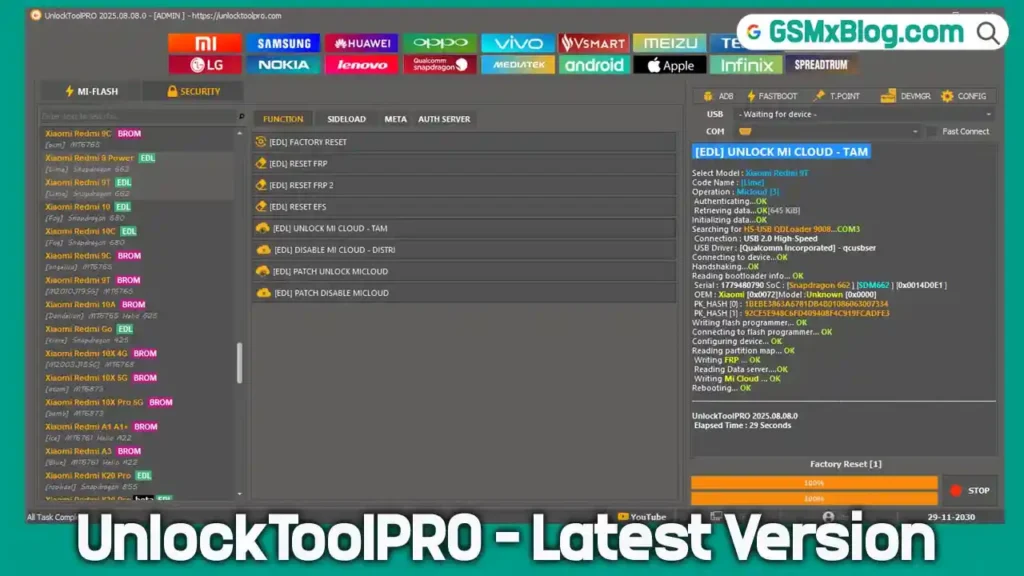
UnlockToolPRO is a professional Android servicing tool designed for unlocking, flashing, resetting, and repairing smartphones. It supports a wide range of brands, chipsets, and working modes, making it suitable for mobile repair shops and advanced users. With frequent updates and new exploits, UnlockToolPRO provides reliable solutions for FRP removal, screen lock reset, firmware flashing, and advanced repair operations.
Features of UnlockToolPRO
🔧 General Operations
- Read Device Information
- Factory Reset
- Format User Data
- Safe Format (Keep Data)
- Flash Firmware
- Root Device Access
🔓 Unlocking Features
- Erase FRP (Google Account)
- Reset Screen Lock (PIN, Pattern, Password)
- Unlock / Relock Bootloader
- Reset Mi Account / Mi Cloud
- Remove Huawei ID
- Remove Samsung Knox
- Remove Demo Mode
- Carrier / Network Unlock
🛠 Repair & Advanced Functions
- Repair IMEI
- Read & Write NVRAM / NVDATA
- Backup & Restore QCN
- Patch Certificate
- Auth Bypass (MediaTek)
- Fix DM-Verity
- Reset EFS
Supported Chipsets & Working Modes
Supported Chipsets
- MediaTek (MTK)
- Qualcomm
- Spreadtrum (SPD / Unisoc)
- Exynos
Supported Modes
- ADB
- Fastboot
- EDL (9008)
- BROM
- Preloader
- MTP
- Diag
UnlockToolPRO 18.12.2025 Download Links
File Name: UnlockToolPRO 18.12.2025.rar
Version: 18.12.2025
File Size: 163 MB
Password: UNLOCKTOOLPRO
How to Register a Free UnlockToolPRO Account
- Open the official registration page in your browser.
- Enter your Username, Email, and Password.
- No email verification is required—your account becomes active immediately.
- Open the UnlockToolPRO software on your computer.
- Log in using your credentials and connect your device to start using the tool.
UnlockToolPRO Update Changelog (18.12.2025)
Oppo (Qualcomm – New Exploit)
Supported Features: Factory Reset | Erase FRP | Flash
- Oppo A3 [CPH2669]
- Oppo A3X 4G [CPH2641]
- Oppo A5 2020 [CPH1931, CPH1933]
- Oppo A5 Pro 5G [CPH2711]
- Oppo A9 2020 [CPH1937]
- Oppo A52 [CPH2061]
- Oppo Reno 2 [CPH1907]
Realme (Unisoc – New Method)
- Realme C71 [RMX5303]
- Realme Narzo N53 [RMX3761]
- Realme Narzo N63 [RMX3939]
- Realme Note 50 [RMX3834]
Xiaomi (Qualcomm – New Loader 2025 Fixed)
Supported Features: Factory Reset | Erase FRP | ReadBack | Flash
BlackShark Series
- BlackShark 1, 2, 2 Pro
- BlackShark 3 / 3S / 3 Pro
- BlackShark 4 / 4 Pro / 4S / 4S Pro
- BlackShark 5 / 5 RS
Poco Series
- Poco F2 Pro
- Poco F3 / F3 Pro
- Poco F4 / F4 GT
- Poco F5
- Poco M2 Pro / M3
- Poco X3 Pro
Redmi K Series
- Redmi K20
- Redmi K30 (4G / 5G variants)
- Redmi K40 Pro / Pro+ / K40s
- Redmi K50 Gaming / K50 Ultra
- Redmi K60 Pro
- Redmi K70 / K70 Pro
Redmi Note Series
- Redmi Note 1S 4G
- Redmi Note 3 Pro / Special Edition
- Redmi Note 4X
- Redmi Note 5 / 5A / 5A Prime
- Redmi Note 6 Pro
- Redmi Note 7 / 7 Pro
- Redmi Note 8 / 8T
- Redmi Note 9 series
- Redmi Note 10 / 10 Pro
- Redmi Note 12 4G
Other Redmi Models
- Redmi 10C
- Redmi Pad SE
- Redmi S2
- Redmi Y3
Conclusion
The UnlockToolPRO 18.12.2025 latest version is a powerful and reliable update for anyone working with Oppo, Realme, Xiaomi, Poco, and BlackShark devices. With new exploits, fixed loaders, and extensive unlocking and repair features, it remains one of the best Android service tools available today. Download UnlockToolPRO now, update your setup, and start handling advanced mobile repair tasks faster and easier than ever. Stay tuned to gsmxblog.com for more tool updates and tutorials. 🚀