SK Tablet V19 (Latest Version) Free 2026 – Samsung Tablet Repair Tool
Looking for a dedicated Samsung tablet repair tool that handles FRP removal, KNOX bypass, factory reset, and firmware flashing across multiple Samsung tablet series? SK Tablet V19 is a Windows-based GSM tool built specifically for Samsung tablets, offering a wide set of servicing functions organized by device mode and tablet model.
One of the standout points of this flash tool is that it works offline after activation, needing an internet connection only during the login and activation stage. In this guide you’ll find the complete feature breakdown, installation steps, and download links.
What Is SK Tablet V19?
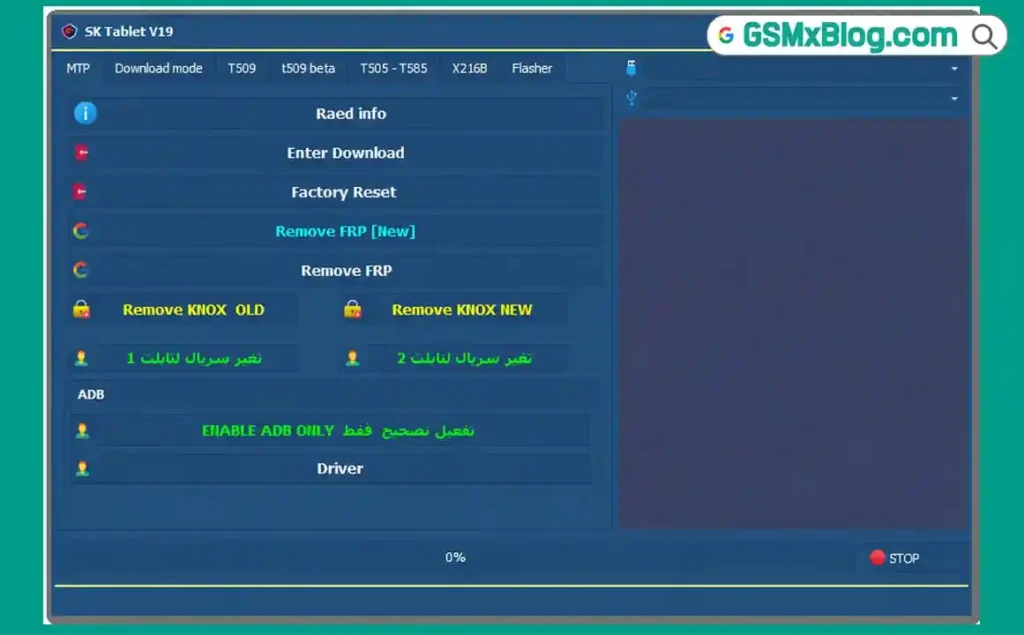
SK Tablet V19 is a Samsung-focused mobile repair tool built mainly for servicing tasks on supported Samsung tablet models. It covers functions across MTP mode, Download mode, and several specific tablet series including the T509, T505, T585, and X216B, alongside a dedicated flasher section for firmware work.
The tool is normally a paid program, but a free version with offline activation is available, which is one of the main reasons it has become popular among technicians who don’t want a tool that constantly depends on a server connection during daily use.
Key Features of SK Tablet V19
📱 MTP Mode Functions
- Read Info
- Enter Download Mode
- Factory Reset
- Remove FRP (New)
- Remove FRP
- Remove KNOX (Old)
- Remove KNOX (New)
- Change Serial Tablet 1
- Change Serial Tablet 2
- Enable ADB Only
- Driver Installation
📥 Download Mode Functions
- Read Info
- Fix Softbrick
🔧 T509 & T509 Beta Tab Functions
- Convert to BROM (New)
- Fix BROM + Handshake
- Format T509 (All/New)
- Flash Dump (New)
- Remove MDM
🔧 T505 & T585 Tab Functions
- Format T505
- Format T585
- Remove MDM
🔧 X216B Tab Functions
- Enter Download Mode
- Format X216B (A9+)
- Alliance Shield Bypass
- Format + FRP All (EDL)
- Format + Remove MDM (EDL)
- Fix A9+ X216B (EDL)
⚙️ Flasher Functions
- Firmware Flashing
- Partition Selection
- Region Selection
- Reboot After Flash
- Repartition
- Update Boot
- Reset EFS
Download SK Tablet V19
- File Name: SK_Tablet_Free_Setup.rar
- Version: V19
- File Size: 266 MB
- Platform: Windows PC
- Activation: Free Loader + 10-Day Key (Offline After Activation)
- Setup Password: gsmyogesh
How to Install SK Tablet V19
- Download the SK_Tablet_Free_Setup.rar file using any link above.
- Right-click the file and select Extract to “SK_Tablet_Free_Setup.”
- Open the extracted folder and right-click SK_Tablet_Free_Setup.exe.
- Select Run as Administrator and click Next on the setup screen.
- Enter the installation password: gsmyogesh
- Click Next, enable Create Desktop Icon, then click Install.
- Wait for the installation to finish and click Finish.
How to Activate and Use SK Tablet V19
▶️ Generate Hardware License
- Run SK Tablet Loader Login Free V19 as administrator.
- Click “Copy Hardware ID Key” once your Hardware ID appears.
- Click “Get Free Activation Key” to open the activation page automatically.
▶️ Generate and Apply Activation Key
- Scroll to “Generate 10 Days Free Activation Key” on the page.
- Paste your Hardware ID and click “Generate Key Now.”
- Copy the generated activation token.
- Return to the loader, paste the token into the license field, and click “Register License.”
- Wait until the status shows ACTIVE (10 Days Remaining).
▶️ Login to the Main Dashboard
- Enter any email address or text in the Account field.
- Paste the license token into the Password field.
- Click Login to open the main dashboard.
✅ Once logged in, the tool runs offline for normal servicing tasks — an internet connection is only required again when the activation period needs renewal.
▶️ Samsung Tablet FRP / KNOX Remove (MTP Mode)
- Connect the Samsung tablet in MTP mode.
- Click “Read Info” to confirm the device is detected.
- Select “Remove FRP” or “Remove KNOX” depending on the issue.
- Wait for the process to complete on screen.
▶️ Firmware Flashing (Flasher Section)
- Open the Flasher tab.
- Load the firmware file and select the correct partitions.
- Choose the region if required.
- Enable “Reboot After Flash” and start the flashing process.
Why Use SK Tablet V19 for Android Repair
This GSM tool stands out among Samsung servicing software because of its offline support after activation, which makes it convenient for mobile technicians who handle multiple tablet repairs daily without relying on a constant internet connection. The free download and 10-day activation key give users a real opportunity to test FRP bypass, KNOX removal, and flashing functions before deciding if it fits their regular workflow.
System Requirements
| Component | Requirement |
|---|---|
| OS | Windows PC (10/11 recommended) |
| Storage | At least 300 MB free space |
| USB Port | USB 2.0 or 3.0 |
| Internet | Required only for login and activation |
⚠️ Warning
Always confirm your exact tablet model (T509, T505, T585, X216B, etc.) before running any format, FRP remove, or EDL-based function. Flashing the wrong firmware or interrupting an EDL operation can cause the tablet to become unresponsive. Test on a non-critical device first.
Important Notes
🛡️ Loader Status: The loader included here is a custom-built C++ tool made without any packers, so it can be checked easily and does not trigger unnecessary security warnings. 📌 Credit: Full credit goes to the SK Team for developing the original SK Tablet software. 🔌 USB Driver: Make sure the correct Samsung USB Driver is installed before connecting any tablet for servicing.
Frequently Asked Questions (FAQs)
❓ Is SK Tablet V19 free to use? The original software is a paid program, but a free version with a 10-day activation key is available through the loader provided here.
❓ Does SK Tablet V19 need an internet connection all the time? No. Internet is required only during login and activation. After that, the tool can run offline for regular servicing tasks.
❓ Which Samsung tablets does this tool support? It supports models across MTP mode, Download mode, and specific tablet series including T509, T509 Beta, T505, T585, and X216B.
❓ What is the activation period for the free key? The free activation key lasts 10 days, after which a new key needs to be generated using the same Hardware ID process.
❓ Is the loader safe to run? The loader used here is custom-built in C++ without packers, making it easier to verify and less likely to trigger antivirus false flags compared to other loaders.
Conclusion
SK Tablet V19 brings together a solid set of Samsung tablet repair functions, from FRP bypass and KNOX removal to dedicated firmware flashing for specific tablet series, all in one Windows tool. Its offline capability after activation makes it a practical flash tool for any mobile technician who needs a reliable option without constant server dependency. If you regularly work on Samsung tablets, download SK Tablet V19 and test the free activation for yourself.
Have you tried SK Tablet V19 on your tablet repairs? Share your results in the comments below.