MH Unlocker Pro Qualcomm Module V1.8 (Latest Version) Download Free 2026
Looking for a lightweight Qualcomm EDL mode repair tool that handles FRP removal, factory reset, and Huawei-specific fixes on a small list of supported devices? MH Unlocker Pro Qualcomm Module V1.8 is a dedicated Windows-based service tool built for technicians who work with Qualcomm-based phones and need quick access to common unlock and repair functions without a bulky interface.
This module is part of the wider MH Unlocker Pro family, sitting alongside the SPD and MTK modules as the chipset-specific version for Qualcomm devices. Below you’ll find the complete feature list, installation steps, and download links for this flash tool.
What Is MH Unlocker Pro Qualcomm Module?
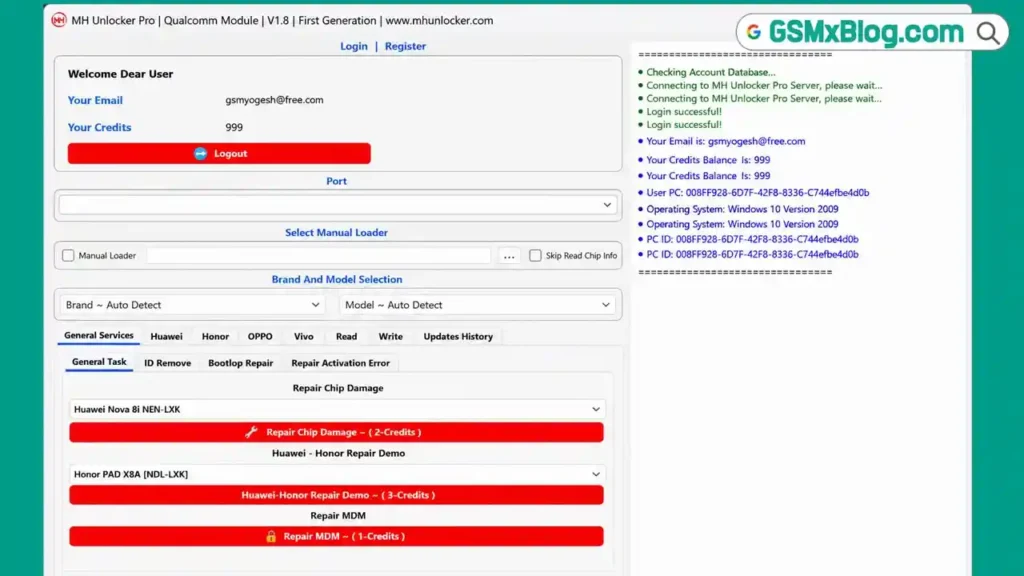
MH Unlocker Pro Qualcomm Module is a Windows-based mobile repair tool that works through Qualcomm EDL mode to perform FRP bypass, factory reset, and Huawei ID removal on supported devices. Account registration is free, and the software opens with a clean, simple interface that most technicians can navigate without a separate guide.
Most service operations inside the tool require an active credit balance once you connect a device, so the free account mainly gives you access to explore the menus before deciding whether to buy credits. The supported device list is currently smaller compared to some other GSM tools on the market, so it’s worth checking the changelog below before downloading.
Key Features of MH Unlocker Pro Qualcomm Module V1.8
🔧 Supported Functions
- Factory Reset + FRP Remove (Para Method)
- Factory Reset – Ext Method
- Remove FRP
- Huawei ID Remove
- Huawei MDM – PayJoy Remove
- Huawei Chip Damage Repair
- Huawei Bootloop ON/OFF Repair
- Repair Keypad / Pink-Blue-Green Display
- Read Security Backup
- Write Security Backup
🌐 Account & Server System
- Free account registration and login
- Online credit balance check before each operation
- HWID-based loader and activation key system
- Server connection required for credit verification
Download MH Unlocker Pro Qualcomm Module V1.8
- File Name: MH_Unlocker_QCOM_V1.8_Free.rar
- Version: V1.8
- File Size: 21 MB
- Platform: Windows PC (10/11)
- Activation: Free Account + Credit System
- RAR Password: gsmyogesh
How to Install MH Unlocker Pro Qualcomm Module V1.8
- Download the RAR package from any link above.
- Extract the file using password: gsmyogesh
- Open the extracted folder.
- Find Loader_MH_Unlocker_QCOM.exe, right-click it, and select Run as Administrator.
- Click “Copy Hardware ID Key” — your HWID is copied automatically.
- Click “GET FREE ACTIVATION KEY” to open the registration page in your browser.
- Paste the 16-character HWID into the key generator section and click “Generate Key Now.”
- Copy the new activation key.
- Return to the loader, paste the key into the activation field, and click “Register License.”
- Once activation turns green, click “Start Server.”
- Allow the certificate installation prompt if Windows asks for permission.
✅ The main software window opens automatically once the server starts and verifies the environment.
How to Use MH Unlocker Pro Qualcomm Module V1.8
▶️ Login and Credit Check
- Use any email and a password such as 12345678 to log in.
- Enable Save Login if you want the tool to remember your details.
- Click Login — the console will show your current credit balance.
▶️ FRP Remove / Factory Reset (EDL Mode)
- Select the device brand and exact model from the list.
- Open the relevant service category (General Services, Huawei, Honor, OPPO, Vivo).
- Click the function you need, such as Factory Reset – FRP Remove.
- Power off the device, boot it into EDL mode, and connect it via USB.
- The selected operation starts automatically once the device is detected.
▶️ Huawei ID / MDM Removal
- Go to the Huawei category.
- Choose Huawei ID Remove or Huawei MDM – PayJoy Remove depending on the issue.
- Connect the device in EDL mode and wait for the process to complete.
Understanding the Credit System
MH Unlocker Pro Qualcomm Module follows the same free-access, credit-required model as other MH Unlocker Pro modules:
- ✅ Free: Account creation, login, and browsing the interface
- ⚠️ Requires Credits: Every actual device operation once a phone is connected
- ⚠️ The supported model list is smaller than some competing GSM tools, so confirm your device is listed before buying credits
📌 If you regularly repair Qualcomm-based Huawei or OPPO devices that match the supported list, the credit cost may be worthwhile. For occasional testing, explore the free interface first.
System Requirements
| Component | Requirement |
|---|---|
| OS | Windows 10 / 11 (64-bit) |
| Processor | Intel / AMD Dual-Core or faster |
| RAM | 2 GB minimum |
| Storage | 100 MB free space |
| USB Port | USB 2.0 or 3.0 |
| Internet | Required for activation, login, and credit verification |
⚠️ Warning
Always read and back up the security data before performing any FRP remove, factory reset, or Huawei ID removal operation. Interrupting the process during EDL mode flashing can cause the device to malfunction. Test on non-critical devices first since the supported model list is limited.
Important Notes
🛡️ Loader Status: This tool uses an HWID-based loader with key activation, which some antivirus programs may flag as a false positive. Run it on a dedicated repair PC. 📌 Credit: Full credit goes to the MH Unlocker Pro Team for developing this Qualcomm module. 💳 Credit System: Account creation is free, but almost every device operation requires credits once connected. 🔌 USB Driver: Install the correct Qualcomm USB Driver before connecting any device in EDL mode.
Frequently Asked Questions (FAQs)
❓ Is MH Unlocker Pro Qualcomm Module V1.8 free? Account creation and login are free, but most device operations require credits once you connect a phone.
❓ What devices does this module support? The supported list is smaller than some other Qualcomm flash tools and is regularly updated — check the changelog below for the latest added models.
❓ What login details should I use? After activation, log in with any email address and a password like 12345678.
❓ Does this tool need EDL mode? Yes, all operations run through Qualcomm EDL mode, so the target device must be powered off and booted into EDL before connecting.
❓ Is the loader safe to use? Antivirus tools may flag the HWID-based loader as a false positive. Use it on a dedicated mobile repair PC and only disable antivirus briefly during activation.
Conclusion
MH Unlocker Pro Qualcomm Module V1.8 is a compact Android repair tool built specifically for Qualcomm EDL mode operations, offering FRP bypass, factory reset, and Huawei-specific fixes in one simple package. The free login lets you explore the interface before deciding if the credit pricing fits your daily repair work. If your device list matches the supported models, download MH Unlocker Pro Qualcomm Module V1.8 and test it on your next job.
Have you used MH Unlocker Pro Qualcomm Module V1.8? Share your results in the comments below.