FRPFILE A5-A6 Activator – Full iCloud Activation Without Arduino (Latest Version)
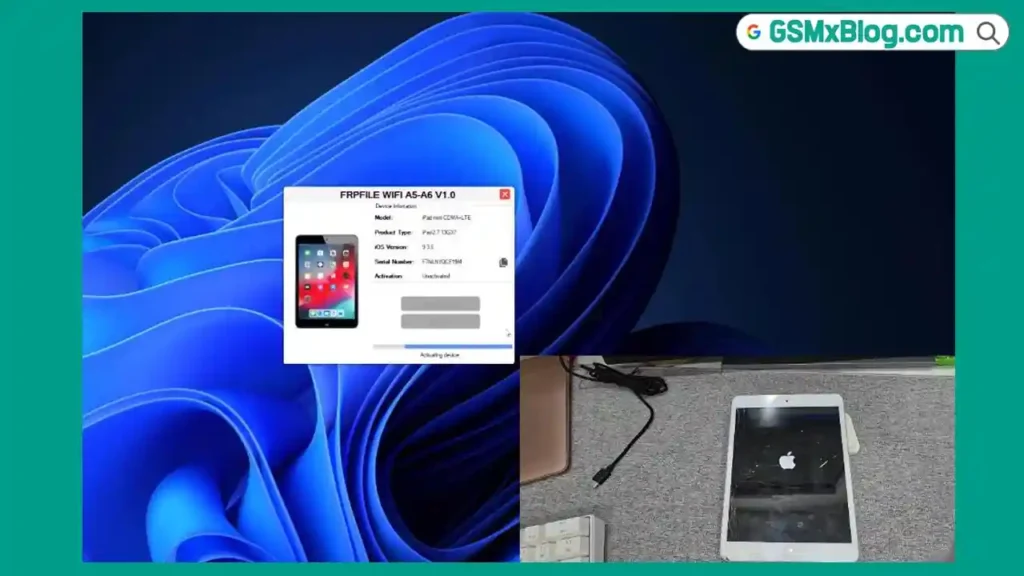
Do you have an old iPhone 4, iPhone 4S, iPhone 5, iPhone 5c, iPad 2, iPad 3, iPad 4, iPad mini 1, or iPod Touch 5 stuck on the iCloud activation screen with no way to proceed? FRPFILE A5-A6 Activator is a lightweight, portable Windows tool developed by the FRPFILE team that performs a full WiFi-based iCloud activation on Apple A5 and A6 chipset devices — completely without Arduino or any additional hardware.
Traditional iCloud bypass methods for these older devices required purchasing and connecting an Arduino microcontroller board, making the process complicated and costly. FRPFILE A5-A6 Activator eliminates that requirement entirely, offering a simple one-click software-only activation directly on Windows. The tool has been personally tested by the GSMxblog team on an iPhone 4S with confirmed results. This guide covers everything: features, supported devices, requirements, file info, step-by-step usage, important warnings, FAQs, and the official download link.
What Is FRPFILE A5-A6 Activator?
FRPFILE A5-A6 Activator is a portable Windows program developed by FRPFILE that provides WiFi-based iCloud activation for older Apple devices running on the A5 and A6 chipsets — specifically the iPhone 4, 4S, 5, 5c, iPad 2, 3, 4, iPad mini 1, and iPod Touch 5.
These devices are too old for modern iCloud bypass methods and were previously dependent on Arduino hardware tools to complete activation. FRPFILE A5-A6 Activator replaces that hardware requirement with a purely software-based Windows solution, making the process accessible to anyone with a PC and USB cable.
⚠️ Legal Notice: This tool is intended solely for lawful device owners and authorized repair technicians. Use on stolen or unauthorized devices is strictly prohibited. By downloading and using this tool, you confirm you are the legal owner of the target device or have explicit written authorization from the owner.
Key Features
- ✔ Full iCloud Activation via WiFi
- ✔ No Arduino or Hardware Tool Required
- ✔ No Additional Equipment Needed
- ✔ Fast & Simple One-Click Activation Process
- ✔ Stable and Reliable Service
- ✔ Beginner-Friendly Interface
- ✔ Portable Windows Program (No Installation Required)
- ✔ Supports Multiple A5 and A6 Apple Devices
- ✔ Officially Released by FRPFILE.com
- ✔ 100% Free to Download
Supported Devices
FRPFILE A5-A6 Activator supports the following Apple devices (A5 & A6 chipset only):
| Device | Chipset |
|---|---|
| iPhone 4 | A4 / Compatible |
| iPhone 4S | A5 |
| iPhone 5 | A6 |
| iPhone 5c | A6 |
| iPad 2 | A5 |
| iPad 3 | A5X |
| iPad 4 | A6X |
| iPad mini 1 | A5 |
| iPod Touch 5 | A5 |
Note: This tool works only on Windows computers. macOS is not supported.
Requirements Before Activation
Before starting the activation process, make sure all of the following conditions are met:
- ✅ The device has been fully restored using iTunes or Finder
- ✅ The device is connected to a working WiFi network
- ✅ The WiFi connection remains stable throughout the entire activation process
- ✅ A Windows PC is being used to run the tool
- ✅ USB cable is connected between the device and PC
⚠️ Critical: WiFi connection on the target device is mandatory. The activation process communicates through WiFi and will fail if the connection drops or is unavailable.
Download FRPFILE A5-A6 Activator
- Tool Name: FRPFILE A5-A6 Activator
- Version: Latest 2026
- Developer: FRPFILE Team
- Platform: Windows
- File Type: Portable (No Installation Required)
- RAR Password: No Password
How to Use FRPFILE A5-A6 Activator
▶️ Full iCloud WiFi Activation (Step by Step)
- Restore your A5/A6 device completely using iTunes (Windows) or Finder (Mac with another machine if needed).
- Power on the device — it will boot into the initial setup screen.
- Complete the setup steps until the WiFi connection screen appears.
- Connect the device to a working WiFi network — keep it connected throughout.
- Connect the device to your Windows PC via USB cable.
- Open FRPFILE A5-A6 Activator on your PC (run as Administrator if needed).
- Click the “Activate Device” button in the tool.
- Wait a few seconds while the tool processes the activation.
- ✅ Device Activated Successfully — setup continues past the iCloud screen.
✅ Tip: If the tool does not detect your device on the first attempt, disconnect and reconnect the USB cable and try again. Detection issues are occasionally reported and usually resolved with a simple reconnect.
Important Security Warning
⚠️ Read this before downloading or installing FRPFILE A5-A6 Activator:
Based on real testing experience, the following security precautions are strongly recommended:
- Use a secondary PC only — do not run this tool on your primary or work computer due to the antivirus warning observed during testing.
- Keep your antivirus enabled during use for background protection — but be aware it may block the tool from opening. If it does, temporarily disable the web filter (not the full antivirus) to allow the tool to run, then re-enable afterward.
- Delete the tool after your work is finished — do not leave it installed or stored on a PC you use for sensitive tasks.
- The tool is portable — no installation is required, which makes it easier to remove cleanly after use.
- Use only on devices you legally own or are explicitly authorized to service.
Advantages & Limitations
✅ Advantages
- Eliminates the need for Arduino hardware entirely
- Confirmed working on iPhone 4S (A5 device) — personally tested
- Portable — no installation needed, easy to remove after use
- Simple one-click interface — beginner friendly
- Fast activation process (seconds after clicking Activate)
- Officially released by the trusted FRPFILE.com team
- Completely free to download
⚠️ Limitations
- WiFi activation only — no cellular signal, calls, or mobile data after bypass
- Device detection can be inconsistent — may require multiple USB reconnects
- Antivirus warning appeared during testing — use on secondary PC only
- Occasional instability reported during detection phase
- Works only on old A5/A6 devices — not compatible with newer iPhones
- Windows only — no macOS support
- Not tested on A6 devices (iPhone 5/5c, iPad 4) — success not personally confirmed for those models
FAQs
Q1: Is FRPFILE A5-A6 Activator completely free? Yes — the tool is officially released by FRPFILE.com and is free to download and use.
Q2: Do I really not need Arduino? Correct. This tool performs a full software-based WiFi activation — no Arduino board, no hardware wiring, no extra equipment of any kind.
Q3: Will cellular signal work after activation? No. This bypass only enables WiFi-based activation. Cellular signal, phone calls, and mobile data will not function after this method. The device can only be used over WiFi.
Q4: Why is my device not being detected? Disconnect and reconnect the USB cable and try again. Multiple reconnects are sometimes needed before the tool detects the device correctly. Make sure iTunes drivers are installed on your Windows PC.
Q6: Does it work on iPhone 5 and 5c (A6 devices)? The developer states A6 support, but personal testing was only performed on an iPhone 4S (A5 device). A6 device compatibility is developer-claimed but not independently confirmed in this review.
Q7: Can I use this on macOS? No. The tool is Windows-only. A Windows PC is required.
Q8: Is this legal to use? The tool is legal for use by the lawful device owner or an authorized repair technician. Using it on stolen or unauthorized devices is illegal and may have legal consequences. FRPFILE cooperates with law enforcement when misuse is reported.
Conclusion
FRPFILE A5-A6 Activator fills a specific and genuine gap in the Apple repair ecosystem — providing a free, hardware-free, Arduino-free WiFi activation solution for old A5 and A6 iPhones and iPads that would otherwise require expensive Arduino setups or remain stuck on the activation screen permanently.
The tool confirmed working on iPhone 4S during personal testing, with a fast and simple one-click activation process. The key limitations to understand before using it are: WiFi-only activation (no signal), occasional device detection issues, and an antivirus warning that warrants using it on a secondary PC only.
Have you tested FRPFILE A5-A6 Activator? Share your experience and device model in the comments below!
Related Posts
- Download Ghost Auth Tool v3.3.0 (Latest Version) Free 2026
- Download BMT PRO Android Edition V3.8 Free 2026
- Download PulsarUnlock v1.8.1.4 (Latest Version) Free 2026
- Download LazyUnlocker v9.1 (Latest Version) Free 2026
- Download RDPowerPlus Tool V19.8 (Latest Version) Free 2026