Download BMT Pro Qualcomm Edition V1.3 (Latest Version) Free 2026 – Tested & Working
Looking for a lightweight, mostly offline Qualcomm device repair and flashing tool in 2026? The BMT Pro Qualcomm Edition V1.3 is a Windows-based professional repair software covering EDL firmware flashing, FRP removal, Mi Cloud removal, EFS backup and restore, factory reset, and more — across 287+ Qualcomm-powered devices from Samsung, Xiaomi, Vivo, OPPO, and Realme.
What makes this tool stand out is its offline-first design — once activated, internet is only needed for initial login authentication. Everything else runs locally on your PC, making it fast, stable, and reliable for daily repair shop use. In this guide you’ll find the complete feature list, activation steps, supported brands, Firehose loader functions, and download links.
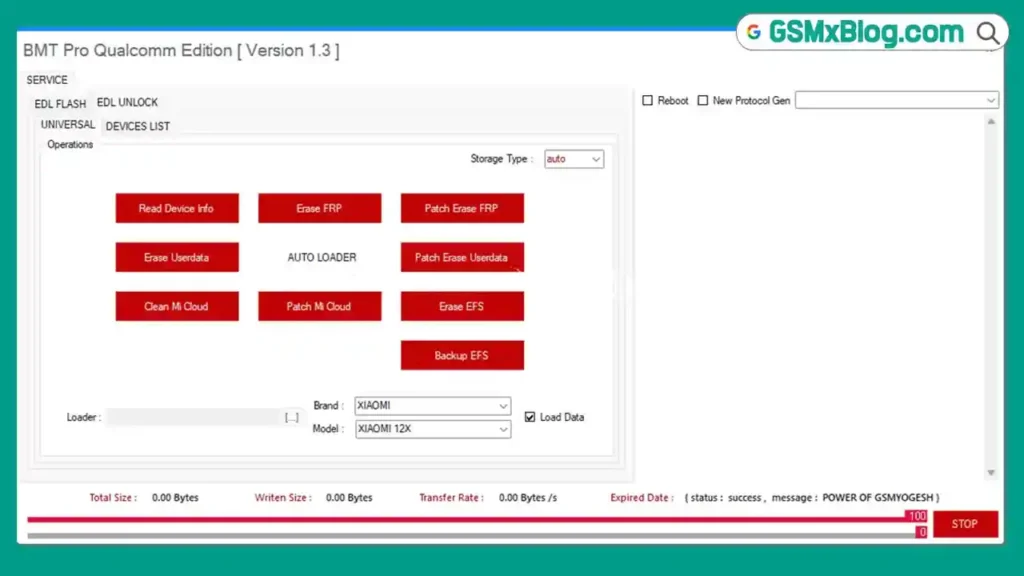
What Is BMT Pro Qualcomm Edition?
BMT Pro Qualcomm Edition is a dedicated Qualcomm chipset repair module developed by the BMT Pro Team. It is part of the broader BMT Pro suite which also includes separate MediaTek and Android editions. This Qualcomm-specific module focuses on EDL (Emergency Download) mode operations — the deepest level of Qualcomm device access — allowing technicians to perform advanced flashing, unlocking, and repair tasks that standard ADB tools cannot handle.
It supports both Flash Mode (for firmware flashing and partition management) and Unlock Mode (for FRP, Mi Cloud, and EFS operations) across 287+ device models from five major brands.
Key Features of BMT Pro Qualcomm Edition V1.3
⚡ EDL Flash Mode Operations
- Auto Clear Userdata — automatic userdata wipe before flashing
- Load Data — load firmware partition data
- Set Boot — configure bootable partition
- Reboot — safely restart device after operations
- Reboot EDL — force device back into EDL mode
- Erase — erase specific partitions
- Backup — full or partial partition backup
- Identify — auto-identify device model and chipset
- Flash — flash stock firmware via EDL
- Clean FRP — erase FRP partition in EDL mode
- Clean Mi Cloud — remove Xiaomi Mi Account lock
- Patch Mi Cloud — patch Mi Cloud partition for removal
🔓 EDL Unlock Mode Operations
- Read Device Info — pull full device information
- Erase FRP — standard FRP erase
- Patch Erase FRP — patch-based FRP removal
- Erase Userdata — wipe user data partition
- AUTO LOADER — automatic Firehose loader detection
- Patch Erase Userdata — patch-based userdata wipe
- Clean Mi Cloud — Mi Account removal
- Patch Mi Cloud — patch-based Mi Cloud removal
- Erase EFS — erase EFS partition (use with caution)
- Backup EFS — back up EFS before any repair operation
🔧 Universal Device Operations
- Factory Reset — full device wipe and reset
- Safe Format — safe partition format without damage
- Reset Data — data partition reset
- Reset FRP — FRP partition reset
- Reset EFS — EFS partition reset
- Read EFS — read and extract EFS partition data
- Read Info — full device diagnostics and information
Download BMT Pro Qualcomm Edition V1.3
- File Name: BMT_Pro_Qualcomm_Edition_V1.3.zip
- Version: V1.3 (Latest 2026)
- File Size: 390 MB
- Platform: Windows (64-bit)
- Trial Period: 10 Days Free
- RAR Password: softwarecrackguru
How to Activate BMT Pro Qualcomm Edition V1.3
Step 1 — Launch the Loader
- Open the tool folder and locate Loader.exe.
- Right-click and select “Run as Administrator.”
- Wait a few seconds — the login utility window will open.
Step 2 — Generate Free Activation Key
- Inside the utility window, locate your unique HWID (Hardware ID).
- Click “Copy Hardware ID Key.”
- Click “Get Free Activation Key” — your browser will open automatically.
- Go to the activation section on gsmyogesh.com.
- Paste your HWID into the box and click “Generate Key Now.”
- Copy the generated activation token.
Step 3 — Register License
- Go back to the Loader window.
- Paste the activation token into the license box.
- Click “REGISTER FRESH LICENSE.”
- You will see: ACTIVE MODULE (10 DAYS REMAINING) ✅
Step 4 — Login
- After activation, the loader will start the network handshake automatically.
- The main BMT login panel will open.
- Enter the login credentials above.
- Enable “Save Login” for faster access in future sessions.
- Click “Sign In” — the Qualcomm module will load automatically. ✅
How to Use BMT Pro Qualcomm Edition V1.3
▶️ Flash Firmware (EDL Flash Mode)
- Open BMT Pro Qualcomm Edition and log in.
- Connect your device in EDL Mode (hold Volume Up + Volume Down + plug USB, or use test point method).
- Navigate to the EDL Flash Mode tab.
- Click “Identify” — the tool will detect device and load the correct Firehose loader automatically.
- Load your firmware file and select required partitions.
- Click “Flash” and wait for the process to complete.
- Click “Reboot” — device restarts with new firmware. ✅
▶️ Remove FRP (EDL Unlock Mode)
- Connect device in EDL Mode.
- Navigate to the EDL Unlock Mode tab.
- Click “Identify” for auto device detection.
- Click “Erase FRP” or “Patch Erase FRP” depending on your device.
- Wait for completion — then click “Reboot.” ✅
▶️ Remove Mi Cloud (Xiaomi)
- Connect Xiaomi device in EDL Mode.
- Go to EDL Flash Mode or EDL Unlock Mode tab.
- Click “Clean Mi Cloud” or “Patch Mi Cloud” as required.
- Wait for the process to complete.
- Reboot — Mi Account lock removed! ✅
▶️ Backup EFS
- Connect device in EDL Mode.
- Navigate to EDL Unlock Mode tab.
- Click “Backup EFS.”
- Choose save location on your PC.
- Wait for EFS backup to complete — save the file securely! ✅
⚠️ Always back up EFS before any IMEI repair, flashing, or partition erase operation. A corrupted or erased EFS without backup can permanently kill the device’s network functionality.
Firehose Loader Supported Functions
BMT Pro Qualcomm Edition V1.3 supports the following Firehose loader operations for deep EDL-level device access:
| Function | Description |
|---|---|
| configure | Configure device storage parameters |
| erase | Erase specified partitions |
| firmwarewrite | Write firmware to device storage |
| getstorageinfo | Read storage type and device info |
| nop | No-operation ping for connection test |
| patch | Apply partition patches |
| poke | Write directly to memory address |
| power | Power control — reboot or power off |
| program | Program / write partition data |
| read | Read partition data |
| setbootablestoragedrive | Set active boot storage |
| benchmark | Storage speed benchmark test |
| emmc | eMMC storage operations |
| ufs | UFS storage operations |
Supported Brands & Device Count
| Brand | Supported Models |
|---|---|
| Xiaomi / Redmi / POCO | 99 Models |
| Vivo | 73 Models |
| Samsung | 60 Models |
| OPPO | 39 Models |
| Realme | 16 Models |
| Total | 287+ Models |
⚠️ Note: Most supported devices are older Qualcomm models. Support for latest 2025–2026 flagship devices is currently limited. The tool is best suited for technicians regularly servicing mid-range and older Qualcomm-powered phones.
System Requirements
| Component | Requirement |
|---|---|
| OS | Windows 10 / 11 (64-bit) |
| Processor | Intel / AMD Dual-Core or faster |
| RAM | 2 GB minimum (4 GB recommended) |
| Storage | 200 MB free space |
| USB Port | USB 2.0 or 3.0 (direct motherboard port preferred) |
| Internet | Required for initial login authentication only |
⚠️ Warning
Before performing any EDL operation, always back up EFS and important partitions — EDL-level operations work at the deepest device storage level and errors can cause permanent data loss or device damage. Always ensure you have the correct Firehose loader for your specific device before flashing. Incorrect loaders may cause boot failures or bricked devices. This tool should only be operated by experienced Qualcomm repair technicians.
Important Notes
🛡️ Virus Status: This tool was scanned with Kaspersky Antivirus before uploading — 100% safe to use. Temporarily disable antivirus during extraction if needed.
📌 Credit: Full credit goes to the BMT Pro Team for developing this tool.
🔌 USB Driver: Install the Qualcomm USB Driver (QDLoader 9008) before connecting any device in EDL mode. Without this driver, your PC will not recognize the device in EDL mode at all.
⚡ Trial Period: The free activation provides 10 days of full access. Test all required functions on your specific devices during the trial before deciding on a paid license.
Why Use BMT Pro Qualcomm Edition V1.3?
- ✅ Mostly offline — stable and fast without continuous server dependency
- ✅ 10-day free trial — test before purchasing any license
- ✅ Covers EDL Flash + Unlock Mode in one clean interface
- ✅ Auto Firehose Loader detection — no manual loader selection needed
- ✅ Full EFS backup and restore support
- ✅ Mi Cloud and FRP removal in both Flash and Unlock modes
- ✅ Lightweight — runs smoothly even on modest PCs
- ✅ Beginner-friendly interface — simple tabbed layout
Frequently Asked Questions (FAQs)
❓ Is BMT Pro Qualcomm Edition completely free? A 10-day free trial is available using the HWID activation method described above. After the trial period, a paid license is required for continued use.
❓ Does the tool require a constant internet connection? No. Internet is only needed during the initial login authentication. After successful login, all operations run fully offline — making it faster and more stable than server-dependent tools.
❓ What is EDL Mode? EDL (Emergency Download) Mode is a special Qualcomm diagnostic mode that allows direct low-level access to device storage via USB — bypassing the Android OS entirely. It enables deep repair operations like firmware flashing, FRP erase, and EFS backup that are not possible in normal or fastboot mode.
❓ Which brands are supported? BMT Pro Qualcomm V1.3 supports 287+ models across Xiaomi/Redmi/POCO (99), Vivo (73), Samsung (60), OPPO (39), and Realme (16).
❓ Does it support latest 2026 flagship devices? Support for the latest 2025–2026 flagship models is currently limited. The tool performs best on mid-range and older generation Qualcomm-powered devices.
❓ What should I do if my device is not detected in EDL Mode? Install the Qualcomm QDLoader 9008 USB Driver, try a different USB port (direct motherboard port preferred), use a shorter high-quality USB cable, and ensure the device is properly in EDL mode before connecting.
❓ Is EFS backup important before EDL operations? Yes — absolutely critical. Always perform an EFS backup before any EDL flash, erase, or IMEI repair operation. A lost or corrupted EFS without backup can permanently destroy the device’s IMEI and network functionality.
Conclusion
The BMT Pro Qualcomm Edition V1.3 is a solid, lightweight EDL repair tool for technicians working with older and mid-range Qualcomm-powered Android devices in 2026. Its offline-first design, clean interface, Auto Firehose Loader, full EFS backup support, and comprehensive EDL Flash + Unlock mode functions make it a genuinely useful addition to any GSM repair toolkit — especially with the generous 10-day free trial that lets you test everything before committing to a purchase.
While its device database leans toward older models and latest 2026 flagship support remains limited, for shops handling mid-range Xiaomi, Vivo, Samsung, OPPO, and Realme Qualcomm repairs daily, it delivers reliable results. Download BMT Pro Qualcomm Edition V1.3 now using the links above and test it on your devices for free! 🚀
Have you tested BMT Pro Qualcomm Edition? Share your experience in the comments below!
Related Posts
- DFT PRO Tool V7.0.0 (Latest Version)
- Android Root Tool (ART) V4.0.1.0 (Latest Version)
- Qualcomm USB Driver (Latest Version)
- MR GSM PRO v9.1.0.0 (Latest Version)