V-Emmc Tool v1.0 – Free Download for Windows PC (Latest)
If you work on dead boot repairs or need to write dump files directly to an eMMC or UFS memory chip, V-Emmc Tool is one of the most straightforward free tools available for Windows. Built by the V-Emmc Team, this eMMC repair tool connects to your device through the ISP method and lets you write dump files, reset user locks, and clear FRP lock — all without needing an expensive dongle or box. It comes packed as a ZIP file containing the tool itself, the required drivers, and a tutorial to get you started.
In this guide, the GSMxblog team covers everything you need to know about V-Emmc Tool v1.0 — what it does, how to use it step by step, and where to download it free for Windows PC.
What is V-Emmc Tool?
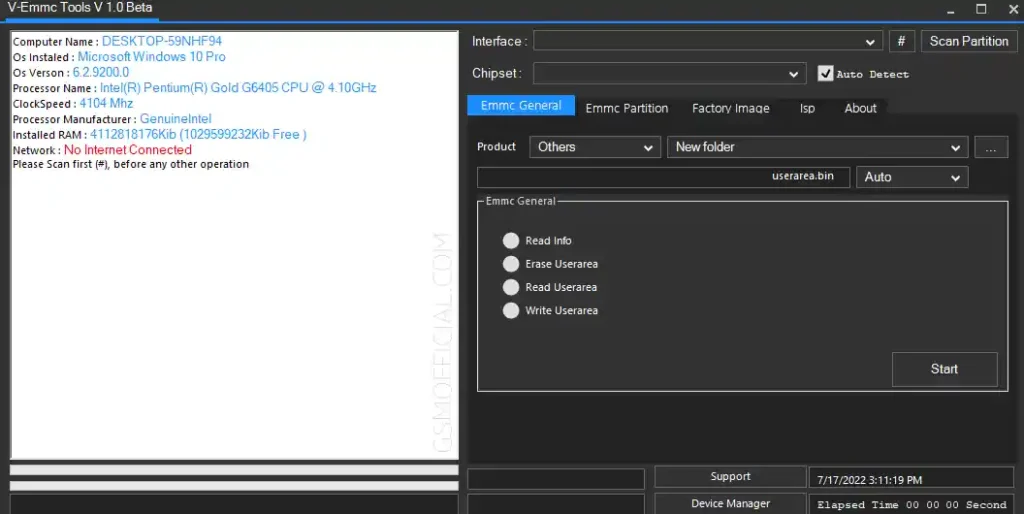
V-Emmc Tool is a free Windows-based eMMC and UFS repair tool that lets mobile technicians write dump files directly to a device’s memory chip using the ISP method. It also handles two of the most common tasks in hardware-level Android repair: resetting user screen locks and clearing FRP lock from the eMMC partition.
Unlike software-based Android repair tools that work through ADB or Fastboot, V-Emmc Tool operates at the chip level. This makes it useful for devices that are completely dead, stuck in a bootloop, or unresponsive to normal flashing methods. If the phone cannot be connected via USB in any standard mode, the ISP method through this tool is often the next step.
The tool is distributed as a free ZIP package by the V-Emmc Team and includes the tool executable, MediaTek and Qualcomm ISP adapter drivers, and a tutorial file.
Key Features of V-Emmc Tool
- Write dump files directly to eMMC or UFS memory chip
- Repair dead boot issues via the ISP method
- Reset user screen lock through eMMC partition
- Clear FRP lock directly from eMMC partition
- Supports MediaTek and Qualcomm ISP adapter drivers
- Includes drivers and tutorial inside the ZIP package
- Lightweight and free — no dongle or credits required
- Login password protected for controlled access
File Information & Download
- File Name: V-EmmcTools_v1.0_beta.zip
- Version: v1.0 Beta (Latest)
- File Size: 75.4MB
- Login Password: jandamuda
- Supported OS: Windows PC
Make sure you have MTK USB Driver and Qualcomm USB Driver installed before using the tool. The ISP adapter drivers are also included inside the ZIP package.
Requirements Before You Start
Before you open V-Emmc Tool, make sure you have everything ready:
- ISP or eMMC/UFS Adapter — This is mandatory. The tool connects to your device through the ISP method, not a standard USB cable. Without an ISP adapter, you cannot connect to the device at all.
- Dump File — If you are writing a dump, have the correct dump file downloaded and extracted on your PC before you open the tool.
- Drivers Installed — Install the MediaTek, Qualcomm, and ISP adapter drivers included in the ZIP package before launching the tool.
- Data Backup — Always take a full backup of your device data before performing any eMMC operation. This process can wipe user data.
How to Use V-Emmc Tool
Step 1: Extract the Package
Extract V-EmmcTools_v1.0_beta.zip to a folder on your Windows PC using WinRAR or 7-Zip.
Step 2: Install the Drivers
Open the extracted folder and install the MediaTek, Qualcomm, and ISP adapter drivers included in the package. This step is required before the tool can detect your connected chip.
Step 3: Connect via ISP Method
Connect your eMMC or UFS chip to your PC using an ISP adapter. Make sure the connection is stable before launching the tool.
Step 4: Launch V-Emmc Tool
Open V-Emmc-Tools.exe from the extracted folder. When prompted for a login password, enter jandamuda to access the tool.
Step 5: Write Dump File
To restore a dump file to the device:
- Click Write Userarea
- Locate your extracted dump file
- Click Start and wait for the process to complete
Step 6: Reset User Screen Lock
To remove a screen lock via eMMC partition:
- Go to Emmc Partition
- Click Special Task
- Select Factory Reset
Step 7: Clear FRP Lock
To remove FRP lock directly from the chip:
- Go to Emmc Partition
- Click Special Task
- Select Clear FRP
Important Notes
Take a Backup First: Any operation through V-Emmc Tool at the partition level can wipe user data. Always back up the device before starting.
ISP Adapter is Mandatory: This tool will not work through a standard USB connection. You must have a physical ISP or eMMC/UFS adapter to connect to the chip. This is hardware-level Android repair — not a software-based unlock method.
Benefits of V-Emmc Tool
- Hardware-Level Repair: V-Emmc Tool works directly at the chip level through ISP, making it one of the few free eMMC tools that can handle completely dead devices that don’t respond to software methods.
- Three Core Functions in One: Dump writing, user lock reset, and FRP bypass are all available inside the same tool without switching between different GSM tools.
- Complete Package: The ZIP includes the tool, drivers, and a tutorial — everything a mobile technician needs to get started without hunting for separate files.
- No Dongle Required: Unlike most professional eMMC repair boxes, V-Emmc Tool is completely free and doesn’t require any dongle or paid activation to use.
- Supports MediaTek and Qualcomm Chipsets: The included ISP adapter driver support covers both MTK and Qualcomm-based Android devices, making it versatile for mixed repair workloads.
- Lightweight: The tool is compact and doesn’t require a complex installation process — extract, install drivers, and launch.
Conclusion
V-Emmc Tool v1.0 is a solid free eMMC repair tool for any mobile technician who needs to work at the chip level on Android devices. Whether you’re writing a dump file to recover a dead boot device, clearing a stubborn FRP lock, or resetting a user screen lock through the eMMC partition — this free GSM tool handles all three tasks cleanly on Windows PC.
The tool is free, requires no dongle, and comes with everything you need inside one ZIP package. Just make sure you have a proper ISP adapter before you start, take a full backup when possible, and follow the steps carefully. For hardware-level Android repair work, V-Emmc Tool is worth having in your toolkit alongside other eMMC solutions.
Download the latest version from the links above and give it a try on your next chip-level repair job. If you have any questions or run into issues, drop a comment below and we’ll help you out.
Related Articles:
- MTK USB Driver – Free Download for Windows
- Qualcomm USB Driver – Free Download for Windows
- USBDK Driver – Free Download for Windows
FAQs
Do I need an ISP adapter to use V-Emmc Tool?
Yes, an ISP or eMMC/UFS adapter is absolutely required. The tool works at the chip level through the ISP method and cannot detect your device through a standard USB cable.
What is the login password for V-Emmc Tool?
The login password is jandamuda. Enter it when the tool prompts you on launch.
Will using V-Emmc Tool delete my data?
Yes, operations like Factory Reset and Clear FRP through the eMMC partition will wipe user data. Always take a full backup before running any task in this tool.
What chipsets does V-Emmc Tool support?
The package includes MediaTek and Qualcomm ISP adapter drivers, so it supports devices built on both chipsets. Install the correct driver for your device before connecting.
Is V-Emmc Tool free to use?
Yes. V-Emmc Tool is distributed for free by the V-Emmc Team. There is no dongle, no credits, and no activation fee required to use v1.0 Beta.
⚠️ Disclaimer: All tools and files shared on GSMxblog are for educational and testing purposes only. Always scan files before use. Use everything at your own risk.
Meta Description: