Bader MediaTek V5 Tool Free Download (MTK Flash Tool)
If you regularly repair Android phones—especially MediaTek-powered devices—you know how frustrating software issues can be. From FRP locks to dead boot problems, having the right tool makes all the difference.
The Bader MediaTek V5 Tool is designed to simplify those tasks. It’s lightweight, beginner-friendly, and built specifically for MediaTek devices using V5 protocol. Whether you want to flash firmware, remove FRP, or fix system errors, this tool gets the job done quickly without complicated steps.
What is Bader MediaTek V5 Tool?
Bader MediaTek V5 Tool is a small Windows-based utility that helps repair software issues on MediaTek Android devices. It supports essential functions like firmware flashing, FRP bypass, data formatting, and backup creation.
Unlike many complex tools, this one focuses on simplicity. Most functions are available with one-click actions, making it suitable even for beginners.
⚠️ Note: This tool mainly supports MediaTek V5 protocol devices, which means it works best with certain older or compatible MTK phones.
Key Features of Bader MediaTek V5 Tool
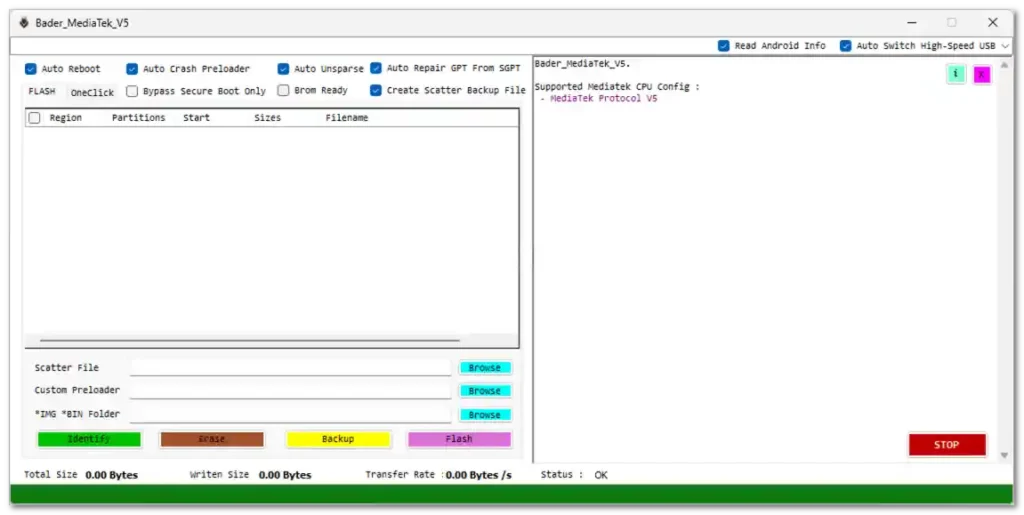
Here’s a breakdown of the main features available inside the tool interface:
Core Functions
- Flash stock firmware on MTK devices
- Erase FRP (Factory Reset Protection)
- Format userdata and reset device
- Backup important data (NV, scatter files)
- Identify connected devices
Advanced Options
- Auto Reboot
- Auto Crash Preloader
- Auto Unsparse
- Repair GPT from SGPT
- Bypass Secure Boot (limited support)
- BROM Mode Ready
- Custom EMI support
Data & Repair Tools
- Backup NV Data
- Erase NV Data
- Format from recovery mode
- Format + FRP erase combination
How to Download Bader MediaTek V5 Tool
You can download the tool using the link below:
- File Name: Bader_MediaTek_V5.zip
- File Size: 12.06 MB
- File Type: Free Tool
- Platform: Windows
- 🔐 Password: Bader Tec
Download From👉 MediaFire
How to Use Bader MediaTek V5 Tool
Follow these simple steps to start using the tool:
- Download the tool from the link above
- Extract the file using the password
- Open the extracted folder
- Run Bader_MediaTek_V5.exe as Administrator
- Connect your MediaTek device to the PC
- Select the required function (FRP, Flash, Format, etc.)
- Click the action button and wait for the process to complete
Important Tips Before Using
- Install proper MediaTek USB drivers
- Use a good quality USB cable
- Charge your device at least 50%
- Always backup important data before formatting
- Make sure your device is supported (V5 protocol)
Conclusion
The Bader MediaTek V5 Tool is a practical solution for anyone working with MediaTek Android devices. It combines essential repair features into a lightweight and easy-to-use interface, making everyday tasks like flashing firmware or removing FRP much faster.
If you want a simple, no-hassle MTK tool that just works, this one is definitely worth trying.