FOX ADB Tool (Latest 2026) – Free Download with 30 Days Trial
Finding a solid ADB tool that lets you test everything before paying for it is not easy. FOX ADB Tool is one of those rare GSM tools that gives you a full 30-day free trial without asking for credits, an email address, or a phone number. You just install it, connect your Android device, and start working. Whether you’re handling Android repair jobs, removing bloatware, bypassing Play Protect, or managing MDM locks, this free ADB tool covers a wide range of tasks in one place.
In this guide, the GSMxblog team walks you through everything — what FOX ADB Tool does, what we found during testing, how to install it correctly, and where to download it free for Windows PC.
What is FOX ADB Tool?
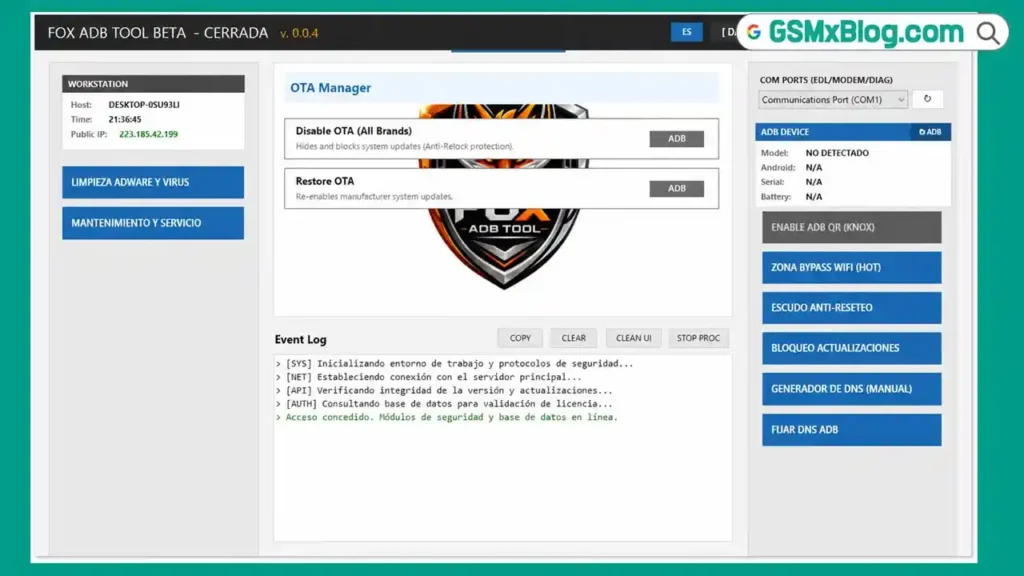
FOX ADB Tool is a free Windows-based ADB and Fastboot tool designed for mobile technicians and Android repair professionals. It brings together a wide set of ADB functions — device information, reboot modes, bloatware removal, MDM bypass, FRP bypass options, and more — under one clean interface.
What makes it stand out from other GSM tools in this category is the 30-day free trial. You don’t need to buy credits or register an account just to test it. Connect your phone with USB debugging enabled and the tool gets to work right away.
Key Features of FOX ADB Tool
- Real-Time Threat Detection using LogCat
- Universal Bloatware Remover
- Manual Package Uninstaller
- Reboot to Recovery Mode
- Reboot to Fastboot or Download Mode
- Remote Wipe Data / Hard Reset
- Play Protect Bypass
- Claro / Telcel Options
- Kiosk Mode
- Motorola Pantalla Blanca Fix
- Admin TI (MDM)
- Oppo Guard
- Samsung KG Section
- Block Factory Reset
- Allow Factory Reset
- Disable OTA Updates
- Restore OTA Updates
- Static DNS Generator
- Private DNS Lock and Unlock
- COM Port Detection for EDL, Modem, and DIAG
- Enable ADB QR (KNOX)
- Automatic update on first launch
- English / Spanish language toggle
What We Tested
The GSMxblog team installed FOX ADB Tool on a Windows PC and connected an Android phone with USB debugging enabled. The device was detected quickly after the USB connection was established.
We opened the device information section first. It correctly displayed the phone model, Android version, serial number, battery level, and ADB connection status — all matching our test device.
Next, we tested the reboot functions. Rebooting into Recovery Mode and Fastboot Mode both worked without any issue on our test device.
We also went through several other sections available in the free trial. Almost every option was accessible without entering an activation key or purchasing credits. The 30-day trial gives you real access to the tool, not just a limited preview.
One thing we noticed on the first launch: the interface opened in Spanish. We switched it to English using the EN button in the toolbar and the layout became easy to read immediately.
The tool also ran an automatic update on the first start. It closed itself during the update, which looks like a crash at first, but it reopens on its own within a few seconds. This is normal behavior — not an error.
File Information & Download
- File Name: PASS_1234_FOX_ADB_TOOL.rar
- File size: 42.25MB
- Version: v.0.0.4
- Trial Period: 30 Days Free
- Supported OS:Windows PC
- RAR Password: 1234
How to Install and Use FOX ADB Tool
Step 1: Download and Extract
Download the RAR file from the link above. Extract it using WinRAR or 7-Zip with password 1234.
Step 2: Move the Folder to C Drive
Move the extracted FoxAdbTool folder directly to your C drive. Do not run it from the Downloads folder or Desktop — placing it in C:\ is required for it to work correctly.
Step 3: Run as Administrator
Open the FoxAdbTool folder and right-click FoxTool.exe. Select Run as Administrator.
Step 4: Allow the Automatic Update
On the first launch, the tool may download and apply an update automatically. It will close and reopen on its own. Wait a few seconds and let it finish.
Step 5: Switch Language to English
After the tool restarts, look for the EN button in the interface and click it to switch from Spanish to English.
Step 6: Connect Your Android Device
Enable USB Debugging on your Android phone from Developer Options. Connect the phone to your PC via USB cable. Accept the ADB authorization prompt on the phone screen.
Step 7: Start Using the Tool
Once the device is detected, navigate to the section you need — device info, reboot options, bloatware remover, MDM, or any other function available in your trial period.
Device Information It Displays
When a phone is connected via ADB, FOX ADB Tool shows the following details on the info screen:
- Device Model
- Android Version
- Serial Number
- Battery Level
- ADB Connection Status
All values matched our test device correctly during the GSMxblog team’s testing session.
Something to Know Before You Start
The tool must be placed in the C drive root folder before launching. Running it from any other location may cause detection issues or prevent certain features from loading.
Also keep in mind that the first-launch automatic update will close the tool briefly. This is expected — just wait for it to reopen and continue normally. It is not a crash.
If you are used to working with ADBTool Beta or similar free Android repair tools, FOX ADB Tool will feel familiar in terms of workflow, but the feature list here is noticeably larger.
Benefits of FOX ADB Tool
- No Registration Required: The 30-day free trial starts the moment you install the tool. No email, no phone number, no credits needed.
- Wide Feature Set: From bloatware removal to MDM bypass, FRP bypass options, and DNS management — everything is in one place.
- Real Device Detection: The tool detected our test device quickly and displayed accurate information without any manual configuration.
- Reboot Functions Work Reliably: Recovery Mode and Fastboot Mode reboots both worked correctly on our test device during the GSMxblog team’s testing.
- COM Port Support: EDL, Modem, and DIAG COM port detection is built in, which is useful for advanced Android repair work.
- Lightweight Installation: The RAR file is small. After extraction and placing the folder on C:, the tool runs without requiring a traditional installer or additional dependencies.
Conclusion
FOX ADB Tool is a capable free ADB and Fastboot tool that gives mobile technicians a genuine 30-day trial with access to a broad range of Android repair features. Device detection works, reboot functions work, the device info section is accurate, and the full feature list covers everything from bloatware removal to Samsung KG, Oppo Guard, MDM bypass, FRP bypass support, and DNS management — all in one GSM tool for Windows PC.
The GSMxblog team tested FOX ADB Tool on a Windows PC with a real Android device and everything performed as expected. If you want to try a new ADB servicing tool before committing to a paid plan, this is worth downloading. Just follow the installation steps carefully — especially moving the folder to C:\ and running it as Administrator — and you’ll be up and running in a few minutes.
Download the latest 2026 version from the link above and test it on your next Android repair job.
If you have any questions or run into any problems, drop a comment below and we’ll help you out.
Related Articles:
- ADBTool Beta – Free ADB Tool for Android Download
- MTK USB Driver – Free Download for Windows
- Qualcomm USB Driver – Free Download for Windows
FAQs
Is FOX ADB Tool completely free?
It offers a full 30-day free trial. You do not need credits, an email address, or a phone number to activate the trial. After 30 days, you may need to purchase a plan to continue using it.
Why does the tool close itself after the first launch?
This happens because the tool runs an automatic update when you open it for the first time. It closes during the update and reopens on its own within a few seconds. This is normal behavior.
Why must I place the folder on the C drive?
The tool requires a fixed installation path to load its components correctly. Placing the FoxAdbTool folder directly in C:\ ensures all features load without path errors.
The interface opened in Spanish — what do I do?
Click the EN button in the tool interface to switch the language to English. This only needs to be done once.
Does FOX ADB Tool work without USB debugging enabled?
No. Your Android device must have USB debugging enabled in Developer Options before connecting to the PC. Without it, the tool will not detect your device.
⚠️ Disclaimer: All tools and files shared on GSMxblog are for educational and testing purposes only. Always scan files before use. Use everything at your own risk.