MultiUnlock Tool v1.2.2 (Latest Version) – Professional MDM & Unlock Tool 2026
Are you a mobile repair technician looking for the most complete multi-brand MDM removal, FRP bypass, carrier unlock, and device repair tool in 2026? The MultiUnlock Tool v1.2.2 is a professional Windows-based service software trusted by thousands of GSM technicians and resellers worldwide — covering Samsung KG Lock, Motorola MDM, OPPO Guard, IT Admin removal, Kiosk Mode bypass, Apple FMI OFF, Samsung FRP on Android 16, and much more.
Developed by the MultiUnlock Team (CodeTeam), this modern tool combines a sleek, intuitive interface with powerful multi-brand repair capabilities — all backed by a global reseller network, free updates during the license period, and an active Telegram support community. In this guide you’ll find the complete feature list, pricing plans, installation steps, usage guide, and download link.
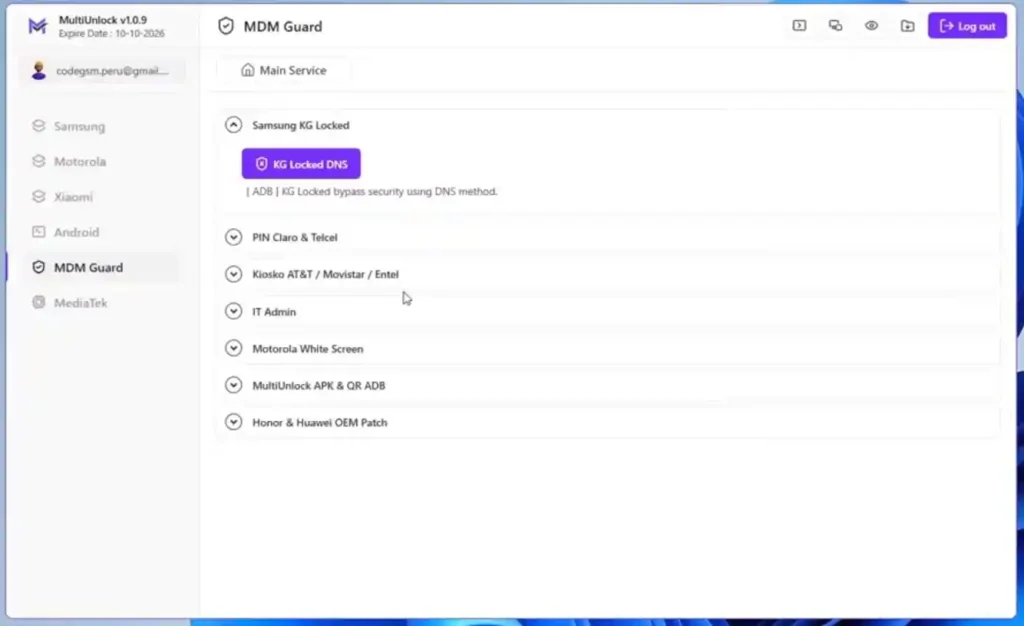
What Is MultiUnlock Tool?
MultiUnlock Tool is a professional Windows-based multitool software developed by CodeTeam. It is designed to help mobile repair technicians and service centers perform MDM removal, FRP bypass, carrier unlock, DNS-based unlocking, and device repair operations across multiple major brands — all from one modern, clean interface.
The tool uses a subscription-based license system and is available through a growing global network of certified resellers, with full support available via Telegram. It is especially popular in Latin America where dedicated Spanish-language support is offered.
Key Features of MultiUnlock Tool v1.2.2
🔐 Samsung Features
- KG Locked DNS — Private DNS method to bypass Samsung KG Lock (requires ISP/UFS support)
- Kiosk DNS — Bypass AT&T, Movistar, Krece Debt Block and other Kiosk locks
- Samsung FRP Android 16 — Remove FRP and Enable ADB on Samsung Android 16 devices
- Fix Banks Root — Repair banking apps on rooted Samsung phones
- Patch FRP UFS/EMMC — FRP patch for Samsung and Motorola MDM locks
- PIN Claro-Telcel — Remove Claro and Telcel Bloatware Blocker
📱 Motorola Features
- Moto White Screen — Bypass Motorola devices blocked for non-payment
- Moto MDM Cricket — Remove Cricket MDM via Premium VPN without re-blocking
- Firmware Patched — Modified Motorola MDM firmware for unlocking
- Moto Auto Unlock BL — Automatic Bootloader Unlock without user intervention
🔓 OPPO / Realme / Tecno / Infinix Features
- OPPO Guard — SIM Lock OS Guard carrier lock removal, allows calls after unlock
- Security Plugin — Security add-on lock removal for Tecno, Infinix, and Realme
- IT Admin — IT Admin security lock removal for Tecno, Infinix, and Realme
🍎 Apple Features
- Apple FMI OFF — Permanent Find My iPhone OFF (Open Menu only)
🌐 DNS & Network Tools
- KG Locked DNS Generator — Generate Private DNS for Samsung KG bypasses
- Premium Private DNS — Advanced DNS solutions for carrier and kiosk locks
- Supports AT&T, Movistar, Krece, Claro, Telcel carrier locks
⚙️ Utility Features
- Fix Banks Root — Repair banking apps on rooted Android devices
- Patch FRP UFS/EMMC — Patch FRP at storage chip level
- Modern intuitive user interface
- PC Change allowed every 24 hours
- Free updates during entire license period
Download MultiUnlock Tool v1.2.2
| File Name | MultiUnlock_1.2.2.zip |
|---|---|
| Version | v1.2.2 (Latest 2026) |
| File Size | 28 MB |
| Platform | Windows (64-bit) |
| Developer | MultiUnlock Team (CodeTeam) |
| Official Site | multiunlock.com |
| License | Subscription (3 / 6 / 12 months) |
| RAR Password | No Password |
MultiUnlock Tool Pricing Plans
MultiUnlock uses a subscription-based model with three license tiers — all including full features, Motorola firmware, DNS Generator, and free updates:
| Plan | Price | Duration |
|---|---|---|
| 3 Months License | $15 USDT | 3 Months |
| 6 Months License | $22 USDT | 6 Months |
| 12 Months License | $30 USDT | 12 Months ⭐ Most Popular |
All plans include:
- ✅ Full feature access
- ✅ Motorola MDM Firmware
- ✅ DNS Generator Premium
- ✅ Official Telegram Support
- ✅ Free Updates during subscription
- ✅ PC Change every 24 hours
📌 How to purchase: Contact any authorized reseller from the official MultiUnlock Resellers page. You will receive your credentials via email after purchase. No registration is needed before purchasing.
How to Install MultiUnlock Tool v1.2.2
- Download
MultiUnlock_1.2.2.zipusing the official link above. - Extract the ZIP file using WinRAR or 7-Zip to any folder on your PC.
- Open the extracted folder and run the setup file as Administrator.
- Follow the installation wizard — click “Next” and “Install.”
- Click “Finish” when done.
- Launch MultiUnlock Tool from the Desktop shortcut.
- Enter your credentials received via email from your reseller.
- Click “Login” — the tool is ready! ✅
✅ Tip: Run as Administrator always for proper USB and ADB access. PC can be changed once every 24 hours if needed.
How to Use MultiUnlock Tool v1.2.2
▶️ Samsung KG Lock Bypass (DNS Method)
- Open MultiUnlock Tool and log in.
- Go to the KG Locked DNS tab.
- Click “Generate DNS” — your private DNS address will appear.
- On the Samsung device, go to Settings → Connections → More Connection Settings → Private DNS.
- Enter the generated DNS address and save.
- Connect to WiFi — KG lock will be bypassed. ✅
⚠️ Note: KG Locked DNS method requires ISP/UFS hardware support for full functionality.
▶️ Samsung FRP Bypass (Android 16)
- Go to the Samsung OS 16 FRP tab.
- Connect Samsung device via USB.
- Follow on-screen instructions to enter the correct mode.
- Click “Remove FRP” — ADB will be enabled automatically.
- Wait for completion — reboot device. ✅
▶️ Motorola White Screen / MDM Removal
- Go to the Moto White Screen or Moto MDM Cricket tab.
- Select your Motorola device model.
- Connect device via USB.
- Click “Remove MDM” and follow on-screen steps.
- Reboot — MDM removed! ✅
▶️ Motorola Auto Unlock Bootloader
- Go to the Moto Auto Unlock BL tab.
- Connect Motorola device via USB with ADB enabled.
- Click “Auto Unlock” — no manual user intervention on the device required.
- Wait for the process to complete — bootloader is unlocked. ✅
▶️ OPPO Guard Removal
- Go to the OPPO Guard tab.
- Connect OPPO device via USB.
- Follow the on-screen steps to enter correct mode.
- Click “Remove OPPO Guard.”
- After completion — carrier lock removed, calls will work. ✅
▶️ Apple FMI OFF (Open Menu)
- Go to the Apple FMI OFF tab.
- Connect iPhone via USB.
- Follow on-screen process steps.
- Wait for permanent FMI OFF completion. ✅
⚠️ Note: Apple FMI OFF is permanent — Open Menu only. Verify device eligibility before proceeding.
▶️ Generate Private DNS (Kiosk / Carrier Bypass)
- Go to the DNS Generator Premium tab.
- Select your carrier or lock type (AT&T, Movistar, Krece, Claro, Telcel, etc.).
- Click “Generate DNS.”
- Apply the generated DNS on the device.
- Connect to WiFi — carrier or kiosk lock removed. ✅
Supported Brands & Functions
| Brand | Supported Functions |
|---|---|
| Samsung | KG Lock DNS, Kiosk DNS, FRP Android 16, Fix Banks Root, Patch FRP, PIN Claro/Telcel |
| Motorola | White Screen, MDM Cricket, Patched Firmware, Auto Unlock Bootloader |
| OPPO | OPPO Guard (SIM Lock / OS Guard removal) |
| Tecno | Security Plugin, IT Admin removal |
| Infinix | Security Plugin, IT Admin removal |
| Realme | Security Plugin removal |
| Apple iPhone | FMI OFF Permanent (Open Menu) |
| Multi-brand | Fix Banks Root (rooted devices), Patch FRP UFS/EMMC |
System Requirements
| Component | Requirement |
|---|---|
| OS | Windows 10 / 11 (64-bit) |
| Processor | Intel / AMD Dual-Core or faster |
| RAM | 2 GB minimum (4 GB recommended) |
| Storage | 100 MB free space |
| USB Port | USB 2.0 or 3.0 |
| Internet | Required for login and DNS generation |
⚠️ Warning
MultiUnlock Tool is intended for use by authorized mobile repair technicians and lawful device owners only. Always verify you have legal ownership or proper authorization before performing any unlocking or MDM removal operation. Use of this tool on devices you do not own or have no authorization to service may violate local telecommunications laws and regulations. The developer and this blog are not responsible for any misuse.
Important Notes
🛡️ Virus Status: MultiUnlock Tool v1.2.2 was scanned with Kaspersky Antivirus before uploading — 100% safe to use.
📌 Credit: Full credit goes to the MultiUnlock Team (CodeTeam) at multiunlock.com for developing and maintaining this professional tool.
🔌 USB Drivers: Ensure correct brand USB drivers are installed before connecting devices — Samsung, Motorola, and OPPO USB drivers are required for their respective operations.
Why Use MultiUnlock Tool v1.2.2?
- ✅ Multi-brand coverage — Samsung, Motorola, OPPO, Tecno, Infinix, Realme, Apple in one tool
- ✅ Built-in DNS Generator — Private DNS for KG Lock and carrier bypass
- ✅ Samsung Android 16 FRP — stays current with the latest Android versions
- ✅ Motorola Auto BL Unlock — no user intervention required
- ✅ Apple FMI OFF — permanent solution included
- ✅ Free updates during entire subscription period
- ✅ Lightweight — only 28 MB
- ✅ 14+ global resellers — easy to purchase from anywhere
- ✅ Active Telegram support community
- ✅ Spanish support for Latin American technicians
- ✅ Affordable — from just $15 for 3 months
Frequently Asked Questions (FAQs)
❓ Do I need to register before purchasing MultiUnlock? No — registration is not required before purchasing. Simply contact an authorized reseller to complete your purchase. Your credentials will be automatically sent to your email address.
❓ Are updates free during my subscription? Yes — users with an active license get free access to all updates throughout their entire subscription period. No additional payment needed.
❓ Can I change my PC? Yes — you can change your PC hardware once every 24 hours within the license system.
❓ What happens if I lose my password? Passwords can be reset. You must have access to your registered email and contact the official support team via Telegram to request a password change.
❓ Does MultiUnlock support Samsung Android 16 FRP? Yes — MultiUnlock v1.2.2 includes Samsung OS 16 FRP removal and ADB enable feature for the latest Android 16 Samsung devices.
❓ Can I perform remote unlocking with this tool? MultiUnlock does not restrict remote operations. However, users are solely responsible for any security breach or vulnerability resulting from remote access usage.
❓ What payment methods are accepted? Accepted payments vary by reseller but typically include USDT, PayPal, BTC, Visa, bank transfer, and local payment methods depending on region.
Conclusion
MultiUnlock Tool v1.2.2 is one of the most well-rounded and professionally supported multi-brand device unlocking tools available in 2026. With coverage spanning Samsung KG Lock, Motorola MDM, OPPO Guard, Tecno/Infinix IT Admin, Apple FMI OFF, Samsung Android 16 FRP, carrier DNS bypass, and banking app repair — all in a lightweight 28 MB package — it delivers exceptional value across a wide range of daily repair scenarios.
Backed by a global network of 14+ authorized resellers, an active Telegram support community, free updates throughout the license period, and affordable pricing starting at just $15 — MultiUnlock Tool v1.2.2 is a smart investment for any serious mobile repair technician in 2026. Download it now from the official site and take your multi-brand repair capabilities to the next level! 🚀
Have you used MultiUnlock Tool before? Share your experience in the comments below!
Related Posts
- DFT PRO Tool V7.0.0 (Latest Version)
- OTAKO SOFT TOOL V2.0 (Latest Version)
- Samsung USB Driver (Latest Version)
- Android Root Tool (ART) V4.0.1.0 (Latest Version)