WinRa1n v2.1 – Free Windows Jailbreak Tool for iPhone 6 to X (iOS 12–16)
If you’re looking for a free, straightforward way to jailbreak an iPhone or iPad on Windows — without the hassle of booting from a USB drive — WinRa1n is one of the best options available right now. Developed by iKey Tools in 2023, this tool was built specifically to give the global jailbreak community an accessible, no-cost solution that runs directly on Windows without any complicated setup.
This page covers everything you need: what WinRa1n does, which devices it supports, how to use it step by step, and where to download it safely.
⚠️ Legal Notice: Jailbreaking may void your device warranty and is your full responsibility. Only jailbreak a device you legally own or are explicitly authorized to service.
What Is WinRa1n?
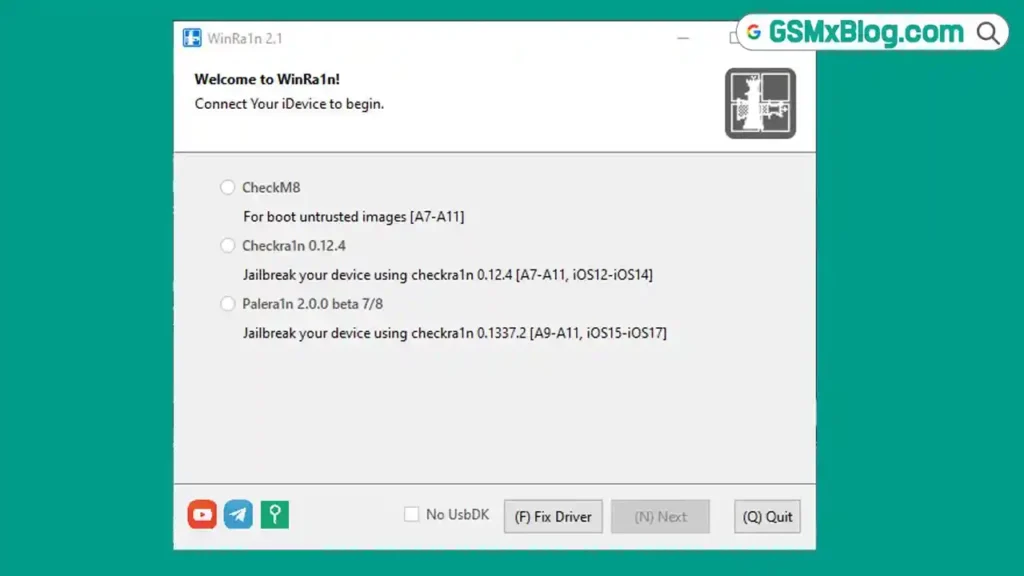
WinRa1n is a free jailbreak tool for Apple iOS devices, designed to run entirely on Windows. What sets it apart from other jailbreak methods is that you do not need to boot your computer from a pendrive or USB drive — the entire process runs straight from your Windows desktop.
The tool was created and released by iKey Tools as a lifetime free contribution to the jailbreak community. It supports iPhone 6 through iPhone X running iOS 12 to iOS 16, and the download package includes Apple USB drivers bundled inside, so you don’t need to hunt them down separately.
If you also work with iCloud activation lock issues on Apple devices, check out the FRPFILE A5-A6 Activator guide on GSMxBlog for a free Arduino-free solution covering older A5/A6 chipset devices.
WinRa1n v2.1 Key Details
| Detail | Info |
|---|---|
| Tool Name | WinRa1n |
| Version | V2.1 (Latest) |
| File Name | WinRa1n v2.1 .zip |
| File Size | 114 MB |
| Developer | iKey Tools |
| Platform | Windows |
| Supported Devices | iPhone 6 to iPhone X |
| Supported iOS | iOS 12 to iOS 16 |
| Price | Free |
| Includes | Apple USB Driver |
Supported Devices
WinRa1n currently supports the following Apple devices for jailbreaking:
- iPhone 6
- iPhone 6S / 6S Plus
- iPhone 7 / 7 Plus
- iPhone 8 / 8 Plus
- iPhone X
iOS Range: iOS 12 through iOS 16 only. Devices running iOS versions outside this range are not supported.
Requirements Before You Start
Before running WinRa1n, make sure the following are in place:
- ✅ A Windows PC — this tool does not support macOS
- ✅ Apple USB Driver installed on your computer — without it, the tool will not detect your device
- ✅ A working USB cable to connect the device to your PC
- ✅ Your iPhone or iPad charged and powered on
⚠️ Important: Installing the Apple USB Driver first is not optional — if you skip this step, the tool will fail to detect your device entirely. The driver is included inside the WinRa1n zip package.
Download WinRa1n v2.1 – Latest Version
Download the latest version using either of the links below. The zip package includes both the WinRa1n tool and the Apple USB Driver.
Previous Versions
How to Use WinRa1n – Step by Step
▶️ Full Jailbreak Guide
- Download WinRa1n v2.1 from the link above and extract the zip file on your Windows PC.
- Install the Apple USB Driver included in the zip package. This step is mandatory — skip it and the tool will not recognize your device.
- Open the WinRa1n tool on your computer.
- Connect your iPhone or iPad to the PC in normal mode using a USB cable.
- When prompted on your device screen, tap “Trust” to allow the connection.
- Once the device is connected and recognized, click “Start” in the tool.
- Your device will automatically enter iTunes mode. When it does, click “Start” again in the tool and follow the on-screen instructions carefully.
- Wait for the jailbreak process to complete — this usually takes a few minutes.
- ✅ Once the process finishes successfully, your device will reboot automatically with the jailbreak applied.
✅ Tip: If the tool does not detect your device after connecting, disconnect and reconnect the USB cable. Make sure the Apple USB Driver is properly installed before trying again.
Advantages & Limitations
✅ Advantages
- Completely free — no hidden charges, no subscriptions
- No need to boot from a USB pendrive — runs directly on Windows
- Apple USB Driver bundled inside the zip — nothing extra to download
- Simple step-by-step process — easy enough for beginners
- Virus scanned before upload — verified clean via Virus Total
- Lifetime free distribution by iKey Tools
- Multiple download mirrors available (AFH and Google Drive)
⚠️ Limitations
- Windows only — macOS is not supported
- Supports iPhone 6 to X only — newer models are not compatible
- iOS 12 to iOS 16 only — devices on iOS 17 or later cannot be jailbroken with this tool
- Apple USB Driver must be installed first — skipping this step causes detection failure
- Jailbreaking may void your device warranty
FAQs
Q1: Is WinRa1n completely free? Yes. WinRa1n was created and distributed by iKey Tools as a lifetime free tool for the jailbreak community. There are no paid tiers or credits required.
Q2: Do I need a USB pendrive to boot the tool? No. That is one of WinRa1n’s key advantages — the entire jailbreak process runs directly from Windows without any pendrive or bootable media.
Q3: Why isn’t my device being detected by the tool? The most common cause is a missing or incorrectly installed Apple USB Driver. Install the driver included in the zip package first, then reconnect your device and try again.
Q4: Which iPhones does WinRa1n support? WinRa1n supports iPhone 6 through iPhone X, running iOS 12 to iOS 16. Devices outside this range are not supported.
Q5: Is the tool safe to download? The tool was scanned using Virus Total before being uploaded. That said, always download from the official links provided — avoid third-party mirrors or repackaged versions.
Q6: Can I use this on a Mac? No. WinRa1n is a Windows-only tool. A Windows PC is required to run it.
Q7: Who developed WinRa1n? WinRa1n was developed and released by iKey Tools in 2023 as a free contribution to the global jailbreak community.
Related Posts
- FRPFILE A5-A6 Activator – Full iCloud Activation Without Arduino
- Download Ghost Auth Tool v3.3.0 (Latest Version) Free 2026
- Download PulsarUnlock v1.8.1.4 (Latest Version) Free 2026
Conclusion
WinRa1n v2.1 is a solid, no-cost jailbreak solution for anyone working with older iPhones running iOS 12 to iOS 16 on Windows. The fact that it runs directly from Windows without any USB boot setup makes it genuinely more accessible than many competing methods. The bundled Apple USB Driver means less setup friction, and the simple click-through process keeps things manageable even for technicians who don’t jailbreak devices regularly.
The key limitations to keep in mind are clear — Windows only, iPhone 6 to X support only, and iOS 16 is the ceiling. If your device falls within that range, WinRa1n does the job cleanly and for free.
Have you used WinRa1n on your device? Share the model and iOS version in the comments below!