Download BirdA Flash Tool v4.4.1 (Latest Version) Free 2026 – Tested & Working
Looking for a portable, no-installation MediaTek flashing tool in 2026? The BirdA Flash Tool v4.4.1 is a lightweight Windows-based utility that lets you flash stock firmware, install custom recovery, and reset FRP locks on MediaTek (MTK) chipset smartphones and tablets — with zero installation required. Just extract and run.
What makes this tool a favourite among technicians is its portable design — no setup wizard, no registry entries, no system dependencies. Drop it on a USB drive and use it on any Windows PC instantly. In this guide you’ll find the complete feature list, step-by-step how-to-use instructions, all old versions, download links, and everything you need to get started.
What Is BirdA Flash Tool?
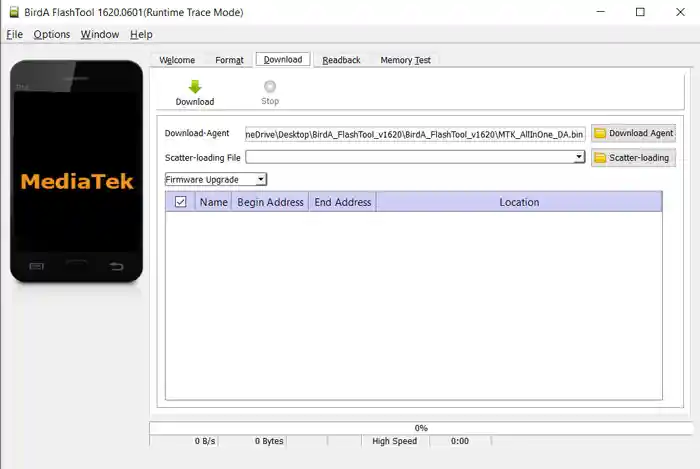
BirdA Flash Tool is a dedicated MediaTek firmware flashing utility designed for Android smartphones and tablets running on MediaTek (MTK) chipsets. It is a portable alternative to the official SP Flash Tool, offering a clean interface and simplified workflow for flashing stock ROMs, custom recovery images, and performing FRP reset operations.
Because it runs as a portable application — no installation needed — it is widely used by mobile repair technicians who need a reliable MTK flashing tool they can carry on a USB drive and run on any workshop PC without leaving traces or requiring admin setup.
Key Features of BirdA Flash Tool v4.4.1
📦 Portable Application
- No installation required — just extract the ZIP and open flash_tool.exe
- Runs directly from any folder or USB drive
- Does not modify Windows registry or require admin-level setup
- Ideal for repair shops working across multiple PCs
⚡ Flash Firmware
- Flash or install stock firmware on MediaTek Android devices with ease
- Recover bricked or bootlooped devices by reflashing the factory ROM
- Supports full firmware flashing as well as selective partition flashing
🔧 MediaTek Chipset Support
- Full compatibility with all MediaTek chipset devices — budget to mid-range
- Covers smartphones, tablets, and MediaTek-powered feature phones
- Works with a wide range of MTK SoCs across multiple generations
🔓 FRP Reset Support
- Reset FRP (Factory Reset Protection) lock on supported MediaTek devices
- Useful for recovering devices locked to a previous Google account after a factory reset
- Fast and reliable FRP partition erase via scatter file method
📄 Scatter Format Support
- Supports the standard MTK scatter file format for partition mapping
- Easily load scatter files to identify and target individual device partitions
- Prevents accidental overwrites by allowing selective partition flashing
Download BirdA Flash Tool v4.4.1
| Detail | Info |
|---|---|
| File Name | BirdA Flash Tool v4.4.1.zip |
| Version | v4.4.1 (Latest 2026) |
| File Size | 188 MB |
| Platform | Windows (32-bit or 64-bit) |
| Type | Portable (No Installation Required) |
| Price | Free |
How to Use BirdA Flash Tool
▶️ Flash Stock Firmware (Step-by-Step)
- Download and install the MediaTek Driver Auto Installer — this installs the required MTK USB drivers on your PC.
- Download the stock firmware for your specific MediaTek device model.
- Extract the firmware ZIP/RAR to a folder on your PC.
- Extract BirdA Flash Tool to any folder — no installation needed.
- Open flash_tool.exe — the BirdA Flash Tool interface will launch.
- Click the “Scatter-loading” button inside the tool.
- Navigate to your extracted firmware folder, locate the scatter file (usually named
MT****_Android_scatter.txt), and open it. - Untick the “Preloader” checkbox in the partition list — this prevents bootloader conflicts on most devices.
- Click the “Download” button — the tool is now ready and waiting for your device.
- Power off your device completely, then connect it to the PC via USB cable. Press Volume Down or Volume Up when prompted — BirdA will detect your device and the flashing process will begin automatically.
- A progress bar will show flashing status — do not disconnect the device during this stage.
- When you see the green ring / “Download OK” message, the flash is complete. ✅
- Disconnect your device and power it on — complete the initial Android setup as normal.
⚠️ Always power off your device completely before connecting for flashing. Never disconnect during the process — an interrupted flash can result in a hard brick.
System Requirements
| Component | Requirement |
|---|---|
| OS | Windows XP / 7 / 8 / 10 / 11 (32-bit or 64-bit) |
| Processor | Intel / AMD Dual-Core or faster |
| RAM | 1 GB minimum (2 GB recommended) |
| Storage | 250 MB free space |
| USB Port | USB 2.0 or 3.0 |
| Internet | Not required (fully offline, portable tool) |
⚠️ Warning
Before flashing any device, always back up all important data — flashing stock firmware will erase all user data and internal storage. Ensure your device has sufficient battery charge before starting; if the device powers off mid-flash it may result in a hard brick. Always use a quality USB cable and a direct PC USB port — avoid USB hubs. This tool is straightforward, but partition-level operations should only be performed by experienced technicians to avoid permanent device damage.
Important Notes
🛡️ Virus Status: BirdA Flash Tool was scanned with Kaspersky Antivirus before uploading — 100% safe to use. If your antivirus flags it during extraction, temporarily disable real-time protection — flash tools commonly trigger false positives due to their low-level device access.
📌 Credit: Full credit goes to MediaTek, Inc. — they originally created and distributed this flashing framework.
🔌 USB Driver: Install the MediaTek (MTK) USB Driver or MediaTek Driver Auto Installer before connecting your device. Without it, BirdA Flash Tool will not detect your device. Download the latest MTK USB Driver from our USB Driver page.
📁 Firmware: Always use firmware that matches your exact device model. Using mismatched firmware can cause boot failure or brick your device. Download the correct firmware from our Flash File section.
Why Use BirdA Flash Tool?
- ✅ 100% free — no license, no dongle, no registration required
- ✅ Portable — no installation needed; runs from any folder or USB drive
- ✅ Fully offline — zero internet dependency during operation
- ✅ Supports all MediaTek chipset devices — smartphones, tablets, feature phones
- ✅ FRP reset support — remove Google account lock on MTK devices
- ✅ Scatter file support — flash specific partitions without touching others
- ✅ Lightweight and fast — minimal resource usage, runs on low-spec PCs
- ✅ Beginner-friendly — clear green ring confirmation on successful flash
- ✅ Large version archive — 10+ old versions available for compatibility
Related Posts
- FRPFILE A5-A6 Activator – Full iCloud Activation Without Arduino
- Download WinRa1n v2.1 – Free Windows Jailbreak Tool for iPhone 6 to X
- Download Ghost Auth Tool v3.3.0 (Latest Version) Free 2026
Frequently Asked Questions (FAQs)
❓ Is BirdA Flash Tool completely free? Yes — BirdA Flash Tool is 100% free to download and use. No paid license, subscription, or dongle is required.
❓ Do I need to install BirdA Flash Tool? No. BirdA is a portable application — just extract the ZIP and run flash_tool.exe directly. No installation wizard, no registry modifications.
❓ Which chipsets does BirdA Flash Tool support? BirdA Flash Tool supports MediaTek (MTK) chipset devices only. It does not support Qualcomm, Spreadtrum/UNISOC, or Exynos devices.
❓ What does the green ring mean after flashing? The green ring is BirdA’s visual confirmation that the firmware flash completed successfully. If you see a red stop symbol instead, the flash failed — check your scatter file, USB driver, and firmware compatibility.
❓ Do I need to untick Preloader before flashing? Yes — in most cases you should untick the Preloader checkbox before clicking Download. Flashing the preloader on an incompatible device can cause a hard brick. Only flash the preloader if you are specifically trying to recover a device with a corrupted bootloader and you know the firmware is 100% correct.
Conclusion
The BirdA Flash Tool v4.4.1 is a reliable, lightweight, and completely free MediaTek firmware flashing utility that earns its place in any GSM repair toolkit in 2026. Its portable design, broad MTK chipset support, FRP reset capability, scatter file compatibility, and beginner-friendly green-ring confirmation make it a practical go-to tool for shops and technicians handling MediaTek device repairs daily.
With 10+ archived versions available, you can always roll back to a version that works best for your specific device lineup. Download BirdA Flash Tool v4.4.1 now using the links above and start flashing! 🚀
Have you used BirdA Flash Tool? Share your experience in the comments below!