Download ZeroActivator Tool v1.0.0 – 1 Click to Activate Your iPhone
Getting stuck on the iPhone activation screen can be stressful, especially when most tools require complex steps or technical knowledge. ZeroActivator Tool v1.0.0 solves this problem with a simple one-click activation method. There is no need to register ECID, create an account, or deal with confusing settings. Just connect your iPhone, click one button, and let the tool do everything automatically.
What is ZeroActivator?
ZeroActivator is an easy-to-use iPhone activation tool designed for speed and simplicity. It helps your iPhone complete the activation process automatically in the background. The tool is perfect for users who want their device working again without long steps, extra files, or technical knowledge.
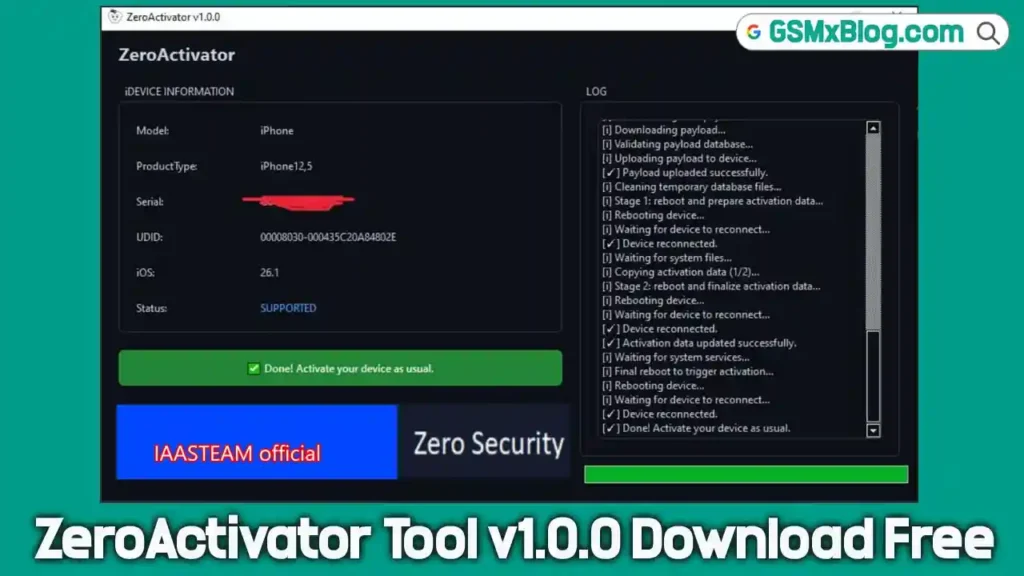
Once connected, ZeroActivator displays clear device information, including:
- Model
- Product Type
- Serial Number
- UDID
- iOS Version
- Activation Status (Supported or Not Supported)
If your device is compatible, a green message appears confirming that activation is complete.
Key Features of ZeroActivator
ZeroActivator offers powerful features while keeping everything simple:
- ✅ Untethered activation
- ✅ Apple Store works normally
- ✅ No battery drain
- ✅ Supports devices with no baseband
- ✅ No ECID or serial registration required
- ✅ Works on iOS versions 18.6 to 26.1
- ✅ Fake Erase option included
- ✅ Block OTA updates
- ✅ Supports A12 and newer devices
These features make ZeroActivator a reliable choice for both professionals and regular users.
Download ZeroActivator
Below are the official download details for ZeroActivator v1.0.0:
- Name: ZeroActivator_setup.exe
- Version: v1.0.0
- File Size: 4.6 MB
Download Link: Mega
How to Install ZeroActivator
Installing ZeroActivator is quick and straightforward:
- Download the ZeroActivator setup file.
- Run the
.exefile on your computer. - Follow the on-screen instructions.
- Launch the tool after installation is complete.
No additional files or complicated setup are required.
How to Use ZeroActivator
Using ZeroActivator is extremely simple:
- Open ZeroActivator on your computer.
- Connect your iPhone using a USB cable.
- Wait for the tool to detect and display your device information.
- If your device is supported, click the Activate button.
- The tool will automatically perform all activation steps.
- Your device may reboot several times during the process.
- When you see “Done! Activate your device as usual”, your iPhone is ready.
That’s all—no extra steps needed.
Supported Models in ZeroActivator
ZeroActivator supports A12 and newer iPhone models. There is no need to register ECID or serial numbers. The tool automatically checks device compatibility and clearly shows whether your device is supported.
What’s New in ZeroActivator v1.0.0
ZeroActivator v1.0.0 focuses on automation, simplicity, and reliability:
- One-click activation process
- Fully automatic background operations
- Detailed logs showing each step, including:
- Downloading payload
- Validating files
- Uploading to the device
- Rebooting and reconnecting
- Updating activation data
- Final reboot
- Improved stability for supported iOS versions
- Built-in Fake Erase and OTA blocking features
Conclusion
ZeroActivator Tool v1.0.0 is an excellent solution for anyone looking for a fast, reliable, and user-friendly way to activate an iPhone. With no ECID registration, instant activation, and full automation, it is ideal for repair shops, technicians, and everyday users.
If you want a simple one-click iPhone activation tool that works without hassle, download ZeroActivator today and get your device up and running in minutes.