Download Mohammad Soft Kirin v3 (Latest Version) Free – Huawei Device Unlock Tool
Huawei smartphones powered by Kirin chipsets can be tricky to unlock due to their secure boot architecture and ID-based locks. Mohammad Soft Kirin v3 simplifies this process by offering a user-friendly tool for unlocking, partition management, Huawei ID removal, and more. Whether you’re a technician or an advanced user, this powerful software offers seamless support for various HiSilicon Kirin chipsets, including Kirin 620, 710, 980, and more.
In this guide, you’ll learn how to download Mohammad Soft Kirin v3 (latest version) for free, install it on your Windows PC, and take full advantage of its unlocking capabilities.
What is Mohammad Soft Kirin v3?
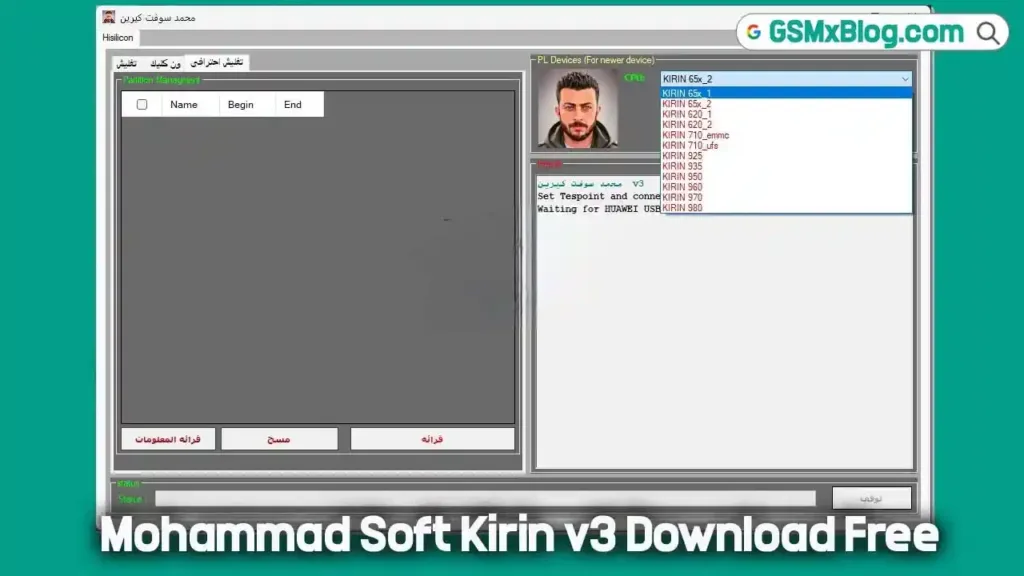
Mohammad Soft Kirin v3 is a lightweight Windows tool designed specifically for Huawei smartphones that use HiSilicon Kirin processors. The tool works in both USB COM and Fastboot modes, making it flexible for a range of repair and unlock scenarios. With real-time status feedback and organized features through tabbed navigation, it delivers a professional experience for both beginners and experts.
Key Features of Mohammad Soft Kirin v3
📋 General Features
- Partition Management
View, edit, or erase partitions by:- Name
- Begin/End address
- Size
- Header size
- Firmware Support
- Built-in firmware download option (تنزيل سوفت)
- Control Panel Tools
- Read Info
- Erase
- Read
- Stop
- Interface Navigation Tabs
- تنظيم (Organize)
- ون كليك (One-Click)
- تفعيل احترافي (Pro Activation)
- تطبيقات (Apps)
- تنظيف احترامي (Respectful Clean)
- Testpoint Detection
- Instruction: “Set Testpoint and connect”
- Auto USB COM 1.0 port detection
- 3-minute timeout safeguard
Mohammad Soft Kirin v3 Download – Latest Version
- File Name:
MOHAMED SOFT KIRIN 2025.zip - File Size: 28 MB
- Unzip Password: 1988
- 🔽Download Fron ProtonDrive
How to Install Mohammad Soft Kirin v3 on Windows
Follow these simple steps to install and use the tool on your Windows PC:
1. Extract the File
2. Run the Installer
- Navigate to the extracted folder
- Launch the installer
- Follow prompts: Click Next → Next → Finish
3. Start the Program
- Find the desktop shortcut
- Right-click and select Run as Administrator
4. Use Without Activation
- The tool is pre-activated
- No license or activation key is required
- 100% free and ready to use
🔌 USB COM Mode Functions
USB COM mode is typically used when the device is in EDL/Testpoint mode. The following functions are available:
- Open Bootloader
- Remove Huawei ID Account
🚀 Fastboot Mode Functions (Unlocked Devices)
Fastboot mode requires the device’s bootloader to be unlocked first. Once accessible, the tool allows:
- Remove Google Account (FRP)
- Remove Huawei ID Account
- Format Device / Factory Reset
Supported HiSilicon Kirin CPUs
The tool is compatible with a wide range of Kirin-based PL devices, including both eMMC and UFS storage types:
- KIRIN 65x_1
- KIRIN 65x_2
- KIRIN 620_1
- KIRIN 620_2
- KIRIN 710 (eMMC & UFS)
- KIRIN 925
- KIRIN 935
- KIRIN 950
- KIRIN 960
- KIRIN 970
- KIRIN 980
Final Thoughts
If you’re looking for a reliable, no-cost tool to unlock Huawei devices, Mohammad Soft Kirin v3 is an excellent solution. It’s simple to install, supports a wide range of Kirin CPUs, and includes powerful functions like partition control, Huawei ID bypass, and FRP removal. With no need for activation, this tool is a must-have for mobile repair professionals and enthusiasts alike.
🔗 Related Tools You Might Like
- AnonySHU Tool V2.0.24.17 (Latest Version)
- Xiaomi Fire Tool v2.9.1 (Latest Version)
- Phoenix Service Tool V6.5.1