WWR MTK Tool v2.51 Free – Scatter File Generator for MediaTek
Working with MediaTek firmware dumps on SP Flash Tool gets complicated fast once you start dealing with newer chipsets that older utilities like MTK Droid Tool can’t handle properly. Scatter files fail to generate, ROM splits come out broken, and the whole workflow stalls. WWR MTK Tool v2.51 was built specifically to solve this — a free, portable Windows utility developed by vvaaavv that splits ROM dumps made with SP Flash Tool and generates scatter files cleanly across newer MTK chipsets where MTK Droid Tool falls short.
Used widely in the MediaTek repair and ROM community, WWR MTK is a straightforward but genuinely useful tool for any technician who backs up, splits, or works with raw MediaTek firmware regularly on Windows PC. This guide covers everything you need — what the tool does, all three available versions, download table, installation steps, usage walkthrough, and FAQs.
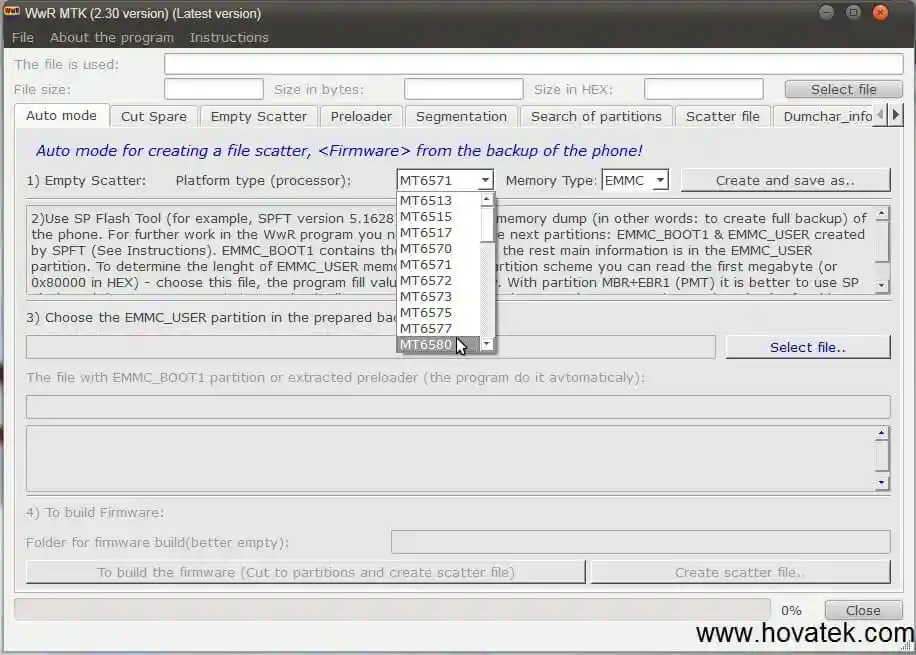
What Is WWR MTK Tool?
WWR MTK Tool (also written as Wwr_MTK) is a free Windows-based MediaTek firmware utility developed by the Russian developer vvaaavv. It serves two core purposes that any technician working with MediaTek ROM dumps on SP Flash Tool will immediately recognize:
1. ROM Dump Splitter — After backing up a MediaTek phone’s firmware using SP Flash Tool (which produces a single raw dump file), WWR MTK splits that dump into individual partition images. This is essential for restoring specific partitions, sharing firmware, or preparing files for flashing back to a device.
2. Scatter File Generator — WWR MTK reads a ROM dump and generates a proper scatter file for it. Scatter files are required by SP Flash Tool to identify partition offsets and flash firmware correctly to MTK devices. Without a valid scatter file, SP Flash Tool cannot flash the firmware at all.
The tool is positioned as a direct alternative to MTK Droid Tool and handles newer MediaTek chipsets that MTK Droid Tool struggles with or does not support. It is free to use, requires no account or credits, and runs as a portable executable on Windows.
Key Features of WWR MTK Tool
💾 ROM Dump Splitting
- Split a full MediaTek ROM dump (created by SP Flash Tool’s Read Back function) into individual partition image files
- Separates the raw dump into named partition files — boot, recovery, system, userdata, preloader, and more — depending on the device’s partition layout
- Essential for selective partition restore or firmware distribution
- Supports newer MTK chipsets where MTK Droid Tool fails to split correctly
📄 Scatter File Generation
- Automatically generates a scatter file from a ROM dump or extracted partition set
- Scatter files produced by WWR MTK are formatted for direct use with SP Flash Tool
- Enables firmware flashing workflows on MTK devices where no original scatter file is available
- Handles newer chipset partition structures that older scatter generators misidentify
🔧 MTK Droid Tool Alternative
- Functions as a drop-in replacement for MTK Droid Tool for newer MediaTek chipsets
- Cleaner handling of modern partition layouts compared to older alternatives
- Actively developed with multiple version releases addressing compatibility and feature additions
Download WWR MTK Tool – All Versions
Wwr_MTK V2.51 – Latest
- File Name: WwR_2.51_Eng.7z
- Version: v2.51
- File Size: 32 MB
Wwr_MTK V2.40
- File Name: WwR_MTK_2.40_Eng.zip
- Version: v2.40
- File Size: 40 MB
Wwr_MTK V2.30
- File Name: WwR_MTK_v2.30.zip
- Version: v2.30
- File Size: 25 MB
How to Install WWR MTK Tool v2.51
- Download the Wwr_MTK_v2.51 file from the MEGA link above.
- Extract the ZIP or RAR file using WinRAR or 7-Zip.
- Open the extracted folder and locate the Wwr_MTK.exe executable.
- Right-click the EXE and select Run as Administrator.
- On first launch (v2.40 and above), a Russian-language splash screen appears with a countdown timer.
- With active internet: the timer completes faster.
- Without internet: wait the full 120 seconds for the timer to finish.
- Once the timer completes, the tool opens and is ready to use. ✅
Note: No installation is required. WWR MTK is a portable executable — run it directly from the extracted folder on any Windows PC.
How to Use WWR MTK Tool v2.51
▶️ Step 1 — Backup MediaTek Firmware Using SP Flash Tool (Prerequisite)
Before using WWR MTK, you need a ROM dump from your MediaTek device. Here is how to create one using SP Flash Tool:
- Open SP Flash Tool on your Windows PC.
- Load the scatter file for your device (use the original scatter that came with the stock ROM if available).
- Switch to the Read Back tab.
- Click Add to add a new read-back entry.
- Set the length to cover the full flash storage size of your device (e.g., 0x400000000 for a 16 GB device).
- Choose a save path and file name for the dump output.
- Click Read Back and connect your powered-off device via USB.
- Wait for the full ROM dump to complete. ✅
The output is a single large raw dump file — this is what WWR MTK Tool processes.
▶️ Step 2 — Split the ROM Dump Using WWR MTK
- Open Wwr_MTK.exe and wait for the splash timer to finish.
- In the tool interface, locate the ROM dump input section.
- Click Browse or the folder icon and navigate to your raw ROM dump file created by SP Flash Tool.
- Select the dump file and confirm.
- Choose an output folder where the split partition images will be saved.
- Click Split or the relevant process button.
- WWR MTK reads the dump, identifies partition boundaries, and exports each partition as a separate named image file. ✅
▶️ Step 3 — Generate a Scatter File
- With the split partition images ready (or from an existing folder of MTK partition images), open Wwr_MTK.exe.
- Navigate to the Scatter Generator function.
- Point the tool to the folder containing your partition images.
- Click Generate Scatter.
- WWR MTK analyzes the partition offsets and produces a properly formatted scatter file in the same output folder.
- The generated scatter file is ready for use with SP Flash Tool for flashing operations. ✅
System Requirements
| Component | Requirement |
|---|---|
| OS | Windows 7 / 8 / 10 / 11 (32-bit & 64-bit) |
| RAM | 1 GB minimum |
| Storage | Sufficient free space for ROM dump and split output files |
| Internet | Optional (reduces splash timer on v2.40 and above) |
| Additional Tool | SP Flash Tool (for creating ROM dumps) |
⚠️ Warning
Always back up your original scatter file before generating a new one. A poorly generated or incorrect scatter file used with SP Flash Tool can write data to wrong partition offsets, resulting in a soft brick or permanently damaged device. Verify that the split partition images match your device’s known partition layout before flashing anything back. This tool is intended for experienced MediaTek technicians and ROM developers — do not use split or regenerated firmware on a device you have not properly identified.
Important Notes
🕐 Splash Screen Timer: WWR MTK v2.40 and v2.51 display a Russian-language advertisement/splash screen at launch with a 120-second countdown timer when offline. With internet access, the timer completes faster. This is normal and expected behavior — simply wait for it to finish.
📌 Credit: Full development credit goes to vvaaavv for creating and maintaining WWR MTK Tool. Originally shared and distributed through the Hovatek Forum community.
🔧 Companion Tool: WWR MTK works alongside SP Flash Tool — it processes the ROM dumps that SP Flash Tool creates and generates scatter files that SP Flash Tool uses. Both tools are needed for a complete MediaTek firmware backup and restore workflow.
💾 Portable Tool: WWR MTK requires no installation. Extract and run from any folder on your Windows PC.
⚠️ Chipset Compatibility: WWR MTK is specifically designed for newer MediaTek chipsets that MTK Droid Tool does not handle correctly. For older MTK devices, MTK Droid Tool may still be adequate.
Frequently Asked Questions (FAQs)
❓ What is WWR MTK Tool used for? WWR MTK Tool splits raw MediaTek ROM dumps (created by SP Flash Tool’s Read Back function) into individual partition image files and generates scatter files from them. It is a free alternative to MTK Droid Tool with better support for newer MediaTek chipsets.
❓ Is WWR MTK Tool free? Yes. It is completely free with no account, no credits, and no activation required. All versions are available as direct downloads from MEGA.
❓ Why does the tool show a Russian screen with a timer at launch? The developer (vvaaavv) is Russian. The splash screen is a normal part of the tool’s startup sequence. Without internet access, the timer runs for 120 seconds before the main tool interface opens. With internet access, the wait is shorter.
❓ What is the difference between WWR MTK and MTK Droid Tool? Both tools split MTK ROM dumps and generate scatter files, but MTK Droid Tool has limited support for newer MediaTek chipsets. WWR MTK was developed specifically to handle newer chipset partition structures that MTK Droid Tool mishandles or does not support at all.
❓ Do I need SP Flash Tool to use WWR MTK? Yes — for creating the initial ROM dump. SP Flash Tool’s Read Back function generates the raw dump file that WWR MTK processes. Once you have the dump, WWR MTK works independently of SP Flash Tool for splitting and scatter generation.
❓ Which version should I download? Download v2.51 — it is the latest and most stable release with the most chipset compatibility and bug fixes. Older versions (v2.30 and v2.40) are available if you encounter compatibility issues with specific older devices.
❓ Can I use the generated scatter file directly with SP Flash Tool? Yes. Scatter files generated by WWR MTK are formatted for direct use with SP Flash Tool for firmware flashing operations on MediaTek devices.
❓ Does this work on Windows 11? Yes. WWR MTK Tool runs on Windows 7, 8, 10, and 11 in both 32-bit and 64-bit configurations.
Conclusion
WWR MTK Tool v2.51 fills a specific but important gap in the MediaTek repair toolkit — a free, portable Windows utility that handles ROM dump splitting and scatter file generation cleanly on newer MTK chipsets where older tools like MTK Droid Tool fall short. For technicians who regularly back up MediaTek firmware using SP Flash Tool or need to generate scatter files from existing dumps, this is a lightweight, no-login, no-credit tool worth keeping in your repair PC toolkit.
Download WWR MTK Tool v2.51 from the MEGA link above, extract it, and pair it with SP Flash Tool for a complete MediaTek firmware backup and scatter generation workflow. Wait out the 120-second splash timer on first launch — the tool is worth it. 🚀
Used WWR MTK on a specific MTK chipset? Share your device model and experience in the comments below — your feedback helps the MediaTek repair community.
Related Posts
- NCK Online MTK Preloader Tool v0.2.5 (Latest Version)
- MTK USB Driver Download (Latest Version)
- Fastboot Enhance Tool v1.4.0 (Latest Version)
- E-GSM Tool v19 (Latest Version)