SK Da Processor Tool Review – The Easiest Way to Check DA File Compatibility
If you’ve ever worked with MediaTek (MTK) phones, you know how tricky it can be to find the right DA (Download Agent) file for flashing. I’ve personally spent hours trying different DA files just to see which one works with a specific chipset — until I discovered the SK Da Processor Tool.
This tiny utility, developed by Said Khalil, turned out to be a real timesaver. It’s small, lightning-fast, and does one thing exceptionally well: it tells you exactly which DA file supports which MTK chipset.
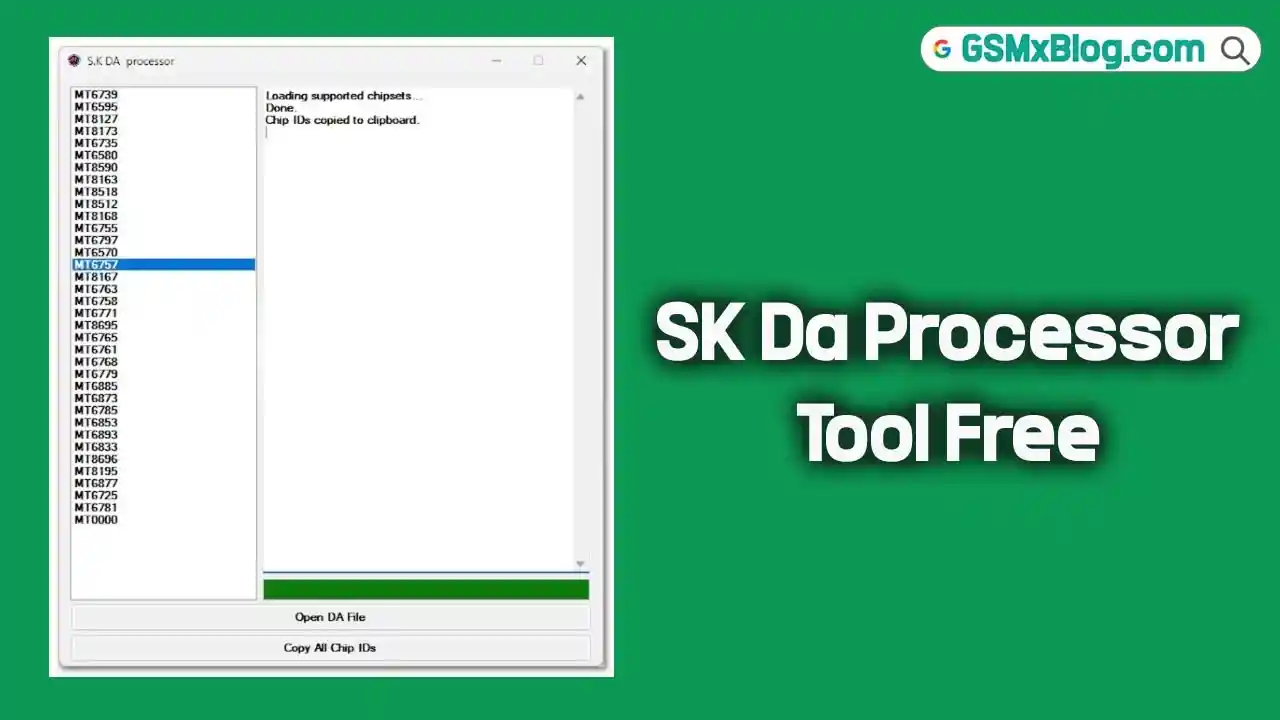
Inside the SK Da Processor Tool Interface
Screenshot: SK Da Processor Tool Interface
The SK Da Processor Tool features a clean, minimalist interface — no clutter, no ads, and no unnecessary buttons.
- Left Panel: Lists all supported MediaTek (MTK) chipsets, including MT6739, MT6570, MT8167, MT6893, and many more. The list loads automatically when you open the tool.
- Right Panel: A log window displays live updates such as:
- “Loading supported chipsets… Done.”
- “Chip IDs copied to clipboard.”
- Bottom Buttons:
- Open DA File: Browse and load any DA file from your PC.
- Copy All Chip IDs: Instantly copy all supported chipset IDs to your clipboard.
This simplicity makes the tool incredibly easy to use — even for beginners. Whether you’re testing a DA file for MT6757, MT6765, or any other MediaTek chipset, results appear instantly. The interface is smooth and responsive, even on older Windows systems.
How It Works
Using the tool is straightforward:
- Download and extract the S.K DA Processor.rar file.
- Run the tool (no installation required).
- Click “Open DA File.”
- Select your DA file and wait a second or two.
The tool displays all the chipsets and processor IDs supported by the DA file. To save the information, click “Copy All Chip IDs” — it copies the list to your clipboard.
During my tests, I tried several DA files from different firmware packages (MT6739, MT6761, MT6785, etc.), and the tool identified all of them accurately.
What I Liked
✅ Fast & Lightweight: Runs instantly without installation or lag.
✅ Accurate Results: Correctly identifies supported chipsets every time.
✅ Beginner-Friendly Interface: One-click operation with no learning curve.
✅ Copy Function: Easy to save chipset IDs for documentation.
✅ Completely Free: No activation, ads, or login required.
What Could Be Improved
While the SK Da Processor Tool is excellent for its purpose, these additions could make it even better:
- Drag-and-drop support for faster DA file loading.
- A dark mode for long work sessions.
- Batch check option to scan multiple DA files simultaneously.
These aren’t deal-breakers, but they would enhance the tool’s functionality for professionals.
Why It’s a Must-Have for GSM Technicians
If you work with SP Flash Tool, Infinity CM2, Miracle Box, or Hydra Tool, you know how critical the right DA file is. The wrong DA file can cause connection errors or failed flashes.
With SK Da Processor Tool, this problem disappears. You can quickly verify any DA file before flashing, making your repair workflow faster and safer.
It’s one of those tools you don’t realize you need until you try it — and once you do, you won’t go back.
Download SK Da Processor Tool (Free)
File Name: S.K DA Processor.rar
File Size: 32.82 KB
Developer: Said Khalil
License: Free
Download Link:
👉 Click Here to Download
Final Verdict
After testing SK Da Processor Tool for several days, I can confidently say it’s one of the most underrated utilities for MTK repair work. It doesn’t flash, unlock, or repair devices — but it saves time, prevents mistakes, and helps you select the right DA file every time.
Lightweight, fast, and free — in the GSM world, that’s a rare combination.
If you’re a technician, firmware developer, or someone who regularly flashes MediaTek devices, this tool deserves a spot in your toolkit.
⭐ Overall Rating: 4.9/5
- Ease of Use: ★★★★★
- Accuracy: ★★★★★
- Design: ★★★★☆
- Performance: ★★★★★
Related Article