Infinity-Box Cm2 Scr V1.07 Download Latest Version
If you’re a mobile technician or enthusiast, the Infinity-Box CM2 SCR v1.07 is an essential tool to have in your repair toolkit. It allows users to flash firmware, repair IMEI, and unlock phones with ease. This latest version provides enhanced stability, better performance, and support for more devices — making it a must-have utility for professional phone repair shops.
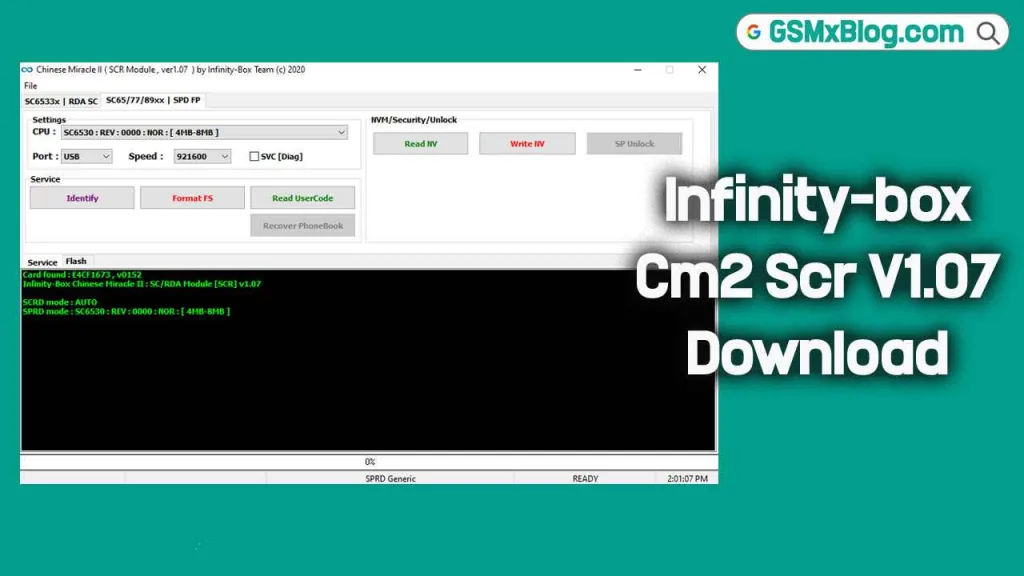
What is Infinity-Box CM2 SCR v1.07?
Infinity-Box CM2 SCR v1.07 is a specialized software designed for flashing, unlocking, and repairing a wide range of smartphones. Developed by Infinity Team, this version improves compatibility with newer devices and enhances the overall repair process. Whether you need to fix software issues, reset FRP, or repair IMEI numbers, CM2 SCR v1.07 delivers fast and reliable performance.
Features Of Infinitybox Cm2 Scr V1.07
- ✅ Flash Firmware Easily: Supports flashing stock ROMs and firmware files to repair software issues.
- 🔓 Unlock Phones: Remove network locks, FRP locks, and security patterns.
- 🧩 IMEI Repair: Fix or rewrite corrupted IMEI numbers quickly.
- 📱 Wide Device Support: Works with a variety of phone models from different brands.
- ⚙️ User-Friendly Interface: Simple UI designed for beginners and professionals alike.
- 💾 Data Management: Backup and restore user data safely before performing operations.
Why You Should Use Infinity-Box CM2 SCR v1.07
If you’re constantly repairing or managing mobile devices, Infinity-Box CM2 SCR v1.07 will save you time and effort. It simplifies complex repair operations into a few clicks, ensuring accuracy and efficiency. With its robust set of features and broad compatibility, it’s perfect for both small service centers and advanced technicians.
Benefits include:
- Speeds up phone flashing and repair processes.
- Reduces software-related errors.
- Eliminates the need for multiple standalone tools.
- Works seamlessly with other Infinity-Box modules.
Infinity-box Cm2 Scr V1.07 (Latest Version)
- File Name: CM2 SCR v1.07.zip
- File Size: 12 MB
- Version: v1.07 (Latest)
Infinity-box Cm2 Scr (Old Version)
| Tool Version | AFH Link | Google Drive Link |
|---|---|---|
| v1.06 | AFH | Google Drive |
| v1.05 | AFH | Google Drive |
| v1.04 | AFH | Google Drive |
| v1.03 | AFH | Google Drive |
| v1.02 | AFH | Google Drive |
System Requirements
Before installing, make sure your PC meets the following requirements:
- Operating System: Windows 7 / 8 / 10 (32-bit or 64-bit)
- RAM: Minimum 2 GB
- Disk Space: At least 500 MB free
- USB Port: Required for phone connection
Installation Guide for Infinity-Box CM2 SCR v1.07
Follow these simple steps to install CM2 SCR v1.07 on your PC:
- Download the setup file from the link above.
- Extract the ZIP file to a folder using WinRAR or 7-Zip.
- Run the installer and follow the on-screen setup instructions.
- Agree to the license terms and complete installation.
- Launch the tool after installation and connect your device.
Setting Up Infinity-Box CM2 SCR v1.07
Once installed, here’s how to set up and use the tool effectively:
- Open Infinity-Box CM2 SCR v1.07 software.
- Connect your mobile device via a USB cable.
- Wait for the software to detect the connected phone.
- Select your desired operation – flash, unlock, or repair.
- Follow the on-screen prompts until the process completes.
Common Issues & Troubleshooting Tips
Here are a few common problems you may encounter and how to fix them:
1. Tool Not Detecting Device
- Ensure the USB cable is in good condition.
- Try connecting via a different USB port.
- Reinstall the proper USB drivers (MTK, SPD, Qualcomm, etc.).
- Restart both the PC and the device.
2. Installation Error
- Verify your PC meets the minimum system requirements.
- Temporarily disable antivirus software during installation.
- Make sure there is enough free disk space available.
Conclusion
The Infinity-Box CM2 SCR v1.07 is a trusted and efficient solution for mobile software repair. Its wide range of features — from flashing to unlocking — makes it an essential tool for professionals. By following the installation and setup guide above, you can start using the tool right away to handle repairs faster and with greater precision.
Related Post: